v3 & Harmony diary / thoughts / code snippets
-
Very good job…
I must just thinking to where put your first part code on nodeBB ACP but I want to test it!
@DownPW The first part of the code I supplied will be placed into a widget. In my case, it’s in the below
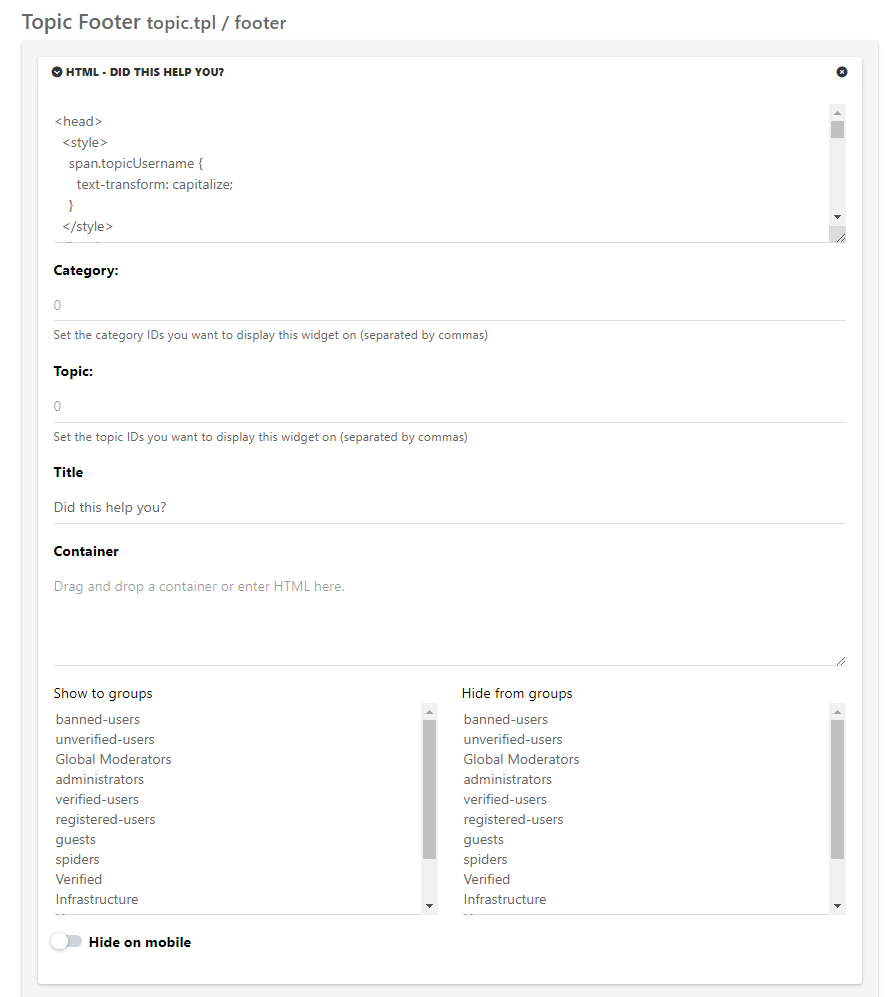
-
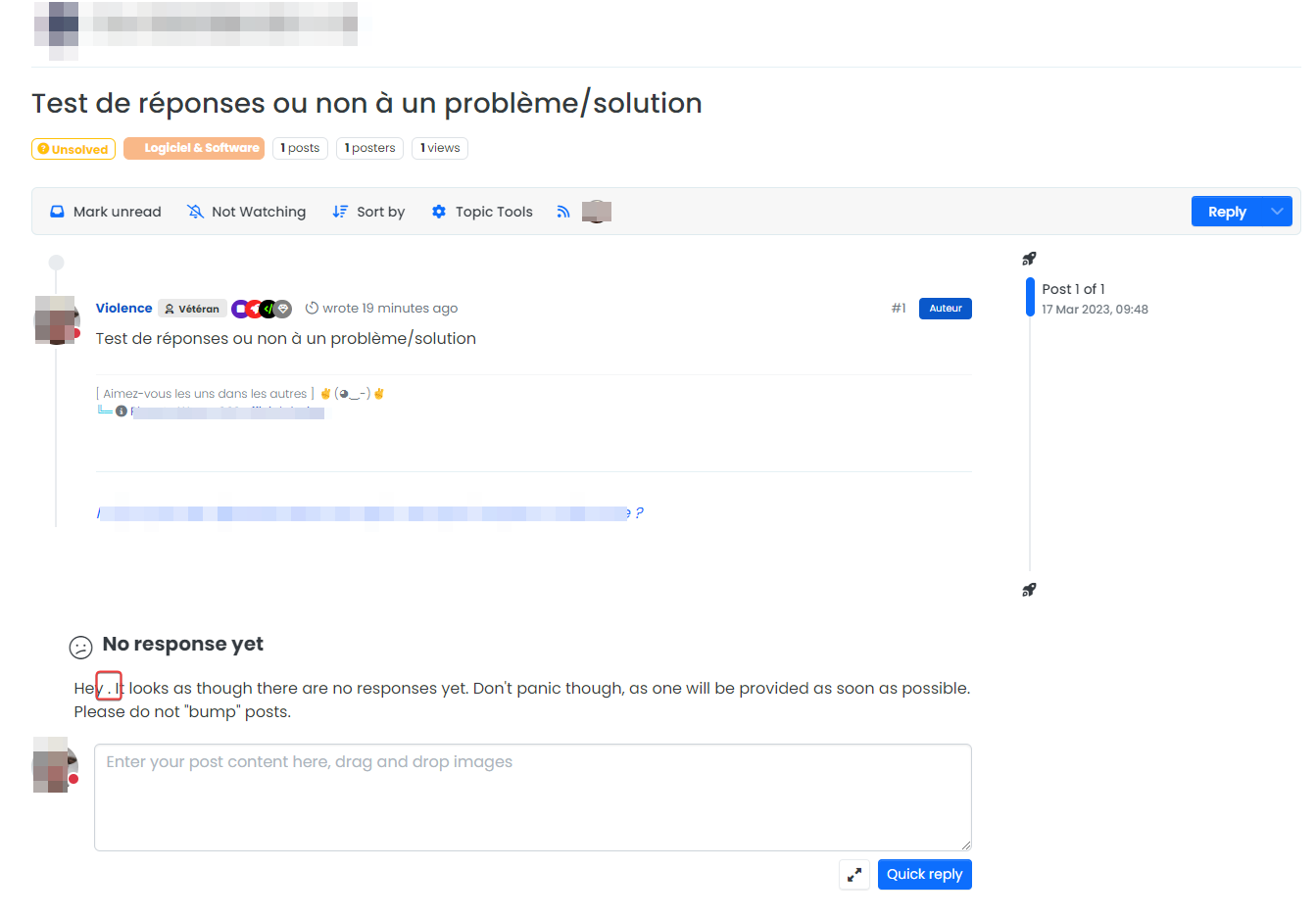
I have tested it seems to work but I seem to be unable to display the username in the replies and I don’t know why for this moment

<span class=“topicUsername”> doesn’t seem to work
PW and WS Spirit alive
-
Other things I have find when I test the code.
This is a very rare case but if the topic is set to solved and there is no answer in it, we get this kind of thing:
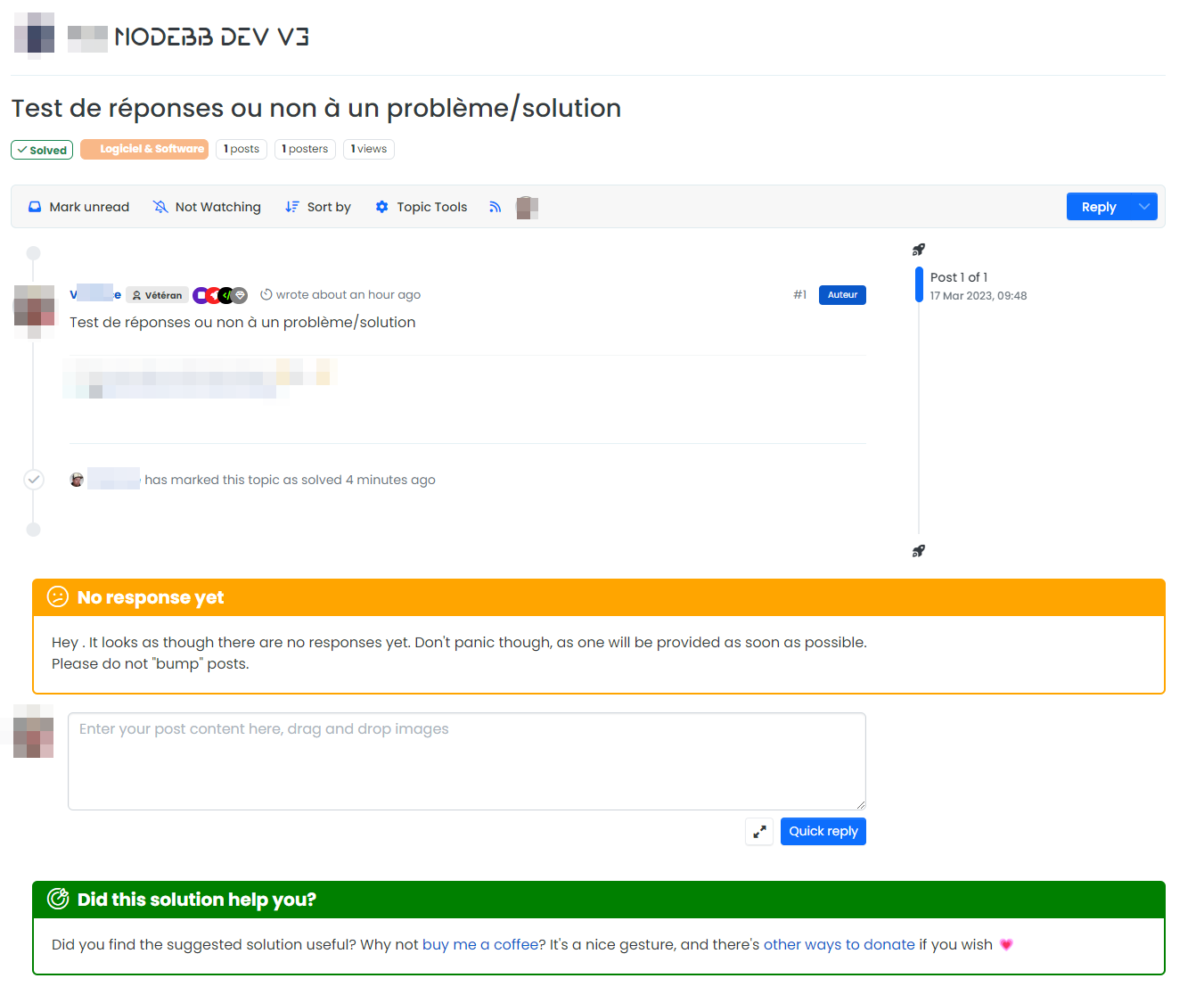
We can imagine that this happens when the user himself would have found a solution and that him or another user did not post answers in the topic and that this one is put in solved
PW and WS Spirit alive
-
I have tested it seems to work but I seem to be unable to display the username in the replies and I don’t know why for this moment
<span class=“topicUsername”> doesn’t seem to work
@DownPW From memory, you should be using a function that looks like this in PROD
$(window).on('action:ajaxify.end', function (data) {
    function updateUsername() {
        $('.getUsername .username').text(app.user.username);
    }
    if (document.readyState === 'loading') {
        document.addEventListener('DOMContentLoaded', updateUsername);
    } else {
        updateUsername();
    }
    var thehours = new Date().getHours();
	var themessage;
	var morning = ('Good morning');
	var afternoon = ('Good afternoon');
	var evening = ('Good evening');
    var matched = false;
    $('#getConsent').attr("href", "/user/" + app.user.username + "/consent");
	if (thehours >= 0 && thehours < 12) {
		themessage = morning;

	} else if (thehours >= 12 && thehours < 17) {
		themessage = afternoon;

	} else if (thehours >= 17 && thehours < 24) {
		themessage = evening;
	}
        $('.getUsername').prepend(themessage);
});
You’ll need the same function in your development environment if you don’t have it already, and will need to add
$('.topicUsername').text(app.user.username);Right after line 3, so
$(window).on('action:ajaxify.end', function(data) {
    function updateUsername() {
        $('.getUsername .username').text(app.user.username);
        $('.topicUsername').text(app.user.username);
    }
    if (document.readyState === 'loading') {
        document.addEventListener('DOMContentLoaded', updateUsername);
    } else {
        updateUsername();
    }
    var thehours = new Date().getHours();
    var themessage;
    var morning = ('Good morning');
    var afternoon = ('Good afternoon');
    var evening = ('Good evening');
    var matched = false;
    $('#getConsent').attr("href", "/user/" + app.user.username + "/consent");
    if (thehours >= 0 && thehours < 12) {
        themessage = morning;

    } else if (thehours >= 12 && thehours < 17) {
        themessage = afternoon;

    } else if (thehours >= 17 && thehours < 24) {
        themessage = evening;
    }
    if (window.location.href.indexOf("topic") > -1) {
        //console.log("This is a topic, so hide the user welcome message");
        $('#mainbanner').hide();
    } else {
        $('.getUsername').prepend(themessage);

    }


    //	$('.getUsername').prepend(themessage);
});
Note that your function might look different as I recall you modifying the code I supplied to meet your own needs.
Mark Cutting also advises organisations as a Fractional CIO, Fractional CISO and Executive Advisor, helping boards improve technology governance, cyber resilience and executive decision making. Learn more at Phenomlab Ltd
-
Other things I have find when I test the code.
This is a very rare case but if the topic is set to solved and there is no answer in it, we get this kind of thing:
We can imagine that this happens when the user himself would have found a solution and that him or another user did not post answers in the topic and that this one is put in solved
@DownPW Ah yes, I can see a case where that would indeed fire, and I’m able to replicate it here
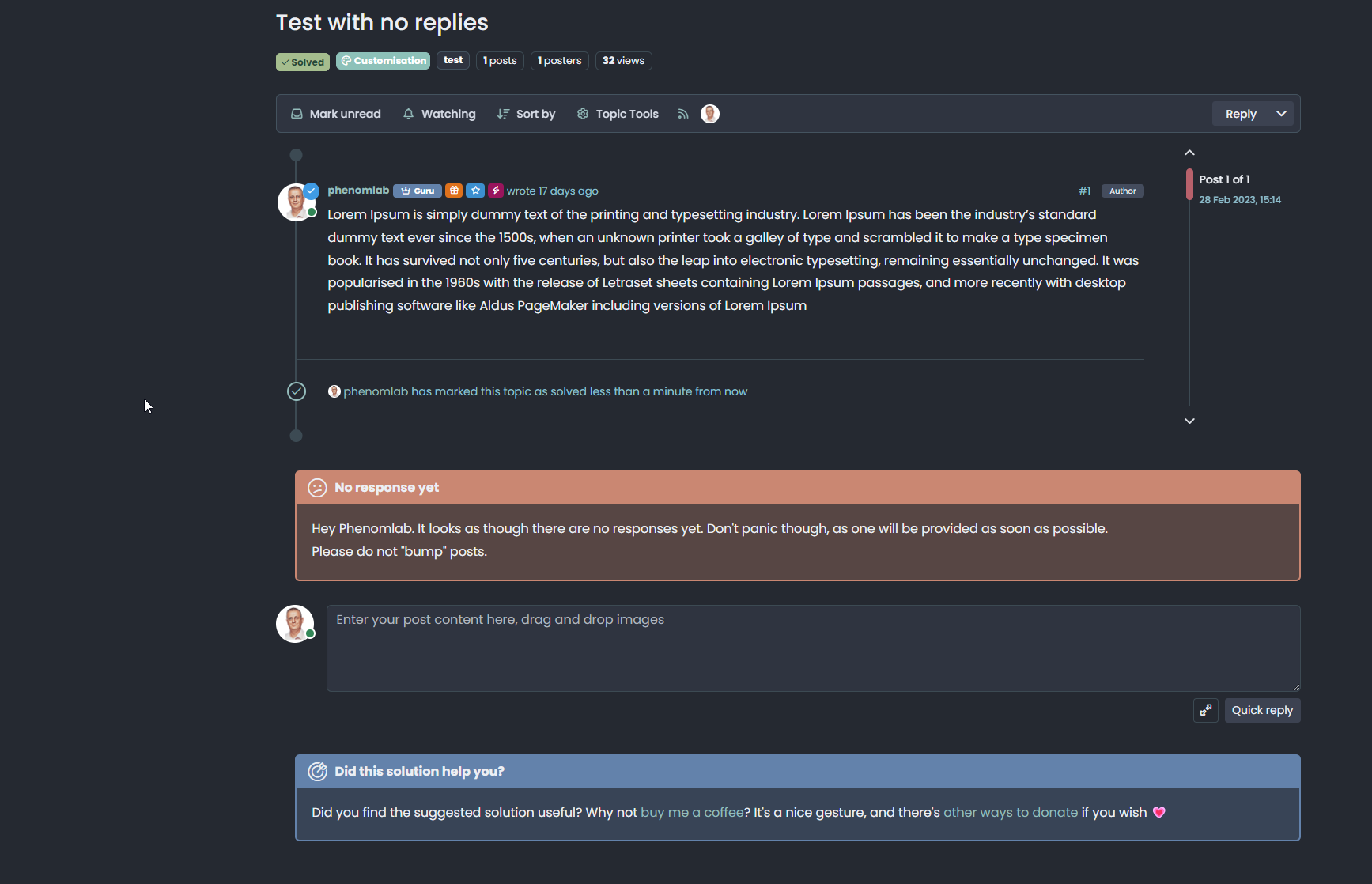
Let me adjust the code and get back to you.
EDIT: Revised widget code here
<head> <style> span.topicUsername { text-transform: capitalize; } </style> </head> {{{ if isSolved }}} <div id="resolved"> <div class="resolved-wrapper"> <h5 class="resolved-header">Did this solution help you?</h5> <div class="resolved-body"> <div class="resolved-message">Did you find the suggested solution useful? Why not <a href="https://www.buymeacoffee.com/phenomlab" target=_blank>buy me a coffee<a />? It's a nice gesture, and there's <a href="https://sudonix.com/donate">other ways to donate</a> if you wish <span class="heart">💗</span></div> </div> </div> </div> <br> <script> if (!window.jQuery) { window.addEventListener('load', function() { $(document).ready(function() { $("#resolved").insertAfter('.isSolved'); }) console.log("Total posts = " + ajaxify.data.postcount) }) } else { $(document).ready(function() { $("#resolved").insertAfter('.isSolved'); }) console.log("Total posts = " + ajaxify.data.postcount) } </script> {{{ end }}} {{{ if (uid == loggedInUser.uid) }}} {{{ if isQuestion }}} {{{ if !isSolved }}} {{{ if !unreplied }}} <div id="unresolved"> <div class="unresolved-wrapper"> <h5 class="unresolved-header">Did you get the answer you needed?</h5> <div class="unresolved-body"> <div class="unresolved-message">Hey <span class="topicUsername"><span class="username"></span></span>. It looks as though there have been one or more replies to your original post. <br>If a provided answer resolved an issue for you, Could you please take a moment, and select "Mark this post as the correct answer" in the corresponding response? <br><br>By doing this, it means that original posters help the rest of the community find answers to previously asked questions by identifying the correct answer. </div> </div> </div> </div> <br> <script> if (!window.jQuery) { window.addEventListener('load', function() { $(document).ready(function() { $("#unresolved").insertBefore('[component="topic/quickreply/container"]'); }) }) } else { $(document).ready(function() { $("#unresolved").insertBefore('[component="topic/quickreply/container"]'); }) } </script> {{{ end }}} {{{ end }}} {{{ end }}} {{{ end }}} {{{ if unreplied }}} {{{ if !isSolved }}} {{{ if isQuestion }}} <div id="unreplied"> <div class="unreplied-wrapper"> <h5 class="unreplied-header">No response yet</h5> <div class="unreplied-body"> <div class="unreplied-message">Hey <span class="topicUsername"><span class="username"></span></span>. It looks as though there are no responses yet. Don't panic though, as one will be provided as soon as possible.<br>Please do not "bump" posts. </div> </div> </div> </div> <br> <script> if (!window.jQuery) { window.addEventListener('load', function() { $(document).ready(function() { $("#unreplied").insertBefore('[component="topic/quickreply/container"]'); }) }) } else { $(document).ready(function() { $("#unreplied").insertBefore('[component="topic/quickreply/container"]'); }) } </script> {{{ end }}} {{{ end }}} {{{ end }}} -
@DownPW From memory, you should be using a function that looks like this in PROD
$(window).on('action:ajaxify.end', function (data) {
    function updateUsername() {
        $('.getUsername .username').text(app.user.username);
    }
    if (document.readyState === 'loading') {
        document.addEventListener('DOMContentLoaded', updateUsername);
    } else {
        updateUsername();
    }
    var thehours = new Date().getHours();
	var themessage;
	var morning = ('Good morning');
	var afternoon = ('Good afternoon');
	var evening = ('Good evening');
    var matched = false;
    $('#getConsent').attr("href", "/user/" + app.user.username + "/consent");
	if (thehours >= 0 && thehours < 12) {
		themessage = morning;

	} else if (thehours >= 12 && thehours < 17) {
		themessage = afternoon;

	} else if (thehours >= 17 && thehours < 24) {
		themessage = evening;
	}
        $('.getUsername').prepend(themessage);
});
You’ll need the same function in your development environment if you don’t have it already, and will need to add
$('.topicUsername').text(app.user.username);Right after line 3, so
$(window).on('action:ajaxify.end', function(data) {
    function updateUsername() {
        $('.getUsername .username').text(app.user.username);
        $('.topicUsername').text(app.user.username);
    }
    if (document.readyState === 'loading') {
        document.addEventListener('DOMContentLoaded', updateUsername);
    } else {
        updateUsername();
    }
    var thehours = new Date().getHours();
    var themessage;
    var morning = ('Good morning');
    var afternoon = ('Good afternoon');
    var evening = ('Good evening');
    var matched = false;
    $('#getConsent').attr("href", "/user/" + app.user.username + "/consent");
    if (thehours >= 0 && thehours < 12) {
        themessage = morning;

    } else if (thehours >= 12 && thehours < 17) {
        themessage = afternoon;

    } else if (thehours >= 17 && thehours < 24) {
        themessage = evening;
    }
    if (window.location.href.indexOf("topic") > -1) {
        //console.log("This is a topic, so hide the user welcome message");
        $('#mainbanner').hide();
    } else {
        $('.getUsername').prepend(themessage);

    }


    //	$('.getUsername').prepend(themessage);
});
Note that your function might look different as I recall you modifying the code I supplied to meet your own needs.
@phenomlab said in v3 & Harmony diary / thoughts / code snippets:
@DownPW From memory, you should be using a function that looks like this in PROD
Ha yes exactly, seems to be forget this lol.

With$('.topicUsername').text(app.user.username);it’s perfect
@phenomlab said in v3 & Harmony diary / thoughts / code snippets:
EDIT: Revised widget code hereyes perfect, definitively better ^^
Just play with CSS for me but it’s a very good job Mark !
I love this functionnality a lot, who play which works together with the nodebb-plugin-question-and-answer pluginPW and WS Spirit alive
-
@phenomlab said in v3 & Harmony diary / thoughts / code snippets:
@DownPW From memory, you should be using a function that looks like this in PROD
Ha yes exactly, seems to be forget this lol.
With$('.topicUsername').text(app.user.username);it’s perfect
@phenomlab said in v3 & Harmony diary / thoughts / code snippets:
EDIT: Revised widget code hereyes perfect, definitively better ^^
Just play with CSS for me but it’s a very good job Mark !
I love this functionnality a lot, who play which works together with the nodebb-plugin-question-and-answer plugin@DownPW said in v3 & Harmony diary / thoughts / code snippets:
With $(‘.topicUsername’).text(app.user.username); it’s perfect
Yes, I need to add that to the documentation above, plus the “missing” function (which I will cut down as the average user won’t need all of it)
@DownPW said in v3 & Harmony diary / thoughts / code snippets:
EDIT: Revised widget code here
yes perfect, definitively better ^^Good news
@DownPW said in v3 & Harmony diary / thoughts / code snippets:
I love this functionnality a lot, who play which works together with the nodebb-plugin-question-and-answer plugin
Great ! It was designed primary to work with
nodebb-plugin-question-and-answerand in fact won’t work very well without it, so it’s actually a core dependency. -
I’m a beta tester @phenomlab

I see other bugs my friends :
-
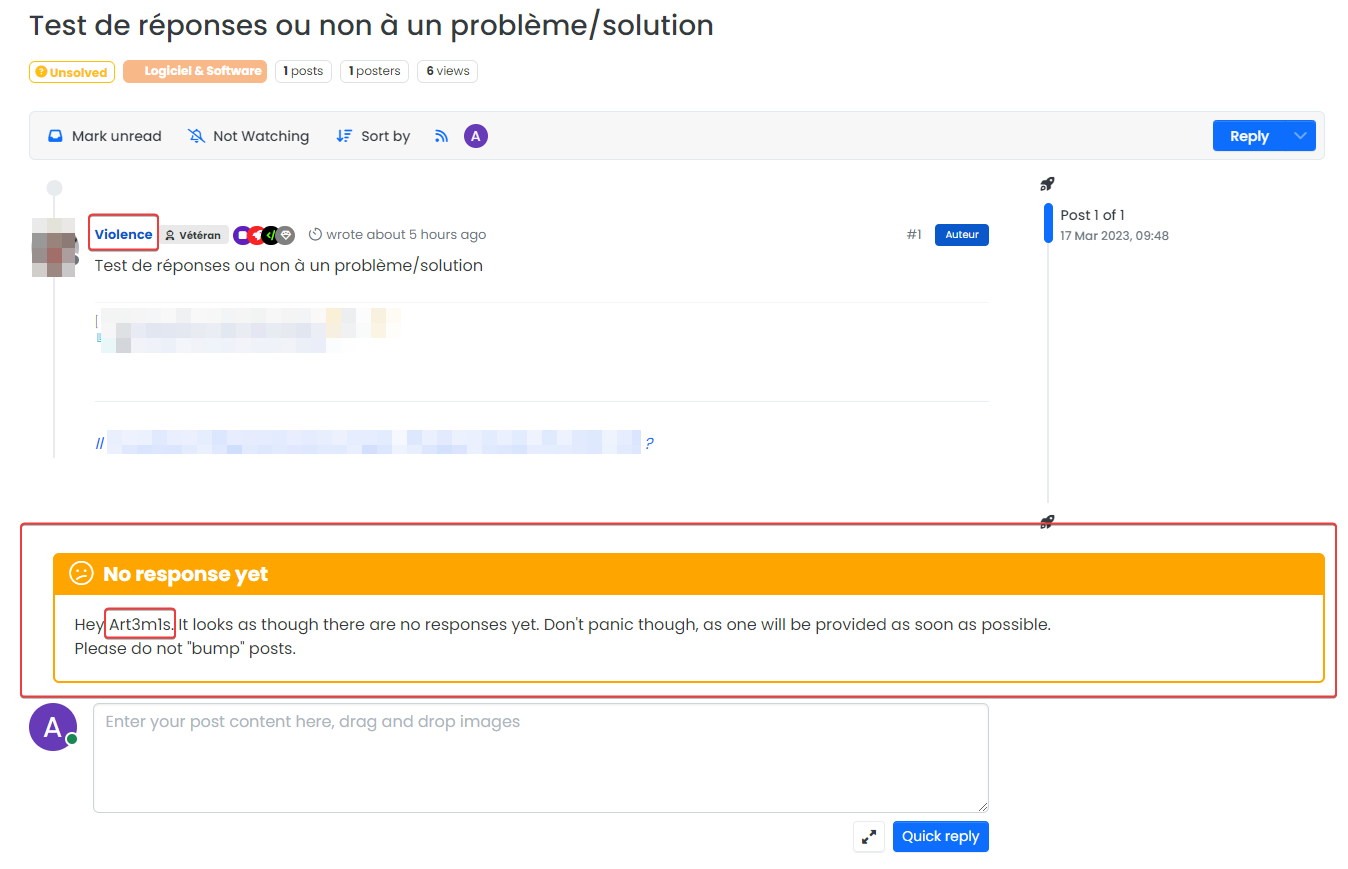
1- A user who has not created the topic sees the message intended for the initiator of the topic :
-
2- Same things with solved Post :
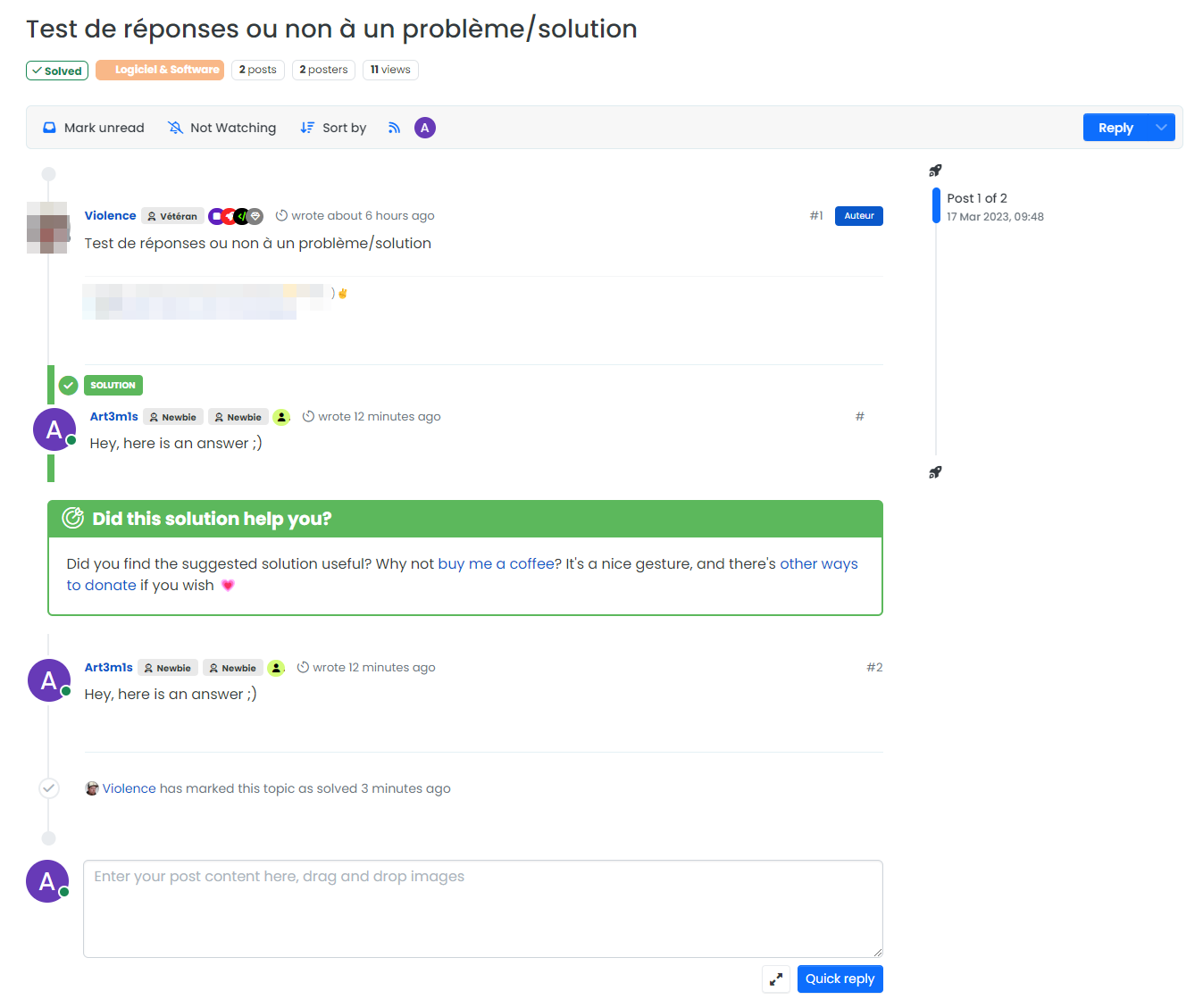
–> If the message is only addressed to the initiator of the topic, it’s a bit problematic, isn’t it?
PW and WS Spirit alive
-
-
I’m a beta tester @phenomlab
I see other bugs my friends :
-
1- A user who has not created the topic sees the message intended for the initiator of the topic :
-
2- Same things with solved Post :
–> If the message is only addressed to the initiator of the topic, it’s a bit problematic, isn’t it?
@DownPW said in v3 & Harmony diary / thoughts / code snippets:
1- A user who has not created the topic sees the message intended for the initiator of the topic :
Ugh. Sorry. Use this widget code (original post updated)
<head> <style> span.topicUsername { text-transform: capitalize; } </style> </head> {{{ if isSolved }}} <div id="resolved"> <div class="resolved-wrapper"> <h5 class="resolved-header">Did this solution help you?</h5> <div class="resolved-body"> <div class="resolved-message">Did you find the suggested solution useful? Why not <a href="https://www.buymeacoffee.com/phenomlab" target=_blank>buy me a coffee<a />? It's a nice gesture, and there's <a href="https://sudonix.com/donate">other ways to donate</a> if you wish <span class="heart">💗</span></div> </div> </div> </div> <br> <script> if (!window.jQuery) { window.addEventListener('load', function() { $(document).ready(function() { $("#resolved").insertAfter('.isSolved'); }) console.log("Total posts = " + ajaxify.data.postcount) }) } else { $(document).ready(function() { $("#resolved").insertAfter('.isSolved'); }) console.log("Total posts = " + ajaxify.data.postcount) } </script> {{{ end }}} {{{ if (uid == loggedInUser.uid) }}} {{{ if isQuestion }}} {{{ if !isSolved }}} {{{ if !unreplied }}} <div id="unresolved"> <div class="unresolved-wrapper"> <h5 class="unresolved-header">Did you get the answer you needed?</h5> <div class="unresolved-body"> <div class="unresolved-message">Hey <span class="topicUsername"><span class="username"></span></span>. It looks as though there have been one or more replies to your original post. <br>If a provided answer resolved an issue for you, Could you please take a moment, and select "Mark this post as the correct answer" in the corresponding response? <br><br>By doing this, it means that original posters help the rest of the community find answers to previously asked questions by identifying the correct answer. </div> </div> </div> </div> <br> <script> if (!window.jQuery) { window.addEventListener('load', function() { $(document).ready(function() { $("#unresolved").insertBefore('[component="topic/quickreply/container"]'); }) }) } else { $(document).ready(function() { $("#unresolved").insertBefore('[component="topic/quickreply/container"]'); }) } </script> {{{ end }}} {{{ end }}} {{{ end }}} {{{ end }}} {{{ if unreplied }}} {{{ if !isSolved }}} {{{ if isQuestion }}} {{{ if (uid == loggedInUser.uid) }}} <div id="unreplied"> <div class="unreplied-wrapper"> <h5 class="unreplied-header">No response yet</h5> <div class="unreplied-body"> <div class="unreplied-message">Hey <span class="topicUsername"><span class="username"></span></span>. It looks as though there are no responses yet. Don't panic though, as one will be provided as soon as possible.<br>Please do not "bump" posts. </div> </div> </div> </div> <br> <script> if (!window.jQuery) { window.addEventListener('load', function() { $(document).ready(function() { $("#unreplied").insertBefore('[component="topic/quickreply/container"]'); }) }) } else { $(document).ready(function() { $("#unreplied").insertBefore('[component="topic/quickreply/container"]'); }) } </script> {{{ end }}} {{{ end }}} {{{ end }}} {{{ end }}}@DownPW said in v3 & Harmony diary / thoughts / code snippets:
If the message is only addressed to the initiator of the topic, it’s a bit problematic, isn’t it?
No, not really
It’s designed to work this way so that anyone else visiting looking for the same answer and finds it has the opportunity to reward you - it’s why it mentions no names -
-
Perfect thats Work on 3;X
I am testing this code in version 2.X but it seems it is not working properly
Only the resolution message seems to work in 2.X
Do you think it is possible to adapt it for 2.X ?
PW and WS Spirit alive
-
Perfect thats Work on 3;X
I am testing this code in version 2.X but it seems it is not working properly
Only the resolution message seems to work in 2.X
Do you think it is possible to adapt it for 2.X ?
@DownPW said in v3 & Harmony diary / thoughts / code snippets:
I am testing this code in version 2.X but it seems it is not working properly
Only the resolution message seems to work in 2.X
Do you think it is possible to adapt it for 2.X ?Hmm - I never wrote it to be compatible with v2, but I can’t think of any reason as wo why this would not work. Is there somewhere I can see it ?
Mark Cutting also advises organisations as a Fractional CIO, Fractional CISO and Executive Advisor, helping boards improve technology governance, cyber resilience and executive decision making. Learn more at Phenomlab Ltd
-
@DownPW said in v3 & Harmony diary / thoughts / code snippets:
I am testing this code in version 2.X but it seems it is not working properly
Only the resolution message seems to work in 2.X
Do you think it is possible to adapt it for 2.X ?Hmm - I never wrote it to be compatible with v2, but I can’t think of any reason as wo why this would not work. Is there somewhere I can see it ?
-
@phenomlab I pm you
@DownPW I see why. The code relies on the existence of
[component="topic/quickreply/container"]However, this by definition means that the below has to be enabled
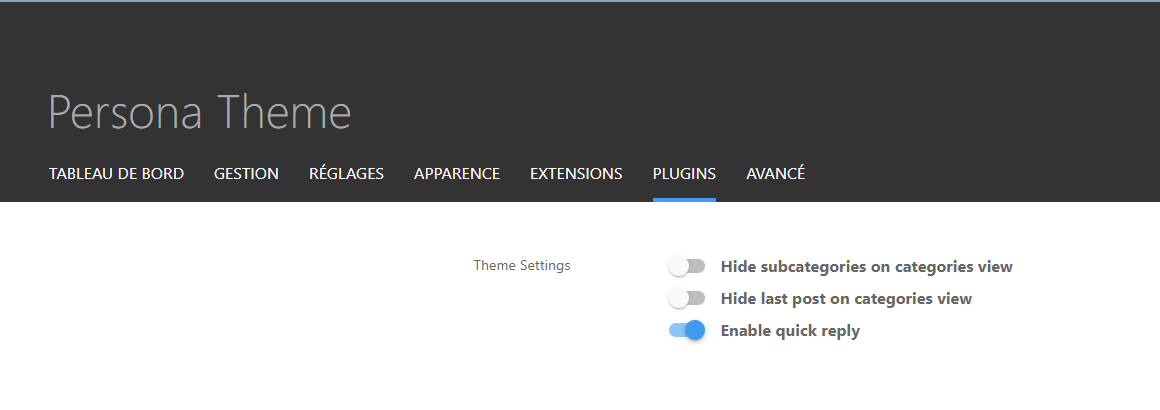
It will then work
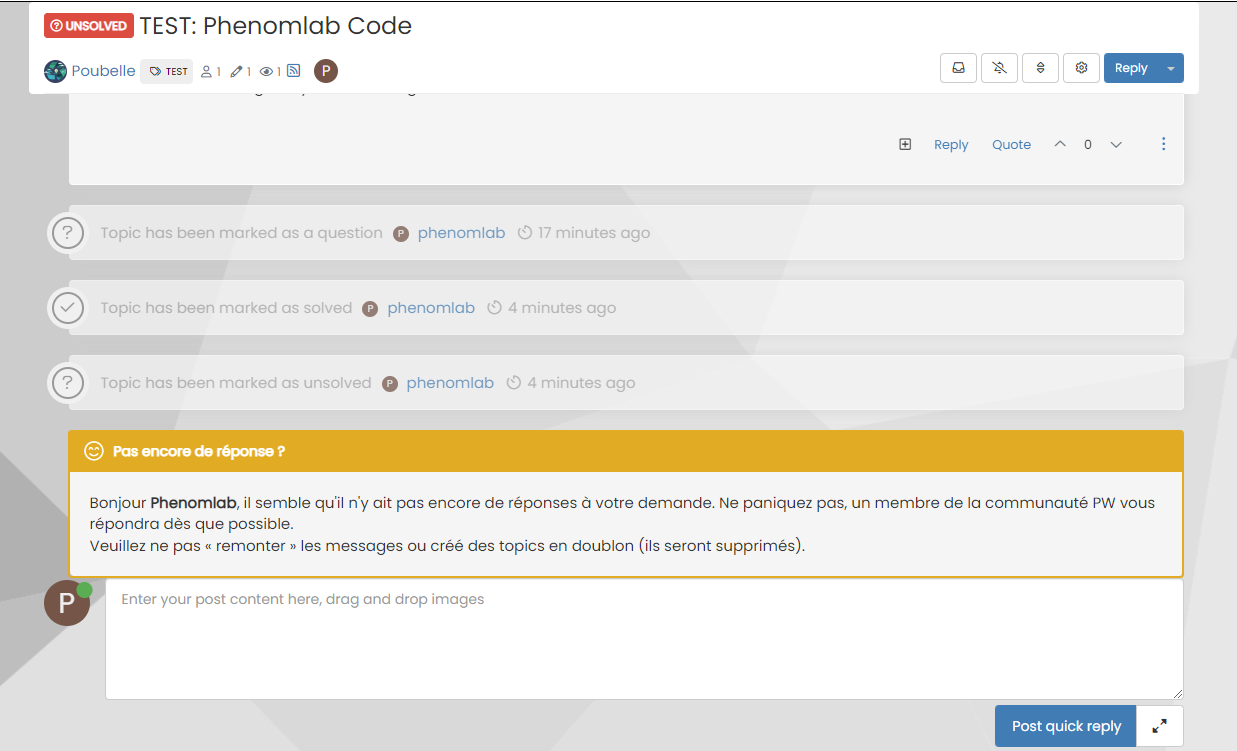
For some unknown reason, this is hidden in Harmony, and only shows if you select it. In v2, it seems that the
<section>is deleted altogether in Persona if “Quick Reply” is disabled, meaning it won’t fire as it can’t locate that specific component.The downside is that you might not want the quick reply function, but I think it’s a PITA to scroll up to the top of the post just to reply, so I have it on


Hello! It looks like you're interested in this conversation, but you don't have an account yet.
Getting fed up of having to scroll through the same posts each visit? When you register for an account, you'll always come back to exactly where you were before, and choose to be notified of new replies (either via email, or push notification). You'll also be able to save bookmarks and upvote posts to show your appreciation to other community members.
With your input, this post could be even better 💗
Register Login