
Help us fixing the H1 header tags
-

Last year during Nov, we changed our site from flarum to WordPress and Sudonix was very helpful, it brought back our smile again!
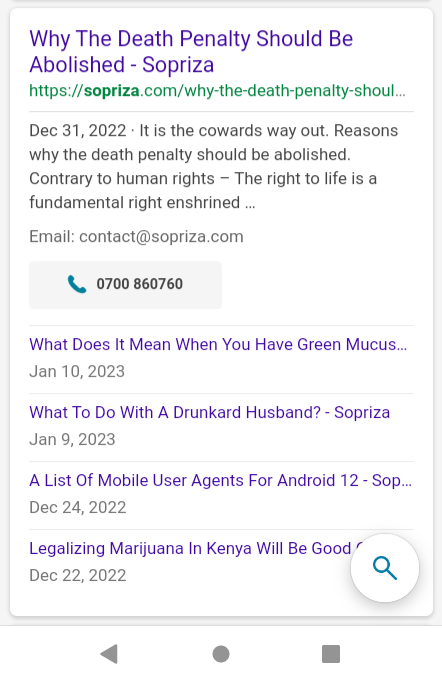
Cutting the story short, there’s one critical change that needs to be fixed.
When you visit the Q&A topic for example: https://sopriza.com/question/france-national-retirement-push-62-64/ it looks okay on your eyes but the thing is search engines have been reporting there are 2 H1 tags that one needs to be removed. I suspect the second h1 tag comes from the breadcrumb, and sad thing i have no knowledge how to remove it

Also tested using: https://www.seoreviewtools.com/html-headings-checker/
-
@Sala This isn’t something I’d recommend in terms of using a mobile phone to perform edits. I also need a response to this
https://sudonix.com/topic/415/help-us-fixing-the-h1-header-tags?_=1674640646756
My initial thoughts here are that your theme and an SEO plugin are doing the same thing in terms of H1 tags. In addition, you should also check Google Analytics to see if you still have cached pages there from before the move.
@phenomlab after carefully checking the code i was able to fix the issue. There was a dnone h1 class tag that wasn’t supposed to be there.
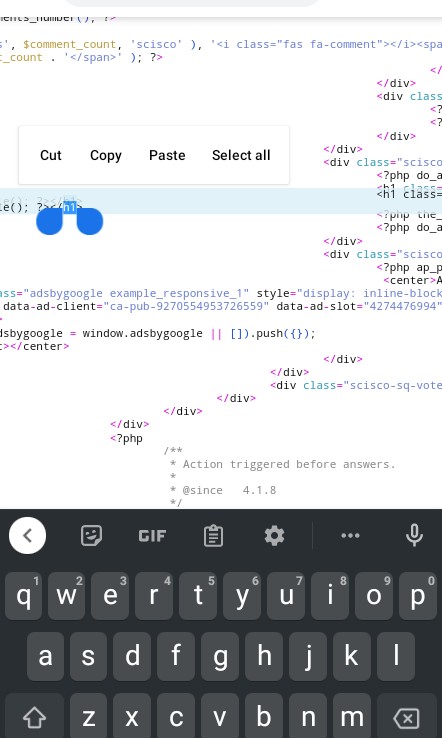
Now reporting one h1 tag. Wooup!
-
Last year during Nov, we changed our site from flarum to WordPress and Sudonix was very helpful, it brought back our smile again!
Cutting the story short, there’s one critical change that needs to be fixed.
When you visit the Q&A topic for example: https://sopriza.com/question/france-national-retirement-push-62-64/ it looks okay on your eyes but the thing is search engines have been reporting there are 2 H1 tags that one needs to be removed. I suspect the second h1 tag comes from the breadcrumb, and sad thing i have no knowledge how to remove it
Also tested using: https://www.seoreviewtools.com/html-headings-checker/

@Sala Which theme are you using? I expect there are two tags being presented - one by the theme itself, and one possibly by an SEO plugin you may have installed.
Mark Cutting also advises organisations as a Fractional CIO, Fractional CISO and Executive Advisor, helping boards improve technology governance, cyber resilience and executive decision making. Learn more at Gratmore Ltd
-
@Sala Which theme are you using? I expect there are two tags being presented - one by the theme itself, and one possibly by an SEO plugin you may have installed.
@phenomlab i will forward to you the login details you check. (Yandex and bing) are the ones reporting that issue. But weird thing, if its breadcrumb, there’s also breadcrumb in blogs and they don’t have reporting for multiple h1 tag.
-
off topic: there are still a few flarum links that are still indexed in google. it would be best if you plan a proper redirection for all of them
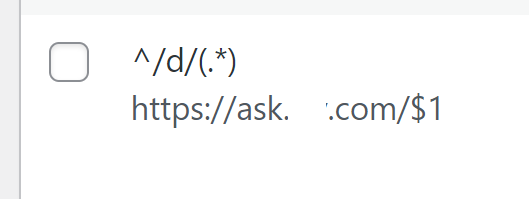
install the redirection plugin and add this rule so the users will end up accessing the correct post instead of going to the home page
301 redirection

-
off topic: there are still a few flarum links that are still indexed in google. it would be best if you plan a proper redirection for all of them
install the redirection plugin and add this rule so the users will end up accessing the correct post instead of going to the home page
301 redirection
Mark Cutting also advises organisations as a Fractional CIO, Fractional CISO and Executive Advisor, helping boards improve technology governance, cyber resilience and executive decision making. Learn more at Gratmore Ltd
-
-

Apk search in health tag, what again were we trying out?

Situational awareness.
-
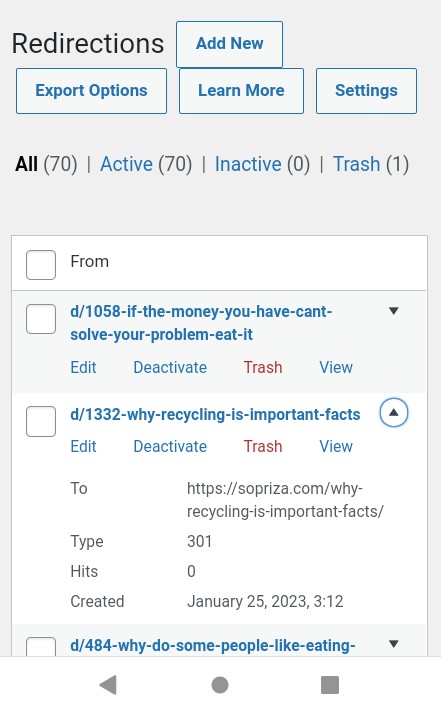
70+ top urls were generated with 301 permanent. Thank you Hari
 ️
@Sala so does this resolve the issue?
Mark Cutting also advises organisations as a Fractional CIO, Fractional CISO and Executive Advisor, helping boards improve technology governance, cyber resilience and executive decision making. Learn more at Gratmore Ltd
-
@phenomlab No, for the h1 header to be fixed, it needs some code editing. I wish you would check for us since we’re editing on a mobile phone.
-
@phenomlab No, for the h1 header to be fixed, it needs some code editing. I wish you would check for us since we’re editing on a mobile phone.
@Sala This isn’t something I’d recommend in terms of using a mobile phone to perform edits. I also need a response to this
https://sudonix.com/topic/415/help-us-fixing-the-h1-header-tags?_=1674640646756
My initial thoughts here are that your theme and an SEO plugin are doing the same thing in terms of H1 tags. In addition, you should also check Google Analytics to see if you still have cached pages there from before the move.
Mark Cutting also advises organisations as a Fractional CIO, Fractional CISO and Executive Advisor, helping boards improve technology governance, cyber resilience and executive decision making. Learn more at Gratmore Ltd
-
phenomlab referenced this topic on
-
@Sala This isn’t something I’d recommend in terms of using a mobile phone to perform edits. I also need a response to this
https://sudonix.com/topic/415/help-us-fixing-the-h1-header-tags?_=1674640646756
My initial thoughts here are that your theme and an SEO plugin are doing the same thing in terms of H1 tags. In addition, you should also check Google Analytics to see if you still have cached pages there from before the move.
@phenomlab after carefully checking the code i was able to fix the issue. There was a dnone h1 class tag that wasn’t supposed to be there.
Now reporting one h1 tag. Wooup!
-
@Sala I’ve spent some time this morning reviewing your WordPress configuration. The issue of the duplicated
h1tag is being caused by AnsPress - you’ll no doubt recall I warned against using this “plugin” (if you can call it that - it’s terrible) herehttps://sudonix.com/topic/358/fresher-in-nodebb-install/6?_=1674640646763
AnsPress is well-known in WordPress circles for being one of those plugins you’d avoid at all costs. I used it once - never again. It causes far too many issues, and provided you don’t mind your site suffering as a result in terms of performance, bugs, and the like, then ok. In relation to SEO, see the below
https://anspress.net/questions/question/seo-issues/
This was reported in October 2022, and it’s still not fixed.
From my own independent review, I also see the following issues
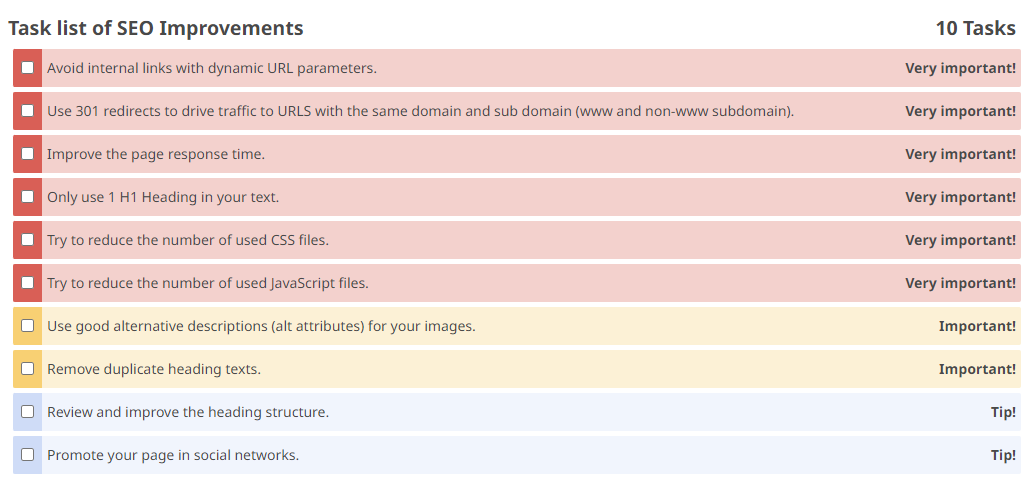
The most damaging of these is content being served on both non-www and www URLS, which needs to be fixed ASAP. You’ll note that the
h1heading appears twice (which you’re already aware of)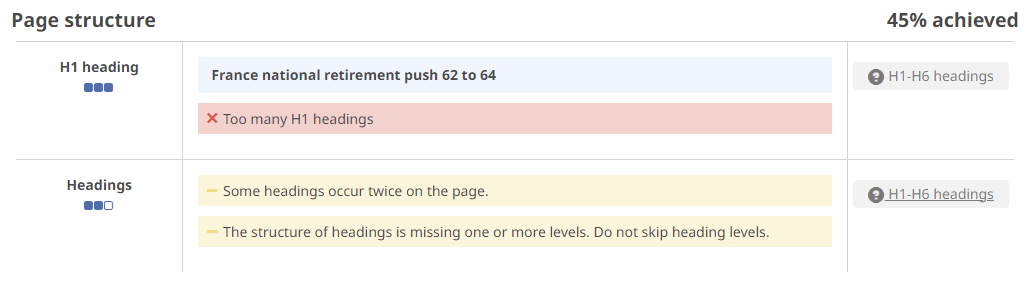
However, aside from SEO, I see far more important issues that you need to resolve first
- TTFB (Time to First Byte) - the page is incredibly slow to load - in some cases, it takes 2-3 seconds before any content is shown. This is a killer in itself as more than one second loading time is considered far too high.
- 301 redirects are missing - in this case, you should have a global redirect so that the content is being served from the same domain at all times.
The bottom line here, and the “fix” is to remove AnsPress. Clearly, this isn’t palatable from your perspective as there is significant investment on your side. I know from previous discussions that AnsPress was shipped with the theme you are using, but it’s a below-par plugin in terms of performance and stability.
You’ll see below my attempts to get AnsPress working as far back as 2017 - I promptly gave up, because it was such a mess
https://theme.co/forum/t/anspress-plugin-with-x-pro-integrity-stack/14015
And finally, one very well respected WordPress resource (wpcrafter.com) parted ways with AnsPress in 2018 for similar reasons, which he clearly stated
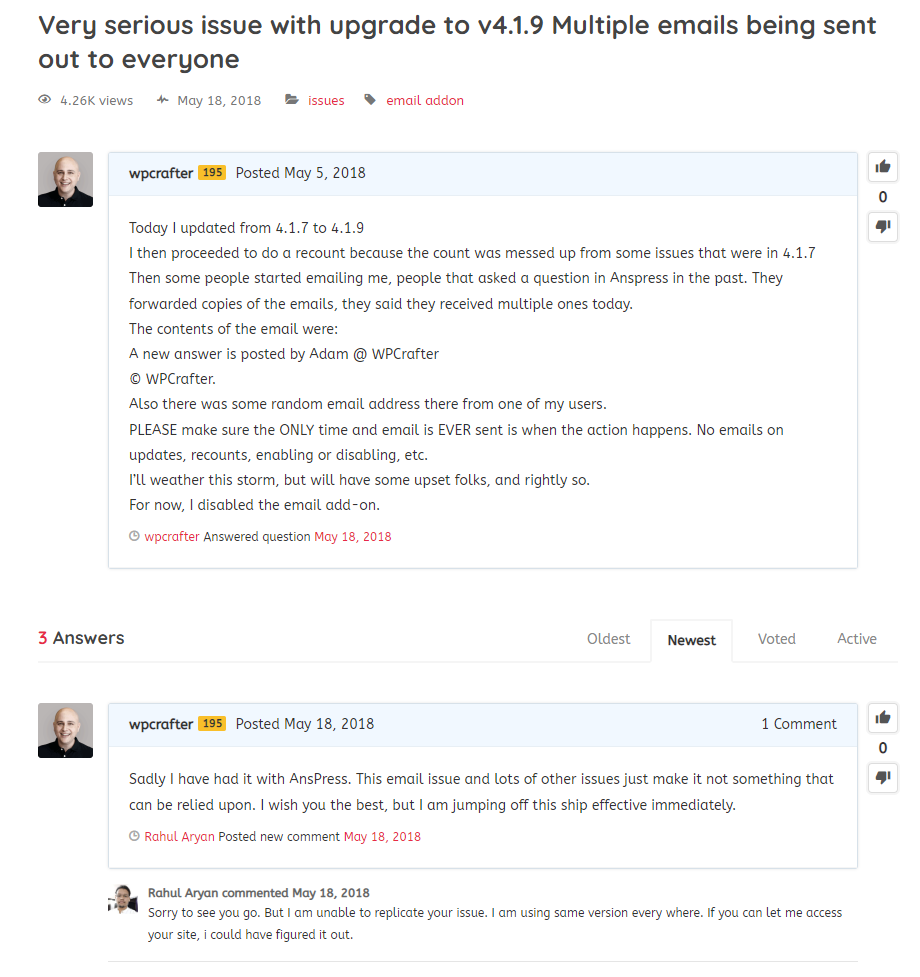
At this point, I would weigh up the investment in AnsPress and seriously consider removing it.
Mark Cutting also advises organisations as a Fractional CIO, Fractional CISO and Executive Advisor, helping boards improve technology governance, cyber resilience and executive decision making. Learn more at Gratmore Ltd
-
phenomlab has marked this topic as solved on
-
phenomlab forked this topic on

Hello! It looks like you're interested in this conversation, but you don't have an account yet.
Getting fed up of having to scroll through the same posts each visit? When you register for an account, you'll always come back to exactly where you were before, and choose to be notified of new replies (either via email, or push notification). You'll also be able to save bookmarks and upvote posts to show your appreciation to other community members.
With your input, this post could be even better 💗
Register LoginDid this solution help you?
Related Topics
-
configure ghost and wordpress combo
Moved Solved WordPress -
Hidden border
Solved WordPress -
-
-
Changing H2 color
Solved WordPress -
-
-