
How to position ads responsively
-
The look of ads on PC they appear correctly but not on mobile.
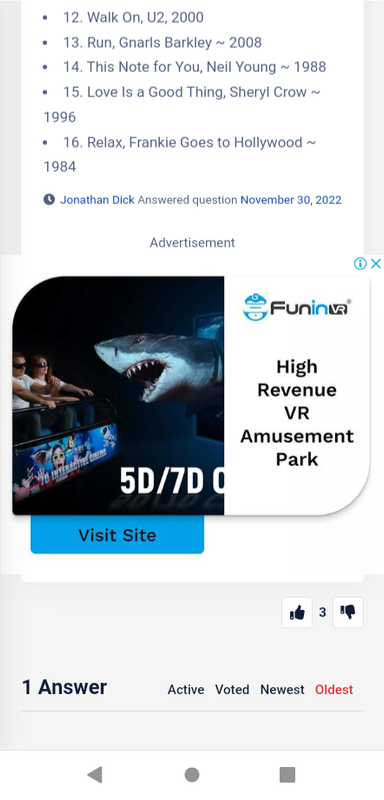
Is there any CSS we could use to position the ads and make them responsive (to not pass out the width div) for all pages like this one https://sopriza.com/question/songs-banned-radio-tv/
Thanks

@Sala Are your ads set to be responsive? You could use CSS, but the images will in fact look worse as they will but cut short. My recommendation would be to follow the below
https://support.google.com/google-ads/answer/7005917?hl=en-GB
Also, you should review this
https://stackoverflow.com/questions/22463041/displaying-responsive-google-ads-css-problems
If you really need something in the short term, you could use this
@media (max-width: 767px) {
	#google-center-div img {
		width: 370px;
		margin-left: -420px;
		height: auto !important;
	}
}
However, it’s worth noting that the
heightvalue is being set byjavascriptso changing it dynamically will not work with CSS (it’s being overridden byjs)Mark Cutting also advises organisations as a Fractional CIO, Fractional CISO and Executive Advisor, helping boards improve technology governance, cyber resilience and executive decision making. Learn more at Gratmore Ltd
-
phenomlab has marked this topic as solved on
-
@Sala Are your ads set to be responsive? You could use CSS, but the images will in fact look worse as they will but cut short. My recommendation would be to follow the below
https://support.google.com/google-ads/answer/7005917?hl=en-GB
Also, you should review this
https://stackoverflow.com/questions/22463041/displaying-responsive-google-ads-css-problems
If you really need something in the short term, you could use this
@media (max-width: 767px) {
	#google-center-div img {
		width: 370px;
		margin-left: -420px;
		height: auto !important;
	}
}
However, it’s worth noting that the
heightvalue is being set byjavascriptso changing it dynamically will not work with CSS (it’s being overridden byjs)
@phenomlab Looks like i will have to dig on this one, because the above CSS code didn’t work. Thanks for trying!
-
@phenomlab Looks like i will have to dig on this one, because the above CSS code didn’t work. Thanks for trying!
@Sala that’s odd - it works when targeting your site.

Mark Cutting also advises organisations as a Fractional CIO, Fractional CISO and Executive Advisor, helping boards improve technology governance, cyber resilience and executive decision making. Learn more at Gratmore Ltd
-
@phenomlab the above CSS code is still inserted while am searching for other options. Or Maybe it’s my mobile phone? Have you tested on your mobile if it’s working?
-
@phenomlab the above CSS code is still inserted while am searching for other options. Or Maybe it’s my mobile phone? Have you tested on your mobile if it’s working?
@Sala Try replacing with
@media (max-width: 767px) {
	#google-center-div img {
		width: 370px !important;
		margin-left: -420px !important;
		height: auto !important;
	}
}
Mark Cutting also advises organisations as a Fractional CIO, Fractional CISO and Executive Advisor, helping boards improve technology governance, cyber resilience and executive decision making. Learn more at Gratmore Ltd
-
@Sala Try replacing with
@media (max-width: 767px) {
	#google-center-div img {
		width: 370px !important;
		margin-left: -420px !important;
		height: auto !important;
	}
}
-
@phenomlab it’s replaced, should I turn off wp rocket?
@Sala Don’t turn it off, but do clear the cache.
Mark Cutting also advises organisations as a Fractional CIO, Fractional CISO and Executive Advisor, helping boards improve technology governance, cyber resilience and executive decision making. Learn more at Gratmore Ltd
-
@phenomlab Their widths still pass out the div.
My actual ad code:
<div><center>Advertisement<script async=“” src=“https://pagead2.googlesyndication.com/pagead/js/adsbygoogle.js?client=ca-pub-xx” crossorigin=“anonymous”></script><!-- example_responsive_1 -->
<ins class=“adsbygoogle” style=“display: inline-block; text-align:center; width: 100%; height: 280px;” data-ad-client=“ca-pub-xx” data-ad-slot=“xx” data-ad-format=“auto” data-full-width-responsive=“true”></ins>
<script>
(adsbygoogle = window.adsbygoogle || []).push({});
</script></center></div> -
@phenomlab Their widths still pass out the div.
My actual ad code:
<div><center>Advertisement<script async=“” src=“https://pagead2.googlesyndication.com/pagead/js/adsbygoogle.js?client=ca-pub-xx” crossorigin=“anonymous”></script><!-- example_responsive_1 -->
<ins class=“adsbygoogle” style=“display: inline-block; text-align:center; width: 100%; height: 280px;” data-ad-client=“ca-pub-xx” data-ad-slot=“xx” data-ad-format=“auto” data-full-width-responsive=“true”></ins>
<script>
(adsbygoogle = window.adsbygoogle || []).push({});
</script></center></div>
@Sala Then you have to use responsive ads as I posted previously. Did you review those links?
Mark Cutting also advises organisations as a Fractional CIO, Fractional CISO and Executive Advisor, helping boards improve technology governance, cyber resilience and executive decision making. Learn more at Gratmore Ltd
-
@Sala Then you have to use responsive ads as I posted previously. Did you review those links?
@phenomlab Sir it has worked after I changed @media @phone {
Wah!

-
@phenomlab Sir it has worked after I changed @media @phone {
Wah!
@Sala ok, fine, but I’d still recommend you go down the responsive ads route. The CSS code will probably cause issues with other images as they are loaded within the Google ads code
Mark Cutting also advises organisations as a Fractional CIO, Fractional CISO and Executive Advisor, helping boards improve technology governance, cyber resilience and executive decision making. Learn more at Gratmore Ltd
-
@Sala ok, fine, but I’d still recommend you go down the responsive ads route. The CSS code will probably cause issues with other images as they are loaded within the Google ads code
@phenomlab yes that’s the problem with these J’s, I will try my best , If I find something better I will share. Thanks
Hello! It looks like you're interested in this conversation, but you don't have an account yet.
Getting fed up of having to scroll through the same posts each visit? When you register for an account, you'll always come back to exactly where you were before, and choose to be notified of new replies (either via email, or push notification). You'll also be able to save bookmarks and upvote posts to show your appreciation to other community members.
With your input, this post could be even better 💗
Register Login


