Flarum - WordPress Journey
-
@phenomlab what stopped you?
By the way my friend made a joke on Billy’s site , she said it looked like world war 2 -rofl-

@Sala I discovered NodeBB

Mark Cutting also advises organisations as a Fractional CIO, Fractional CISO and Executive Advisor, helping boards improve technology governance, cyber resilience and executive decision making. Learn more at Gratmore Ltd
-

-
@phenomlab and im Enthusiast member in it!
-
@Hari see how I started pimping my shop online

 already
@Sala Surely not…

Mark Cutting also advises organisations as a Fractional CIO, Fractional CISO and Executive Advisor, helping boards improve technology governance, cyber resilience and executive decision making. Learn more at Gratmore Ltd
-
-
@phenomlab 30tb? Shipment is from China
Bdw when I use security headers, I noticed the bbcodes icons in editor for answering questions disappear
https://i.postimg.cc/SR41mCZc/Screenshot-20221209-104409.png
-
@phenomlab 30tb? Shipment is from China
-
Bdw when I use security headers, I noticed the bbcodes icons in editor for answering questions disappear
https://i.postimg.cc/SR41mCZc/Screenshot-20221209-104409.png
@Sala said in Flarum - WordPress Journey:
Bdw when I use security headers, I noticed the bbcodes icons in editor for answering questions disappear
Can you elaborate a bit on this? Not sure what you mean.
Mark Cutting also advises organisations as a Fractional CIO, Fractional CISO and Executive Advisor, helping boards improve technology governance, cyber resilience and executive decision making. Learn more at Gratmore Ltd
-
@Sala said in Flarum - WordPress Journey:
Bdw when I use security headers, I noticed the bbcodes icons in editor for answering questions disappear
Can you elaborate a bit on this? Not sure what you mean.
@phenomlab same here 30tb I also thought I had lapses in technology, maybe new things came without my notice

The bbcodes icons
https://i.postimg.cc/R0YNnrGK/Screenshot-20221209-162710.pngSo they show when creating a new topic, but not showing on answering on already created topic.
It doesn’t hurt but it’s caused by adding that security headers module. Anyway to rectify the cause?
-
@phenomlab same here 30tb I also thought I had lapses in technology, maybe new things came without my notice
The bbcodes icons
https://i.postimg.cc/R0YNnrGK/Screenshot-20221209-162710.pngSo they show when creating a new topic, but not showing on answering on already created topic.
It doesn’t hurt but it’s caused by adding that security headers module. Anyway to rectify the cause?
@Sala Can you show me the output from the console when responding to a message? My personal thoughts are that this could be
CORSrelated, but I need to verify that first.Mark Cutting also advises organisations as a Fractional CIO, Fractional CISO and Executive Advisor, helping boards improve technology governance, cyber resilience and executive decision making. Learn more at Gratmore Ltd
-
@Sala Can you show me the output from the console when responding to a message? My personal thoughts are that this could be
CORSrelated, but I need to verify that first.
@phenomlab I knew you would love this, security part. 🥳 I’ve forwarded to you a test user.
-
@phenomlab I knew you would love this, security part. 🥳 I’ve forwarded to you a test user.
@Sala It the BBCodes show on a new topic as below
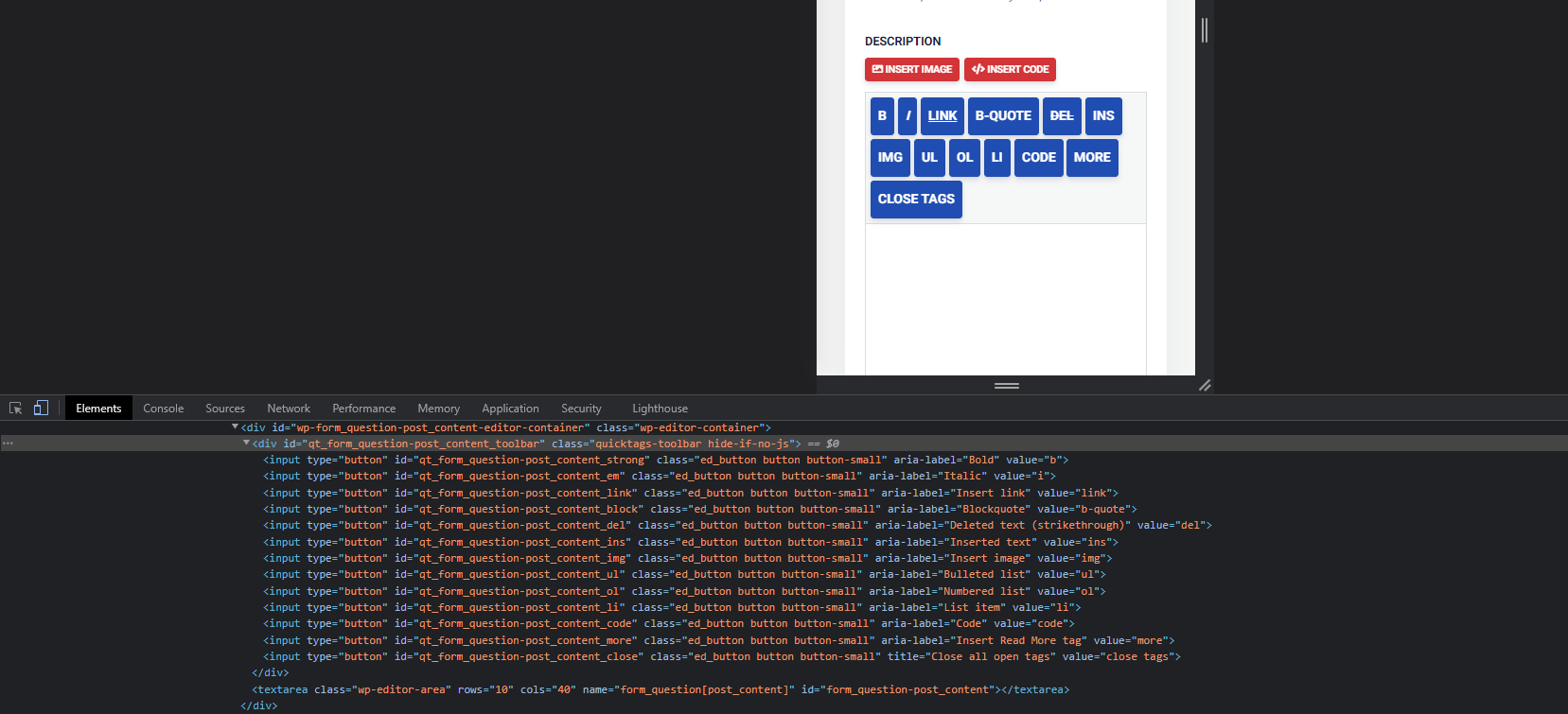
On response to a question, the same DIV is there but not populated
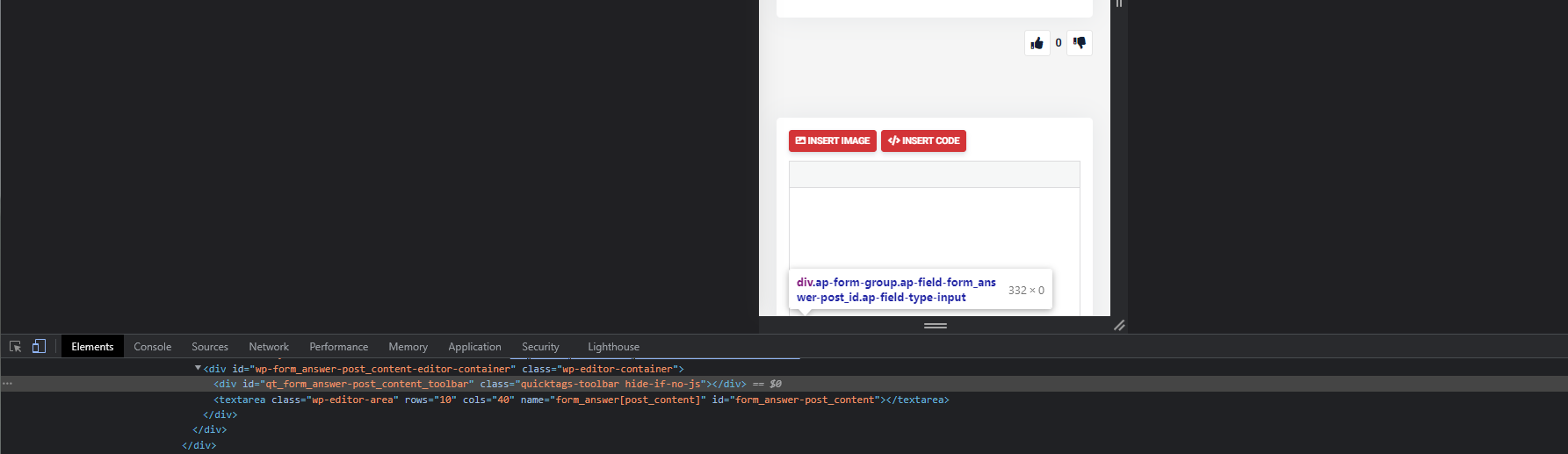
This is almost certainly a CORS issue, but I’ll need to see the headers you’ve applied to comment further, or make suggestions.
Mark Cutting also advises organisations as a Fractional CIO, Fractional CISO and Executive Advisor, helping boards improve technology governance, cyber resilience and executive decision making. Learn more at Gratmore Ltd
-
@Sala It the BBCodes show on a new topic as below
On response to a question, the same DIV is there but not populated
This is almost certainly a CORS issue, but I’ll need to see the headers you’ve applied to comment further, or make suggestions.
-
@phenomlab this one is going to be hard, I put it on pause
@Sala not sure what you mean? I need the headers you specified in your
.htaccessfile (I’m assuming Apache here).Mark Cutting also advises organisations as a Fractional CIO, Fractional CISO and Executive Advisor, helping boards improve technology governance, cyber resilience and executive decision making. Learn more at Gratmore Ltd
-
@Sala not sure what you mean? I need the headers you specified in your
.htaccessfile (I’m assuming Apache here).
-
@phenomlab I have forwarded to you the headers found in htaccess
@Sala thanks. I’ve checked the headers and again and I can’t see anything in the specific code I provided that would cause the bbcode to not display.
Does it work if you remove all the headers? If this is the case, my recommendation would be to enable them one by one and find out which one actually causes the issue. Once we know which one it is, we can then modify it to allow the display of bbcode.
It just seems odd to me that everything works fine on a new post, but not on reply. This would tell me they it’s not the headers, but I could be wrong. You may want to try disabling wp-rocket to see if that resolves the issue rather than removing the headers.
Mark Cutting also advises organisations as a Fractional CIO, Fractional CISO and Executive Advisor, helping boards improve technology governance, cyber resilience and executive decision making. Learn more at Gratmore Ltd
-
@Sala thanks. I’ve checked the headers and again and I can’t see anything in the specific code I provided that would cause the bbcode to not display.
Does it work if you remove all the headers? If this is the case, my recommendation would be to enable them one by one and find out which one actually causes the issue. Once we know which one it is, we can then modify it to allow the display of bbcode.
It just seems odd to me that everything works fine on a new post, but not on reply. This would tell me they it’s not the headers, but I could be wrong. You may want to try disabling wp-rocket to see if that resolves the issue rather than removing the headers.
@phenomlab yesterday I fix 2 bugs on just at the time you needed an answer for the headers, I immediately knew this one needed a test of one by one bcoz it could be the Defer for Js .
-
@phenomlab yesterday I fix 2 bugs on just at the time you needed an answer for the headers, I immediately knew this one needed a test of one by one bcoz it could be the Defer for Js .
@Sala yes, deferring
JScan have a negative effect on functionality. For speed reasons, you typically placeJSin the footer rather than the header, but this then means it’s not executed in time and in theDOMwhen needed.Another potentially damaging feature is minifying
JSto reduce it’s size. Whilst wp-rocket offers several mechanisms to make the site load faster, you’d need to test each one of these settings to ensure it doesn’t negatively impact the site.Mark Cutting also advises organisations as a Fractional CIO, Fractional CISO and Executive Advisor, helping boards improve technology governance, cyber resilience and executive decision making. Learn more at Gratmore Ltd
-
@Sala yes, deferring
JScan have a negative effect on functionality. For speed reasons, you typically placeJSin the footer rather than the header, but this then means it’s not executed in time and in theDOMwhen needed.Another potentially damaging feature is minifying
JSto reduce it’s size. Whilst wp-rocket offers several mechanisms to make the site load faster, you’d need to test each one of these settings to ensure it doesn’t negatively impact the site.
@phenomlab Hurray!
We have found the line that blocked the icons, it was this one:-Header set Permissions-Policy "geolocation=(),midi=(),sync-xhr=(),microphone=(),camera=(),magnetometer=(),gyroscope=(),fullscreen=(self),payment=()"Now it’s your part to come up with another config line

-
@phenomlab Hurray!
We have found the line that blocked the icons, it was this one:-Header set Permissions-Policy "geolocation=(),midi=(),sync-xhr=(),microphone=(),camera=(),magnetometer=(),gyroscope=(),fullscreen=(self),payment=()"Now it’s your part to come up with another config line
Hello! It looks like you're interested in this conversation, but you don't have an account yet.
Getting fed up of having to scroll through the same posts each visit? When you register for an account, you'll always come back to exactly where you were before, and choose to be notified of new replies (either via email, or push notification). You'll also be able to save bookmarks and upvote posts to show your appreciation to other community members.
With your input, this post could be even better 💗
Register LoginRelated Topics
-
configure ghost and wordpress combo
Moved Solved WordPress -
-
-
-
-
-
-

WordPress & NodeBB
Solved WordPress