Custom badges

-
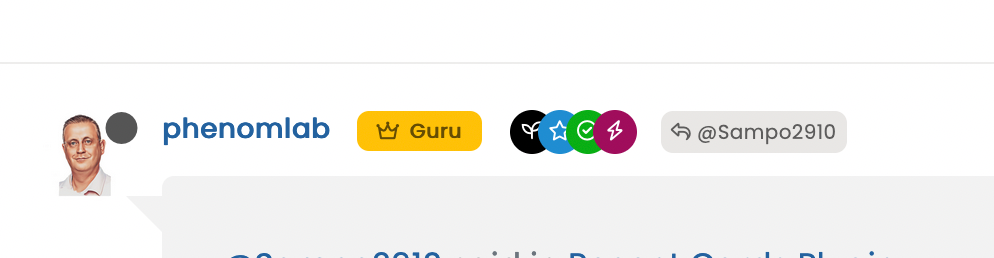
@cagatay Do you want the icon to show? Because of the size of the screen estate, I think it makes more sense to hide it?
-
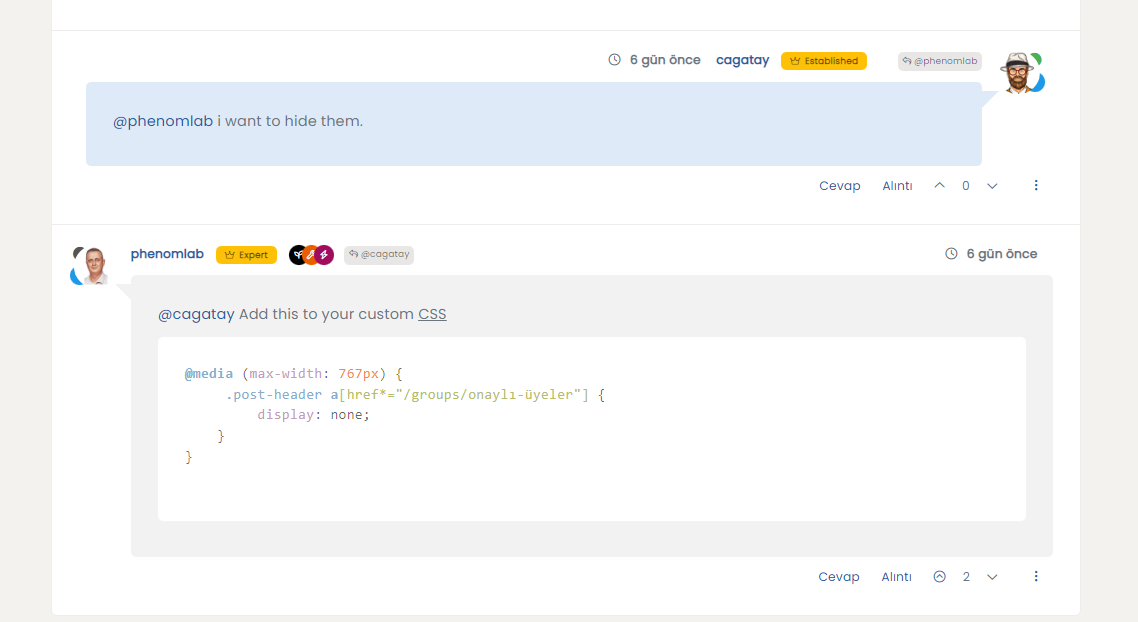
@phenomlab i want to hide them.
@cagatay Add this to your custom CSS
@media (max-width: 767px) {
     .post-header a[href*="/groups/onaylı-üyeler"] {
         display: none;
    }
}
Mark Cutting also advises organisations as a Fractional CIO, Fractional CISO and Executive Advisor, helping boards improve technology governance, cyber resilience and executive decision making. Learn more at Phenomlab Ltd
-
@cagatay Add this to your custom CSS
@media (max-width: 767px) { .post-header a[href*="/groups/onaylı-üyeler"] { display: none; } } -
@cagatay Already fixed. Thanks.
This seems to have become an issue in the most recent update from NodeBB.
-
hi @phenomlab , I have made some updates to the CSS elements, and right now it looks like a badge with a wavy edge…

.post-header a[href*="/forum/groups/verified"] {
    margin-right: 3px;
    margin-top: 1px;
    border-radius: 50%;
    line-height: 20px;
    display: inline-block;
    vertical-align: middle;
    overflow: hidden;
    position: relative;
}

.post-header a[href*="/forum/groups/verified"]::before {
    content: "\f00c";
    position: absolute;
    z-index: 1; /* Added z-index to bring it to the front */
    width: 20px;
    height: 20px;
    background-image: url("data:image/svg+xml;charset=utf-8,%3Csvg xmlns='http://www.w3.org/2000/svg' width='24' height='24' stroke-width='1.5' viewBox='0 0 24 24' fill='%23085EAC'%3E%3Cpath d='M10.5213 2.62368C11.3147 1.75255 12.6853 1.75255 13.4787 2.62368L14.4989 3.74391C14.8998 4.18418 15.4761 4.42288 16.071 4.39508L17.5845 4.32435C18.7614 4.26934 19.7307 5.23857 19.6757 6.41554L19.6049 7.92905C19.5771 8.52388 19.8158 9.10016 20.2561 9.50111L21.3763 10.5213C22.2475 11.3147 22.2475 12.6853 21.3763 13.4787L20.2561 14.4989C19.8158 14.8998 19.5771 15.4761 19.6049 16.071L19.6757 17.5845C19.7307 18.7614 18.7614 19.7307 17.5845 19.6757L16.071 19.6049C15.4761 19.5771 14.8998 19.8158 14.4989 20.2561L13.4787 21.3763C12.6853 22.2475 11.3147 22.2475 10.5213 21.3763L9.50111 20.2561C9.10016 19.8158 8.52388 19.5771 7.92905 19.6049L6.41553 19.6757C5.23857 19.7307 4.26934 18.7614 4.32435 17.5845L4.39508 16.071C4.42288 15.4761 4.18418 14.8998 3.74391 14.4989L2.62368 13.4787C1.75255 12.6853 1.75255 11.3147 2.62368 10.5213L3.74391 9.50111C4.18418 9.10016 4.42288 8.52388 4.39508 7.92905L4.32435 6.41553C4.26934 5.23857 5.23857 4.26934 6.41554 4.32435L7.92905 4.39508C8.52388 4.42288 9.10016 4.18418 9.50111 3.74391L10.5213 2.62368Z' stroke='none'/%3E%3C/svg%3E");
    background-size: cover;
    color: #ffffff; /* Added to set the color of the checkmark */
    font-family: "Font Awesome 5 Free";
    font-weight: 900;
    font-size:8px;
    text-align: center;
    line-height: 20px;
}
small.label.group-label.inline-block i {
    margin-top: 1px;
    margin-left: 0px;
    vertical-align: middle;
    justify-content: center;
    display: flex;
}
.post-header a[href*="/forum/groups/verified"] .group-label {
    min-width: 20px;
    display: flex;
    justify-content: center;
    background-color: transparent !important;
}
.group-label {
    vertical-align: -6px;
}
This is achieved thanks to ChatGPT… the code specifically uses this “#085EAC” color… it can of course be changed…
-
hi @phenomlab , I have made some updates to the CSS elements, and right now it looks like a badge with a wavy edge…
.post-header a[href*="/forum/groups/verified"] {
    margin-right: 3px;
    margin-top: 1px;
    border-radius: 50%;
    line-height: 20px;
    display: inline-block;
    vertical-align: middle;
    overflow: hidden;
    position: relative;
}

.post-header a[href*="/forum/groups/verified"]::before {
    content: "\f00c";
    position: absolute;
    z-index: 1; /* Added z-index to bring it to the front */
    width: 20px;
    height: 20px;
    background-image: url("data:image/svg+xml;charset=utf-8,%3Csvg xmlns='http://www.w3.org/2000/svg' width='24' height='24' stroke-width='1.5' viewBox='0 0 24 24' fill='%23085EAC'%3E%3Cpath d='M10.5213 2.62368C11.3147 1.75255 12.6853 1.75255 13.4787 2.62368L14.4989 3.74391C14.8998 4.18418 15.4761 4.42288 16.071 4.39508L17.5845 4.32435C18.7614 4.26934 19.7307 5.23857 19.6757 6.41554L19.6049 7.92905C19.5771 8.52388 19.8158 9.10016 20.2561 9.50111L21.3763 10.5213C22.2475 11.3147 22.2475 12.6853 21.3763 13.4787L20.2561 14.4989C19.8158 14.8998 19.5771 15.4761 19.6049 16.071L19.6757 17.5845C19.7307 18.7614 18.7614 19.7307 17.5845 19.6757L16.071 19.6049C15.4761 19.5771 14.8998 19.8158 14.4989 20.2561L13.4787 21.3763C12.6853 22.2475 11.3147 22.2475 10.5213 21.3763L9.50111 20.2561C9.10016 19.8158 8.52388 19.5771 7.92905 19.6049L6.41553 19.6757C5.23857 19.7307 4.26934 18.7614 4.32435 17.5845L4.39508 16.071C4.42288 15.4761 4.18418 14.8998 3.74391 14.4989L2.62368 13.4787C1.75255 12.6853 1.75255 11.3147 2.62368 10.5213L3.74391 9.50111C4.18418 9.10016 4.42288 8.52388 4.39508 7.92905L4.32435 6.41553C4.26934 5.23857 5.23857 4.26934 6.41554 4.32435L7.92905 4.39508C8.52388 4.42288 9.10016 4.18418 9.50111 3.74391L10.5213 2.62368Z' stroke='none'/%3E%3C/svg%3E");
    background-size: cover;
    color: #ffffff; /* Added to set the color of the checkmark */
    font-family: "Font Awesome 5 Free";
    font-weight: 900;
    font-size:8px;
    text-align: center;
    line-height: 20px;
}
small.label.group-label.inline-block i {
    margin-top: 1px;
    margin-left: 0px;
    vertical-align: middle;
    justify-content: center;
    display: flex;
}
.post-header a[href*="/forum/groups/verified"] .group-label {
    min-width: 20px;
    display: flex;
    justify-content: center;
    background-color: transparent !important;
}
.group-label {
    vertical-align: -6px;
}
This is achieved thanks to ChatGPT… the code specifically uses this “#085EAC” color… it can of course be changed…
@crazycells oooohhhhh - I like!!!
Mark Cutting also advises organisations as a Fractional CIO, Fractional CISO and Executive Advisor, helping boards improve technology governance, cyber resilience and executive decision making. Learn more at Phenomlab Ltd
-
@crazycells oooohhhhh - I like!!!
@phenomlab I had to ask ChatGPT 30 times to get this

the codes will be more clear to you than to me
 but I had to add a “transparent” background color, so that svg can be created with the color you want. otherwise svg is not visible.
I had to remove “text-align” because it is ruining the position of the badge.
And lastly, although there is a checkmark, unfortunately, it stays behind the SVG, so it had to add a checkmark using CSS codes to make it visible and changed its position using z-index. (or something like this
) -
@phenomlab I had to ask ChatGPT 30 times to get this
the codes will be more clear to you than to me
but I had to add a “transparent” background color, so that svg can be created with the color you want. otherwise svg is not visible.I had to remove “text-align” because it is ruining the position of the badge.
And lastly, although there is a checkmark, unfortunately, it stays behind the SVG, so it had to add a checkmark using CSS codes to make it visible and changed its position using z-index. (or something like this
)@crazycells it’s a lot of effort, but I really like the effect. I’m just wondering if it’s easier to use an actual image?
Mark Cutting also advises organisations as a Fractional CIO, Fractional CISO and Executive Advisor, helping boards improve technology governance, cyber resilience and executive decision making. Learn more at Phenomlab Ltd
-
@crazycells oooohhhhh - I like!!!
@phenomlab said in Custom badges:
@crazycells oooohhhhh - I like!!!
that background URL is universal, right? I mean it will always be available and not be deleted?
I used this page to get that: https://fontawesomeicons.com/svg/icons/twitter-verified-badge#ex-tab1
-
@phenomlab said in Custom badges:
@crazycells oooohhhhh - I like!!!
that background URL is universal, right? I mean it will always be available and not be deleted?
I used this page to get that: https://fontawesomeicons.com/svg/icons/twitter-verified-badge#ex-tab1
@crazycells said in Custom badges:
that background URL is universal, right? I mean it will always be available and not be deleted?
Yes, correct.
-
@crazycells it’s a lot of effort, but I really like the effect. I’m just wondering if it’s easier to use an actual image?
@phenomlab I prefer this way, because I would like to change the color of it depending on profession. In our forum, I am not planning to use it for “email verified” users, it will mainly be used for professional users that we host. I can easily edit this depending on the groups.
-
@phenomlab I prefer this way, because I would like to change the color of it depending on profession. In our forum, I am not planning to use it for “email verified” users, it will mainly be used for professional users that we host. I can easily edit this depending on the groups.
@crazycells That makes sense.
-
good job @crazycells
I wonder if we could do it for each badge without changing the color of course and keep the color of the original badges.
Curious to see what it would look like

PW and WS Spirit alive
-
good job @crazycells
I wonder if we could do it for each badge without changing the color of course and keep the color of the original badges.
Curious to see what it would look like
@DownPW said in Custom badges:
good job @crazycells
I wonder if we could do it for each badge without changing the color of course and keep the color of the original badges.
Curious to see what it would look like
no, this does not work. the overlap of a wavy edge circle and a circle becomes a circle. so, you cannot detect any flower shape with this method. The way that I achieved this was by removing the background color (making it transparent by CSS although there is an assigned color for it in ACP) and then creating a new flower shape on top of it by CSS.
-
@DownPW said in Custom badges:
good job @crazycells
I wonder if we could do it for each badge without changing the color of course and keep the color of the original badges.
Curious to see what it would look like
no, this does not work. the overlap of a wavy edge circle and a circle becomes a circle. so, you cannot detect any flower shape with this method. The way that I achieved this was by removing the background color (making it transparent by CSS although there is an assigned color for it in ACP) and then creating a new flower shape on top of it by CSS.
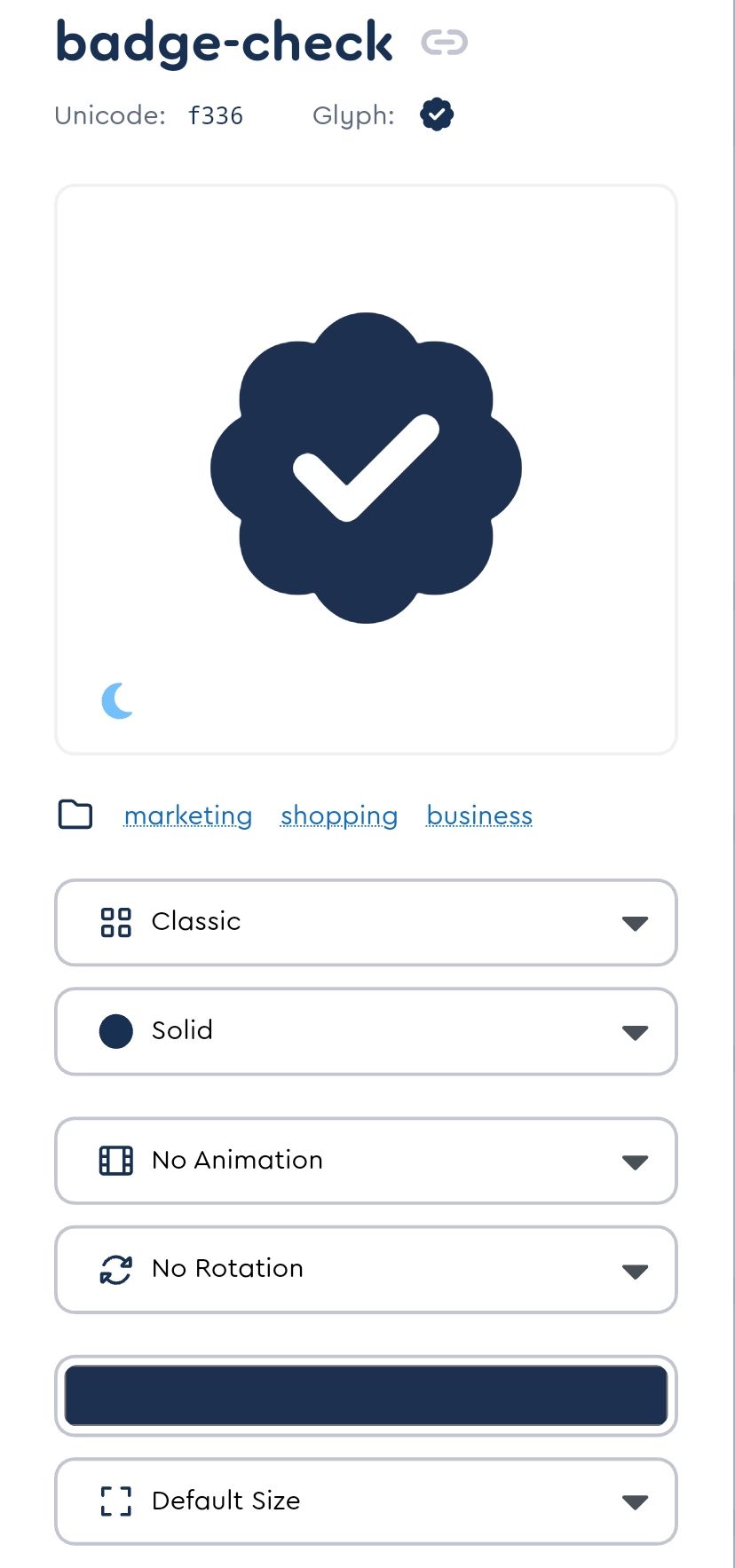
@crazycells just thinking about this. Wouldn’t it be easier to just use font awesome?
https://fontawesome.com/icons/badge-check?f=classic&s=solid
Mark Cutting also advises organisations as a Fractional CIO, Fractional CISO and Executive Advisor, helping boards improve technology governance, cyber resilience and executive decision making. Learn more at Phenomlab Ltd
-
@crazycells just thinking about this. Wouldn’t it be easier to just use font awesome?
https://fontawesome.com/icons/badge-check?f=classic&s=solid
@phenomlab said in Custom badges:
@crazycells just thinking about this. Wouldn’t it be easier to just use font awesome?
https://fontawesome.com/icons/badge-check?f=classic&s=solid
as far as I remember, we discussed this before and you mentioned that that badge is not in the free tier.
-
@phenomlab said in Custom badges:
@crazycells just thinking about this. Wouldn’t it be easier to just use font awesome?
https://fontawesome.com/icons/badge-check?f=classic&s=solid
as far as I remember, we discussed this before and you mentioned that that badge is not in the free tier.
@crazycells Yes, you’re right

-
@phenomlab said in Custom badges:
@crazycells just thinking about this. Wouldn’t it be easier to just use font awesome?
https://fontawesome.com/icons/badge-check?f=classic&s=solid
as far as I remember, we discussed this before and you mentioned that that badge is not in the free tier.
@crazycells This intrigued me somewhat, I won’t lie
I decided to take a stab at this myself.HTML
<!DOCTYPE html>
<html>
<head>
<script src="https://cdnjs.cloudflare.com/ajax/libs/font-awesome/6.4.0/js/all.min.js" integrity="sha512-fD9DI5bZwQxOi7MhYWnnNPlvXdp/2Pj3XSTRrFs5FQa4mizyGLnJcN6tuvUS6LbmgN1ut+XGSABKvjN0H6Aoow==" crossorigin="anonymous" referrerpolicy="no-referrer"></script>
<link rel="stylesheet" href="https://cdnjs.cloudflare.com/ajax/libs/font-awesome/6.4.0/css/all.min.css" integrity="sha512-iecdLmaskl7CVkqkXNQ/ZH/XLlvWZOJyj7Yy7tcenmpD1ypASozpmT/E0iPtmFIB46ZmdtAc9eNBvH0H/ZpiBw==" crossorigin="anonymous" referrerpolicy="no-referrer" />
<meta charset=utf-8 />
<title>JS Bin</title>
</head>
<body>
  <div class="base"></div>
  <div class="inner"><i class="check fa-solid fa-check"></i></div>
</body>
</html>
CSS
.base {
  left: 100px;
  top: 100px;
  height: 80px;
  width: 80px;
  background: #067acc;
  position: absolute;
  border-radius: 10px;
}
.base:before {
  height: 80px;
  width: 80px;
  background: #067acc;
  content:"";
  position: absolute;
  transform: rotate(-30deg);
  border-radius: 10px;
}
.base:after {
  padding-top: 10px;
  text-align: center;
  vertical-align: middle;
  height: 70px;
  width: 80px;
  background: #067acc;
  content: "";
  position: absolute;
  transform: rotate(30deg);
  border-radius: 10px;
}
.inner {
  color: #000000;
  left: 95px;
  top: 95px;
  position: absolute;
  text-align:center;
  padding-top: 25px;
  width: 90px;
  height: 65px;
  background: #067acc;
  border-radius: 50px;
  background: #067acc; /* Old browsers */
}
.check {
  font-size: 36px;
  color: #ffffff;
}
Here’s the result
Mark Cutting also advises organisations as a Fractional CIO, Fractional CISO and Executive Advisor, helping boards improve technology governance, cyber resilience and executive decision making. Learn more at Phenomlab Ltd
-
@crazycells This intrigued me somewhat, I won’t lie
I decided to take a stab at this myself.HTML
<!DOCTYPE html>
<html>
<head>
<script src="https://cdnjs.cloudflare.com/ajax/libs/font-awesome/6.4.0/js/all.min.js" integrity="sha512-fD9DI5bZwQxOi7MhYWnnNPlvXdp/2Pj3XSTRrFs5FQa4mizyGLnJcN6tuvUS6LbmgN1ut+XGSABKvjN0H6Aoow==" crossorigin="anonymous" referrerpolicy="no-referrer"></script>
<link rel="stylesheet" href="https://cdnjs.cloudflare.com/ajax/libs/font-awesome/6.4.0/css/all.min.css" integrity="sha512-iecdLmaskl7CVkqkXNQ/ZH/XLlvWZOJyj7Yy7tcenmpD1ypASozpmT/E0iPtmFIB46ZmdtAc9eNBvH0H/ZpiBw==" crossorigin="anonymous" referrerpolicy="no-referrer" />
<meta charset=utf-8 />
<title>JS Bin</title>
</head>
<body>
  <div class="base"></div>
  <div class="inner"><i class="check fa-solid fa-check"></i></div>
</body>
</html>
CSS
.base {
  left: 100px;
  top: 100px;
  height: 80px;
  width: 80px;
  background: #067acc;
  position: absolute;
  border-radius: 10px;
}
.base:before {
  height: 80px;
  width: 80px;
  background: #067acc;
  content:"";
  position: absolute;
  transform: rotate(-30deg);
  border-radius: 10px;
}
.base:after {
  padding-top: 10px;
  text-align: center;
  vertical-align: middle;
  height: 70px;
  width: 80px;
  background: #067acc;
  content: "";
  position: absolute;
  transform: rotate(30deg);
  border-radius: 10px;
}
.inner {
  color: #000000;
  left: 95px;
  top: 95px;
  position: absolute;
  text-align:center;
  padding-top: 25px;
  width: 90px;
  height: 65px;
  background: #067acc;
  border-radius: 50px;
  background: #067acc; /* Old browsers */
}
.check {
  font-size: 36px;
  color: #ffffff;
}
Here’s the result
-
@crazycells Sorry, yes. Fixed that now.
Mark Cutting also advises organisations as a Fractional CIO, Fractional CISO and Executive Advisor, helping boards improve technology governance, cyber resilience and executive decision making. Learn more at Phenomlab Ltd





Hello! It looks like you're interested in this conversation, but you don't have an account yet.
Getting fed up of having to scroll through the same posts each visit? When you register for an account, you'll always come back to exactly where you were before, and choose to be notified of new replies (either via email, or push notification). You'll also be able to save bookmarks and upvote posts to show your appreciation to other community members.
With your input, this post could be even better 💗
Register Login