answers appearance css code request
-
Hello !!!
I think the way to post our answers in the topics is very great!!
What’s good is that it only does it in the answers and not in the first POST if you are the author.
Is it possible to share this code or is it too abused?

PW and WS Spirit alive
-
Hello !!!
I think the way to post our answers in the topics is very great!!
What’s good is that it only does it in the answers and not in the first POST if you are the author.
Is it possible to share this code or is it too abused?
@DownPW Sorry - I think I know what you mean, but could you elaborate in case I’m wrong ?
Mark Cutting also advises organisations as a Fractional CIO, Fractional CISO and Executive Advisor, helping boards improve technology governance, cyber resilience and executive decision making. Learn more at Phenomlab Ltd
-
@DownPW Sorry - I think I know what you mean, but could you elaborate in case I’m wrong ?
@phenomlab said in answers appearance css code request:
@DownPW Sorry - I think I know what you mean, but could you elaborate in case I’m wrong ?
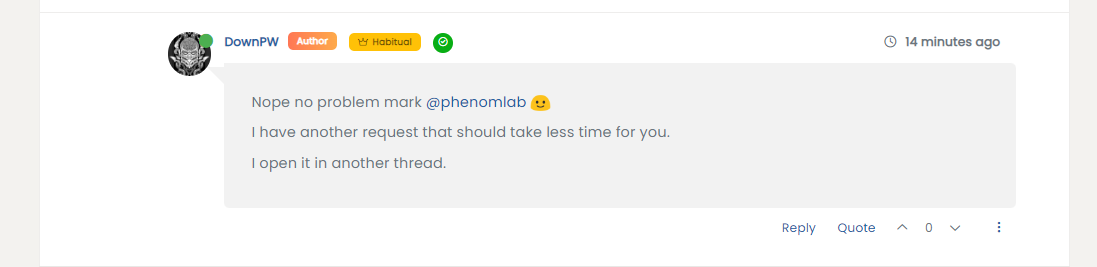
Like the screenshot.
Our answer is differnt like other replies on PostPW and WS Spirit alive
-
@phenomlab said in answers appearance css code request:
@DownPW Sorry - I think I know what you mean, but could you elaborate in case I’m wrong ?
Like the screenshot.
Our answer is differnt like other replies on Post@DownPW Isn’t this it ?
-
hmm i will test if it’s that
PW and WS Spirit alive
-
@DownPW I think it is - let me know.
-
-
@DownPW odd. That’s definitely the CSS.
-
hmmmm I’m obliged to add this code @phenomlab :
@media (min-width: 1200px) {
li.self-post .content:not(.isSolved [component="post/content"])[itemprop="text"] {
    background: #ccc;
}
}

@media (min-width: 1200px) {
li.self-post .content:not(.isSolved [component="post/content"]) {
    background: #ccc;
    padding: 30px;
    border-radius: 4px;
    border-top-left-radius: 0px;
}
}
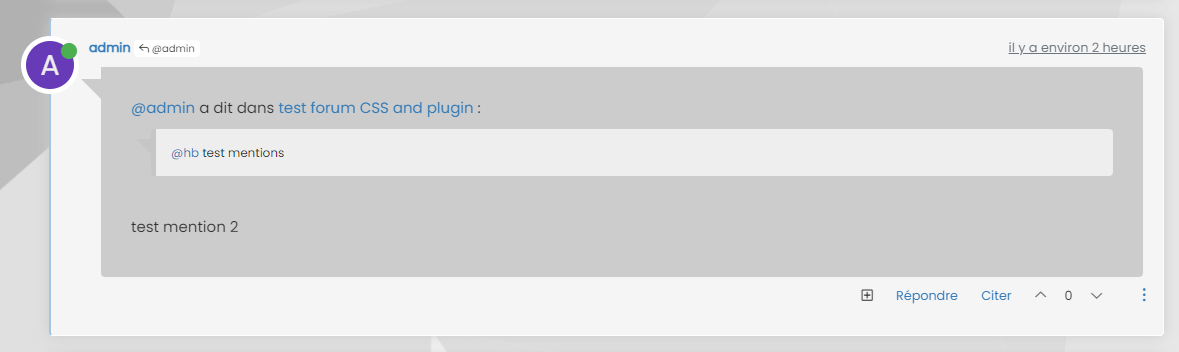
But the result is odd :

-
Better with this code:
@media (min-width: 1200px) {
li.self-post .content:not(.isSolved [component="post/content"])[itemprop="text"] {
    background: #ccc;
}
}

@media (min-width: 1200px) {
li.self-post .content:not(.isSolved [component="post/content"]) {
    background: #ccc;
    padding: 30px;
    border-radius: 4px;
    border-top-left-radius: 0px;
    margin-left: 50px;
    margin-right: 20px;
}
}

@media (min-width: 1200px) {
li.self-post .content:not(.isSolved [component="post/content"]):after {
    border-left: 20px solid transparent;
    border-top: 20px solid #ccc;
    top: 60px;
    content: "";
    position: absolute;
    left: 30px;
}
}
PW and WS Spirit alive
-
Better with this code:
@media (min-width: 1200px) { li.self-post .content:not(.isSolved [component="post/content"])[itemprop="text"] { background: #ccc; } } @media (min-width: 1200px) { li.self-post .content:not(.isSolved [component="post/content"]) { background: #ccc; padding: 30px; border-radius: 4px; border-top-left-radius: 0px; margin-left: 50px; margin-right: 20px; } } @media (min-width: 1200px) { li.self-post .content:not(.isSolved [component="post/content"]):after { border-left: 20px solid transparent; border-top: 20px solid #ccc; top: 60px; content: ""; position: absolute; left: 30px; } }@DownPW yes, because of the modifications that Sudonix uses, you’ll need to tailor to fit your needs.
-
 undefined DownPW has marked this topic as solved on

Hello! It looks like you're interested in this conversation, but you don't have an account yet.
Getting fed up of having to scroll through the same posts each visit? When you register for an account, you'll always come back to exactly where you were before, and choose to be notified of new replies (either via email, or push notification). You'll also be able to save bookmarks and upvote posts to show your appreciation to other community members.
With your input, this post could be even better 💗
Register Login