Skip to content

Forum Statistics Box

Solved Customisation
5 2 2.2k 1
  • wrote on last edited by
    #1

    HI All,

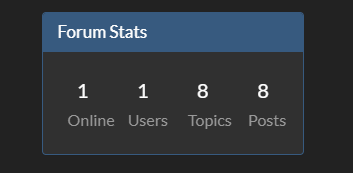
    How yours looks 🙂
    ss2.png

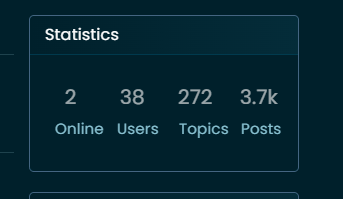
    How the default one looks like on mine 😞 ss1.png

    Best way that I am able to change that ? Change font size.

    Thank you 🙂

  • HI All,

    How yours looks 🙂
    ss2.png

    How the default one looks like on mine 😞 ss1.png
    Best way that I am able to change that ? Change font size.

    Thank you 🙂

    wrote on last edited by
    #2

    @Sampo2910 Try this

    .row.forum-stats {
        padding: 10px;
        margin-top: -25px;
        margin-bottom: -25px;
        margin-left: auto;
        margin-right: auto;
    }
    .row.forum-stats small {
        font-size: 50%;
    }

    
  • @Sampo2910 Try this

    .row.forum-stats {
        padding: 10px;
        margin-top: -25px;
        margin-bottom: -25px;
        margin-left: auto;
        margin-right: auto;
    }
    .row.forum-stats small {
        font-size: 50%;
    }
    
    wrote on last edited by
    #3

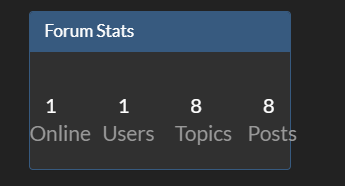
    Thank you 🙂 Works A Treat. ss1.png

    As you can see a new forum 🙂

    I am wondering about this custom CSS though. Noob Question coming up 🙂 ss2.png
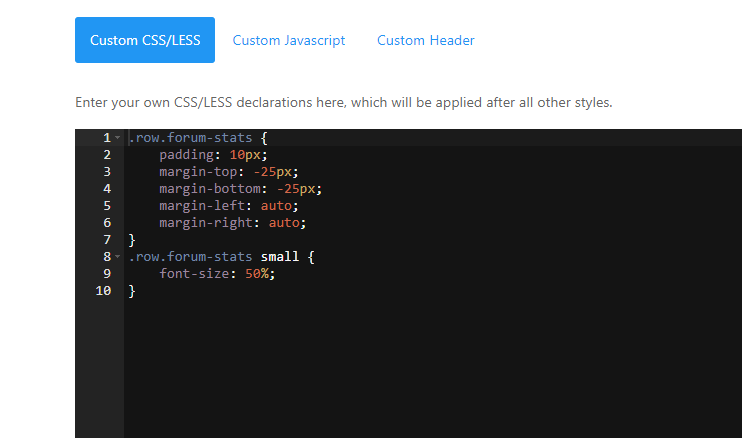
    As you see I put your code in and all good. What happens when i want to put more in? Goes underneath in new thread. ? Say i wanted new theme for example or again something like this?

    Thx as always.

  • Sampo2910 Sampo2910 has marked this topic as solved on
  • Thank you 🙂 Works A Treat. ss1.png

    As you can see a new forum 🙂

    I am wondering about this custom CSS though. Noob Question coming up 🙂 ss2.png

    As you see I put your code in and all good. What happens when i want to put more in? Goes underneath in new thread. ? Say i wanted new theme for example or again something like this?

    Thx as always.

    wrote on last edited by
    #4

    @Sampo2910 said in Forum Statistics Box:

    Goes underneath in new thread. ?

    Yes, exactly that

  • Thank you 🙂 Works A Treat. ss1.png

    As you can see a new forum 🙂

    I am wondering about this custom CSS though. Noob Question coming up 🙂 ss2.png

    As you see I put your code in and all good. What happens when i want to put more in? Goes underneath in new thread. ? Say i wanted new theme for example or again something like this?

    Thx as always.

    wrote on last edited by
    #5

    @Sampo2910 said in Forum Statistics Box:

    Say i wanted new theme for example or again something like this?

    Yes, exactly the same process.


Did this solution help you?
Did you find the suggested solution useful? Support 💗 Sudonix with a coffee ☕
If your organisation needs deeper expertise around infrastructure, security, or technology leadership, learn more about Phenomlab Ltd. Many of the deeper technical guides behind Sudonix are published there.

Related Topics
  • Forum customisation

    Customisation nodebb forum customised
    11
    2
    6 Votes
    11 Posts
    3k Views
    JAC
    Thank you Mark, the changes look fantastic!!
  • Heading text on NodeBB forum

    Solved Customisation
    27
    1 Votes
    27 Posts
    11k Views
    phenomlab
    @mventures I’ve not done anything here.
  • Tips for custom colors for forum categories

    Resources colours customization
    10
    8 Votes
    10 Posts
    4k Views
    crazycells
    @phenomlab much better [image: Screen Shot 2023-02-04 at 19.37.50.png] [image: read]
  • Forum Icons NodeBB

    Solved Customisation icons forum nodebb
    13
    0 Votes
    13 Posts
    5k Views
    phenomlab
    @cagatay That matches what I see [image: 4f0f858d-9812-42b1-9f61-ffb13d31dccd-image.png]
  • How to fix header side as boxed

    Solved Customisation header boxed sudonix nodebb
    10
    1
    6 Votes
    10 Posts
    3k Views
    cagatay
    @phenomlab yes it caused a problem for mobile users. thank you for helping …
  • Title on homepage of nodebb forum

    Solved Customisation nodebb
    2
    1 Votes
    2 Posts
    2k Views
    phenomlab
    @eveh Welcome board The code you are referring to is custom written as no such functionality exists under NodeBB. However, adding the functionality is relatively trivial. Below are the required steps Navigate to /admin/appearance/customise#custom-header Add the below code to your header, and save once completed <ol id="mainbanner" class="breadcrumb"><li id="addtext">Your Title Goes Here</li></ol> Navigate to /admin/appearance/customise#custom-js and add the below code, then save $(document).ready(function() { $(window).on('action:ajaxify.end', function(data) { // Initialise mainbanner ID, but hide it from view $('#mainbanner').hide(); var pathname = window.location.pathname; if (pathname === "/") { $("#addtext").text("Your Title"); $('#mainbanner').show(); } else {} // If we want to add a title to a sub page, uncomment the below and adjust accordingly //if (pathname === "/yourpath") { //$("#addtext").text("Your Title"); //$('#mainbanner').show(); //} }); }); Navigate to /admin/appearance/customise#custom-css and add the below CSS block .breadcrumb { right: 0; margin-right: auto; text-align: center; background: #0086c4; color: #ffffff; width: 100vw; position: relative; margin-left: -50vw; left: 50%; top: 50px; position: fixed; z-index: 1020; } Note, that you will need to adjust your CSS code to suit your own site / requirements.
  • 5 Votes
    9 Posts
    3k Views
    crazycells
    is there any way to see whose reputation is changed by this plugin?
  • Forum customisation

    Customisation forum customise
    17
    3 Votes
    17 Posts
    6k Views
    JAC
    @jac said in Forum customisation: @phenomlab said in Forum customisation: @jac 100%. Just setting up some free time. I’m on annual leave from work offer the coming 2 weeks so hopefully will have a bit more time then. Not a problem Mark, I don’t wish for you to use all your spare time doing that, just do it when you can, no issues I know you’re busy doing other things but when you get a chance mate I’m happy for this to go ahead along with the RSS script.