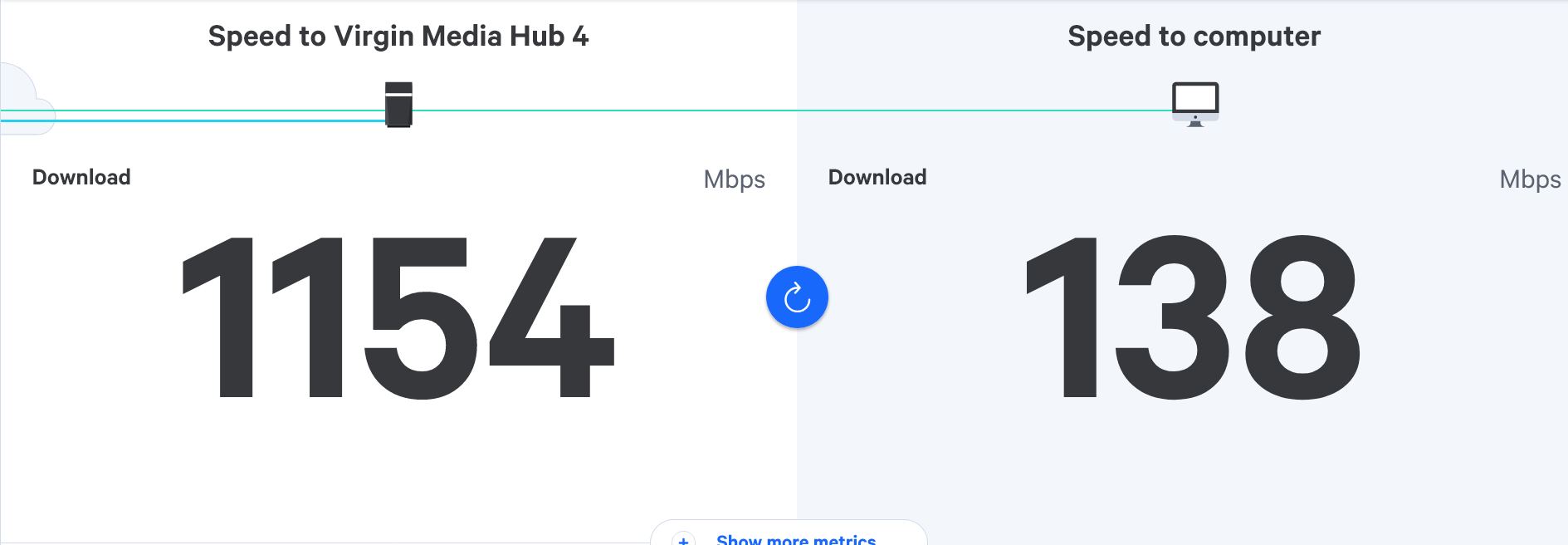
Virgin router replacement
-
@phenomlab thanks for the detailed response.
Wow, sounds more complicated than I thought then.
If we can’t agree a new contract with Virgin then would it mean moving to Sky, like virgin they have ‘stream’ which is over WiFi, would this sort of set up irradiate the need for more cables running through the house for example to a V6 box?
Appreciate the detailed reply.

@JAC said in Virgin router replacement:
If we can’t agree a new contract with Virgin then would it mean moving to Sky, like virgin they have ‘stream’ which is over WiFi, would this sort of set up irradiate the need for more cables running through the house for example to a V6 box?
Yes, but not all that glitters is gold. The Sky router is also well known to have Wifi related issues, and if you can only get a slower connection, for example, their “Sky Fiber” is around 60Mbps even for their fastest product (unless you go for Gigafast which isn’t available everywhere), isn’t FTTH (Fiber to the House) and you need at least 30Mbps for the Stream to work properly. That doesn’t leave much for everything else (simple math) meaning that if you have a device that hogs a lot of bandwidth, your TV becomes unwatchable.
Modern routers have something called QoS (Quality of Service) where you can set the minimum speed a specific device gets, but why do that? You have 1Gbps with Virgin and you are getting those speeds. The last thing you want is the missus bending your ear because she can’t watch Coronation Street

If you’re an online gamer, then going to SKY with 60Mbps from Virgin with 1Gbps would be huge mistake.
Mark Cutting also advises organisations as a Fractional CIO, Fractional CISO and Executive Advisor, helping boards improve technology governance, cyber resilience and executive decision making. Learn more at Gratmore Ltd
-
-
Understand everything you’ve put, thanks Mark. So if I moved the router but kept the TV downstairs or even went with Virgin Stream (which is over WiFi) would this no longer mean the need for the hub to be next to the TV?
@JAC Correct. The TV box should be using Wifi anyway. I have mine in the lounge, and the hub itself is upstairs in my study. I recall you recently upgraded to the 1Gbps package, so you’re likely contracted for 18 months minimum which will prevent you from going elsewhere for a while unless you’re happy to pay a termination fee.
Mark Cutting also advises organisations as a Fractional CIO, Fractional CISO and Executive Advisor, helping boards improve technology governance, cyber resilience and executive decision making. Learn more at Gratmore Ltd
-
@JAC said in Virgin router replacement:
If we can’t agree a new contract with Virgin then would it mean moving to Sky, like virgin they have ‘stream’ which is over WiFi, would this sort of set up irradiate the need for more cables running through the house for example to a V6 box?
Yes, but not all that glitters is gold. The Sky router is also well known to have Wifi related issues, and if you can only get a slower connection, for example, their “Sky Fiber” is around 60Mbps even for their fastest product (unless you go for Gigafast which isn’t available everywhere), isn’t FTTH (Fiber to the House) and you need at least 30Mbps for the Stream to work properly. That doesn’t leave much for everything else (simple math) meaning that if you have a device that hogs a lot of bandwidth, your TV becomes unwatchable.
Modern routers have something called QoS (Quality of Service) where you can set the minimum speed a specific device gets, but why do that? You have 1Gbps with Virgin and you are getting those speeds. The last thing you want is the missus bending your ear because she can’t watch Coronation Street
If you’re an online gamer, then going to SKY with 60Mbps from Virgin with 1Gbps would be huge mistake.

@phenomlab said in Virgin router replacement:
Yes, but not all that glitters is gold. The Sky router is also well known to have Wifi related issues, and if you can only get a low connection, for example, their “Sky Fiber” is around 60Mbps even for their fastest product, isn’t FTTH (Fiber to the House) and you need at least 30Mbps for the Stream to work properly. That doesn’t leave much for everything else (simple math) meaning that if you have a device that hogs a lot of bandwidth, your TV becomes unwatchable.
I’ve read this too, with bad reviews but it’s the same with Virgin and anything in general, most of the time people only write bad reviews when there’s an issue or complaint to be had.
I would most likely stick with Virgin anyway, with the Virgin Stream boxes, I did try and upgrade to the new box but they wasn’t having any of it unless I paid £70 for two boxes which included some sort of activation.
-
@JAC Correct. The TV box should be using Wifi anyway. I have mine in the lounge, and the hub itself is upstairs in my study. I recall you recently upgraded to the 1Gbps package, so you’re likely contracted for 18 months minimum which will prevent you from going elsewhere for a while unless you’re happy to pay a termination fee.
@phenomlab said in Virgin router replacement:
likely contracted for 18 months minimum which will prevent you from going elsewhere for a while unless you’re happy to pay a termination fee
Contract expires in December pal, soon come round!
-
@phenomlab said in Virgin router replacement:
Yes, but not all that glitters is gold. The Sky router is also well known to have Wifi related issues, and if you can only get a low connection, for example, their “Sky Fiber” is around 60Mbps even for their fastest product, isn’t FTTH (Fiber to the House) and you need at least 30Mbps for the Stream to work properly. That doesn’t leave much for everything else (simple math) meaning that if you have a device that hogs a lot of bandwidth, your TV becomes unwatchable.
I’ve read this too, with bad reviews but it’s the same with Virgin and anything in general, most of the time people only write bad reviews when there’s an issue or complaint to be had.
I would most likely stick with Virgin anyway, with the Virgin Stream boxes, I did try and upgrade to the new box but they wasn’t having any of it unless I paid £70 for two boxes which included some sort of activation.
@JAC Yes. I too looked at moving back to Sky, but there’s no way I’m dumping a 380Mbps connection and replacing it with 60Mbps! Besides, I called them and haggled. Got my bill down from £160 a month to £70.
Mark Cutting also advises organisations as a Fractional CIO, Fractional CISO and Executive Advisor, helping boards improve technology governance, cyber resilience and executive decision making. Learn more at Gratmore Ltd
-
@phenomlab said in Virgin router replacement:
likely contracted for 18 months minimum which will prevent you from going elsewhere for a while unless you’re happy to pay a termination fee
Contract expires in December pal, soon come round!
@JAC said in Virgin router replacement:
Contract expires in December pal, soon come round!
OMG. Where has the time gone!!
Mark Cutting also advises organisations as a Fractional CIO, Fractional CISO and Executive Advisor, helping boards improve technology governance, cyber resilience and executive decision making. Learn more at Gratmore Ltd
-
@JAC Correct. The TV box should be using Wifi anyway. I have mine in the lounge, and the hub itself is upstairs in my study. I recall you recently upgraded to the 1Gbps package, so you’re likely contracted for 18 months minimum which will prevent you from going elsewhere for a while unless you’re happy to pay a termination fee.
@phenomlab said in Virgin router replacement:
I have mine in the lounge, and the hub itself is upstairs in my study.
That does sound like a much better setup!
-
@JAC said in Virgin router replacement:
Contract expires in December pal, soon come round!
OMG. Where has the time gone!!
-
@phenomlab said in Virgin router replacement:
I have mine in the lounge, and the hub itself is upstairs in my study.
That does sound like a much better setup!
@JAC Works well, as the study is the virtual center of the house. Bedroom and Lounge TV’s have no issues (although they did before I placed an Archer in the mix and put the hub into bridge mode)
Mark Cutting also advises organisations as a Fractional CIO, Fractional CISO and Executive Advisor, helping boards improve technology governance, cyber resilience and executive decision making. Learn more at Gratmore Ltd
-
@JAC Yes. I too looked at moving back to Sky, but there’s no way I’m dumping a 380Mbps connection and replacing it with 60Mbps! Besides, I called them and haggled. Got my bill down from £160 a month to £70.
@phenomlab said in Virgin router replacement:
Got my bill down from £160 a month to £70.
I’m going to have to do something similar.
-
@phenomlab said in Virgin router replacement:
Got my bill down from £160 a month to £70.
I’m going to have to do something similar.
@JAC Do it - they’ll never call you to offer you a better deal, but if you insist, they put you through to customer retention who have much better deals that the first line operators. Don’t let them con you into their o2 SIMS to get your bill down as there is no saving there at all.
Mark Cutting also advises organisations as a Fractional CIO, Fractional CISO and Executive Advisor, helping boards improve technology governance, cyber resilience and executive decision making. Learn more at Gratmore Ltd
-
@JAC Works well, as the study is the virtual center of the house. Bedroom and Lounge TV’s have no issues (although they did before I placed an Archer in the mix and put the hub into bridge mode)
@phenomlab said in Virgin router replacement:
(although they did before I placed an Archer in the mix and put the hub into bridge mode)
So realistically move the router to the hallway and swap the V6 box out for Virgin Stream boxes? (£25 fee)
Or the other option is to buy the archer which is over £100.
If the router was moved we could probably get rid of the WiFi pods in all honesty, well I’d hope to anyway!
-
@JAC Do it - they’ll never call you to offer you a better deal, but if you insist, they put you through to customer retention who have much better deals that the first line operators. Don’t let them con you into their o2 SIMS to get your bill down as there is no saving there at all.
@phenomlab to get the 1gb package last time this is exactly what I signed up to
 .
£57 a month to virgin, £29 (as it’s increased) to O2.
-
@phenomlab said in Virgin router replacement:
(although they did before I placed an Archer in the mix and put the hub into bridge mode)
So realistically move the router to the hallway and swap the V6 box out for Virgin Stream boxes? (£25 fee)
Or the other option is to buy the archer which is over £100.
If the router was moved we could probably get rid of the WiFi pods in all honesty, well I’d hope to anyway!
@JAC said in Virgin router replacement:
So realistically move the router to the hallway and swap the V6 box out for Virgin Stream boxes? (£25 fee)
No. I’d leave that as is, but if it’s connected via ethernet, use Wifi instead. I’m doing the same and it works with no issues.
@JAC said in Virgin router replacement:
Or the other option is to buy the archer which is over £100.
I think I’d do this anyway. You get more control over the Wifi
@JAC said in Virgin router replacement:
If the router was moved we could probably get rid of the WiFi pods in all honesty, well I’d hope to anyway!
Yes. You could also leave the Virgin Hub where it is, and use a long ethernet cable (providing you can conceal it somehow so you don’t see - or more importantly - trip over it) which would save you the cost and hassle of Virgin engineers. Or, use the Coax extender I suggested earlier, but this is even thicker than a network cable, so perhaps not. You could get a black network cable and run it behind or under skirtings. I’ve done that before.
Mark Cutting also advises organisations as a Fractional CIO, Fractional CISO and Executive Advisor, helping boards improve technology governance, cyber resilience and executive decision making. Learn more at Gratmore Ltd
-
@JAC said in Virgin router replacement:
So realistically move the router to the hallway and swap the V6 box out for Virgin Stream boxes? (£25 fee)
No. I’d leave that as is, but if it’s connected via ethernet, use Wifi instead. I’m doing the same and it works with no issues.
@JAC said in Virgin router replacement:
Or the other option is to buy the archer which is over £100.
I think I’d do this anyway. You get more control over the Wifi
@JAC said in Virgin router replacement:
If the router was moved we could probably get rid of the WiFi pods in all honesty, well I’d hope to anyway!
Yes. You could also leave the Virgin Hub where it is, and use a long ethernet cable (providing you can conceal it somehow so you don’t see - or more importantly - trip over it) which would save you the cost and hassle of Virgin engineers. Or, use the Coax extender I suggested earlier, but this is even thicker than a network cable, so perhaps not. You could get a black network cable and run it behind or under skirtings. I’ve done that before.
@phenomlab said in Virgin router replacement:
I think I’d do this anyway. You get more control over the Wifi
Thanks Mark, I’ll look into this. It’s probably the next step but also very unfortunate that Virgin don’t offer reliable routers.
When I’ve spoken to my brother about this he finds it ridiculous how I may have to use another router, effectively powering both because of Virgins shortfall.
He seems to think that you’re paying for a service from them so it should be them who corrects any issue, which is right however the issue probably appears to be more the range for me especially upstairs.
Generally speaking do you think the Archer would make that much difference over what’s in place now mate?
-
Do you have this mate?
@JAC yes, but I don’t actually have a mesh network, no real need for it
Mark Cutting also advises organisations as a Fractional CIO, Fractional CISO and Executive Advisor, helping boards improve technology governance, cyber resilience and executive decision making. Learn more at Gratmore Ltd
-
@phenomlab said in Virgin router replacement:
I think I’d do this anyway. You get more control over the Wifi
Thanks Mark, I’ll look into this. It’s probably the next step but also very unfortunate that Virgin don’t offer reliable routers.
When I’ve spoken to my brother about this he finds it ridiculous how I may have to use another router, effectively powering both because of Virgins shortfall.
He seems to think that you’re paying for a service from them so it should be them who corrects any issue, which is right however the issue probably appears to be more the range for me especially upstairs.
Generally speaking do you think the Archer would make that much difference over what’s in place now mate?
-
@phenomlab Thanks pal.

Hello! It looks like you're interested in this conversation, but you don't have an account yet.
Getting fed up of having to scroll through the same posts each visit? When you register for an account, you'll always come back to exactly where you were before, and choose to be notified of new replies (either via email, or push notification). You'll also be able to save bookmarks and upvote posts to show your appreciation to other community members.
With your input, this post could be even better 💗
Register LoginRelated Topics
-
-
-

Linksys EA6400
Solved Networks -
Issues with routing
Solved Networks -
-
Nvidia shield & router
Solved Configure -
-
Virgin Media Broadband
Solved General