installing flarum with plesk
-
create redis using docker or any other easy way and connect it to flarum.
Why do you need to use Docker to run Redis ? For all the time I was using Flarum under Plesk, I never had to do this. Nor did I have any issues using SSH commands. Did you create a domain package in Plesk to use, or did you try to install everything as root ?
If root, then this definitely will not work.
@phenomlab i was using it wrong, i used root ID
Once we add domain how to login as / switch to domain user? Switching to domain user SSH will make installing flarum easy? All these days i thought using poket hold is the only easiest way to install flarum in plesk.
-
@phenomlab i was using it wrong, i used root ID
Once we add domain how to login as / switch to domain user? Switching to domain user SSH will make installing flarum easy? All these days i thought using poket hold is the only easiest way to install flarum in plesk.
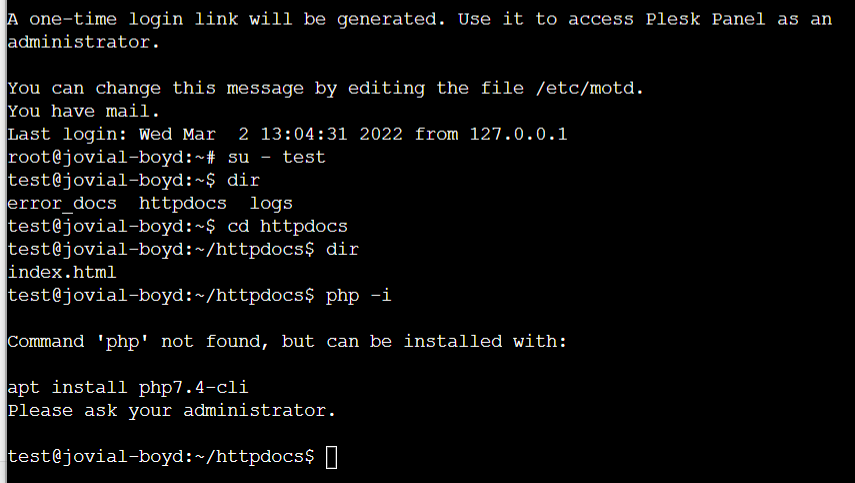
@Hari Yes, absolutely. In essence, you install Plesk, create the package you want to deploy (the default is fine) and then once you have added your domain, you create an associated user to go with it, and use that account to access SSH. No permissions issues etc.
If you do it as root, it’s 100% guaranteed to fail and cause severe problems with permissions. I personally would not use pocket hold. This is really designed for shared hosting with no SSH access.
A bit more detail here
https://www.eukhost.com/kb/setup-addon-domain-in-plesk-panel/
Mark Cutting also advises organisations as a Fractional CIO, Fractional CISO and Executive Advisor, helping boards improve technology governance, cyber resilience and executive decision making. Learn more at Phenomlab Ltd
-
@Hari Yes, absolutely. In essence, you install Plesk, create the package you want to deploy (the default is fine) and then once you have added your domain, you create an associated user to go with it, and use that account to access SSH. No permissions issues etc.
If you do it as root, it’s 100% guaranteed to fail and cause severe problems with permissions. I personally would not use pocket hold. This is really designed for shared hosting with no SSH access.
A bit more detail here
https://www.eukhost.com/kb/setup-addon-domain-in-plesk-panel/
@phenomlab it’s around 6pm here and I was feeling lazy in bed… your reply made me to come online and deploy a droplet. Will disturb you in few minutes hope you don’t mind

-
@phenomlab it’s around 6pm here and I was feeling lazy in bed… your reply made me to come online and deploy a droplet. Will disturb you in few minutes hope you don’t mind
@Hari No issues.
-
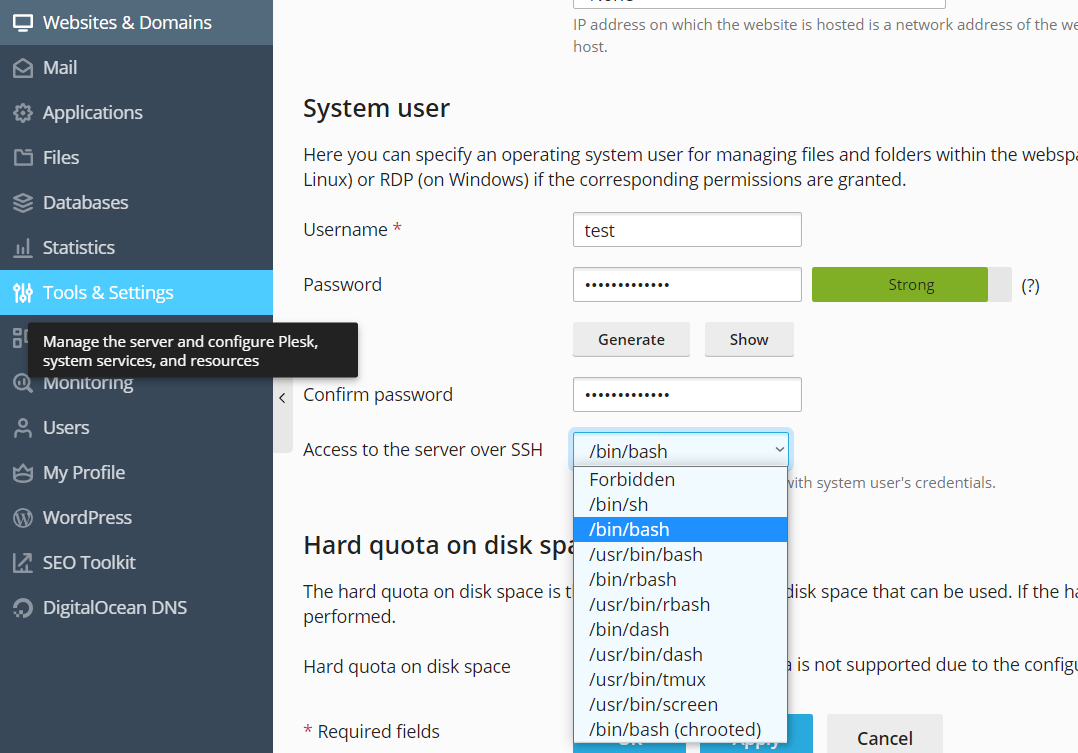
create the package you want to deploy (the default is fine)once i pick plesk from marketplace it automatically created plesk . package means obsidian?
I’ve added the domain > need to update this right? @phenomlab
-
create the package you want to deploy (the default is fine)once i pick plesk from marketplace it automatically created plesk . package means obsidian?
I’ve added the domain > need to update this right? @phenomlab
@Hari Yes. Sorry, by “package” I meant the allowance of disk space, memory, etc.
Mark Cutting also advises organisations as a Fractional CIO, Fractional CISO and Executive Advisor, helping boards improve technology governance, cyber resilience and executive decision making. Learn more at Phenomlab Ltd
-
@Hari Yes. Sorry, by “package” I meant the allowance of disk space, memory, etc.
-
@Hari Didn’t we cover that here ?
https://sudonix.com/topic/234/installing-flarum-with-plesk/24?_=1646226322731Mark Cutting also advises organisations as a Fractional CIO, Fractional CISO and Executive Advisor, helping boards improve technology governance, cyber resilience and executive decision making. Learn more at Phenomlab Ltd
-
 undefined phenomlab referenced this topic on
-
@Hari Didn’t we cover that here ?
https://sudonix.com/topic/234/installing-flarum-with-plesk/24?_=1646226322731@phenomlab i just recalled as that is not an easy way

anyway, i went forward with pocket hold -
how can i connect redis now?i don’t want to use SSH for this, i want to use doker.
while composing this i got another thought, installing bomastra redis will be complicated right? we need to provide full path of PHP for each and every command instead can we just mention the extension name in the composer file?
what is the right command to run composer command?
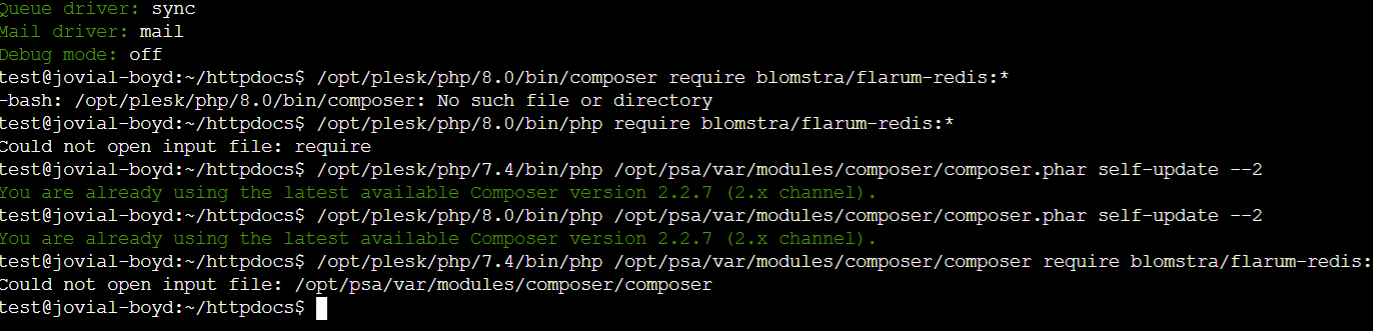
/opt/plesk/php/8.0/bin/php /opt/psa/var/modules/composer/composer require blomstra/flarum-redis:*i will save that command in notes, could you suggest to me the right command to use composer, i think we need to give the right path of compser.
-
@phenomlab i just recalled as that is not an easy way
anyway, i went forward with pocket hold -
how can i connect redis now?i don’t want to use SSH for this, i want to use doker.
while composing this i got another thought, installing bomastra redis will be complicated right? we need to provide full path of PHP for each and every command instead can we just mention the extension name in the composer file?
what is the right command to run composer command?
/opt/plesk/php/8.0/bin/php /opt/psa/var/modules/composer/composer require blomstra/flarum-redis:*i will save that command in notes, could you suggest to me the right command to use composer, i think we need to give the right path of compser.
i don’t want to use SSH for this, i want to use doker.
What is the fascination for Docker here ? It’s not needed, and unnecessary overhead from the overall management perspective. You just install redis in the same way as you would do normally. This is exactly the way I had one of my previous Flarum forums running.
Using pocket hold under Plesk is completely pointless and will be a nightmare to support and administer.
We’ve also mentioned the install of composer here
https://sudonix.com/topic/226/issues-getting-flarum-to-work-on-new-host/13?_=1646226835366Based on this, you already have the info you need.
Mark Cutting also advises organisations as a Fractional CIO, Fractional CISO and Executive Advisor, helping boards improve technology governance, cyber resilience and executive decision making. Learn more at Phenomlab Ltd
-
i don’t want to use SSH for this, i want to use doker.
What is the fascination for Docker here ? It’s not needed, and unnecessary overhead from the overall management perspective. You just install redis in the same way as you would do normally. This is exactly the way I had one of my previous Flarum forums running.
Using pocket hold under Plesk is completely pointless and will be a nightmare to support and administer.
We’ve also mentioned the install of composer here
https://sudonix.com/topic/226/issues-getting-flarum-to-work-on-new-host/13?_=1646226835366Based on this, you already have the info you need.
@phenomlab since I have seen many console errors i have asked like that regarding docker. I will try again later tomorrow.
-
@phenomlab since I have seen many console errors i have asked like that regarding docker. I will try again later tomorrow.
@Hari Don’t go down the docker rabbit hole unless you really and truly need segregation between hosts. Flarum doesn’t need this level of complexity

-
today i have revisited this discussion and tried again, now i can call myself a certified flarum pleskian

installed 3 flarums and running without any issues, figured out how to run redis
I am feeling happy to use Plesk though virutalmin offers lot of other functionality to my intelligence level i feel like plesk is a good place for me to sit and use.
-
today i have revisited this discussion and tried again, now i can call myself a certified flarum pleskian
installed 3 flarums and running without any issues, figured out how to run redis
I am feeling happy to use Plesk though virutalmin offers lot of other functionality to my intelligence level i feel like plesk is a good place for me to sit and use.
@Hari don’t celebrate too early
 Plesk can be the ultimate Achilles Heel when it comes to troubleshooting and resolving issues.
Mark Cutting also advises organisations as a Fractional CIO, Fractional CISO and Executive Advisor, helping boards improve technology governance, cyber resilience and executive decision making. Learn more at Phenomlab Ltd
-
@Hari don’t celebrate too early
Plesk can be the ultimate Achilles Heel when it comes to troubleshooting and resolving issues.@phenomlab Today I have received this email
Important notice regarding a potentially misconfigured Redis instance on your Droplet plesk-ubuntu-s-2vcpu-4gb-amd-blr1-01:
Hello,
A recent network security scan suggests your Droplet plesk-ubuntu-s-2vcpu-4gb-amd-blr1-01 is running Redis and that it may be unintentionally exposing data or misconfigured to allow unauthorized access.
Redis listens for traffic from everywhere on port 6379, and you can validate this report by attempting to connect to your Redis on 6379 via a simple telnet command:
telnet 1.0.0.0 6379If the connection is successful, you will receive output like the following, which will confirm that your Redis installation is visible to the public Internet:
    Trying 1.0.0.0....
    Connected to 1.0.0.0.
    Escape character is '^]'.
You will want to restrict outside access to your Redis instance to prevent outsiders from reading or obtaining your data.
Remediation of this issue will take just a few minutes and is relatively straightforward. You will need to open /etc/redis/redis.conf and uncomment (remove the “#”) or modify the line beginning with:
#bind 127.0.0.1 ::1Afterwards, restart redis with:
sudo systemctl restart redisYou could find this information also in our community tutorial at: https://www.digitalocean.com/community/tutorials/how-to-install-and-secure-redis-on-ubuntu-20-04
Regards,
Security Operations
DigitalOcean Security


i have tried following multiple guides as i see redis.conf file is empty there is no
superviseddirectivewhat should i do to set this IP to local, what code i need to add?
-
@phenomlab Today I have received this email
Important notice regarding a potentially misconfigured Redis instance on your Droplet plesk-ubuntu-s-2vcpu-4gb-amd-blr1-01:
Hello,
A recent network security scan suggests your Droplet plesk-ubuntu-s-2vcpu-4gb-amd-blr1-01 is running Redis and that it may be unintentionally exposing data or misconfigured to allow unauthorized access.
Redis listens for traffic from everywhere on port 6379, and you can validate this report by attempting to connect to your Redis on 6379 via a simple telnet command:
telnet 1.0.0.0 6379If the connection is successful, you will receive output like the following, which will confirm that your Redis installation is visible to the public Internet:
    Trying 1.0.0.0....
    Connected to 1.0.0.0.
    Escape character is '^]'.
You will want to restrict outside access to your Redis instance to prevent outsiders from reading or obtaining your data.
Remediation of this issue will take just a few minutes and is relatively straightforward. You will need to open /etc/redis/redis.conf and uncomment (remove the “#”) or modify the line beginning with:
#bind 127.0.0.1 ::1Afterwards, restart redis with:
sudo systemctl restart redisYou could find this information also in our community tutorial at: https://www.digitalocean.com/community/tutorials/how-to-install-and-secure-redis-on-ubuntu-20-04
Regards,
Security Operations
DigitalOcean Security
i have tried following multiple guides as i see redis.conf file is empty there is no
superviseddirectivewhat should i do to set this IP to local, what code i need to add?
@Hari is this the correct solution?
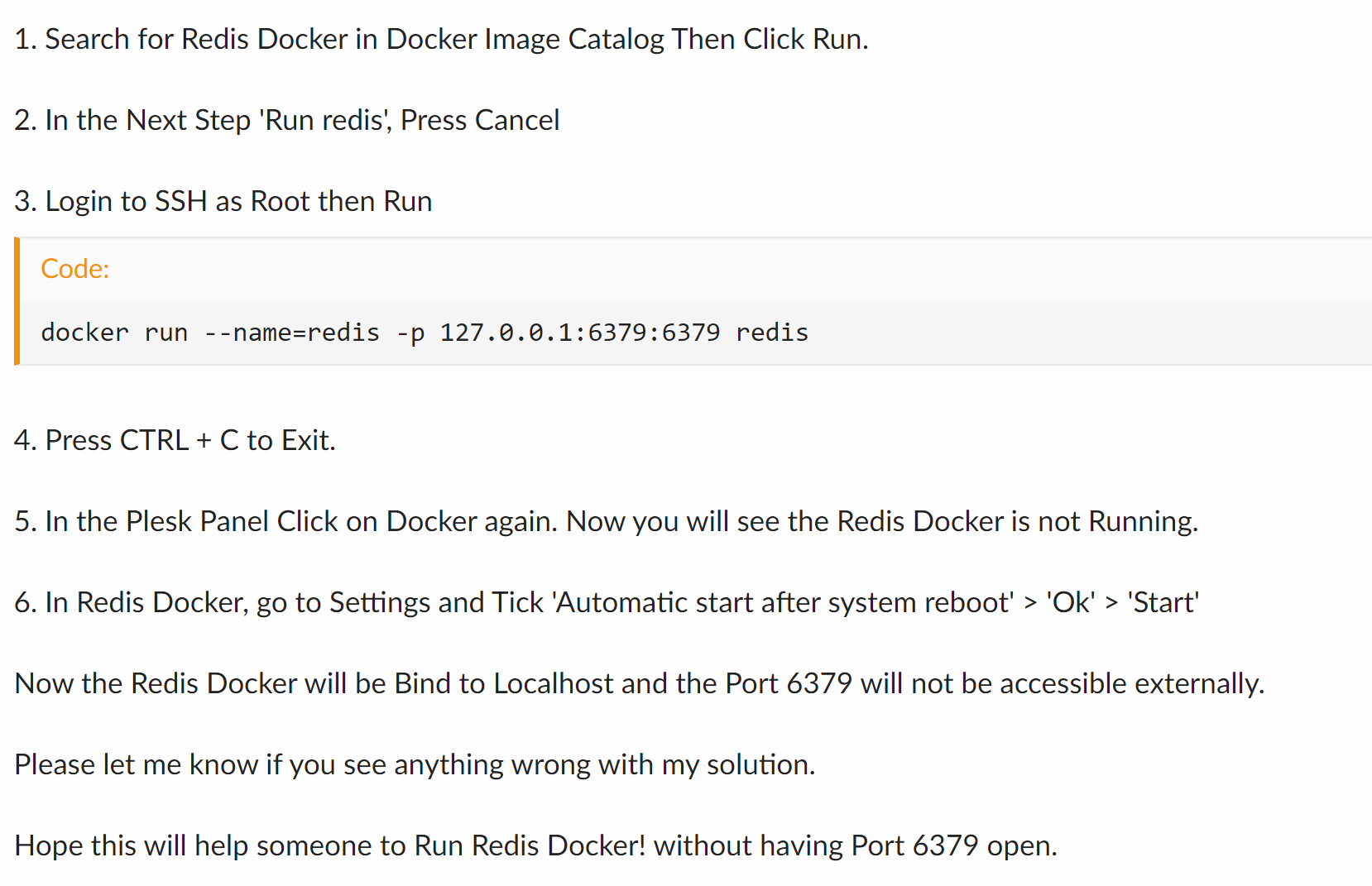
https://talk.plesk.com/threads/plesk-docker-redis-plesk-firewall-open-port-issue.352324/
-
@phenomlab Today I have received this email
Important notice regarding a potentially misconfigured Redis instance on your Droplet plesk-ubuntu-s-2vcpu-4gb-amd-blr1-01:
Hello,
A recent network security scan suggests your Droplet plesk-ubuntu-s-2vcpu-4gb-amd-blr1-01 is running Redis and that it may be unintentionally exposing data or misconfigured to allow unauthorized access.
Redis listens for traffic from everywhere on port 6379, and you can validate this report by attempting to connect to your Redis on 6379 via a simple telnet command:
telnet 1.0.0.0 6379If the connection is successful, you will receive output like the following, which will confirm that your Redis installation is visible to the public Internet:
    Trying 1.0.0.0....
    Connected to 1.0.0.0.
    Escape character is '^]'.
You will want to restrict outside access to your Redis instance to prevent outsiders from reading or obtaining your data.
Remediation of this issue will take just a few minutes and is relatively straightforward. You will need to open /etc/redis/redis.conf and uncomment (remove the “#”) or modify the line beginning with:
#bind 127.0.0.1 ::1Afterwards, restart redis with:
sudo systemctl restart redisYou could find this information also in our community tutorial at: https://www.digitalocean.com/community/tutorials/how-to-install-and-secure-redis-on-ubuntu-20-04
Regards,
Security Operations
DigitalOcean Security
i have tried following multiple guides as i see redis.conf file is empty there is no
superviseddirectivewhat should i do to set this IP to local, what code i need to add?
@Hari File
redis.confshould not be empty. If it were, then REDIS does not work - what’s the output oflocate redis.conf?Mark Cutting also advises organisations as a Fractional CIO, Fractional CISO and Executive Advisor, helping boards improve technology governance, cyber resilience and executive decision making. Learn more at Phenomlab Ltd
-
@Hari File
redis.confshould not be empty. If it were, then REDIS does not work - what’s the output oflocate redis.conf?@phenomlab said in installing flarum with plesk:
locate redis.conf
root@admiring-goldwasser:~# su - site_sdxtjg95b7 site_sdxtjg95b7@admiring-goldwasser:~$ locate redis.conf Command 'locate' not found, but can be installed with: apt install mlocate Please ask your administrator. site_sdxtjg95b7@admiring-goldwasser:~$ exit logout root@admiring-goldwasser:~# apt install mlocate Reading package lists... Done Building dependency tree Reading state information... Done The following package was automatically installed and is no longer required: plesk-py27-pycrypto Use 'apt autoremove' to remove it. Suggested packages: nocache The following NEW packages will be installed: mlocate 0 upgraded, 1 newly installed, 0 to remove and 0 not upgraded. Need to get 50.1 kB of archives. After this operation, 258 kB of additional disk space will be used. Get:1 http://mirrors.digitalocean.com/ubuntu focal/main amd64 mlocate amd64 0.26-3ubuntu3 [50.1 kB] Fetched 50.1 kB in 0s (326 kB/s) Selecting previously unselected package mlocate. (Reading database ... 146957 files and directories currently installed.) Preparing to unpack .../mlocate_0.26-3ubuntu3_amd64.deb ... Unpacking mlocate (0.26-3ubuntu3) ... Setting up mlocate (0.26-3ubuntu3) ... update-alternatives: using /usr/bin/mlocate to provide /usr/bin/locate (locate) in auto mode Adding group `mlocate' (GID 121) ... Done. Initializing mlocate database; this may take some time... done Processing triggers for man-db (2.9.1-1) ... root@admiring-goldwasser:~# locate redis.conf /var/lib/dpkg/info/plesk-php74-redis.conffiles /var/lib/dpkg/info/plesk-php80-redis.conffiles root@admiring-goldwasser:~# -
@phenomlab said in installing flarum with plesk:
locate redis.conf
root@admiring-goldwasser:~# su - site_sdxtjg95b7 site_sdxtjg95b7@admiring-goldwasser:~$ locate redis.conf Command 'locate' not found, but can be installed with: apt install mlocate Please ask your administrator. site_sdxtjg95b7@admiring-goldwasser:~$ exit logout root@admiring-goldwasser:~# apt install mlocate Reading package lists... Done Building dependency tree Reading state information... Done The following package was automatically installed and is no longer required: plesk-py27-pycrypto Use 'apt autoremove' to remove it. Suggested packages: nocache The following NEW packages will be installed: mlocate 0 upgraded, 1 newly installed, 0 to remove and 0 not upgraded. Need to get 50.1 kB of archives. After this operation, 258 kB of additional disk space will be used. Get:1 http://mirrors.digitalocean.com/ubuntu focal/main amd64 mlocate amd64 0.26-3ubuntu3 [50.1 kB] Fetched 50.1 kB in 0s (326 kB/s) Selecting previously unselected package mlocate. (Reading database ... 146957 files and directories currently installed.) Preparing to unpack .../mlocate_0.26-3ubuntu3_amd64.deb ... Unpacking mlocate (0.26-3ubuntu3) ... Setting up mlocate (0.26-3ubuntu3) ... update-alternatives: using /usr/bin/mlocate to provide /usr/bin/locate (locate) in auto mode Adding group `mlocate' (GID 121) ... Done. Initializing mlocate database; this may take some time... done Processing triggers for man-db (2.9.1-1) ... root@admiring-goldwasser:~# locate redis.conf /var/lib/dpkg/info/plesk-php74-redis.conffiles /var/lib/dpkg/info/plesk-php80-redis.conffiles root@admiring-goldwasser:~#@Hari How did you install Redis ?
Mark Cutting also advises organisations as a Fractional CIO, Fractional CISO and Executive Advisor, helping boards improve technology governance, cyber resilience and executive decision making. Learn more at Phenomlab Ltd
-

Hello! It looks like you're interested in this conversation, but you don't have an account yet.
Getting fed up of having to scroll through the same posts each visit? When you register for an account, you'll always come back to exactly where you were before, and choose to be notified of new replies (either via email, or push notification). You'll also be able to save bookmarks and upvote posts to show your appreciation to other community members.
With your input, this post could be even better 💗
Register Login