
[NodeBB] username cards
-
Hi @phenomlab , you have very nice cards showing while hovering the username in this forum. How did you do it?
-
Hi @phenomlab , you have very nice cards showing while hovering the username in this forum. How did you do it?
@crazycells with this plugin
https://community.nodebb.org/topic/15676/hover-cards-nodebb-plugin-cards?_=1640720058074Mark Cutting also advises organisations as a Fractional CIO, Fractional CISO and Executive Advisor, helping boards improve technology governance, cyber resilience and executive decision making. Learn more at Phenomlab Ltd
-
@phenomlab lol sorry my bad. we use nodebb-plugin-cards2 plugin, and somehow I thought this is the fixed version of cards plugin.
-
 undefined crazycells has marked this topic as solved on
-
@phenomlab lol sorry my bad. we use nodebb-plugin-cards2 plugin, and somehow I thought this is the fixed version of cards plugin.
@phenomlab actually, it does not work on our forum…
You are sure that that plugin does that, right? I guess it might be because we have NodeBB installed as a subfolder /forum … Do you think this might be the reason?
-
@phenomlab actually, it does not work on our forum…
You are sure that that plugin does that, right? I guess it might be because we have NodeBB installed as a subfolder /forum … Do you think this might be the reason?
@crazycells yes. Here’s the one I’m using
https://github.com/Schamper/nodebb-plugin-cards#readmeMark Cutting also advises organisations as a Fractional CIO, Fractional CISO and Executive Advisor, helping boards improve technology governance, cyber resilience and executive decision making. Learn more at Phenomlab Ltd
-
@crazycells yes. Here’s the one I’m using
https://github.com/Schamper/nodebb-plugin-cards#readmeThe topic is a little old so sorry to revive
 My forum is sooo small and to be honest just for my learning so there is nothing on it. When i am happy with it I will ‘advertise it’ for its purpose.
Anyway this is a really nice plugin and I also use. I get a little strange behavior but it is not when i hover over all the time.
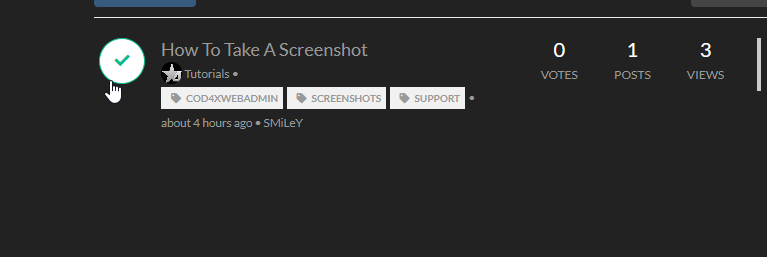
If i click on it it just goes green.
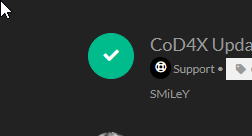
As you see in other areas that it seems to be ok. (although with the only deafult themes I like it is not so good )
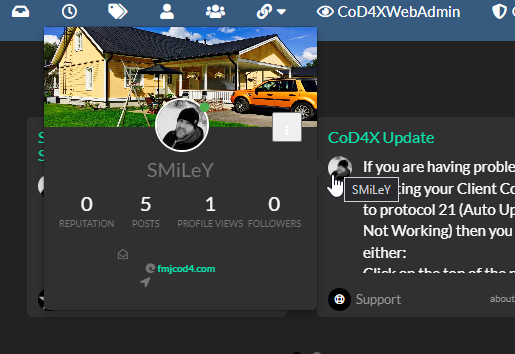
Any ideas? I think i have uninstalled NodeBB and started again about 4 times haha so maybe traces of ‘bad stuff’
-
The topic is a little old so sorry to revive
My forum is sooo small and to be honest just for my learning so there is nothing on it. When i am happy with it I will ‘advertise it’ for its purpose.Anyway this is a really nice plugin and I also use. I get a little strange behavior but it is not when i hover over all the time.
If i click on it it just goes green.
As you see in other areas that it seems to be ok. (although with the only deafult themes I like it is not so good )
Any ideas? I think i have uninstalled NodeBB and started again about 4 times haha so maybe traces of ‘bad stuff’
@Sampo2910 hey. The behavior you were seeing is in fact normal. The card will only display in the actual post view and not in the main list. Clicking the avatar in the recent view (or any others) simply selects that post for multiple functions which explains the reason for turning green, and the avatar replaced by a check mark.
Mark Cutting also advises organisations as a Fractional CIO, Fractional CISO and Executive Advisor, helping boards improve technology governance, cyber resilience and executive decision making. Learn more at Phenomlab Ltd
-
@Sampo2910 hey. The behavior you were seeing is in fact normal. The card will only display in the actual post view and not in the main list. Clicking the avatar in the recent view (or any others) simply selects that post for multiple functions which explains the reason for turning green, and the avatar replaced by a check mark.
Aha…nice to know. As always thank you for the reply and information.


Hello! It looks like you're interested in this conversation, but you don't have an account yet.
Getting fed up of having to scroll through the same posts each visit? When you register for an account, you'll always come back to exactly where you were before, and choose to be notified of new replies (either via email, or push notification). You'll also be able to save bookmarks and upvote posts to show your appreciation to other community members.
With your input, this post could be even better 💗
Register LoginDid this solution help you?
Related Topics
-
NodeBB: Creating pages
Solved Configure -
Forum Icons NodeBB
Solved Customisation -
-
-
-
-
Customising NodeBB
Locked Customisation -
WordPress & NodeBB
Solved WordPress








