NodeBB customisation
-
@phenomlab yes please mate, it’s the possible at all? - happy to choose a different font as wary of copying mate.
Many thanks as always!
Although the font did look great last time. I can’t remember if the header was a different font
 .
. -
Although the font did look great last time. I can’t remember if the header was a different font
.@jac Let me have a play around with this.
Mark Cutting also advises organisations as a Fractional CIO, Fractional CISO and Executive Advisor, helping boards improve technology governance, cyber resilience and executive decision making. Learn more at Phenomlab Ltd
-
@phenomlab said in NodeBB customisation:
@jac Let me have a play around with this.
Many thanks mate.
-
@jac said in NodeBB customisation:
@jac said in NodeBB customisation:
@jac said in NodeBB customisation:
@phenomlab said in NodeBB customisation:
@jac It’s in the above post

Apologies!

Worked a treat! Many thanks again

 .
.Am ok to keep posting little tweaks that I am looking to change?
Looking to change the font & number of read posts.
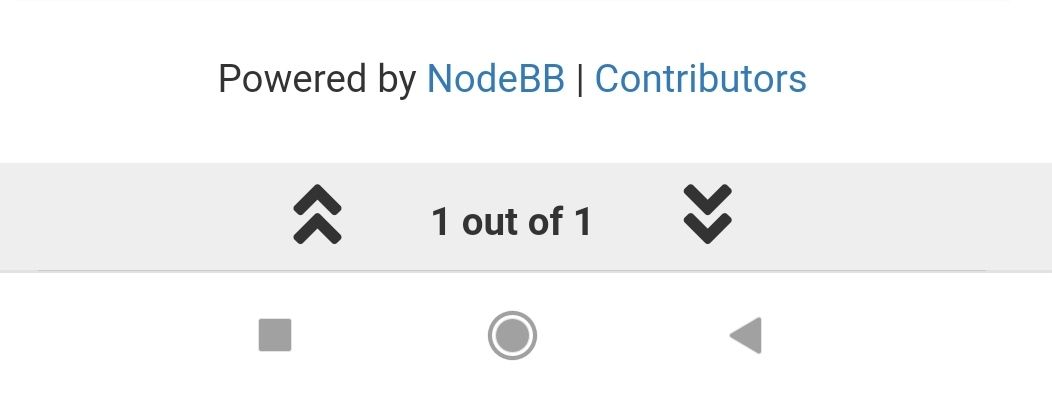
Looking to change this to blue white a white font and then as the posts are read it changes to yellow?
Is this something that is possible? I seem to remember it working out well on the last installation.
Many thanks.
I’ve actually found a screenshot of how grtit looked last time. The font etc and the bottom bar looked great!
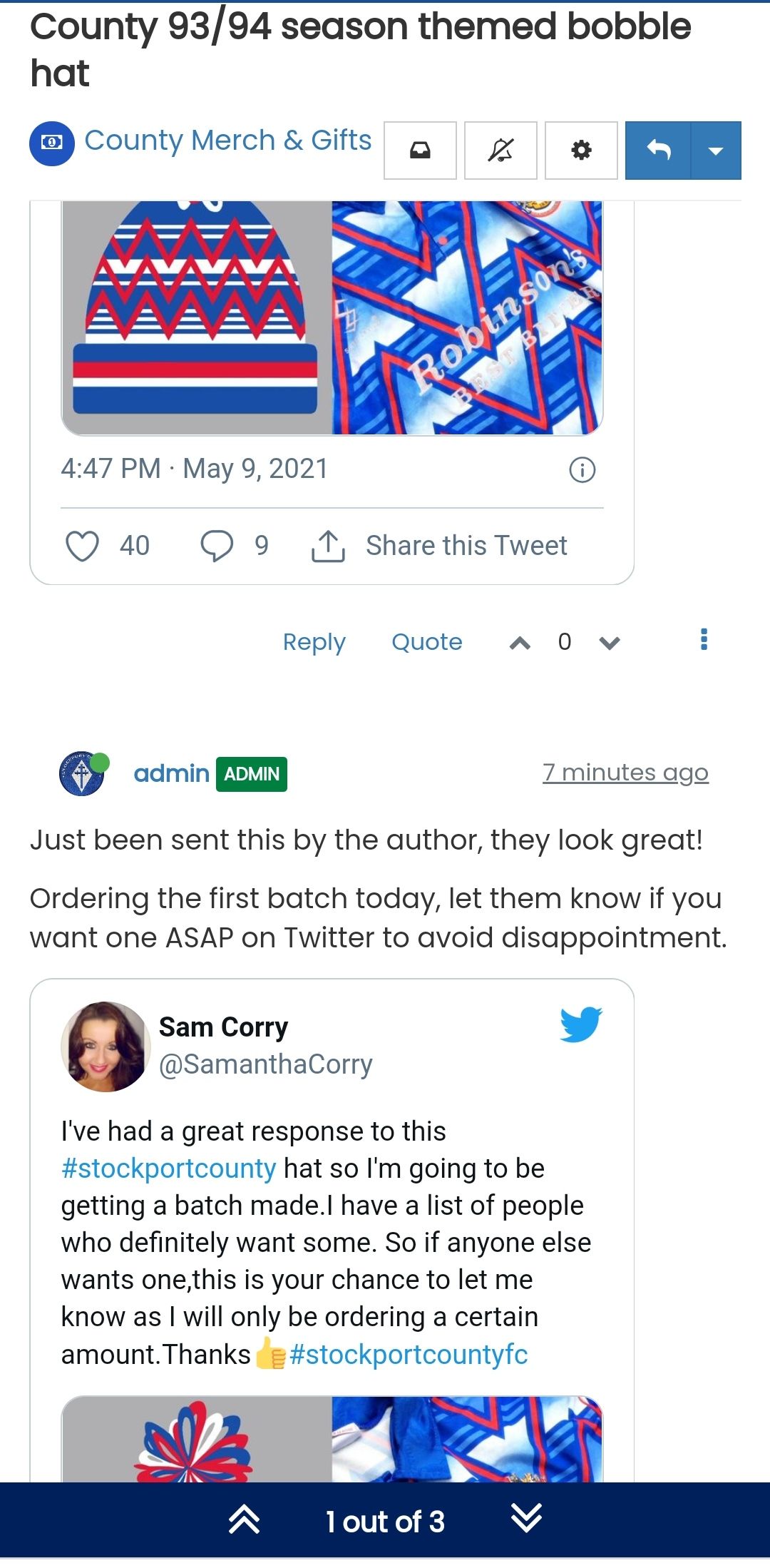
Is there any way to change the member name colour on the quote? As this clashes with the colour.
Thanks
.
@jac said in NodeBB customisation:
@jac said in NodeBB customisation:
@jac said in NodeBB customisation:
@jac said in NodeBB customisation:
@phenomlab said in NodeBB customisation:
@jac It’s in the above post
Apologies!
Worked a treat! Many thanks again
.Am ok to keep posting little tweaks that I am looking to change?
Looking to change the font & number of read posts.
Looking to change this to blue white a white font and then as the posts are read it changes to yellow?
Is this something that is possible? I seem to remember it working out well on the last installation.
Many thanks.
I’ve actually found a screenshot of how grtit looked last time. The font etc and the bottom bar looked great!
Is there any way to change the member name colour on the quote? As this clashes with the colour.
Thanks
.Youll see the title don’t appears to be different or bold.
Many thanks as always!
-
@jac said in NodeBB customisation:
@jac said in NodeBB customisation:
@jac said in NodeBB customisation:
@jac said in NodeBB customisation:
@phenomlab said in NodeBB customisation:
@jac It’s in the above post
Apologies!
Worked a treat! Many thanks again
.Am ok to keep posting little tweaks that I am looking to change?
Looking to change the font & number of read posts.
Looking to change this to blue white a white font and then as the posts are read it changes to yellow?
Is this something that is possible? I seem to remember it working out well on the last installation.
Many thanks.
I’ve actually found a screenshot of how grtit looked last time. The font etc and the bottom bar looked great!
Is there any way to change the member name colour on the quote? As this clashes with the colour.
Thanks
.Youll see the title don’t appears to be different or bold.
Many thanks as always!
@jac I fixed that a while back

-
@jac said in NodeBB customisation:
@jac said in NodeBB customisation:
@jac said in NodeBB customisation:
@jac said in NodeBB customisation:
@phenomlab said in NodeBB customisation:
@jac It’s in the above post
Apologies!
Worked a treat! Many thanks again
.Am ok to keep posting little tweaks that I am looking to change?
Looking to change the font & number of read posts.
Looking to change this to blue white a white font and then as the posts are read it changes to yellow?
Is this something that is possible? I seem to remember it working out well on the last installation.
Many thanks.
I’ve actually found a screenshot of how grtit looked last time. The font etc and the bottom bar looked great!
Is there any way to change the member name colour on the quote? As this clashes with the colour.
Thanks
.Youll see the title don’t appears to be different or bold.
Many thanks as always!
@jac said in NodeBB customisation:
@jac said in NodeBB customisation:
@jac said in NodeBB customisation:
@jac said in NodeBB customisation:
@jac said in NodeBB customisation:
@phenomlab said in NodeBB customisation:
@jac It’s in the above post
Apologies!
Worked a treat! Many thanks again
.Am ok to keep posting little tweaks that I am looking to change?
Looking to change the font & number of read posts.
Looking to change this to blue white a white font and then as the posts are read it changes to yellow?
Is this something that is possible? I seem to remember it working out well on the last installation.
Many thanks.
I’ve actually found a screenshot of how grtit looked last time. The font etc and the bottom bar looked great!
Is there any way to change the member name colour on the quote? As this clashes with the colour.
Thanks
.Youll see the title don’t appears to be different or bold.
Many thanks as always!
Apologies it’s this mate, it was hiding at the start of the quote.
-
@jac said in NodeBB customisation:
@jac said in NodeBB customisation:
@jac said in NodeBB customisation:
@jac said in NodeBB customisation:
@jac said in NodeBB customisation:
@phenomlab said in NodeBB customisation:
@jac It’s in the above post
Apologies!
Worked a treat! Many thanks again
.Am ok to keep posting little tweaks that I am looking to change?
Looking to change the font & number of read posts.
Looking to change this to blue white a white font and then as the posts are read it changes to yellow?
Is this something that is possible? I seem to remember it working out well on the last installation.
Many thanks.
I’ve actually found a screenshot of how grtit looked last time. The font etc and the bottom bar looked great!
Is there any way to change the member name colour on the quote? As this clashes with the colour.
Thanks
.Youll see the title don’t appears to be different or bold.
Many thanks as always!
Apologies it’s this mate, it was hiding at the start of the quote.
This post is deleted! -
@jac said in NodeBB customisation:
@jac said in NodeBB customisation:
@jac said in NodeBB customisation:
@jac said in NodeBB customisation:
@jac said in NodeBB customisation:
@phenomlab said in NodeBB customisation:
@jac It’s in the above post
Apologies!
Worked a treat! Many thanks again
.Am ok to keep posting little tweaks that I am looking to change?
Looking to change the font & number of read posts.
Looking to change this to blue white a white font and then as the posts are read it changes to yellow?
Is this something that is possible? I seem to remember it working out well on the last installation.
Many thanks.
I’ve actually found a screenshot of how grtit looked last time. The font etc and the bottom bar looked great!
Is there any way to change the member name colour on the quote? As this clashes with the colour.
Thanks
.Youll see the title don’t appears to be different or bold.
Many thanks as always!
Apologies it’s this mate, it was hiding at the start of the quote.
@jac said in NodeBB customisation:
@jac said in NodeBB customisation:
@jac said in NodeBB customisation:
@jac said in NodeBB customisation:
@jac said in NodeBB customisation:
@jac said in NodeBB customisation:
@phenomlab said in NodeBB customisation:
@jac It’s in the above post
Apologies!
Worked a treat! Many thanks again
.Am ok to keep posting little tweaks that I am looking to change?
Looking to change the font & number of read posts.
Looking to change this to blue white a white font and then as the posts are read it changes to yellow?
Is this something that is possible? I seem to remember it working out well on the last installation.
Many thanks.
I’ve actually found a screenshot of how grtit looked last time. The font etc and the bottom bar looked great!
Is there any way to change the member name colour on the quote? As this clashes with the colour.
Thanks
.Youll see the title don’t appears to be different or bold.
Many thanks as always!
Apologies it’s this mate, it was hiding at the start of the quote.
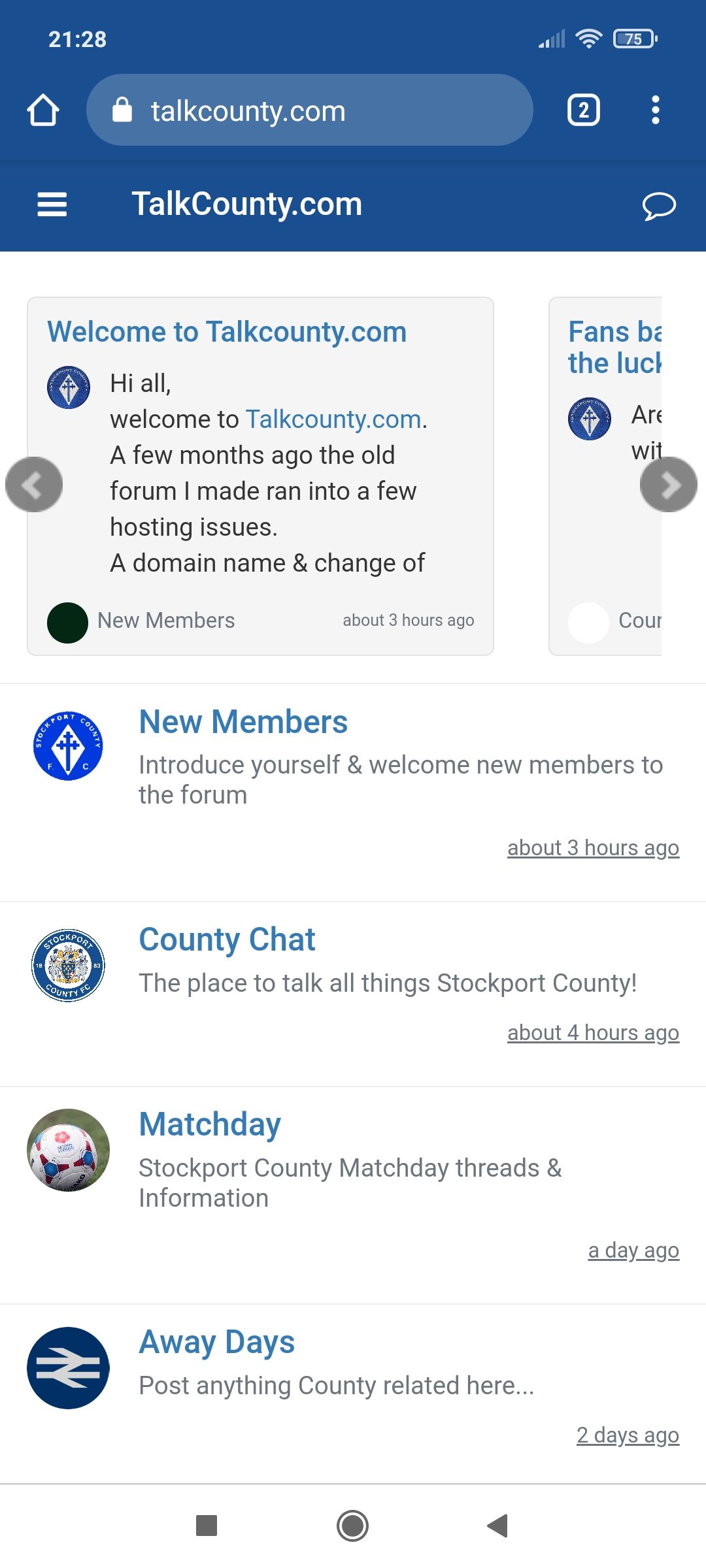
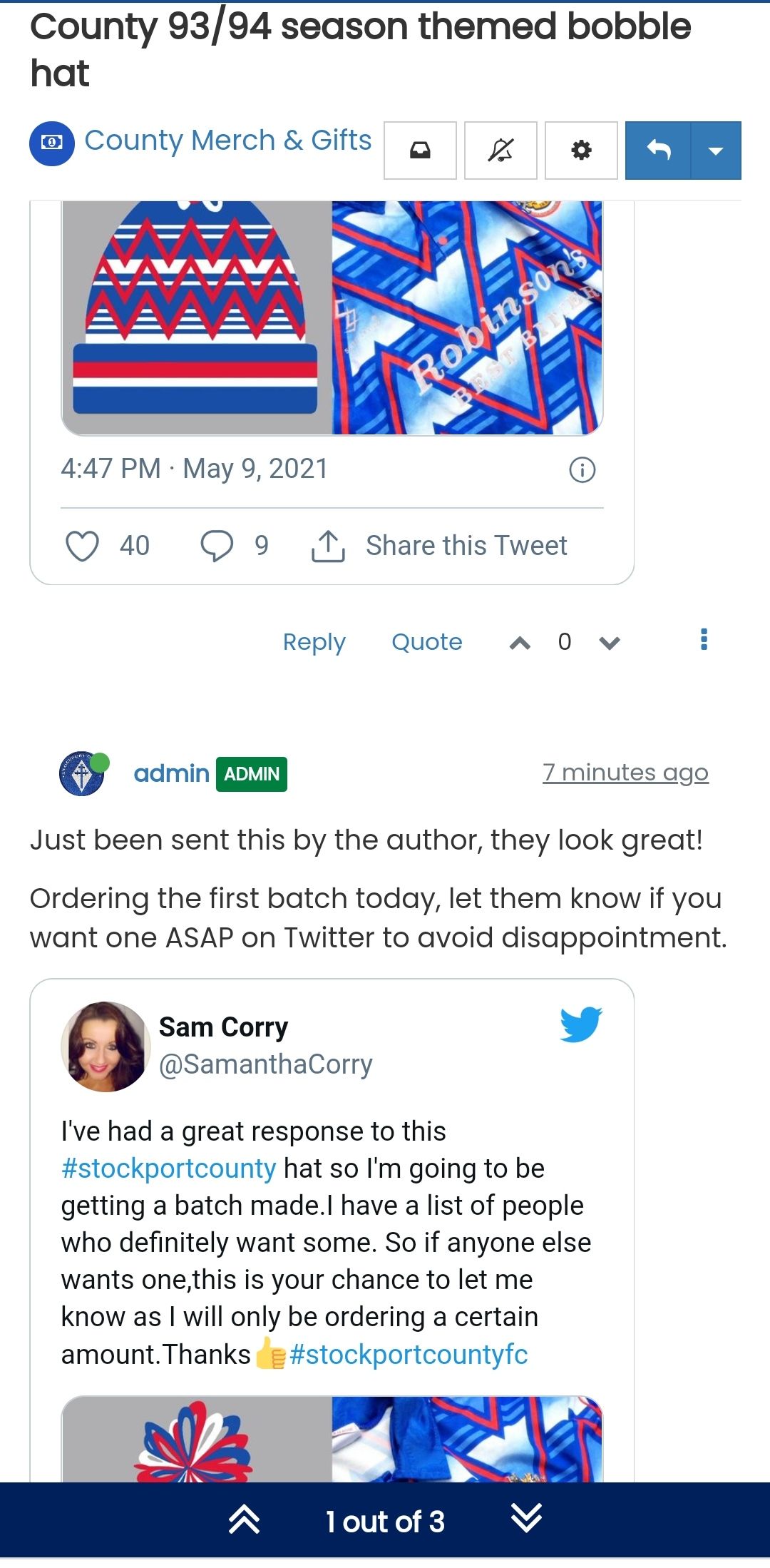
Title font appears to be bold compared? Although possibly same font.
-
@jac said in NodeBB customisation:
@jac said in NodeBB customisation:
@jac said in NodeBB customisation:
@jac said in NodeBB customisation:
@jac said in NodeBB customisation:
@jac said in NodeBB customisation:
@phenomlab said in NodeBB customisation:
@jac It’s in the above post
Apologies!
Worked a treat! Many thanks again
.Am ok to keep posting little tweaks that I am looking to change?
Looking to change the font & number of read posts.
Looking to change this to blue white a white font and then as the posts are read it changes to yellow?
Is this something that is possible? I seem to remember it working out well on the last installation.
Many thanks.
I’ve actually found a screenshot of how grtit looked last time. The font etc and the bottom bar looked great!
Is there any way to change the member name colour on the quote? As this clashes with the colour.
Thanks
.Youll see the title don’t appears to be different or bold.
Many thanks as always!
Apologies it’s this mate, it was hiding at the start of the quote.
Title font appears to be bold compared? Although possibly same font.
@jac said in NodeBB customisation:
Title font appears to be bold compared? Although possibly same font.
Ok, add this
.topic h1 .topic-title {
    font-weight: 600;
}
Mark Cutting also advises organisations as a Fractional CIO, Fractional CISO and Executive Advisor, helping boards improve technology governance, cyber resilience and executive decision making. Learn more at Phenomlab Ltd
-
@jac said in NodeBB customisation:
Title font appears to be bold compared? Although possibly same font.
Ok, add this
.topic h1 .topic-title { font-weight: 600; }@phenomlab said in NodeBB customisation:
@jac said in NodeBB customisation:
Title font appears to be bold compared? Although possibly same font.
Ok, add this
.topic h1 .topic-title {
    font-weight: 600;
}
Worked a treat again my friend, thank you very much as always!
-
@phenomlab said in NodeBB customisation:
@jac said in NodeBB customisation:
Title font appears to be bold compared? Although possibly same font.
Ok, add this
.topic h1 .topic-title {
    font-weight: 600;
}
Worked a treat again my friend, thank you very much as always!
There’s probably going to be more changes on the way, if that’s ok? But like I’ve said previously I’m more than happy to put the Phenomlab stamp on it
. -
There’s probably going to be more changes on the way, if that’s ok? But like I’ve said previously I’m more than happy to put the Phenomlab stamp on it
.I think this was done last time… Is there any way to add … To the slider if it has a certain amount of characters?
Many thanks.
-
There’s probably going to be more changes on the way, if that’s ok? But like I’ve said previously I’m more than happy to put the Phenomlab stamp on it
.@jac Fine. Just keep using this thread as we’ll document the changes along the way
Mark Cutting also advises organisations as a Fractional CIO, Fractional CISO and Executive Advisor, helping boards improve technology governance, cyber resilience and executive decision making. Learn more at Phenomlab Ltd
-
@jac Fine. Just keep using this thread as we’ll document the changes along the way
@phenomlab said in NodeBB customisation:
@jac Fine. Just keep using this thread as we’ll document the changes along the way
Many thanks mate, sounds good to me
. -
I think this was done last time… Is there any way to add … To the slider if it has a certain amount of characters?
Many thanks.
@jac Something like this ?

.recent-cards .recent-card-container .recent-card .topic-info p {
    max-width: 200px;
    margin: 0;
    width: 200px;
    white-space: nowrap;
    overflow: hidden;
    text-overflow: ellipsis;
    line-height: 1.2;
}
Mark Cutting also advises organisations as a Fractional CIO, Fractional CISO and Executive Advisor, helping boards improve technology governance, cyber resilience and executive decision making. Learn more at Phenomlab Ltd
-
@jac Something like this ?
.recent-cards .recent-card-container .recent-card .topic-info p { max-width: 200px; margin: 0; width: 200px; white-space: nowrap; overflow: hidden; text-overflow: ellipsis; line-height: 1.2; }@phenomlab said in NodeBB customisation:
@jac Something like this ?
.recent-cards .recent-card-container .recent-card .topic-info p {
    max-width: 200px;
    margin: 0;
    width: 200px;
    white-space: nowrap;
    overflow: hidden;
    text-overflow: ellipsis;
    line-height: 1.2;
}
Thanks mate, yes like that but with the … At the end of the last word in the box?
-
@phenomlab said in NodeBB customisation:
@jac Something like this ?
.recent-cards .recent-card-container .recent-card .topic-info p {
    max-width: 200px;
    margin: 0;
    width: 200px;
    white-space: nowrap;
    overflow: hidden;
    text-overflow: ellipsis;
    line-height: 1.2;
}
Thanks mate, yes like that but with the … At the end of the last word in the box?
@jac That’s not as simple as it looks unfortunately. The text isn’t formatted as a single line so the artefact of that is the multiple three dots you can see. It’s possible to consolidate this into one line, but it can only be for that particular view meaning you need explicit CSS.
Happy to have another look, but it’s a lot of work for very little (cosmetic) gain.
Mark Cutting also advises organisations as a Fractional CIO, Fractional CISO and Executive Advisor, helping boards improve technology governance, cyber resilience and executive decision making. Learn more at Phenomlab Ltd
-
@jac That’s not as simple as it looks unfortunately. The text isn’t formatted as a single line so the artefact of that is the multiple three dots you can see. It’s possible to consolidate this into one line, but it can only be for that particular view meaning you need explicit CSS.
Happy to have another look, but it’s a lot of work for very little (cosmetic) gain.
@phenomlab said in NodeBB customisation:
@jac That’s not as simple as it looks unfortunately. The text isn’t formatted as a single line so the artefact of that is the multiple three dots you can see. It’s possible to consolidate this into one line, but it can only be for that particular view meaning you need explicit CSS.
Happy to have another look, but it’s a lot of work for very little (cosmetic) gain.
Thanks for looking mate, I seem to remember it was possible last time but I can’t find a screenshot to show you unfortunately.
No sweat mate, I just thought it would look a bit more professional and cleaner
. -
@jac That’s not as simple as it looks unfortunately. The text isn’t formatted as a single line so the artefact of that is the multiple three dots you can see. It’s possible to consolidate this into one line, but it can only be for that particular view meaning you need explicit CSS.
Happy to have another look, but it’s a lot of work for very little (cosmetic) gain.
@phenomlab is there any way to change the colour of the tags?
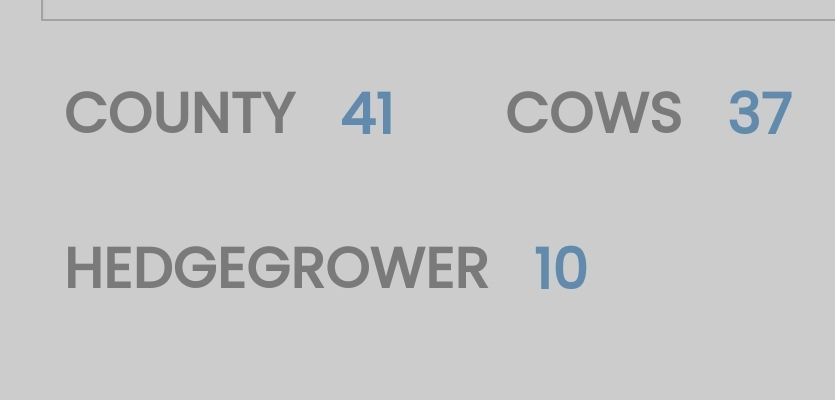
Is there any way to have the tag background In blue, with white writing and the number to be in yellow? but to all be together?
Many thanks

-
@phenomlab is there any way to change the colour of the tags?
Is there any way to have the tag background In blue, with white writing and the number to be in yellow? but to all be together?
Many thanks
Apologies to keep throwing these into the mix.
.if the requests get too much let me know. I just find little changes here and there.Itz probably a longshot anyway, but is there any way to change the link colour on the quotes to yellow?
Many thanks



Hello! It looks like you're interested in this conversation, but you don't have an account yet.
Getting fed up of having to scroll through the same posts each visit? When you register for an account, you'll always come back to exactly where you were before, and choose to be notified of new replies (either via email, or push notification). You'll also be able to save bookmarks and upvote posts to show your appreciation to other community members.
With your input, this post could be even better 💗
Register LoginRelated Topics
-
-
Forum Icons NodeBB
Solved Customisation -
-
-
-
-
NodeBB Footer
Solved Customisation -