Linux on a Stick
-
Yes, linux on a stick, otherwise know as a usb drive. I’m not talking about a live usb version of Linux. I am talking about actually install Linux on a usb drive. I was curious over the weekend, how cool would it be to install Linux on a usb drive and be able to use any computer to boot up and use my own same operating system each time with persistent data. Meaning that I can update, install and change whatever I want and be able to have the versatility of using whatever computer that may be around.
I had read a couple of articles regarding this and decided to give it a try. I used Virtualbox to create a virtual machine. During the creation, I did not create the virtual hard drive portion. Under the USB section, I made sure to choose USB 3.0 and with the USB drive plugged in, I added it to that section. In the network section, I kept the network option to NAT and everything else I setup according to what I would normally do. Those don’t technically matter because when you boot up, the OS will use the system resources directly. One other thing that I had to select was to use EFI. With that option selected, you get the option to boot up with systemd and not grub. That did make a difference.
I use Arch for this. One thing I found out is that you want to use the latest installer. I would say that no matter which Linux version you use, to use the latest installer to make sure you get the latest mirrors and such. I have tried this on one of the laptops at home and it worked beeeaauuttiifffuullyyyy! It was awesome. When I was done and shutdown the laptop, removed the USB drive and started the laptop up, it booted right into windblows again. So with this method, you have a portable OS that you can take anywhere and use on any computer.
I did try using this on my work computer, but they have that locked down so you can’t get to the boot menu. I may try it again at some point just in case I picked the wrong option, but regardless, I have a couple more laptops at home that I can test it on in the mean time.
This was a fun experiment and I have to say that the results were Linux running blazing fast, even over a USB port. My next option would be to run it over USB C and I imagine the OS would be even faster.
-
Yes, linux on a stick, otherwise know as a usb drive. I’m not talking about a live usb version of Linux. I am talking about actually install Linux on a usb drive. I was curious over the weekend, how cool would it be to install Linux on a usb drive and be able to use any computer to boot up and use my own same operating system each time with persistent data. Meaning that I can update, install and change whatever I want and be able to have the versatility of using whatever computer that may be around.
I had read a couple of articles regarding this and decided to give it a try. I used Virtualbox to create a virtual machine. During the creation, I did not create the virtual hard drive portion. Under the USB section, I made sure to choose USB 3.0 and with the USB drive plugged in, I added it to that section. In the network section, I kept the network option to NAT and everything else I setup according to what I would normally do. Those don’t technically matter because when you boot up, the OS will use the system resources directly. One other thing that I had to select was to use EFI. With that option selected, you get the option to boot up with systemd and not grub. That did make a difference.
I use Arch for this. One thing I found out is that you want to use the latest installer. I would say that no matter which Linux version you use, to use the latest installer to make sure you get the latest mirrors and such. I have tried this on one of the laptops at home and it worked beeeaauuttiifffuullyyyy! It was awesome. When I was done and shutdown the laptop, removed the USB drive and started the laptop up, it booted right into windblows again. So with this method, you have a portable OS that you can take anywhere and use on any computer.
I did try using this on my work computer, but they have that locked down so you can’t get to the boot menu. I may try it again at some point just in case I picked the wrong option, but regardless, I have a couple more laptops at home that I can test it on in the mean time.
This was a fun experiment and I have to say that the results were Linux running blazing fast, even over a USB port. My next option would be to run it over USB C and I imagine the OS would be even faster.
@Madchatthew Great overview, thanks. I too have done something similar (although not for a few years), and it’s a great way to be completely secure in the sense that if you need to use a public computer, you simply restart it with the USB drive attached. I’m inclined to do this again, and would probably go for a USB stick like the below
https://www.amazon.co.uk/SSK-External-Android-Business-Essential/dp/B0C36CXVP4
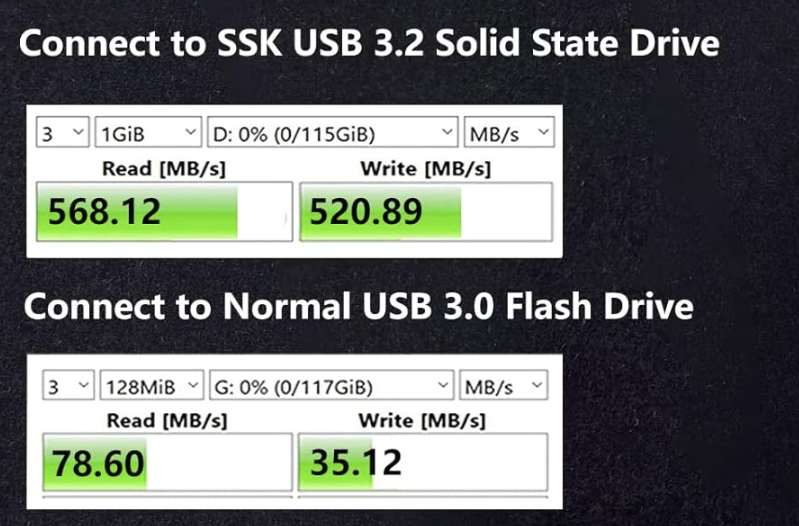
The difference in read/write speed is significant
Mark Cutting also advises organisations as a Fractional CIO, Fractional CISO and Executive Advisor, helping boards improve technology governance, cyber resilience and executive decision making. Learn more at Phenomlab Ltd
-
@Madchatthew Great overview, thanks. I too have done something similar (although not for a few years), and it’s a great way to be completely secure in the sense that if you need to use a public computer, you simply restart it with the USB drive attached. I’m inclined to do this again, and would probably go for a USB stick like the below
https://www.amazon.co.uk/SSK-External-Android-Business-Essential/dp/B0C36CXVP4
The difference in read/write speed is significant
@phenomlab That is awesome! I just used a 32 G stick because that is all I had. A 256 MB one would be way better and probably all you would need. It would be kinda fun to go up to 1 TB, but I don’t think you would need that size for this application.
I love how you can use either end. One for regular USB and the other for USB C. That is great and the price is actually pretty good. I looked at the 1 TB and the price wasn’t bad even for that size.
-
 undefined Madchatthew marked this topic as a regular topic on
-
@phenomlab That is awesome! I just used a 32 G stick because that is all I had. A 256 MB one would be way better and probably all you would need. It would be kinda fun to go up to 1 TB, but I don’t think you would need that size for this application.
I love how you can use either end. One for regular USB and the other for USB C. That is great and the price is actually pretty good. I looked at the 1 TB and the price wasn’t bad even for that size.
@Madchatthew Yes, I am tempted, I must confess.
Mark Cutting also advises organisations as a Fractional CIO, Fractional CISO and Executive Advisor, helping boards improve technology governance, cyber resilience and executive decision making. Learn more at Phenomlab Ltd
-
@Madchatthew Yes, I am tempted, I must confess.
@phenomlab I say dooooo eeeeeetttttt becuase I probably will haha
-
I am totally geaking out right now. I am working from home today and tried this on another laptop we have and it is so very awesome! I did have to disable the boot security on this laptop, which I’m not too worried about. I can always re-enable it. I think I will be buying that USB you posted Phenomlab.
I am currently typing this post from that drive and am setting up neovim for development following along a youtube video. Just because. I have been using neovim more lately and really am starting to like it. It is very powerful and a lot you can do with it from what I am seeing.
Anyway, had to post this here because it is frickin awesome!
-
I am totally geaking out right now. I am working from home today and tried this on another laptop we have and it is so very awesome! I did have to disable the boot security on this laptop, which I’m not too worried about. I can always re-enable it. I think I will be buying that USB you posted Phenomlab.
I am currently typing this post from that drive and am setting up neovim for development following along a youtube video. Just because. I have been using neovim more lately and really am starting to like it. It is very powerful and a lot you can do with it from what I am seeing.
Anyway, had to post this here because it is frickin awesome!
@Madchatthew said in Linux on a Stick:
I think I will be buying that USB you posted Phenomlab.
Let me know how you get on with it. I too am considering it
Mark Cutting also advises organisations as a Fractional CIO, Fractional CISO and Executive Advisor, helping boards improve technology governance, cyber resilience and executive decision making. Learn more at Phenomlab Ltd
-
@Madchatthew said in Linux on a Stick:
I think I will be buying that USB you posted Phenomlab.
Let me know how you get on with it. I too am considering it
@phenomlab I will do that. I am hoping to buy it within the next week or two.
-
So I purchased this the other day. I was able to install Linux on it last night. I ended up not having time to try it on one of the laptops yet though. So I will be doing that either tonight or tomorrow. I am excited to see how it performs with the USB-C connection.
-
So I purchased this the other day. I was able to install Linux on it last night. I ended up not having time to try it on one of the laptops yet though. So I will be doing that either tonight or tomorrow. I am excited to see how it performs with the USB-C connection.
@Madchatthew Keep us posted!
Mark Cutting also advises organisations as a Fractional CIO, Fractional CISO and Executive Advisor, helping boards improve technology governance, cyber resilience and executive decision making. Learn more at Phenomlab Ltd
-
Well, I have to say with the USB-C connection, you can’t even tell you are running off of a usb stick. It is ssoooo fast it is crazy. Everything functions and works as expected. It is awesome!
-
I was able to also install Steam and play a game. I also was able to install a game my daughter and I play and Minecraft. They all worked without a hitch. The only thing is that you can’t play Bedrock version on Linux. I wish MS would get their heads out of their arses and make it so you can. I only say that because my daughter like the Bedrock version and the laptop she uses will have to be switched over to Linux as well.
-
I was able to also install Steam and play a game. I also was able to install a game my daughter and I play and Minecraft. They all worked without a hitch. The only thing is that you can’t play Bedrock version on Linux. I wish MS would get their heads out of their arses and make it so you can. I only say that because my daughter like the Bedrock version and the laptop she uses will have to be switched over to Linux as well.
@Madchatthew just revisiting this and was curious as to why you used virtual box rather than booting directly off a live CD then installing onto a connected USB?
Mark Cutting also advises organisations as a Fractional CIO, Fractional CISO and Executive Advisor, helping boards improve technology governance, cyber resilience and executive decision making. Learn more at Phenomlab Ltd
-
@Madchatthew just revisiting this and was curious as to why you used virtual box rather than booting directly off a live CD then installing onto a connected USB?
@phenomlab I could have done it that way too and I don’t know why I didn’t. It would have probably been easier. I found directions on the webs and just did it that way. There isn’t a specific reason. I guess doing it this way, I didn’t have to reboot my computer and could do other things while waiting for the install to complete.
I have also not used it for several weeks on purpose, to see if reflector (I believe that is what it is called) will update the source list and update the OS without throwing an error.
-
@phenomlab I could have done it that way too and I don’t know why I didn’t. It would have probably been easier. I found directions on the webs and just did it that way. There isn’t a specific reason. I guess doing it this way, I didn’t have to reboot my computer and could do other things while waiting for the install to complete.
I have also not used it for several weeks on purpose, to see if reflector (I believe that is what it is called) will update the source list and update the OS without throwing an error.
@Madchatthew Thanks! Was more curiosity than anything else

Mark Cutting also advises organisations as a Fractional CIO, Fractional CISO and Executive Advisor, helping boards improve technology governance, cyber resilience and executive decision making. Learn more at Phenomlab Ltd
-
@Madchatthew Thanks! Was more curiosity than anything else
@phenomlab you are welcome, but I wish I would have thought of doing it that way instead. I think it would have been easier and faster to be honest.
-
@phenomlab you are welcome, but I wish I would have thought of doing it that way instead. I think it would have been easier and faster to be honest.
@Madchatthew said in Linux on a Stick:
I wish I would have thought of doing it that way instead. I think it would have been easier and faster to be honest.
I’m old… Been there, done it
Mark Cutting also advises organisations as a Fractional CIO, Fractional CISO and Executive Advisor, helping boards improve technology governance, cyber resilience and executive decision making. Learn more at Phenomlab Ltd
-
I purposely didn’t boot up to the USB drive for over a month. I booted up the USB Linux on a stick today and went to the console and did the update command for Arch and no issues whatsoever like in the past. I installed Reflector and it updated the source files for me automatically and I was just able to run the update with no issues. It was so awesome!!
It just worked. So I recommend that if anyone installs and uses Arch whether for a server or desktop for their daily driver that you install Reflector in case you don’t update for awhile for whatever reason.
-
I purposely didn’t boot up to the USB drive for over a month. I booted up the USB Linux on a stick today and went to the console and did the update command for Arch and no issues whatsoever like in the past. I installed Reflector and it updated the source files for me automatically and I was just able to run the update with no issues. It was so awesome!!
It just worked. So I recommend that if anyone installs and uses Arch whether for a server or desktop for their daily driver that you install Reflector in case you don’t update for awhile for whatever reason.
@Madchatthew I guess I’m just not brave enough for Arch, but then again, I felt the same way about Manjaro before I got into it. Having said that, I’ve not used Manjaro for some years so perhaps it’s time to revisit.
Mark Cutting also advises organisations as a Fractional CIO, Fractional CISO and Executive Advisor, helping boards improve technology governance, cyber resilience and executive decision making. Learn more at Phenomlab Ltd
-
@Madchatthew I guess I’m just not brave enough for Arch, but then again, I felt the same way about Manjaro before I got into it. Having said that, I’ve not used Manjaro for some years so perhaps it’s time to revisit.
@phenomlab I tried Manjaro before. I believe I liked it overall. It is one of the ones that I was interested in, but for some reason there was something with it that I didn’t like. Unfortunately, my brain isn’t allowing me to remember what that was. Another thing that I did that I forgot to mention, was after doing the updates, I tested the three games that I installed on it. The one game that I play with my daughter, I just had to reinstall with the setup file and then it worked just fine afterwards and automatically picked up the settings and data that was already stored. For steam, I had to reboot the computer but once I did that, then Steam worked just fine. I installed Minecraft on it and that just worked as soon as I double clicked on it, before the reboot.
I am still quite a newbie with Arch, but so far, I really like it and am actually quite surprised how so far things just seem to just work with it. Now that may be a different story when I go to install it on the desktop and go through these same processes, but my hope is that it will be the same experience.



Hello! It looks like you're interested in this conversation, but you don't have an account yet.
Getting fed up of having to scroll through the same posts each visit? When you register for an account, you'll always come back to exactly where you were before, and choose to be notified of new replies (either via email, or push notification). You'll also be able to save bookmarks and upvote posts to show your appreciation to other community members.
With your input, this post could be even better 💗
Register LoginRelated Topics
-
-
-
-
-
-
-
SASL LOGIN authentication failed: generic failure
Moved Solved Linux -