Skip to content

Tutorial for secure emailing with personal domain,Cloudflare, virtualmin and postfix

Unsolved Linux
30 2 12.0k 1
  • Indeed. +1 for telnet.

    I just trusted the netstats which told me that everything is OK which is certainly the case on the server.

    since I didn’t have Telnet on hand I tested a website which told me OK

    ba38b6b1-1bbc-497a-b787-81edf7662a6b-image.png

    wrote on last edited by
    #19

    @DownPW said in Tutorial for secure emailing with personal domain,Cloudflare, virtualmin and postfix:

    since I didn’t have Telnet on hand I tested a website which told me OK

    I have to confess, I installed the telnet-client on your server for diagnostic purposes.

  • OUPS 🙂

    Ok so I think it’s Hetzner who is blocking.
    I will make them an unblocking request.

    wrote on last edited by
    #20

    @DownPW said in Tutorial for secure emailing with personal domain,Cloudflare, virtualmin and postfix:

    I will make them an unblocking request.

    Curious to know how you got on with this…

  • wrote on last edited by DownPW
    #21

    sorry for the late response my friends. They unblocked port 25 very quickly and I can send emails;

    Just that the domains in caramail.com refused my sending of email for obscure reasons and protonmail, I receive them but in spam with an error message

    I will share all its errors with you to see and I would like to deepen that the DMARC, and DKIM puts the private/public key which I do not really understand (see my request above)

    https://sudonix.org/post/8462

  • sorry for the late response my friends. They unblocked port 25 very quickly and I can send emails;

    Just that the domains in caramail.com refused my sending of email for obscure reasons and protonmail, I receive them but in spam with an error message

    I will share all its errors with you to see and I would like to deepen that the DMARC, and DKIM puts the private/public key which I do not really understand (see my request above)

    https://sudonix.org/post/8462

    wrote on last edited by
    #22

    @DownPW emails are going to junk because of missing DNS records as I mentioned previously. You won’t need to use the public and private keys unless you need extended and/or advanced functions.

  • wrote on last edited by
    #23

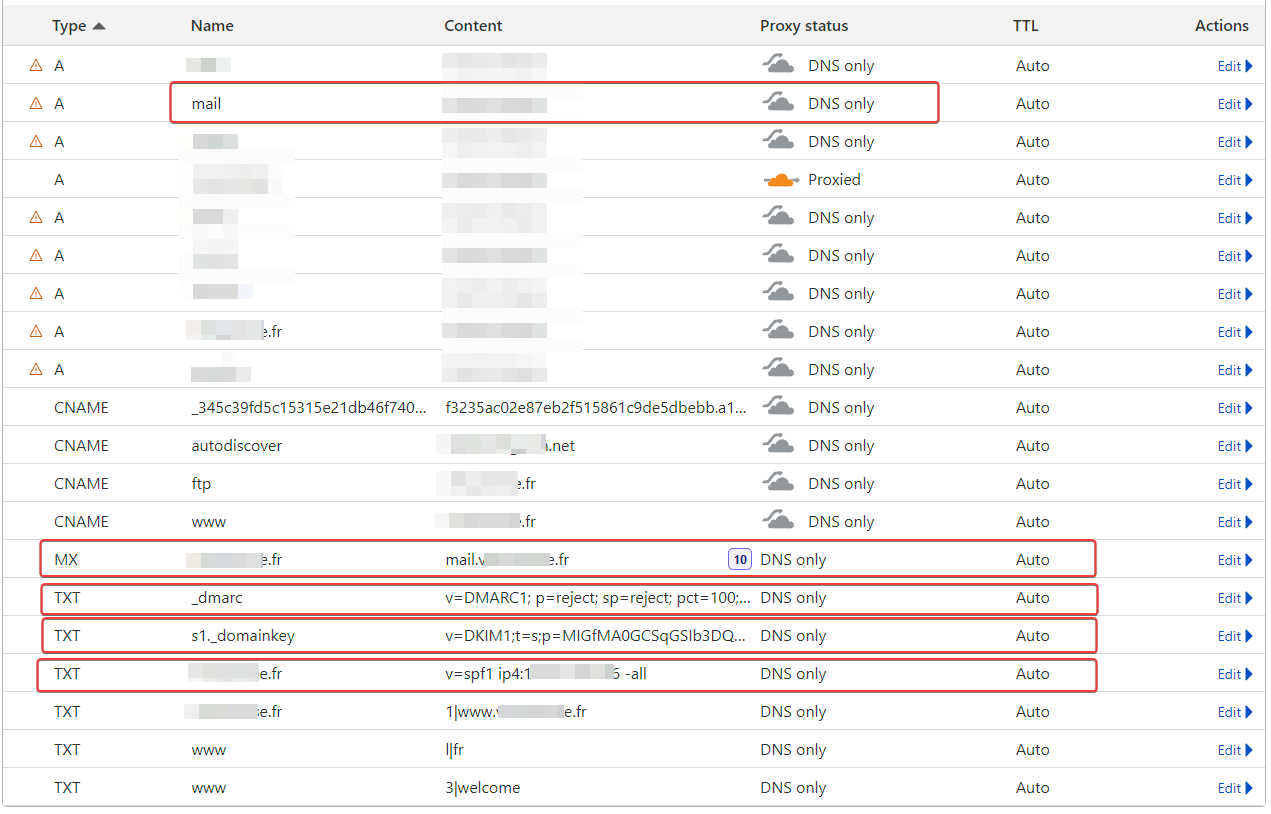
    I have the DNS pointers present

    image.png

  • I have the DNS pointers present

    image.png

    wrote on last edited by
    #24

    @DownPW not all are there. The SPF record is missing. That’s enough to place email you sent into junk at the recipient end.

  • wrote on last edited by DownPW
    #25

    Spf is on the screenshot

  • Spf is on the screenshot

    wrote on last edited by
    #26

    @DownPW sorry, yes, it is. Completely missed that.

  • Spf is on the screenshot

    wrote on last edited by
    #27

    @DownPW Can you PM me your domain name so I can run a few tests?

  • wrote on last edited by
    #28

    Yep no problem

  • Yep no problem

    wrote on last edited by phenomlab
    #29

    @DownPW thanks. See PM. You can validate your domain in terms of its email suitability by using the checker below

    https://emailhealthcheckup.com/

    In addition, there are some great generators and checkers here

    https://dmarcly.com/tools/

  • Yep no problem

    wrote on last edited by
    #30

    @DownPW any update?


Related Topics
  • Adjusting HSTS settings for public wifi's

    Solved Security hsts cloudflare ssl
    4
    1
    2 Votes
    4 Posts
    2k Views
    phenomlab
    @Hari Ok, no issues. Keep me posted…
  • how to use CF tunnels with Virtualmin?

    Solved Configure cf tunnel cloudflare virtualmin
    10
    3 Votes
    10 Posts
    4k Views
    phenomlab
    @Hari DDoS protection is not just a switch, or one component. It’s a collection of different and often disparate technologies that when grouped together form the basis of a combined toolset that can be used in defence. Typically these consist of IDS (Instrusion Detection System) and IPS (Intrusion Prevention System) components that detect irregularities in network traffic, and will take decisive action based on predefined rulesets, or in the case of more modern systems, AI and ML. Traditional “traffic shaping” technology is also deployed, so if an attack cannot be easily identified as malicious, the bandwidth available to that connection is severely limited to nothing more than a trickle rather than a full flow. Years ago, ISP’s used traffic shaping (also called “policers”) as an effective means of stopping applications such as BearShare, eDonkey, Napster, and other P2P based sharing systems from functioning correctly - essentially reducing the “appeal” of distributing and seeding illegal downloads. This was essentially the ISP’s way of saying “stop what you are doing please” without actually pulling the plug. These days, DDoS attacks are designed to overwhelm - not assume control of - webservers and other public facing components. It’s rare for small entities to be attacked unless there is some form of political agenda driven by your site or product. A classic example is governmental institutions or lawmakers who effectively are classed as “enforcers” and those who disagree are effectively making a statement in the form of Denial of Service. DDoS protection is effectively the responsibility of the hosting provider, but you shouldn’t just assume that they will protect you or your site. Their responsibility stops at their infrastructure, so it’s then up to you too decide how you full the gap in between your host and the website. Typically, you’d leverage something like Imunify360 which you can get for Plesk (and something I’d strongly recommend) but it’s not free, and is a paid (not expensive per month) subscription. If you want to use VirtualMin then there are a variety of tools readily available out of the box such as firewalls and fail2ban.
  • Issues getting Flarum to work on new host

    Solved Configure virtualmin
    65
    14 Votes
    65 Posts
    30k Views
    phenomlab
    @crazycells huh. Thanks. Will need to check that as well.
  • how to configure DNS records virtualmin?

    Solved Linux digitalocean dns
    26
    1
    11 Votes
    26 Posts
    10k Views
    Hari
    i think we can mark this discussion as solved learned how to install virtualmin with NGINX We can easily point the DNS by mentioning server IP at CF a name record learned how to install SSL
  • VirtualMin create virtual server

    Solved Configure
    4
    2 Votes
    4 Posts
    2k Views
    phenomlab
    @justoverclock correct. You only need to keep an eye on the resources of the droplet itself
  • Virtualmin Letsencrypt Renewal

    Solved Hosting
    13
    1 Votes
    13 Posts
    6k Views
    phenomlab
    @gotwf said in Virtualmin Letsencrypt Renewal: I favor KISS engineering Then I think you’ll be able to appreciate this https://content.sudonix.com/keep-it-simple-stupid/
  • Cloudflare now handling email routing, YAY 🚀

    Configure cloudflare
    1
    0 Votes
    1 Posts
    1k Views
    No one has replied
  • SASL LOGIN authentication failed: generic failure

    Moved Solved Linux
    5
    0 Votes
    5 Posts
    3k Views
    phenomlab
    @Ash3T I’m going to mark this post as solved as I’ve not heard from you in a while. Let me know if this isn’t the case and you need more help.