Virgin router replacement
-
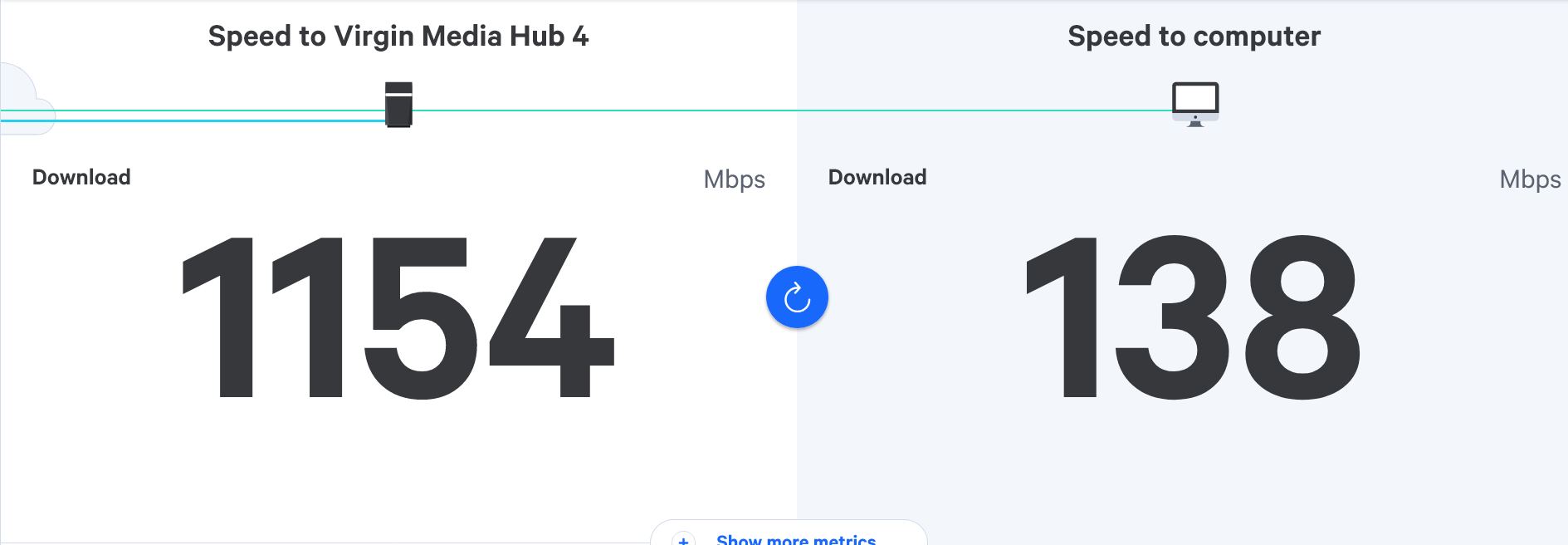
@JAC There is absolutely nothing wrong with your setup mate. 878Mbps is a great speed, and you’re going to be hard pushed to top that. Obviously, wired without the VPN is the optimum setting.

@phenomlab said in Virgin router replacement:
There is absolutely nothing wrong with your setup mate. 878Mbps is a great speed, and you’re going to be hard pushed to top that. Obviously, wired without the VPN is the optimum setting.
It is a great speed yes, I’m happy to finally see them sorts of speeds, however it is without the VPN running.
Should I still go ahead and order / find the powerline adapters to increase the speed upstairs? Of course the tests just done are right next to the router.
-
@phenomlab said in Virgin router replacement:
. A VPN will always slow the speed down because it will proxy all traffic upstream to another server. 493Mbps is certainly more than acceptable to that device, and is excellent for Wifi.
I know you use the VPN to gain access to US based TV programs etc, so it’s a must have, but the speed drop is always inevitable.
That’s really opened my eyes, I must say!
Very surprised with such low speeds with the VPN running through, is there no way to increase these or is it just pretty much a case of putting up with it? I constantly run the VPN.

@JAC said in Virgin router replacement:
Very surprised with such low speeds with the VPN running through, is there no way to increase these or is it just pretty much a case of putting up with it? I constantly run the VPN.
You don’t have much choice other than to put up with it I’m afraid. You try other servers in the same region, although you’re probably connecting to a US based server which will add what is called latency to your overall speed. From the UK to the US is typically around 77ms (milliseconds), and whilst that doesn’t sound like much (not even 1/100th of a second) your traffic isn’t the only request and it really depends on how many other connection requests there are at the same time.
Think 3 lanes of traffic on a motorway designed originally for 5 lanes. The speed decrease is the result of that congestion, or perhaps limited by the edge VPN server itself to ensure it is not overwhelmed. Basically, even though you can transmit and receive at high speed, it does not mean the device sending the traffic back will let you receive at that speed as that would hamper the service for everyone else.
You’ll probably see quite an increase in speed if you connect to a local VPN server, although that defeats the object as you need to connect to the US to get access to their streaming services.
Mark Cutting also advises organisations as a Fractional CIO, Fractional CISO and Executive Advisor, helping boards improve technology governance, cyber resilience and executive decision making. Learn more at Gratmore Ltd
-
@phenomlab said in Virgin router replacement:
There is absolutely nothing wrong with your setup mate. 878Mbps is a great speed, and you’re going to be hard pushed to top that. Obviously, wired without the VPN is the optimum setting.
It is a great speed yes, I’m happy to finally see them sorts of speeds, however it is without the VPN running.
Should I still go ahead and order / find the powerline adapters to increase the speed upstairs? Of course the tests just done are right next to the router.
@JAC said in Virgin router replacement:
Of course the tests just done are right next to the router.
I would, yes. You won’t equal that speed because there are other factors at play such as distance of cabling (power and ethernet) and you are reliant on the hardware transmitting the speeds you require. The bottom line is that you need to test with the VPN disabled to get the true speed. I think you’ll get close to what you are looking for, and at this point, I’d hold off the Archer for the time being unless you actually want to go down that route to get even more performance.
One final point is that if you are using Nord VPN, the Archer supports this meaning you can enforce the VPN at the router and all connections will pass over it, so nothing is device dependant.
Mark Cutting also advises organisations as a Fractional CIO, Fractional CISO and Executive Advisor, helping boards improve technology governance, cyber resilience and executive decision making. Learn more at Gratmore Ltd
-
@JAC said in Virgin router replacement:
Very surprised with such low speeds with the VPN running through, is there no way to increase these or is it just pretty much a case of putting up with it? I constantly run the VPN.
You don’t have much choice other than to put up with it I’m afraid. You try other servers in the same region, although you’re probably connecting to a US based server which will add what is called latency to your overall speed. From the UK to the US is typically around 77ms (milliseconds), and whilst that doesn’t sound like much (not even 1/100th of a second) your traffic isn’t the only request and it really depends on how many other connection requests there are at the same time.
Think 3 lanes of traffic on a motorway designed originally for 5 lanes. The speed decrease is the result of that congestion, or perhaps limited by the edge VPN server itself to ensure it is not overwhelmed. Basically, even though you can transmit and receive at high speed, it does not mean the device sending the traffic back will let you receive at that speed as that would hamper the service for everyone else.
You’ll probably see quite an increase in speed if you connect to a local VPN server, although that defeats the object as you need to connect to the US to get access to their streaming services.
@phenomlab thanks for all the information Mark, I appreciate it.
I understand everything you are saying, I use Switzerland, Germany, US to name a few.
I’ve just tested the UK VPN and it’[censored]ting 157mbps, Germany hits 99mbps at the moment.
-
@JAC said in Virgin router replacement:
Of course the tests just done are right next to the router.
I would, yes. You won’t equal that speed because there are other factors at play such as distance of cabling (power and ethernet) and you are reliant on the hardware transmitting the speeds you require. The bottom line is that you need to test with the VPN disabled to get the true speed. I think you’ll get close to what you are looking for, and at this point, I’d hold off the Archer for the time being unless you actually want to go down that route to get even more performance.
One final point is that if you are using Nord VPN, the Archer supports this meaning you can enforce the VPN at the router and all connections will pass over it, so nothing is device dependant.
@phenomlab said in Virgin router replacement:
I would, yes. You won’t equal that speed because there are other factors at play such as distance of cabling (power and ethernet) and you are reliant on the hardware transmitting the speeds you require. The bottom line is that you need to test with the VPN disabled to get the true speed. I think you’ll get close to what you are looking for, and at this point, I’d hold off the Archer for the time being unless you actually want to go down that route to get even more performance
Thanks Mark.
I’ll order / find the powerline adapters and go from there, I’ll try sort them first and depending on what happens with them I’ll hold off on the Archer for now.
It does seem to be working that’s the main thing.
-
@JAC I seem to recall us having this discussion before ?
Get the below for the 1Gbps Powerline adapters
https://www.amazon.co.uk/TP-Link-TL-PA717-KIT-Powerline-Configuration/dp/B07G37DJ8R/
And the below for the network cables (you obviously want 2)
@phenomlab do you recommend these or the ones I have if I can find them will they be ok?
I do need to order another Ethernet cable.
-
-
Whilst I’m at it did you want to still see the settings?
@JAC Nope - no need because it is 1Gbps - if that were not the case, you’d struggle to get over 100Mbps on wired when you are getting 800+ without the VPN.
Mark Cutting also advises organisations as a Fractional CIO, Fractional CISO and Executive Advisor, helping boards improve technology governance, cyber resilience and executive decision making. Learn more at Gratmore Ltd
-
@phenomlab do you recommend these or the ones I have if I can find them will they be ok?
I do need to order another Ethernet cable.
@JAC said in Virgin router replacement:
do you recommend these or the ones I have if I can find them will they be ok?
Either should be fine
Mark Cutting also advises organisations as a Fractional CIO, Fractional CISO and Executive Advisor, helping boards improve technology governance, cyber resilience and executive decision making. Learn more at Gratmore Ltd
-
@JAC said in Virgin router replacement:
do you recommend these or the ones I have if I can find them will they be ok?
Either should be fine
@phenomlab I’ve found the pods, I have one ethernet cable that I used to get them speeds earlier. I have another coming tomorrow, then I can set up the powerline adapters
 .
-
@JAC Nope - no need because it is 1Gbps - if that were not the case, you’d struggle to get over 100Mbps on wired when you are getting 800+ without the VPN.
@phenomlab said in Virgin router replacement:
Nope - no need because it is 1Gbps - if that were not the case, you’d struggle to get over 100Mbps on wired when you are getting 800+ without the VPN.
Thanks Mark for all the advice!

-
@phenomlab said in Virgin router replacement:
Nope - no need because it is 1Gbps - if that were not the case, you’d struggle to get over 100Mbps on wired when you are getting 800+ without the VPN.
Thanks Mark for all the advice!
@JAC Anytime.
Mark Cutting also advises organisations as a Fractional CIO, Fractional CISO and Executive Advisor, helping boards improve technology governance, cyber resilience and executive decision making. Learn more at Gratmore Ltd
-
@phenomlab thank you!
Is it a case of plugin and play with the powerline adapters?
I don’t remember there being any settings to sort last time 🧐.
-
@phenomlab thank you!
Is it a case of plugin and play with the powerline adapters?
I don’t remember there being any settings to sort last time 🧐.
@JAC said in Virgin router replacement:
Is it a case of plugin and play with the powerline adapters?
Yes. You just need to press the “pair” button on both devices when plugged in and connected
Mark Cutting also advises organisations as a Fractional CIO, Fractional CISO and Executive Advisor, helping boards improve technology governance, cyber resilience and executive decision making. Learn more at Gratmore Ltd
-
@JAC said in Virgin router replacement:
Is it a case of plugin and play with the powerline adapters?
Yes. You just need to press the “pair” button on both devices when plugged in and connected
@phenomlab brilliant, thank you!
I’ll be back in touch tomorrow when the other ethernet cable has arrived.
Many thanks again as always!
-
-
-
Testing with no VPN on…

Testing with VPN on

Not what I quite expected

@JAC Me neither. Which brand are these?
Mark Cutting also advises organisations as a Fractional CIO, Fractional CISO and Executive Advisor, helping boards improve technology governance, cyber resilience and executive decision making. Learn more at Gratmore Ltd
-
-
@phenomlab Tenda


Hello! It looks like you're interested in this conversation, but you don't have an account yet.
Getting fed up of having to scroll through the same posts each visit? When you register for an account, you'll always come back to exactly where you were before, and choose to be notified of new replies (either via email, or push notification). You'll also be able to save bookmarks and upvote posts to show your appreciation to other community members.
With your input, this post could be even better 💗
Register LoginRelated Topics
-
-
-

Linksys EA6400
Solved Networks -
Issues with routing
Solved Networks -
-
Nvidia shield & router
Solved Configure -
-
Virgin Media Broadband
Solved General