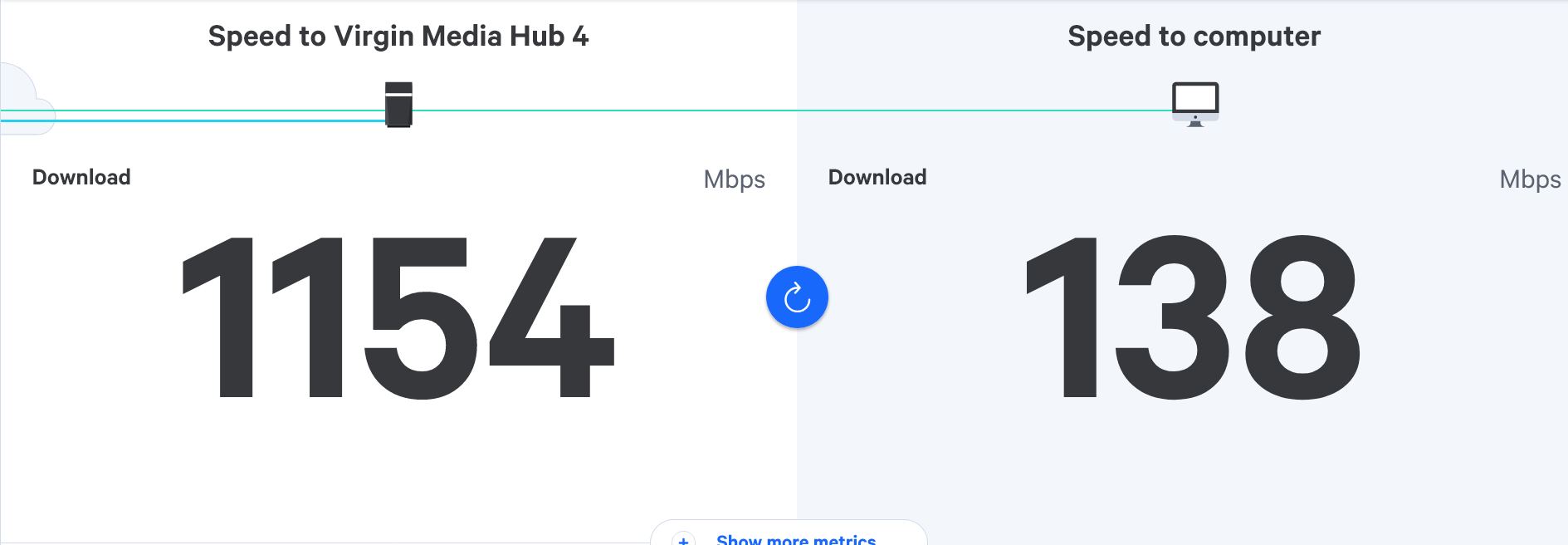
Virgin router replacement
-
@phenomlab thanks for the continued info Mark.
The Mrs on her phone upstairs (where the shield is) got 312mbps last night, is this a device issue do you think?
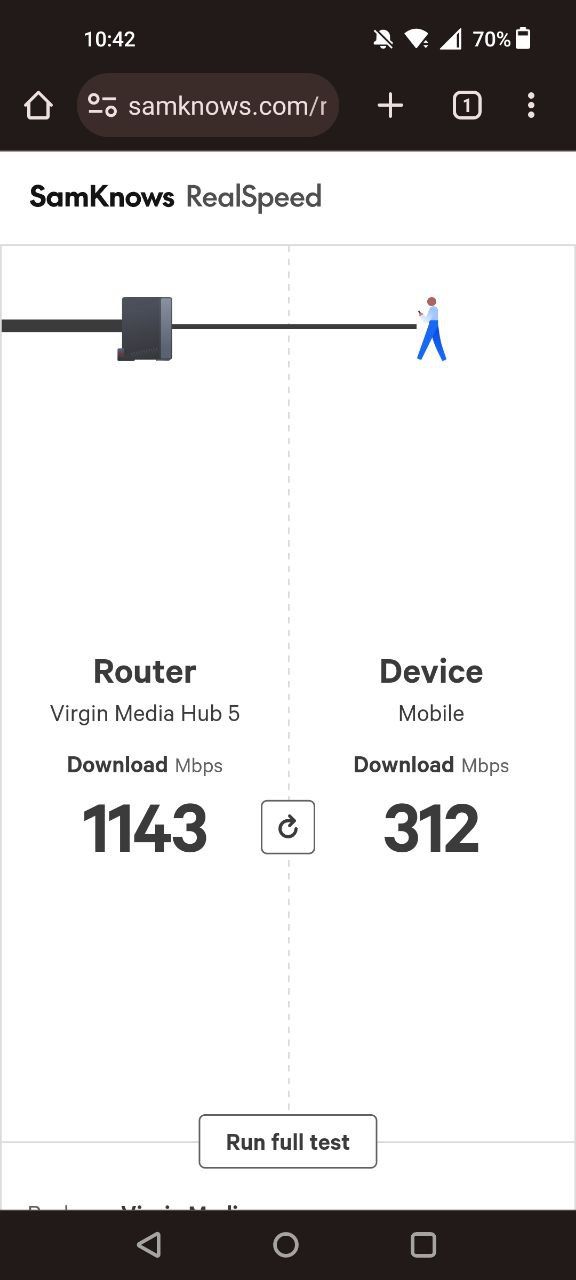
For example on my Samsung A53 I get probably 40/50mbps in that room tops.

@JAC Yes, very likely to be hardware related, so we’d need to see what the settings are. Can you ask your wife to do the same test but via
The thing with the Virgin Hub is that it will mix both
2.4Ghzand5Ghzsignals together under the same SSID, so you can’t tell the difference between the two networks, and the hub then decides which one you’ll use. Once the Archer is in place, it will split the two networks, so you can connect to each one to see which performs the best, and then use that going foward.5Ghzis good for close proximity and will deliver high speeds to those devices that support it, whereas2.4Ghzis much better when distance is an issue but will deliver a slower speed by comparison. Each of these frequencies have different use cases and the Archer will provide detailed information on each.Mark Cutting also advises organisations as a Fractional CIO, Fractional CISO and Executive Advisor, helping boards improve technology governance, cyber resilience and executive decision making. Learn more at Gratmore Ltd
-
@JAC another possibility here is “bandwidth hogs” which may be inadvertently consuming bandwidth meaning you won’t get a true reading. You should also power off any wifi capable devices that are not necessary for the test, so you’re left with just your phone and the hub itself when conducting these tests to get a true reading.
-
@JAC Yes, very likely to be hardware related, so we’d need to see what the settings are. Can you ask your wife to do the same test but via
The thing with the Virgin Hub is that it will mix both
2.4Ghzand5Ghzsignals together under the same SSID, so you can’t tell the difference between the two networks, and the hub then decides which one you’ll use. Once the Archer is in place, it will split the two networks, so you can connect to each one to see which performs the best, and then use that going foward.5Ghzis good for close proximity and will deliver high speeds to those devices that support it, whereas2.4Ghzis much better when distance is an issue but will deliver a slower speed by comparison. Each of these frequencies have different use cases and the Archer will provide detailed information on each.
@phenomlab thank you. If she’s at home I’ll ask her to do it now mate.
-
-
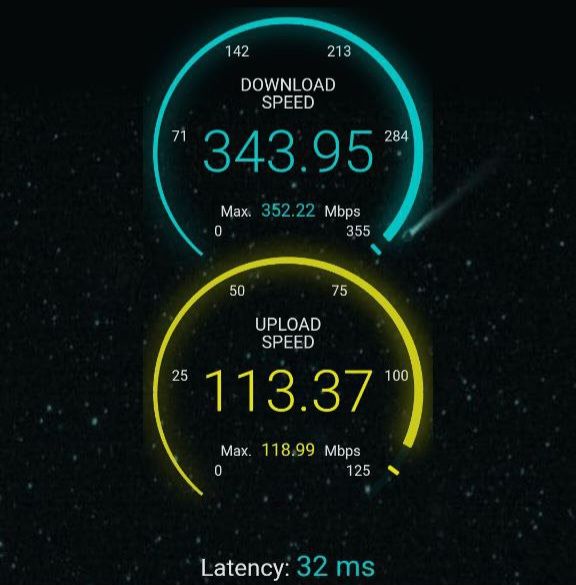
The test was also ran in the same room upstairs where the shield is.

@JAC Those are in fact good speeds, but I’m sure we can do better with the Archer.
Mark Cutting also advises organisations as a Fractional CIO, Fractional CISO and Executive Advisor, helping boards improve technology governance, cyber resilience and executive decision making. Learn more at Gratmore Ltd
-
@phenomlab I agree yes, the speed is great. I wonder why I only see speeds of around 100mbps or less on the Nvidia Shield 🧐
-
@phenomlab I agree yes, the speed is great. I wonder why I only see speeds of around 100mbps or less on the Nvidia Shield 🧐
@JAC Do you ever get the full speed on the shield, or is it always set at 100Mbps? This does sound very much like a restriction in the sense that the port on that device is hard coded to a specific speed, or is autosensing, but the network port is being limited by something else.
Is the shield on a wired connection, or wifi? From previous discussions, you are using Powerline (1Gbps) adapters in between with a network cable?
Mark Cutting also advises organisations as a Fractional CIO, Fractional CISO and Executive Advisor, helping boards improve technology governance, cyber resilience and executive decision making. Learn more at Gratmore Ltd
-
@JAC Do you ever get the full speed on the shield, or is it always set at 100Mbps? This does sound very much like a restriction in the sense that the port on that device is hard coded to a specific speed, or is autosensing, but the network port is being limited by something else.
Is the shield on a wired connection, or wifi? From previous discussions, you are using Powerline (1Gbps) adapters in between with a network cable?
@phenomlab I also have these coming later - https://amzn.eu/d/8x0Tzja
They may be of no use but I want to try cover every base.
The shield is connected via WiFi. I was using a powerline adapter but it made the speed worse, just plugging in a virgin pod in the room where the shield is it makes the speed much worse.
-
@JAC Do you ever get the full speed on the shield, or is it always set at 100Mbps? This does sound very much like a restriction in the sense that the port on that device is hard coded to a specific speed, or is autosensing, but the network port is being limited by something else.
Is the shield on a wired connection, or wifi? From previous discussions, you are using Powerline (1Gbps) adapters in between with a network cable?
@phenomlab said in Virgin router replacement:
Do you ever get the full speed on the shield
The best score I’ve ever got was over WiFi which was around 150mbps.
-
@phenomlab said in Virgin router replacement:
Do you ever get the full speed on the shield
The best score I’ve ever got was over WiFi which was around 150mbps.
@JAC Ethernet (wired) will always be faster - see below
Mark Cutting also advises organisations as a Fractional CIO, Fractional CISO and Executive Advisor, helping boards improve technology governance, cyber resilience and executive decision making. Learn more at Gratmore Ltd
-
@phenomlab said in Virgin router replacement:
Do you ever get the full speed on the shield
The best score I’ve ever got was over WiFi which was around 150mbps.
@JAC said in Virgin router replacement:
The best score I’ve ever got was over WiFi which was around 150mbps.
Out of curiosity, is the unit itself slow (in terms of menu navigation etc) or is it just the internet speed?
Mark Cutting also advises organisations as a Fractional CIO, Fractional CISO and Executive Advisor, helping boards improve technology governance, cyber resilience and executive decision making. Learn more at Gratmore Ltd
-
@phenomlab said in Virgin router replacement:
Ethernet (wired) will always be faster - see below
Is this something I can replicate upstairs then without the need of although router? Are there any ethernet cables you recommend to achieve this?
When I actually plugged in ethernet cable it honestly went worse. It must be a faulty wire that’s all I can think it can be.
-
@JAC said in Virgin router replacement:
The best score I’ve ever got was over WiFi which was around 150mbps.
Out of curiosity, is the unit itself slow (in terms of menu navigation etc) or is it just the internet speed?
@phenomlab said in Virgin router replacement:
Out of curiosity, is the unit itself slow (in terms of menu navigation etc) or is it just the internet speed
The unit itself runs fine mate

-
@phenomlab said in Virgin router replacement:
Ethernet (wired) will always be faster - see below
I could try replicate this with the cable just purchased?
-
@phenomlab said in Virgin router replacement:
Ethernet (wired) will always be faster - see below
I could try replicate this with the cable just purchased?
@JAC said in Virgin router replacement:
I could try replicate this with the cable just purchased?
Yes, you could. I’m more interested in a photo of the settings page - specifically the network interface speed.
Mark Cutting also advises organisations as a Fractional CIO, Fractional CISO and Executive Advisor, helping boards improve technology governance, cyber resilience and executive decision making. Learn more at Gratmore Ltd
-
@JAC said in Virgin router replacement:
I could try replicate this with the cable just purchased?
Yes, you could. I’m more interested in a photo of the settings page - specifically the network interface speed.
-
@phenomlab should I login to the settings later?
@JAC Yes, and provide a screenshot
Mark Cutting also advises organisations as a Fractional CIO, Fractional CISO and Executive Advisor, helping boards improve technology governance, cyber resilience and executive decision making. Learn more at Gratmore Ltd
-
@phenomlab not a problem mate will do. Once logged in is there a particular page you want me to screenshot, or is it the settings mainly?
-
@phenomlab not a problem mate will do. Once logged in is there a particular page you want me to screenshot, or is it the settings mainly?
@JAC Should be in the settings. Not sure exactly where it is though.
Mark Cutting also advises organisations as a Fractional CIO, Fractional CISO and Executive Advisor, helping boards improve technology governance, cyber resilience and executive decision making. Learn more at Gratmore Ltd
-
@phenomlab thanks pal, will sort when back in, probably be around 5ish.
Hello! It looks like you're interested in this conversation, but you don't have an account yet.
Getting fed up of having to scroll through the same posts each visit? When you register for an account, you'll always come back to exactly where you were before, and choose to be notified of new replies (either via email, or push notification). You'll also be able to save bookmarks and upvote posts to show your appreciation to other community members.
With your input, this post could be even better 💗
Register LoginRelated Topics
-
-
-

Linksys EA6400
Solved Networks -
Issues with routing
Solved Networks -
-
Nvidia shield & router
Solved Configure -
-
Virgin Media Broadband
Solved General