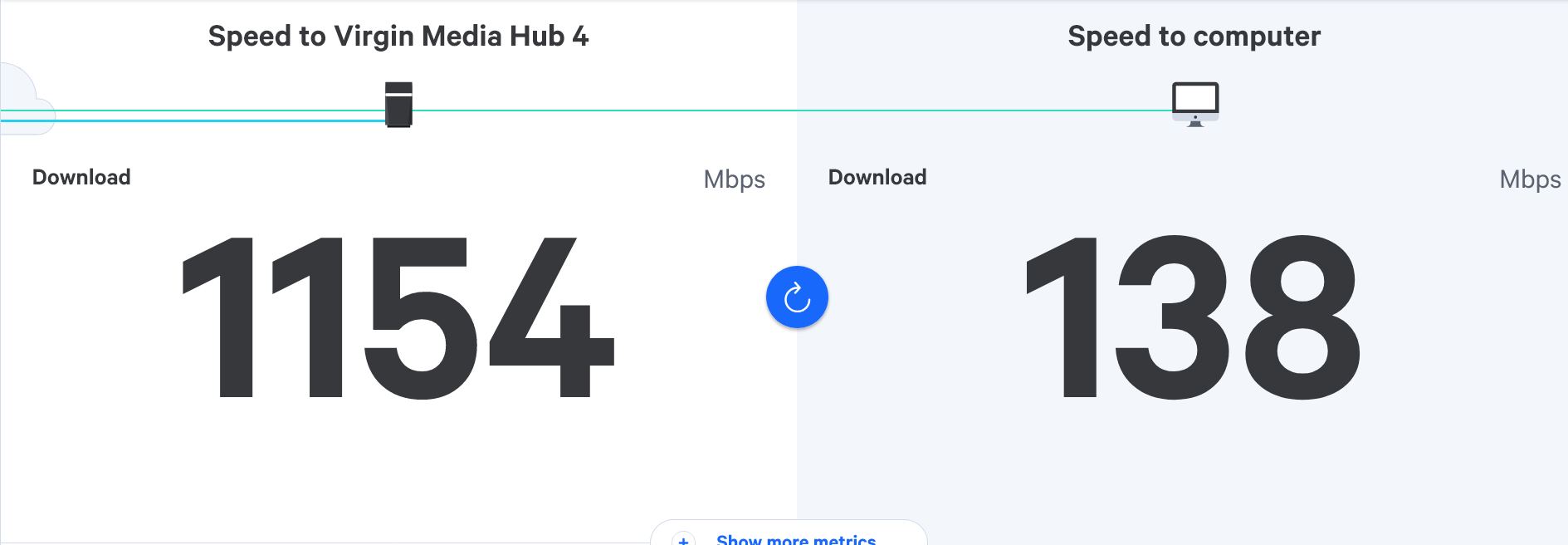
Virgin router replacement
-
@phenomlab I am not disabling the WiFi no, I will try this later tonight and get back to you
 .

@JAC Ok. Thanks
Mark Cutting also advises organisations as a Fractional CIO, Fractional CISO and Executive Advisor, helping boards improve technology governance, cyber resilience and executive decision making. Learn more at Gratmore Ltd
-

@phenomlab apologies will get round to this later tonight pal.
-
Technician has been and upgraded pod to hub 5.
He said he was getting speeds of 780 on his iPhone and 1030 direct from the hub, sounds much better but yet to be confirmed or tested.
Hopefully this solves the issue, will check and report back later tonight.
-
Technician has been and upgraded pod to hub 5.
He said he was getting speeds of 780 on his iPhone and 1030 direct from the hub, sounds much better but yet to be confirmed or tested.
Hopefully this solves the issue, will check and report back later tonight.
@JAC Will be interesting to see if this does indeed fix the issue.
Mark Cutting also advises organisations as a Fractional CIO, Fractional CISO and Executive Advisor, helping boards improve technology governance, cyber resilience and executive decision making. Learn more at Gratmore Ltd
-
@phenomlab I do wonder if it’s still worth taking a look at this also - https://www.tp-link.com/uk/home-networking/wifi-router/archer-ax73/
I remember you posting it a while back.
-
@phenomlab I do wonder if it’s still worth taking a look at this also - https://www.tp-link.com/uk/home-networking/wifi-router/archer-ax73/
I remember you posting it a while back.
@JAC 100%. This is the same router as I have. Zero issues.
Mark Cutting also advises organisations as a Fractional CIO, Fractional CISO and Executive Advisor, helping boards improve technology governance, cyber resilience and executive decision making. Learn more at Gratmore Ltd
-
@phenomlab so…
The speed has slightly increased with the new router but not much.
The issue is still there for me, two WiFi pods installed but not getting more than 100mbs to the shield upstairs.
The closer you go to the router (and test) the worse the speed becomes
 .
Starting to think we have doomed internet
 .
-
-
Technician has been and upgraded pod to hub 5.
He said he was getting speeds of 780 on his iPhone and 1030 direct from the hub, sounds much better but yet to be confirmed or tested.
Hopefully this solves the issue, will check and report back later tonight.
@JAC said in Virgin router replacement:
He said he was getting speeds of 780 on his iPhone and 1030 direct from the hub, sounds much better but yet to be confirmed or tested.
If he’s getting that speed directly from the hub, then the cabling etc isn’t the issue - the hub itself is the problem - but but the modem side. The WiFi capabilities of the Virginil Media hubs has always been well below par, and the only way to resolve that is to place the hub into bypass mode and let another device (such as the Archer I pointed out in this thread) handle the WiFi side of things.
Are your dividing walls inside the house solid (brick) or hollow (stud walls or breeze block)? You’ll know the answer to this quite easily by how easy it is to bang a nail into the wall for example. This makes all the difference when it comes to determining which equipment and frequencies should be in use.
Let’s start with the WiFi issue first and then work outwards to the shield box.
Mark Cutting also advises organisations as a Fractional CIO, Fractional CISO and Executive Advisor, helping boards improve technology governance, cyber resilience and executive decision making. Learn more at Gratmore Ltd
-
@JAC said in Virgin router replacement:
He said he was getting speeds of 780 on his iPhone and 1030 direct from the hub, sounds much better but yet to be confirmed or tested.
If he’s getting that speed directly from the hub, then the cabling etc isn’t the issue - the hub itself is the problem - but but the modem side. The WiFi capabilities of the Virginil Media hubs has always been well below par, and the only way to resolve that is to place the hub into bypass mode and let another device (such as the Archer I pointed out in this thread) handle the WiFi side of things.
Are your dividing walls inside the house solid (brick) or hollow (stud walls or breeze block)? You’ll know the answer to this quite easily by how easy it is to bang a nail into the wall for example. This makes all the difference when it comes to determining which equipment and frequencies should be in use.
Let’s start with the WiFi issue first and then work outwards to the shield box.
@phenomlab Thanks for the info Mark.
The walls are hollow… if cabling isn’t the issue, could moving the router to the middle of the house be a solution?
If not I will look into the box, it’s a shame we have to do this sort of thing
 .
-
@JAC said in Virgin router replacement:
He said he was getting speeds of 780 on his iPhone and 1030 direct from the hub, sounds much better but yet to be confirmed or tested.
If he’s getting that speed directly from the hub, then the cabling etc isn’t the issue - the hub itself is the problem - but but the modem side. The WiFi capabilities of the Virginil Media hubs has always been well below par, and the only way to resolve that is to place the hub into bypass mode and let another device (such as the Archer I pointed out in this thread) handle the WiFi side of things.
Are your dividing walls inside the house solid (brick) or hollow (stud walls or breeze block)? You’ll know the answer to this quite easily by how easy it is to bang a nail into the wall for example. This makes all the difference when it comes to determining which equipment and frequencies should be in use.
Let’s start with the WiFi issue first and then work outwards to the shield box.
@phenomlab said in Virgin router replacement:
then the cabling etc isn’t the issue -
Is there any cabling you would recommend though?
-
@phenomlab said in Virgin router replacement:
then the cabling etc isn’t the issue -
Is there any cabling you would recommend though?
-
@phenomlab Thanks for the info Mark.
The walls are hollow… if cabling isn’t the issue, could moving the router to the middle of the house be a solution?
If not I will look into the box, it’s a shame we have to do this sort of thing
.
@JAC said in Virgin router replacement:
The walls are hollow…
This is a good indicator as it means you won’t have to worry about castle keep walls where radio signals will simply bounce off the walls.
-
-
-
Thanks for the advice Mark, so generally you would say go for the router?
Anything you recommend other than that one?
@JAC yes, go for that router. However, see if you can one on eBay first - not necessarily that specific model - this is more about keeping the costs same whilst we work towards a solution.
Something like this is ideal to start
https://www.ebay.co.uk/itm/235225096895
It’s not the top end model, and honestly, it doesn’t need to be. The point here is that we need to remove the WiFi side of things from the Virgin Hub and let the new router take care of that. You’ll get a lot more control over the WiFi taking this route as most of the settings we’ll need to modify aren’t exposed by the hub whereas once the router assumes that task, they will be.
I’m not saying that this is going to be the holy grail, but it will certainly make life much easier and provide more flexibility.
Mark Cutting also advises organisations as a Fractional CIO, Fractional CISO and Executive Advisor, helping boards improve technology governance, cyber resilience and executive decision making. Learn more at Gratmore Ltd
-
Just out of interest how much did you buy it for? - interesting to say if the price has decreased much over time.
Currently down to £142, was expecting to pay more, pretty sure I’ve seen it for close to £200 when I last looked.
@JAC said in Virgin router replacement:
Currently down to £142, was expecting to pay more, pretty sure I’ve seen it for close to £200 when I last looked.
Good price, but let’s start low and slow here. You can then move up when you’re ready once we improve things.
-
@JAC yes, go for that router. However, see if you can one on eBay first - not necessarily that specific model - this is more about keeping the costs same whilst we work towards a solution.
Something like this is ideal to start
https://www.ebay.co.uk/itm/235225096895
It’s not the top end model, and honestly, it doesn’t need to be. The point here is that we need to remove the WiFi side of things from the Virgin Hub and let the new router take care of that. You’ll get a lot more control over the WiFi taking this route as most of the settings we’ll need to modify aren’t exposed by the hub whereas once the router assumes that task, they will be.
I’m not saying that this is going to be the holy grail, but it will certainly make life much easier and provide more flexibility.
@phenomlab Thanks again for the advice Mark throughout the evening.
I am just looking into this now. If for example I take this route will we have to reinsert WiFi codes etc?
I’ve seen many Virgin customers do this, so I know it clearly improves their WiFi, shame on Virgin hey!
Should I be worried the product is ‘end of line’
https://www.tp-link.com/uk/home-networking/wifi-router/archer-c1200/
-
@phenomlab Thanks again for the advice Mark throughout the evening.
I am just looking into this now. If for example I take this route will we have to reinsert WiFi codes etc?
I’ve seen many Virgin customers do this, so I know it clearly improves their WiFi, shame on Virgin hey!
Should I be worried the product is ‘end of line’
https://www.tp-link.com/uk/home-networking/wifi-router/archer-c1200/
@JAC said in Virgin router replacement:
I am just looking into this now. If for example I take this route will we have to reinsert WiFi codes etc?
Yes, because the router will take over this role.
-
@phenomlab Thanks again for the advice Mark throughout the evening.
I am just looking into this now. If for example I take this route will we have to reinsert WiFi codes etc?
I’ve seen many Virgin customers do this, so I know it clearly improves their WiFi, shame on Virgin hey!
Should I be worried the product is ‘end of line’
https://www.tp-link.com/uk/home-networking/wifi-router/archer-c1200/
@JAC said in Virgin router replacement:
Should I be worried the product is ‘end of line’
For the short term, no. If it resolves the issue you’re experiencing, then later down the line, you upgrade to something more suitable and that new device also receives updates etc. Provided it’s secured, which being a stateful device, it will be and your WiFi has a strong password, plus uses modern encryption methods, then the risk is low.
Obviously, over time that risk would increase, but it’s not something to worry about overnight. The priority here is to get to a stage where you’re actually getting the speeds you are paying for. After that, spending a bit more on what then becomes a permanent setup is less of a pill to swallow because you know it’s going to work.
TP-Link, whilst not “the best” on the market works very well and will certainly meet your needs and beyond.
Mark Cutting also advises organisations as a Fractional CIO, Fractional CISO and Executive Advisor, helping boards improve technology governance, cyber resilience and executive decision making. Learn more at Gratmore Ltd
Hello! It looks like you're interested in this conversation, but you don't have an account yet.
Getting fed up of having to scroll through the same posts each visit? When you register for an account, you'll always come back to exactly where you were before, and choose to be notified of new replies (either via email, or push notification). You'll also be able to save bookmarks and upvote posts to show your appreciation to other community members.
With your input, this post could be even better 💗
Register LoginRelated Topics
-
-
-

Linksys EA6400
Solved Networks -
Issues with routing
Solved Networks -
-
Nvidia shield & router
Solved Configure -
-
Virgin Media Broadband
Solved General