Virgin router replacement
-

@phenomlab said in Virgin router replacement:
@JAC 1Gb ?
 Wow. You could run the entire street with that.
Absolutely matey, it was their best offer and comes with a few ‘wifi inelegance’ pods. Which may solve our issue.
-
@phenomlab said in Virgin router replacement:
@JAC 1Gb ?
Wow. You could run the entire street with that.Absolutely matey, it was their best offer and comes with a few ‘wifi inelegance’ pods. Which may solve our issue.

@JAC good luck

Mark Cutting also advises organisations as a Fractional CIO, Fractional CISO and Executive Advisor, helping boards improve technology governance, cyber resilience and executive decision making. Learn more at Gratmore Ltd
-
@phenomlab said in Virgin router replacement:
@JAC good luck
Thanks Mark, will let you know how I get on

 .
-
@phenomlab said in Virgin router replacement:
@JAC good luck
Thanks Mark, will let you know how I get on
.
@JAC said in Virgin router replacement:
@phenomlab said in Virgin router replacement:
@JAC good luck
Thanks Mark, will let you know how I get on
.Still awaiting Gig router ;).
-
@JAC said in Virgin router replacement:
@phenomlab said in Virgin router replacement:
@JAC good luck
Thanks Mark, will let you know how I get on
.Still awaiting Gig router ;).
Mark Cutting also advises organisations as a Fractional CIO, Fractional CISO and Executive Advisor, helping boards improve technology governance, cyber resilience and executive decision making. Learn more at Gratmore Ltd
-
@phenomlab said in Virgin router replacement:
@JAC said in Virgin router replacement:
Still awaiting Gig router ;).
The router and speeds have been fantastic (wif based) so far, can’t complain

-
@phenomlab said in Virgin router replacement:
@JAC said in Virgin router replacement:
Still awaiting Gig router ;).
The router and speeds have been fantastic (wif based) so far, can’t complain
-
Right, I’m here again to update this thread…
We are on the 1gbps package with Virgin Media.
Obviously that’s the speed that goes to the router, but upstairs even with X2 adapters I’m only getting between 75-100mbps.
Would changing router help?
@JAC Most likely, yes. The Virgin Router is notorious for it’s abysmal throughput on wireless connections. I have the 400Mbps package, and the wireless speeds are almost non-existent.
I resolved this specific issue by purchasing a TP-Link AX5400 below
https://www.tp-link.com/uk/home-networking/wifi-router/archer-ax73/
However, this is not cheap (over £100), so you could start by attempting to change the channels that 2.4Ghz and 5Ghz are broadcasting on to see if that makes a difference.
Mark Cutting also advises organisations as a Fractional CIO, Fractional CISO and Executive Advisor, helping boards improve technology governance, cyber resilience and executive decision making. Learn more at Gratmore Ltd
-
phenomlab has marked this topic as unsolved on
-
@JAC Most likely, yes. The Virgin Router is notorious for it’s abysmal throughput on wireless connections. I have the 400Mbps package, and the wireless speeds are almost non-existent.
I resolved this specific issue by purchasing a TP-Link AX5400 below
https://www.tp-link.com/uk/home-networking/wifi-router/archer-ax73/
However, this is not cheap (over £100), so you could start by attempting to change the channels that 2.4Ghz and 5Ghz are broadcasting on to see if that makes a difference.
@phenomlab Thank you for the advice as always Mark, appreciate it massively.
Will try this when back in.
-
@phenomlab Thank you for the advice as always Mark, appreciate it massively.
Will try this when back in.
@JAC No problems. You might also want to consider using an app which will provide the best available / lease used frequency. Some recommendations below
https://www.netspotapp.com/wifi-troubleshooting/best-wifi-booster-apps.html
-
They have sent out new cables. They agreed that the speed we are getting is incredibly low for the package we are on. There is over 1gbps to the box, but sometimes only 100mbps to a device.
I know certain devices only allow certain speeds so this will vary, however the speeds are still incredibly low when even tested in the same room as the router.
They appear to be taking note of my complaints now, seeing as there is only 4 months left on the contract.
I am going to have to look into alternatives and generally find Virgin to be the best but on principle this may go out of the window ;).
@JAC new cables are very unlikely to help in any way. The only way to improve the Wi-Fi speed of a virgin hub is to put it into bridge mode and place a decent WiFi router inline.
The Wi-Fi router then acts as the gateway and passes all Internet requests to the Virgin hub for resolution.
Mark Cutting also advises organisations as a Fractional CIO, Fractional CISO and Executive Advisor, helping boards improve technology governance, cyber resilience and executive decision making. Learn more at Gratmore Ltd
-
@JAC new cables are very unlikely to help in any way. The only way to improve the Wi-Fi speed of a virgin hub is to put it into bridge mode and place a decent WiFi router inline.
The Wi-Fi router then acts as the gateway and passes all Internet requests to the Virgin hub for resolution.
@phenomlab Thanks Mark.
How do I achieve this? Is there one that you recommend?
I have the latest Virgin router, is this clearly not good enough? - contract ends in December, the internet issues need sorting one way or another.
May end up getting a technician out yet, when I spoke to someone the other week from Virgin they said I shouldn’t get less than 800mbps, I get nothing like that, in fact I’m lucky to get 200mbps.
-
@phenomlab Thanks Mark.
How do I achieve this? Is there one that you recommend?
I have the latest Virgin router, is this clearly not good enough? - contract ends in December, the internet issues need sorting one way or another.
May end up getting a technician out yet, when I spoke to someone the other week from Virgin they said I shouldn’t get less than 800mbps, I get nothing like that, in fact I’m lucky to get 200mbps.
@JAC said in Virgin router replacement:
May end up getting a technician out yet, when I spoke to someone the other week from Virgin they said I shouldn’t get less than 800mbps, I get nothing like that, in fact I’m lucky to get 200mbps.
What speeds to do you get if you plug an ethernet cable into the back of the virgin hub and use a laptop? Remove the Wifi for the moment - I want to see what speeds the hub is actually delivering in terms of direct internet access.
Mark Cutting also advises organisations as a Fractional CIO, Fractional CISO and Executive Advisor, helping boards improve technology governance, cyber resilience and executive decision making. Learn more at Gratmore Ltd
-
@JAC said in Virgin router replacement:
May end up getting a technician out yet, when I spoke to someone the other week from Virgin they said I shouldn’t get less than 800mbps, I get nothing like that, in fact I’m lucky to get 200mbps.
What speeds to do you get if you plug an ethernet cable into the back of the virgin hub and use a laptop? Remove the Wifi for the moment - I want to see what speeds the hub is actually delivering in terms of direct internet access.
@phenomlab said in Virgin router replacement:
What speeds to do you get if you plug an ethernet cable into the back of the virgin hub and use a laptop?
Will try this tomorrow and update.
-
@phenomlab said in Virgin router replacement:
What speeds to do you get if you plug an ethernet cable into the back of the virgin hub and use a laptop?
Will try this tomorrow and update.
I’m looking to either replace Virgin soon or at least get it working at some good speeds
 .
Is there anything you recommend personally like a mesh system?
The trouble is the router is downstairs, so anything upstairs isn’t getting great speeds despite having two WiFi pods that they provided, but the package expires in December, we have an engineer coming to look at the issue over the weekend, so it’s time to see what they can do to resolve the issue or what I can do differently myself.
-
I’m looking to either replace Virgin soon or at least get it working at some good speeds
.Is there anything you recommend personally like a mesh system?
The trouble is the router is downstairs, so anything upstairs isn’t getting great speeds despite having two WiFi pods that they provided, but the package expires in December, we have an engineer coming to look at the issue over the weekend, so it’s time to see what they can do to resolve the issue or what I can do differently myself.
-
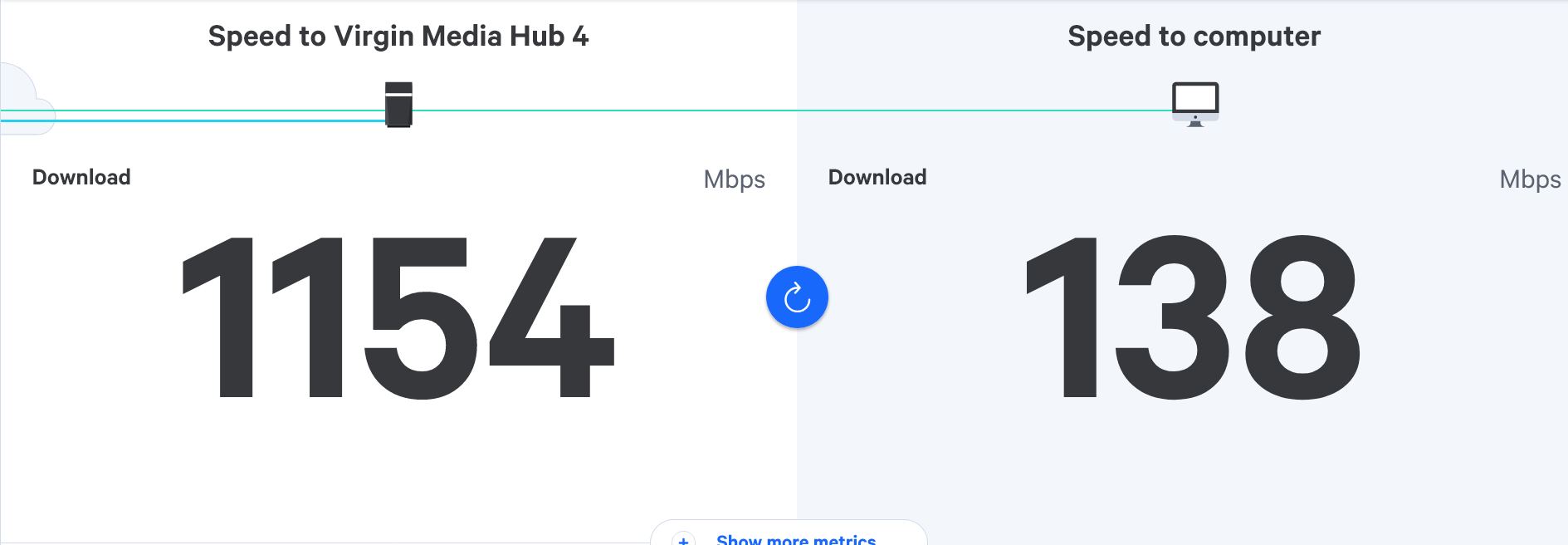
 - with 1gb ethernet cable to laptop.
 - with wifi connection only
Both tests were done in the room where the router is located. - Package 1gbps.
@JAC those speeds are extremely low in terms of download to the device. What tools did you use to get those results?
Mark Cutting also advises organisations as a Fractional CIO, Fractional CISO and Executive Advisor, helping boards improve technology governance, cyber resilience and executive decision making. Learn more at Gratmore Ltd
-
@JAC those speeds are extremely low in terms of download to the device. What tools did you use to get those results?
@phenomlab long story short, they didn’t show up at the weekend.
Complained etc and they are coming out on Monday now.
I’ve never received over 300mbps on a 1gbps package… looks like I’ll be moving to Sky if they don’t fix this.
-
@phenomlab long story short, they didn’t show up at the weekend.
Complained etc and they are coming out on Monday now.
I’ve never received over 300mbps on a 1gbps package… looks like I’ll be moving to Sky if they don’t fix this.
@JAC Ok, but you’ll get the same issues on SKY. That service still uses ADSL, which will be FFTC (Fiber To The Cabinet) only, and not FTTH (Fiber To The House). The last mile is always run in copper, so you’ll get breakneck speeds at the cab, and whatever the copper line can take to the house.
Mark Cutting also advises organisations as a Fractional CIO, Fractional CISO and Executive Advisor, helping boards improve technology governance, cyber resilience and executive decision making. Learn more at Gratmore Ltd
Hello! It looks like you're interested in this conversation, but you don't have an account yet.
Getting fed up of having to scroll through the same posts each visit? When you register for an account, you'll always come back to exactly where you were before, and choose to be notified of new replies (either via email, or push notification). You'll also be able to save bookmarks and upvote posts to show your appreciation to other community members.
With your input, this post could be even better 💗
Register LoginRelated Topics
-
-
-

Linksys EA6400
Solved Networks -
Issues with routing
Solved Networks -
-
Nvidia shield & router
Solved Configure -
-
Virgin Media Broadband
Solved General