Skip to content

Why CSS acts different in Desktop?

Bugs
11 3 3.0k 1
  • Disclaimer, I’m not a CSS fan. But others on this site are more CSS aware, so I ask this general question.
    The Admin side panel on NodeBB vanishes in Desktop mode on mobile. What could be happening to cause that?

    Its an issue Ive raised on NodeBB site a few times now but its one of those topics that has been ignored.
    I thought if I could propose why this is happening, it might help get a fix.
    I dont see why it would be so different. Admin side panel works on Desktop, and on mobile (mobile view), so why not mobile (Desktop view)?

    @Panda What theme are you using? I’m not familiar with a side panel in the admin console. Can you provide a screenshot?

  • It happens in all themes, if you go into Admin, then click the top left menu (3 lines button) the side panel extends out but is blank
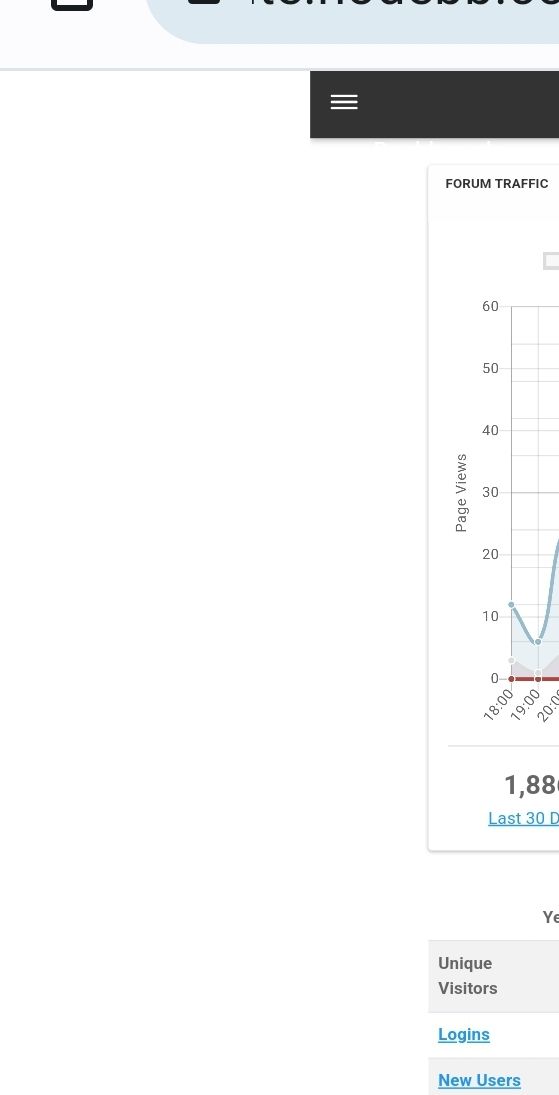
    Screenshot_20230622_174252_Chrome.jpg

  • It happens in all themes, if you go into Admin, then click the top left menu (3 lines button) the side panel extends out but is blank

    Screenshot_20230622_174252_Chrome.jpg

    @Panda Sorry - understood now - but why would you want to use Desktop Mode on a mobile ?

  • @Panda Sorry - understood now - but why would you want to use Desktop Mode on a mobile ?

    @phenomlab
    2 situations-
    i) as my tablet defaults to it
    ii) some things cant be altered in Admin, on mobile in mobile view 😞

    That aside, why should panel be blanks just because of the browser view?
    Its quite an annoying bug, if you ever need to do any admining on the move!

    Out of interest, can you replicate this bug? Im wondering if it happens on iPhones too, I only have Android

  • @phenomlab
    2 situations-
    i) as my tablet defaults to it
    ii) some things cant be altered in Admin, on mobile in mobile view 😞

    That aside, why should panel be blanks just because of the browser view?
    Its quite an annoying bug, if you ever need to do any admining on the move!

    Out of interest, can you replicate this bug? Im wondering if it happens on iPhones too, I only have Android

    @Panda You make some good points here - I too often need to make changes on the move, but just “accepted” thaty some things (like widgets) can’t be manipulated on mobile devices.

    WordPress has always been like that incidentally.

  • @phenomlab
    2 situations-
    i) as my tablet defaults to it
    ii) some things cant be altered in Admin, on mobile in mobile view 😞

    That aside, why should panel be blanks just because of the browser view?
    Its quite an annoying bug, if you ever need to do any admining on the move!

    Out of interest, can you replicate this bug? Im wondering if it happens on iPhones too, I only have Android

    @Panda said in Why CSS acts different in Desktop?:

    Out of interest, can you replicate this bug? Im wondering if it happens on iPhones too, I only have Android

    Yes, I am able to replicate on Android, but on an iPhone, it behaves differently in the sense that you request the desktop site, but it simply defaults to mobile.

  • Yep better to use ACP on Desktop. Not a bug., It is not made to be used on Mobile

  • Yep better to use ACP on Desktop. Not a bug., It is not made to be used on Mobile

    @DownPW it works for the most part, but anything that utilizes drag and drop like widgets is a non starter.

  • Yes sure, in landscape mode, it’s manageable but I think it’s more of a bonus than anything else.

  • Yes sure, in landscape mode, it’s manageable but I think it’s more of a bonus than anything else.

    @DownPW I’d have to agree with that.


Related Topics
  • MogoDB v6 to v7 upgrade

    Solved Configure nodebb
    5
    1 Votes
    5 Posts
    2k Views
    @Panda if you used the Ubuntu PPA, I think this only goes as far as 6.x if I recall correctly.
  • Page control arrows for PWA

    Solved Customisation nodebb
    27
    25 Votes
    27 Posts
    12k Views
    @crazycells it is, yes - I think I’ll leave it as there is no specific PWA CSS classes I know of. Well, you could use something like the below, but this means multiple CSS files for different operating systems. /** * Determine the mobile operating system. * This function returns one of 'iOS', 'Android', 'Windows Phone', or 'unknown'. * * @returns {String} */ function getMobileOperatingSystem() { var userAgent = navigator.userAgent || navigator.vendor || window.opera; // Windows Phone must come first because its UA also contains "Android" if (/windows phone/i.test(userAgent)) { return "Windows Phone"; } if (/android/i.test(userAgent)) { return "Android"; } if (/iPad|iPhone|iPod/.test(userAgent) && !window.MSStream) { return "iOS"; } return "unknown"; // return “Android” - one should either handle the unknown or fallback to a specific platform, let’s say Android } Once you’re in that rabbit hole, it’s impossible to get out of it.
  • Can you adjust Admin settings on your NodeBB?

    Bugs nodebb
    5
    0 Votes
    5 Posts
    2k Views
    @Panda as, yes, now I understand and that makes 100% sense. It means those who get down voted can still have an opinion and use common services. And yes, you’re right. Rather than down vote, just ignore if you don’t agree.
  • 36 Votes
    55 Posts
    22k Views
    @DownPW I see why. The code relies on the existence of [component="topic/quickreply/container"] However, this by definition means that the below has to be enabled [image: 1679077966615-aeef638f-4188-489d-a9f2-f3a26dbca9d8-image.png] It will then work [image: 1679077992245-7fb38631-e0f3-46ef-b652-00929d927b13-image.png] For some unknown reason, this is hidden in Harmony, and only shows if you select it. In v2, it seems that the <section> is deleted altogether in Persona if “Quick Reply” is disabled, meaning it won’t fire as it can’t locate that specific component. The downside is that you might not want the quick reply function, but I think it’s a PITA to scroll up to the top of the post just to reply, so I have it on
  • Title on homepage of nodebb forum

    Solved Customisation nodebb
    2
    1 Votes
    2 Posts
    2k Views
    @eveh Welcome board The code you are referring to is custom written as no such functionality exists under NodeBB. However, adding the functionality is relatively trivial. Below are the required steps Navigate to /admin/appearance/customise#custom-header Add the below code to your header, and save once completed <ol id="mainbanner" class="breadcrumb"><li id="addtext">Your Title Goes Here</li></ol> Navigate to /admin/appearance/customise#custom-js and add the below code, then save $(document).ready(function() { $(window).on('action:ajaxify.end', function(data) { // Initialise mainbanner ID, but hide it from view $('#mainbanner').hide(); var pathname = window.location.pathname; if (pathname === "/") { $("#addtext").text("Your Title"); $('#mainbanner').show(); } else {} // If we want to add a title to a sub page, uncomment the below and adjust accordingly //if (pathname === "/yourpath") { //$("#addtext").text("Your Title"); //$('#mainbanner').show(); //} }); }); Navigate to /admin/appearance/customise#custom-css and add the below CSS block .breadcrumb { right: 0; margin-right: auto; text-align: center; background: #0086c4; color: #ffffff; width: 100vw; position: relative; margin-left: -50vw; left: 50%; top: 50px; position: fixed; z-index: 1020; } Note, that you will need to adjust your CSS code to suit your own site / requirements.
  • 5 Votes
    9 Posts
    3k Views
    is there any way to see whose reputation is changed by this plugin?
  • [NodeBB] Import custom Font

    Solved Customisation custom fonts nodebb css
    12
    3 Votes
    12 Posts
    4k Views
    @cagatay you’ll need to define this in the body tag (or another element if you want greater or more granular targets) - for example body { font-family: "Poppins"; font-size: 16px; } Essentially, you use the font-size CSS directive.
  • NodeBB vs Discourse

    Chitchat nodebb discourse board
    25
    6 Votes
    25 Posts
    11k Views
    @phenomlab said in NodeBB vs Discourse: Hetzner eh ? I use them also. In fact, Sudonix is hosted in Nuremberg yes i’m also at hetzner, i have been a customer there for years with a reseller account for domains. My VPS that I host there are also in Nuremberg