Plugin to show images in teasers
-
Hi,
I’ve posted this on nodebb before but was hoping to get more response here if anyone is interested.

I was searching for a solution to show images, especially custom emojis, in teasers. Right now custom emojis or images are shown like “xyz.png” or “:emoji1:”:
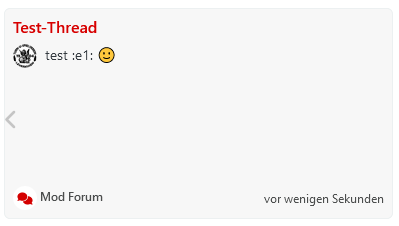
Regular emojis from emoji packs are displayed, I guess because the browser interprets ASCII.
I’ve then created a plugin using an intended solution found here. It should remove the img-tag from the configureStripTags Hook.
Unfortunately there is no impact to the recent cards plugin or any other teasers. No regarding error or warning found in the nodebb log. This is part of the log when I run ./nodebb dev:
verbose: [plugins] Loaded plugin: nodebb-plugin-teaser-image

verbose: [plugins/fireHook] filter:teasers.configureStripTags
Plugin is as basic as it can be:
index.js:
'use strict';

var plugin = {};

plugin.filterTeasersConfigureStripTags = async function (hookData) {
  // Check if the "img" tag is present in the tags array
  if (hookData.tags.includes('img')) {
    // Remove the "img" tag from the tags array
    hookData.tags = hookData.tags.filter(tag => tag !== 'img');
  }

  return hookData;
};

module.exports = plugin;
package.json:
{
  "name": "nodebb-plugin-teaser-image",
  "version": "1.0.0",
  "description": "NodeBB Plugin to show images in teasers",
  "main": "index.js",
  "dependencies": {},
  "nbbpm": {
    "compatibility": "^1.0.0 || ^2.0.0 || ^3.0.0"
  }
}
plugin.json:
{
  "id": "nodebb-plugin-teaser-image",
  "name": "Show images in Teasers",
  "description": "A NodeBB plugin to show images in teasers",
  "version": "1.0.0",
  "hooks": [
    {
      "hook": "filter:teasers.configureStripTags",
      "method": "filterTeasersConfigureStripTags"
    }
  ]
}
Anything I have overlooked or any more information I could add? From my understanding, this should already work.
 Help is appreciated. I don’t have a github link yet, If anyone wants to try you can just create a folder in node_modules and add the above files.
 -
Hi,
I’ve posted this on nodebb before but was hoping to get more response here if anyone is interested.
I was searching for a solution to show images, especially custom emojis, in teasers. Right now custom emojis or images are shown like “xyz.png” or “:emoji1:”:
Regular emojis from emoji packs are displayed, I guess because the browser interprets ASCII.
I’ve then created a plugin using an intended solution found here. It should remove the img-tag from the configureStripTags Hook.
Unfortunately there is no impact to the recent cards plugin or any other teasers. No regarding error or warning found in the nodebb log. This is part of the log when I run ./nodebb dev:
verbose: [plugins] Loaded plugin: nodebb-plugin-teaser-image

verbose: [plugins/fireHook] filter:teasers.configureStripTags
Plugin is as basic as it can be:
index.js:
'use strict';

var plugin = {};

plugin.filterTeasersConfigureStripTags = async function (hookData) {
  // Check if the "img" tag is present in the tags array
  if (hookData.tags.includes('img')) {
    // Remove the "img" tag from the tags array
    hookData.tags = hookData.tags.filter(tag => tag !== 'img');
  }

  return hookData;
};

module.exports = plugin;
package.json:
{
  "name": "nodebb-plugin-teaser-image",
  "version": "1.0.0",
  "description": "NodeBB Plugin to show images in teasers",
  "main": "index.js",
  "dependencies": {},
  "nbbpm": {
    "compatibility": "^1.0.0 || ^2.0.0 || ^3.0.0"
  }
}
plugin.json:
{
  "id": "nodebb-plugin-teaser-image",
  "name": "Show images in Teasers",
  "description": "A NodeBB plugin to show images in teasers",
  "version": "1.0.0",
  "hooks": [
    {
      "hook": "filter:teasers.configureStripTags",
      "method": "filterTeasersConfigureStripTags"
    }
  ]
}
Anything I have overlooked or any more information I could add? From my understanding, this should already work.
Help is appreciated. I don’t have a github link yet, If anyone wants to try you can just create a folder in node_modules and add the above files.@dave1904 there’s nothing wrong with the plugin you’ve written, but seeing as it’s a server side hook, have you changed the plugin load order so that yours is the last to load?
It could well be that your plugin is being overridden by another.
Mark Cutting also advises organisations as a Fractional CIO, Fractional CISO and Executive Advisor, helping boards improve technology governance, cyber resilience and executive decision making. Learn more at Phenomlab Ltd
-
@dave1904 there’s nothing wrong with the plugin you’ve written, but seeing as it’s a server side hook, have you changed the plugin load order so that yours is the last to load?
It could well be that your plugin is being overridden by another.
@phenomlab said in Plugin to show images in teasers:
have you changed the plugin load order so that yours is the last to load?
Yes I did, the plugin is last in the plugin order list.
-
@phenomlab said in Plugin to show images in teasers:
have you changed the plugin load order so that yours is the last to load?
Yes I did, the plugin is last in the plugin order list.
@dave1904 have you considered doing this client side? You could fairly easily manipulate the element in question using
js.Admittedly, anyone using your site without script access won’t be able to leverage this, but it’s an acceptable solution.
-
Thank you @phenomlab
Client side development is something I would consider but I don’t like it when things don’t work and especially when I don’t know why they don’t work. Do you maybe have any idea where I could have a look for more troubleshooting? I see that the hook is fired but can I see anywhere what the hook is doing in detail?
-
Thank you @phenomlab
Client side development is something I would consider but I don’t like it when things don’t work and especially when I don’t know why they don’t work. Do you maybe have any idea where I could have a look for more troubleshooting? I see that the hook is fired but can I see anywhere what the hook is doing in detail?
@dave1904 I’d start by adding a
console.logfunction tohookDataso you can see what is being returnedreturn hookData; console.log(hookData):


Hello! It looks like you're interested in this conversation, but you don't have an account yet.
Getting fed up of having to scroll through the same posts each visit? When you register for an account, you'll always come back to exactly where you were before, and choose to be notified of new replies (either via email, or push notification). You'll also be able to save bookmarks and upvote posts to show your appreciation to other community members.
With your input, this post could be even better 💗
Register Login