[NODEBB] Help for my custom CSS
-
it’s just the brand HTML header widget, just add this code to him
<span id="thisuser" class="getUsername">, <a href="/me"><span class="username">DownPW</span></a></span>]What do you want ? The HTML header widget on welcome message JS code ?
EDIT : All code in PM
@DownPW thanks. Can you try a theory for me and change that code so it looks like the below
<span id="thisuserbrand" class="getUsername">, <a href="/me"><span class="username">DownPW</span></a></span>I expect this to return nothing, which will prove my theory around the Ajax calls.
-
-
Nope @phenomlab
Same things, same problem
@DownPW then the problem isn’t the existing function. That ID I provided doesn’t exist anywhere and isn’t tied to any elements so should never trigger.
-
oups don’t know why I have used this code, replace by :
<div class="getUsername">, <a href="/me"><span class="username"></span></a></div>But same problem
PW and WS Spirit alive
-
oups don’t know why I have used this code, replace by :
<div class="getUsername">, <a href="/me"><span class="username"></span></a></div>But same problem
@DownPW did you remove the original line from the footer before placing it in the brand header?
-
remove no, but commented like this
<!-- <span id="thisuser" class="getUsername">, <a href="/me"><span class="username">DownPW</span></a></span> -->EDIT: test with remove = same
PW and WS Spirit alive
-
remove no, but commented like this
<!-- <span id="thisuser" class="getUsername">, <a href="/me"><span class="username">DownPW</span></a></span> -->EDIT: test with remove = same
@DownPW can you send me the footer function your are using. I’m 100% certain this is being caused by the
ajaxcall. -
remove no, but commented like this
<!-- <span id="thisuser" class="getUsername">, <a href="/me"><span class="username">DownPW</span></a></span> -->EDIT: test with remove = same
@DownPW can you change the top line of this function from
$(window).on('action:ajaxify.end', function (data) {To
$(document).ready() {Save and let me know if this changes anything. The theory here is that the Ajax call in the top line causes the
prependto be executed multiple times -
the code doesn’t work with this
PW and WS Spirit alive
-
@DownPW it should work once at least on site reload, no? Or does it crash?
-
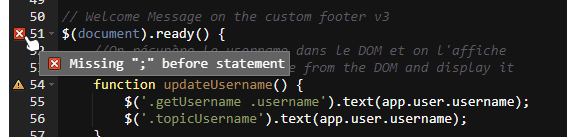
no, doesn’t work and break theme and swatch applet
PW and WS Spirit alive
-
@DownPW that shouldn’t cause the error you are seeing there. It looks like that is from the previous function.
-
the previous function is just fancybox and nothing more :
// Fancybox Media Reader
if (top.location.pathname !== '/login') {
    $(window).on('action:posts.loaded', function(data) {
        console.log("Polling DOM for lazyLoaded images to apply Fancybox");
        $(document).ready(function() {
            $('a').not('.forum-logo').not(".avatar").not(".emoji").not(".bmac-noanimate").each(function() {
                $('a[href*=".jpg"], a[href*=".jpeg"], a[href*=".png"], a[href*=".gif"], a[href*=".webp"]').addClass("noanimate");
            });
        });
    });
}

if (top.location.pathname !== '/login') {
    $(document).ready(function() {
        $(window).on('action:ajaxify.end', function(data) {
            this.$('a').not('.forum-logo').not(".avatar").not(".emoji").not(".bmac-noanimate").each(function() {
                $('a[href*=".jpg"], a[href*=".jpeg"], a[href*=".png"], a[href*=".gif"], a[href*=".webp"]').addClass("noanimate");
                data.preventDefault()
                // Strip out the images contained inside blockquotes as this looks nasty :)
                $('blockquote img').remove();
            });
            Fancybox.bind(
                'a[href*=".jpg"], a[href*=".jpeg"], a[href*=".png"], a[href*=".gif"], a[href*=".webp"]', {
                    groupAll: true,
                }
            );
        });
    });
}

// Chat fancybox - fires when chat module loaded and AJAX calls new chat
$(document).ready(function() {
    $(window).on('action:chat.loaded', function(data) {
            this.$('img').not('.forum-logo').not(".avatar").not(".emoji").not(".bmac-noanimate").each(function() {
                var newHref = $(this).attr("src");
                $(this).wrap("<a class='fancybox' href='" + newHref + "'/>");
                $('a[href*=".jpg"], a[href*=".jpeg"], a[href*=".png"], a[href*=".gif"], a[href*=".webp"]').addClass("noanimate");
                data.preventDefault();
                // Strip out the images contained inside blockquotes as this looks nasty :)
                $('blockquote img').remove();
            });
            Fancybox.bind(
                'a[href*=".jpg"], a[href*=".jpeg"], a[href*=".png"], a[href*=".gif"], a[href*=".webp"]', {
                    groupAll: true,
                }
            );
    });
});
the error above just appear wit hthe change of
$(document).ready() {, no error with$(window).on('action:ajaxify.end', function (data) {PW and WS Spirit alive
-
the previous function is just fancybox and nothing more :
// Fancybox Media Reader
if (top.location.pathname !== '/login') {
    $(window).on('action:posts.loaded', function(data) {
        console.log("Polling DOM for lazyLoaded images to apply Fancybox");
        $(document).ready(function() {
            $('a').not('.forum-logo').not(".avatar").not(".emoji").not(".bmac-noanimate").each(function() {
                $('a[href*=".jpg"], a[href*=".jpeg"], a[href*=".png"], a[href*=".gif"], a[href*=".webp"]').addClass("noanimate");
            });
        });
    });
}

if (top.location.pathname !== '/login') {
    $(document).ready(function() {
        $(window).on('action:ajaxify.end', function(data) {
            this.$('a').not('.forum-logo').not(".avatar").not(".emoji").not(".bmac-noanimate").each(function() {
                $('a[href*=".jpg"], a[href*=".jpeg"], a[href*=".png"], a[href*=".gif"], a[href*=".webp"]').addClass("noanimate");
                data.preventDefault()
                // Strip out the images contained inside blockquotes as this looks nasty :)
                $('blockquote img').remove();
            });
            Fancybox.bind(
                'a[href*=".jpg"], a[href*=".jpeg"], a[href*=".png"], a[href*=".gif"], a[href*=".webp"]', {
                    groupAll: true,
                }
            );
        });
    });
}

// Chat fancybox - fires when chat module loaded and AJAX calls new chat
$(document).ready(function() {
    $(window).on('action:chat.loaded', function(data) {
            this.$('img').not('.forum-logo').not(".avatar").not(".emoji").not(".bmac-noanimate").each(function() {
                var newHref = $(this).attr("src");
                $(this).wrap("<a class='fancybox' href='" + newHref + "'/>");
                $('a[href*=".jpg"], a[href*=".jpeg"], a[href*=".png"], a[href*=".gif"], a[href*=".webp"]').addClass("noanimate");
                data.preventDefault();
                // Strip out the images contained inside blockquotes as this looks nasty :)
                $('blockquote img').remove();
            });
            Fancybox.bind(
                'a[href*=".jpg"], a[href*=".jpeg"], a[href*=".png"], a[href*=".gif"], a[href*=".webp"]', {
                    groupAll: true,
                }
            );
    });
});
the error above just appear wit hthe change of
$(document).ready() {, no error with$(window).on('action:ajaxify.end', function (data) {@DownPW very odd. I’ll have a look at this directly on your dev site tomorrow morning to see why this is.
EDIT - this is now fixed. I looked at the code, and I was right that it should work, and only execute once
 - not sure what happened there.
EDIT2 - I absolutely love this design, and am stealing it
Such a clever way of depicting colour in the theme, and I’m going to make it dynamic also so that the colours change if the theme cssdoes.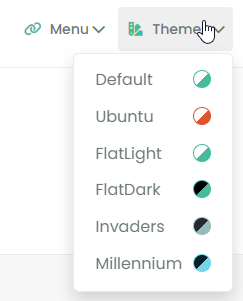
Mark Cutting also advises organisations as a Fractional CIO, Fractional CISO and Executive Advisor, helping boards improve technology governance, cyber resilience and executive decision making. Learn more at Phenomlab Ltd
-
@DownPW very odd. I’ll have a look at this directly on your dev site tomorrow morning to see why this is.
EDIT - this is now fixed. I looked at the code, and I was right that it should work, and only execute once
- not sure what happened there.EDIT2 - I absolutely love this design, and am stealing it
Such a clever way of depicting colour in the theme, and I’m going to make it dynamic also so that the colours change if the theme cssdoes.@phenomlab said in [NODEBB] Help for my custom CSS:
EDIT - this is now fixed. I looked at the code, and I was right that it should work, and only execute once - not sure what happened there.
 ️ hmmm not, almost fixed @phenomlab !
It’s ok for duplicate ajax problem but not fixed for the the footer image : It’s appear one time and if you go to another section (like recent or unread for example), the image on footer don’t appear
Same in incognito mode.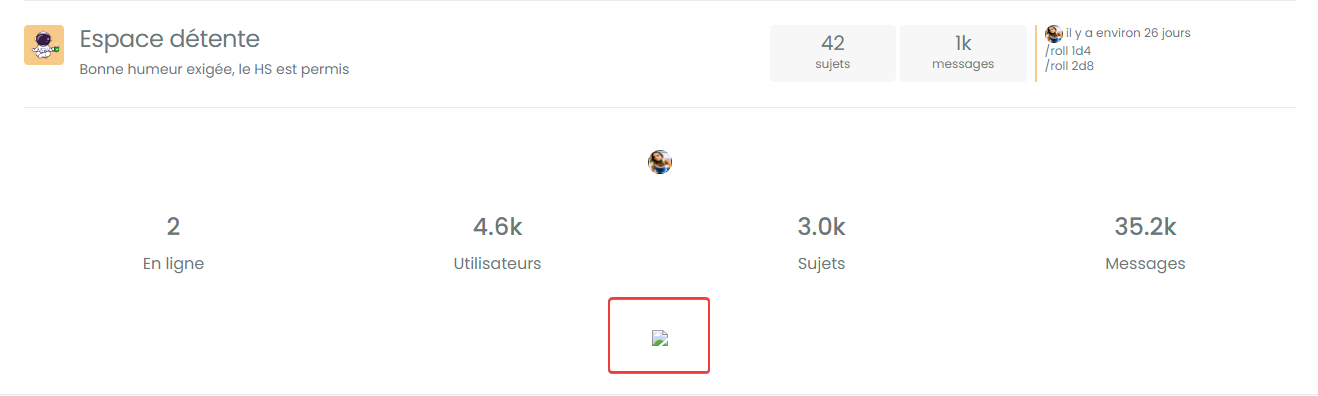
@phenomlab said in [NODEBB] Help for my custom CSS:
EDIT2 - I absolutely love this design, and am stealing it Such a clever way of depicting colour in the theme, and I’m going to make it dynamic also so that the colours change if the theme css does.
Thank you !
–> I already told you, my code is your code
Thinking about it, I found this idea elsewhere but I don’t really know where
I just added a rotation effect on it and adapted it to the dropdown of the brand menu widget.
You talk about making it dynamic but I don’t really see what you mean since the theme colors represented do not change.
Unless you want to automate it. Genre detects the 2 main color types of the theme according to 2 values/declarations present in the css file.PW and WS Spirit alive
-
@phenomlab said in [NODEBB] Help for my custom CSS:
EDIT - this is now fixed. I looked at the code, and I was right that it should work, and only execute once - not sure what happened there.
️ hmmm not, almost fixed @phenomlab !
It’s ok for duplicate ajax problem but not fixed for the the footer image : It’s appear one time and if you go to another section (like recent or unread for example), the image on footer don’t appear
Same in incognito mode.@phenomlab said in [NODEBB] Help for my custom CSS:
EDIT2 - I absolutely love this design, and am stealing it Such a clever way of depicting colour in the theme, and I’m going to make it dynamic also so that the colours change if the theme css does.
Thank you !
–> I already told you, my code is your codeThinking about it, I found this idea elsewhere but I don’t really know where
I just added a rotation effect on it and adapted it to the dropdown of the brand menu widget.
You talk about making it dynamic but I don’t really see what you mean since the theme colors represented do not change.
Unless you want to automate it. Genre detects the 2 main color types of the theme according to 2 values/declarations present in the css file.@DownPW said in [NODEBB] Help for my custom CSS:
It’s ok for duplicate ajax problem but not fixed for the the footer image : It’s appear one time and if you go to another section (like recent or unread for example), the image on footer don’t appear
I kind of expected that because the footer image relies on an
ajaxreload to determine the time, then work out which image to display based on that. The real problem here is that the prepend is being called on each request, and because it’s anprepend, you are seeing multiple copies.One way to fix this is to delete the element and recreate it, but that is horribly inefficient

I’ve modified the function to include a check to see if the containing
divis empty or not - if it is, we add the icon and message - if it’s already there, we skip it// Test to see if the DIV containing the icon and message is empty. If it is, insert icon and message if ($('#busername').length === 0) { $('.getUsername').prepend("<div id='busername'><i id='thisicon' class='" + theicon + "'></i></div>" + themessage); } else { // nothing to do here :) }(Note that this has been added to the existing function)
And some minor
csswhich allows us to float the newdivso that it displaysinline// Inline display fix for Welcome DIV div#busername { display: inline; } -
@phenomlab said in [NODEBB] Help for my custom CSS:
EDIT - this is now fixed. I looked at the code, and I was right that it should work, and only execute once - not sure what happened there.
️ hmmm not, almost fixed @phenomlab !
It’s ok for duplicate ajax problem but not fixed for the the footer image : It’s appear one time and if you go to another section (like recent or unread for example), the image on footer don’t appear
Same in incognito mode.@phenomlab said in [NODEBB] Help for my custom CSS:
EDIT2 - I absolutely love this design, and am stealing it Such a clever way of depicting colour in the theme, and I’m going to make it dynamic also so that the colours change if the theme css does.
Thank you !
–> I already told you, my code is your codeThinking about it, I found this idea elsewhere but I don’t really know where
I just added a rotation effect on it and adapted it to the dropdown of the brand menu widget.
You talk about making it dynamic but I don’t really see what you mean since the theme colors represented do not change.
Unless you want to automate it. Genre detects the 2 main color types of the theme according to 2 values/declarations present in the css file.@DownPW said in [NODEBB] Help for my custom CSS:
You talk about making it dynamic but I don’t really see what you mean since the theme colors represented do not change.
Unless you want to automate it. Genre detects the 2 main color types of the theme according to 2 values/declarations present in the css file.Simple enough -you just reference the variables, but admittedly, you’d need to refactor some code to make this work transiently, so it’s probably not a very good idea. I suppose it really depends on how often you decide to revamp your themes - in which case, it would make sense.
I just don’t like static variables
Mark Cutting also advises organisations as a Fractional CIO, Fractional CISO and Executive Advisor, helping boards improve technology governance, cyber resilience and executive decision making. Learn more at Phenomlab Ltd
-
@DownPW said in [NODEBB] Help for my custom CSS:
You talk about making it dynamic but I don’t really see what you mean since the theme colors represented do not change.
Unless you want to automate it. Genre detects the 2 main color types of the theme according to 2 values/declarations present in the css file.Simple enough -you just reference the variables, but admittedly, you’d need to refactor some code to make this work transiently, so it’s probably not a very good idea. I suppose it really depends on how often you decide to revamp your themes - in which case, it would make sense.
I just don’t like static variables
@phenomlab said in [NODEBB] Help for my custom CSS:
I just don’t like static variables
It doesn’t bother me too much personally because I’m not ready to modify the themes in depth, especially the main colors, but what you say makes sense.
It’s always better to automate when you can.I’ll see what you can do ha ha
In any case, I’m happy to bring my stone to the building
PW and WS Spirit alive
-
Hello @phenomlab
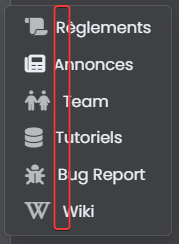
I have a dropdown menu with manu different left icons and I want to align vertically the <a> text
I don’t know why I can’t do it. Fatigue maybe?Here the code of my menu :
<li><a id="menubrand" class="dropdown-item rounded-1" href="https://xxxxxxxxxxxxxxxx"><i id="menubrand" class="fa-solid fa-lg fa-scroll text-primary"></i> Règlements</a></li> <li><a id="menubrand" class="dropdown-item rounded-1" href="https://xxxxxxxxxxxxxxxx"><i id="menubrand" class="fa-solid fa-lg fa-newspaper"></i> Annonces</a></li> <li><a id="menubrand" class="dropdown-item rounded-1" href="https://xxxxxxxxxxxxxxxx"><i id="menubrand" class="fa-solid fa-lg fa-people text-primary"></i> Team</a></li> <li><a id="menubrand" class="dropdown-item rounded-1" href="https://xxxxxxxxxxxxxxxx""><i id="menubrand" class="fa-solid fa-lg fa-database text-primary"></i> Tutoriels</a></li> <li><a id="menubrand" class="dropdown-item rounded-1" href="https://xxxxxxxxxxxxxxxx"><i id="menubrand" class="fa-solid fa-lg fa-bug text-primary"></i> Bug Report</a></li> <li><a id="menubrand" class="dropdown-item rounded-1" href="https://xxxxxxxxxxxxxxxx"><i id="menubrand" class="fa-solid fa-lg fa-brands fa-wikipedia-w text-primary"></i> Wiki</a></li>Resut :
Many thanks
PW and WS Spirit alive
-
Hello @phenomlab
I have a dropdown menu with manu different left icons and I want to align vertically the <a> text
I don’t know why I can’t do it. Fatigue maybe?Here the code of my menu :
<li><a id="menubrand" class="dropdown-item rounded-1" href="https://xxxxxxxxxxxxxxxx"><i id="menubrand" class="fa-solid fa-lg fa-scroll text-primary"></i> Règlements</a></li> <li><a id="menubrand" class="dropdown-item rounded-1" href="https://xxxxxxxxxxxxxxxx"><i id="menubrand" class="fa-solid fa-lg fa-newspaper"></i> Annonces</a></li> <li><a id="menubrand" class="dropdown-item rounded-1" href="https://xxxxxxxxxxxxxxxx"><i id="menubrand" class="fa-solid fa-lg fa-people text-primary"></i> Team</a></li> <li><a id="menubrand" class="dropdown-item rounded-1" href="https://xxxxxxxxxxxxxxxx""><i id="menubrand" class="fa-solid fa-lg fa-database text-primary"></i> Tutoriels</a></li> <li><a id="menubrand" class="dropdown-item rounded-1" href="https://xxxxxxxxxxxxxxxx"><i id="menubrand" class="fa-solid fa-lg fa-bug text-primary"></i> Bug Report</a></li> <li><a id="menubrand" class="dropdown-item rounded-1" href="https://xxxxxxxxxxxxxxxx"><i id="menubrand" class="fa-solid fa-lg fa-brands fa-wikipedia-w text-primary"></i> Wiki</a></li>Resut :
Many thanks
@DownPW You’ll need to restructure the HTML first - don’t use
nbsp;- you should always usemarginorpadding Also, you are using the same ID multiple times which will cause you problems with markup as it is not unique.Try this
<li><a class="menubrand dropdown-item rounded-1" href="https://xxxxxxxxxxxxxxxx"><i class="fa-solid fa-lg fa-scroll text-primary menubrand"></i>Règlements</a></li>
<li><a class="dropdown-item rounded-1" href="https://xxxxxxxxxxxxxxxx"><i class="fa-solid fa-lg fa-newspaper menubrand"></i>Annonces</a></li>
<li><a class="dropdown-item rounded-1" href="https://xxxxxxxxxxxxxxxx"><i class="fa-solid fa-lg fa-people text-primary menubrand"></i>Team</a></li>
<li><a class="dropdown-item rounded-1" href="https://xxxxxxxxxxxxxxxx""><i class="fa-solid fa-lg fa-database text-primary menubrand"></i>Tutoriels</a></li>
<li><a class="dropdown-item rounded-1" href="https://xxxxxxxxxxxxxxxx"><i class="fa-solid fa-lg fa-bug text-primary menubrand"></i>Bug Report</a></li>
<li><a class="dropdown-item rounded-1" href="https://xxxxxxxxxxxxxxxx"><i class="fa-solid fa-lg fa-brands fa-wikipedia-w text-primary menubrand"></i>Wiki</a></li>
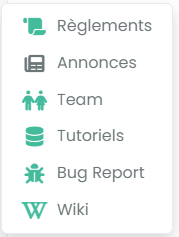
Then use this CSS
i.menubrand {
    max-width: 25px;
    width: 25px;
    margin-right: 10px;
    text-align: center;
    vertical-align: middle;
}
Should give you this



Hello! It looks like you're interested in this conversation, but you don't have an account yet.
Getting fed up of having to scroll through the same posts each visit? When you register for an account, you'll always come back to exactly where you were before, and choose to be notified of new replies (either via email, or push notification). You'll also be able to save bookmarks and upvote posts to show your appreciation to other community members.
With your input, this post could be even better 💗
Register LoginDid this solution help you?
Related Topics
-
Spam spam spam
Solved Configure -
-
-
-
-
-
-
[NODEBB] CSS Style Sheets SelectBox
Locked Solved Customisation