Skip to content

Issues with Progress Bar on v3
Solved Customisation
48 4 20.0k 1
  • wrote on last edited by
    #23

    Status of my web site by android phone;

    • Main page - bar not working
    • topic - bar working
    • chat - bar not working
  • Status of my web site by android phone;

    • Main page - bar not working
    • topic - bar working
    • chat - bar not working
    wrote on last edited by
    #24

    @cagatay The reason this fails for you is because you have to auto-hide the bottom bar
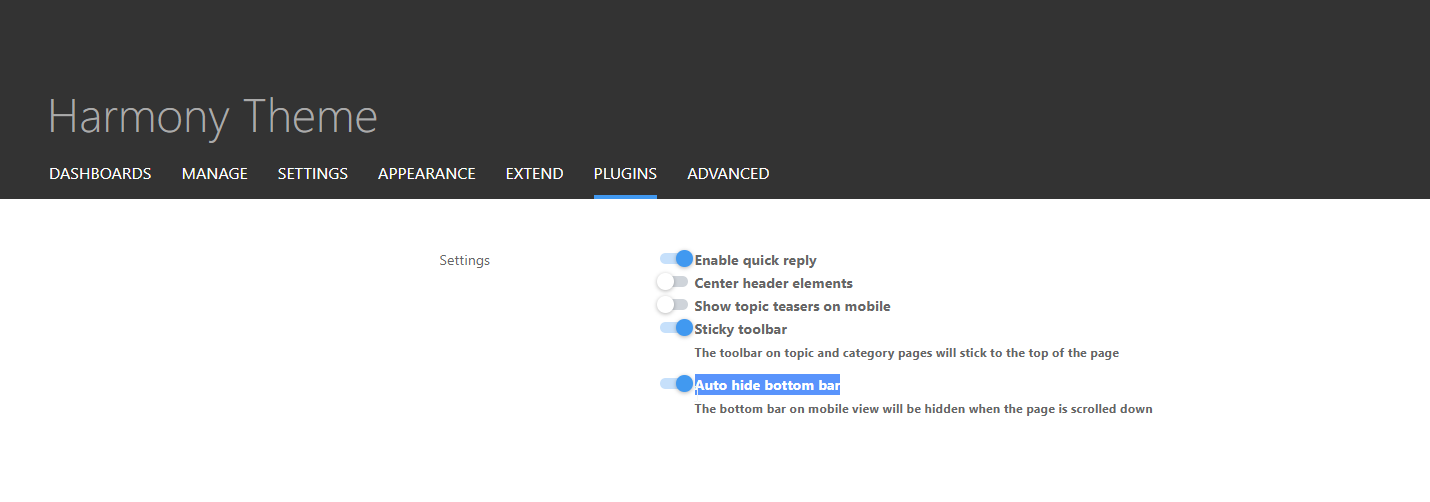
    b103c8c9-eb9f-45ee-9c7d-335a73e83fed-image.png

    I’ve made this change and it’s now working for the most part - but it should also float with the bottom bar depending on it’s position. Not sure why that’s not working but looking now.

  • wrote on last edited by
    #25

    all working now.

  • all working now.

    wrote on last edited by
    #26

    @cagatay Thanks. Also fixed the floating progress bar on mobile. It’s tied into the footer code which you are not using so it wasn’t included in your build (but is now)

  • wrote on last edited by
    #27

    whats is the fix ?

  • whats is the fix ?

    wrote on last edited by
    #28

    @DownPW The footer bar js code.

  • wrote on last edited by
    #29

    You mean I have to change mine?

  • You mean I have to change mine?

    wrote on last edited by
    #30

    @DownPW no. It was missing on @cagatay install

  • wrote on last edited by
    #31

    Mark hi,

    on the Android phone when client at main page, footer bar which has new message, new post, profil etc. can not seen because of bar. How we can change or hide for andorid user this bar on main page?

  • Mark hi,

    on the Android phone when client at main page, footer bar which has new message, new post, profil etc. can not seen because of bar. How we can change or hide for andorid user this bar on main page?

    wrote on last edited by
    #32

    @cagatay Because of the progress bar, or the bottom bar?

  • wrote on last edited by
    #33

    because of progress bar, andorid user can not see new message, new post, profil bar.

  • because of progress bar, andorid user can not see new message, new post, profil bar.

    wrote on last edited by
    #34

    @cagatay Send me a screenshot. I am connected to your forum now and am not able to replicate this.

  • wrote on last edited by
    #35

    WhatsApp Image 2023-05-19 at 19.00.05.jpeg

  • wrote on last edited by
    #36

    @cagatay This appears to be a bug on your forum that is being caused by other CSS. I am using exactly the same code on Sudonix without any issues. In addition, your bottombar appears to be hiding on scroll, which is correct, but not returning when it reaches the correct position. My code does not touch the bottom bar.

    Not sure where this is coming from presently.

  • wrote on last edited by cagatay
    #37

    how i can fix it? as i know i use also your css codes, i did not anything wihtouth you 🙂

  • how i can fix it? as i know i use also your css codes, i did not anything wihtouth you 🙂

    wrote on last edited by
    #38

    @cagatay I’m not sure yet. I will need to look at this when I have some free time. For now, you could disable the progress bar by removing the header.

  • @cagatay The reason this fails for you is because you have to auto-hide the bottom bar

    b103c8c9-eb9f-45ee-9c7d-335a73e83fed-image.png

    I’ve made this change and it’s now working for the most part - but it should also float with the bottom bar depending on it’s position. Not sure why that’s not working but looking now.

    wrote on last edited by
    #39

    @phenomlab said in Issues with Progress Bar on v3:

    @cagatay The reason this fails for you is because you have to auto-hide the bottom bar

    b103c8c9-eb9f-45ee-9c7d-335a73e83fed-image.png

    I’ve made this change and it’s now working for the most part - but it should also float with the bottom bar depending on it’s position. Not sure why that’s not working but looking now.

    i did disable mode auto hide 🙂 now working normally on phones.

  • @phenomlab said in Issues with Progress Bar on v3:

    @cagatay The reason this fails for you is because you have to auto-hide the bottom bar

    b103c8c9-eb9f-45ee-9c7d-335a73e83fed-image.png

    I’ve made this change and it’s now working for the most part - but it should also float with the bottom bar depending on it’s position. Not sure why that’s not working but looking now.

    i did disable mode auto hide 🙂 now working normally on phones.

    wrote on last edited by
    #40

    @cagatay Excellent.

  • wrote on last edited by
    #41

    yop Mark 🙂

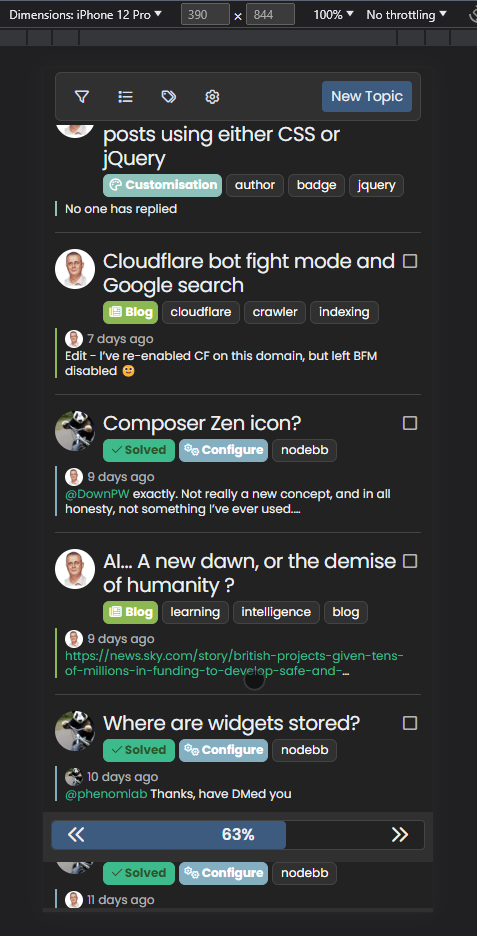
    I see this on progress bar :

    On small screen resolutions, the space between the arrows and the background div (progress bar) is not fixed.
    It wouldn’t hurt to add fixed spaces no matter the resolution


    image.png

  • yop Mark 🙂

    I see this on progress bar :

    On small screen resolutions, the space between the arrows and the background div (progress bar) is not fixed.
    It wouldn’t hurt to add fixed spaces no matter the resolution
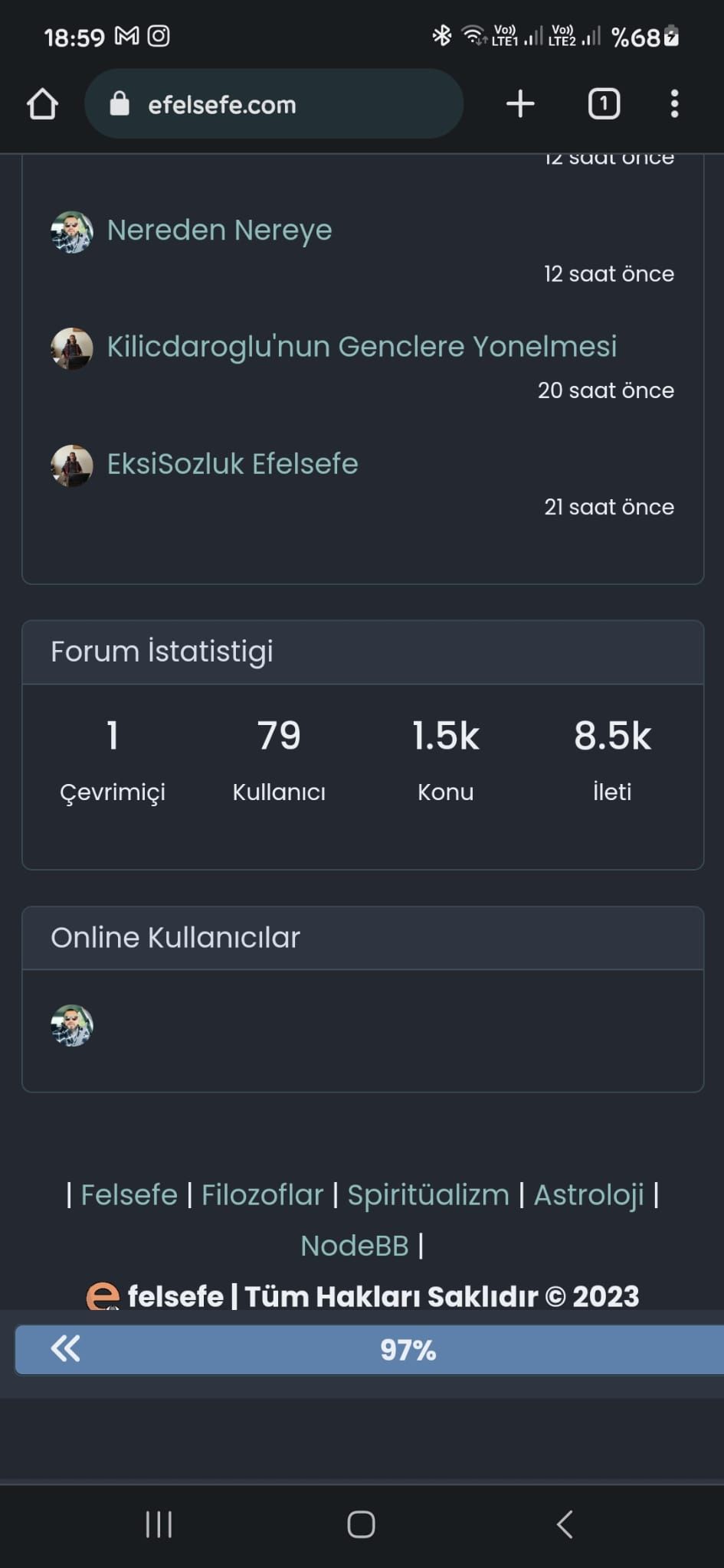
    image.png

    wrote on last edited by phenomlab
    #42

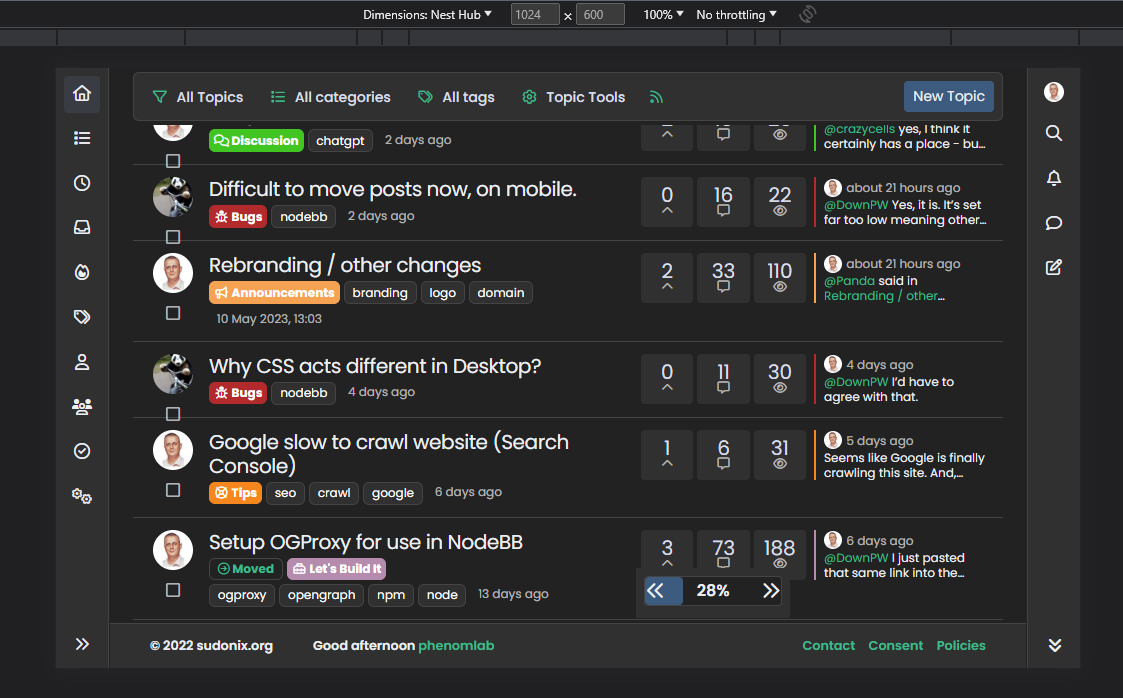
    @DownPW I already have that here?

    a959fe2a-7fdf-4663-88fa-aa042d755576-image.png

    EDIT - I see what you mean here

    b35c5d62-460d-4204-8d45-401f36a852fd-image.png


Did this solution help you?
Did you find the suggested solution useful? Support 💗 Sudonix with a coffee ☕
If your organisation needs deeper expertise around infrastructure, security, or technology leadership, learn more about Phenomlab Ltd. Many of the deeper technical guides behind Sudonix are published there.

Related Topics
  • Please help me, I can't install nodebb

    Locked Solved Customisation nodebb
    7
    5 Votes
    7 Posts
    2k Views
    phenomlab
    Installation completed, verified, and tested. Correct installation methodology is below https://docs.nodebb.org/installing/os/ubuntu/
  • Forum customisation

    Customisation nodebb forum customised
    11
    2
    6 Votes
    11 Posts
    3k Views
    JAC
    Thank you Mark, the changes look fantastic!!
  • Fancybox zoom

    Unsolved Customisation fancybox zoom image
    2
    1
    0 Votes
    2 Posts
    944 Views
    phenomlab
    @DownPW Technically, it should be possible with the addition of the below Toolbar: { display: { left: ["infobar"], middle: [ "zoomIn", "zoomOut", "toggle1to1", "rotateCCW", "rotateCW", "flipX", "flipY", ], right: ["slideshow", "thumbs", "close"], }, }, Meaning your code block becomes function fancybox() { if (top.location.pathname !== '/login') { $(document).ready(function() { $('a').not('.forum-logo').not(".avatar").not(".emoji").not(".bmac-noanimate").each(function() { $('a[href*=".jpg"], a[href*=".jpeg"], a[href*=".png"], a[href*=".gif"], a[href*=".webp"], a[href*=".svg"]').addClass("noanimate"); }); }); Fancybox.bind( 'a[href*=".jpg"], a[href*=".jpeg"], a[href*=".png"], a[href*=".gif"], a[href*=".webp"], a[href*=".svg"]', { Toolbar: { display: { left: ["infobar"], middle: [ "zoomIn", "zoomOut", "toggle1to1", "rotateCCW", "rotateCW", "flipX", "flipY", ], right: ["slideshow", "thumbs", "close"], }, }, } ); } } Note, that you just need to add/remove the elements in the toolbar you do not need. Obviously, zoomIn and zoomOut are the ones you are specifically interested in. However, if Fancybox detects that the image has already been zoomed as far as possible, then this will not work. You’d need an external library such as zoom.js to add this functionality, or perhaps simpler https://www.jacklmoore.com/zoom/ A good example of how you’d make these two independent libraries work together is below https://codepen.io/ezra_siton/pen/VgrjKw It’s worth nothing that this specific code is based on Fancybox 3, so may need to be refactored to work with the latest version 5.
  • CSS code customization for the link preview plugin

    Solved Customisation css nodebb
    6
    2
    3 Votes
    6 Posts
    3k Views
    phenomlab
    @kadir-ay-0 marking as resolved based on https://community.nodebb.org/topic/17109/manual-build-a-night-mode-for-harmony/5 Please do not raise requests in two places - here and the NodeBB forums. All this does is create unnecessary load for both parties.
  • NodeBB v3 Vote Icon

    Solved Customisation icons vote icons
    9
    2 Votes
    9 Posts
    3k Views
    cagatay
    @phenomlab forget it, look likes good with your codes.
  • Mongo Eror with v3 beta-1

    Solved Customisation nodebb v3
    8
    4 Votes
    8 Posts
    2k Views
    phenomlab
    @cagatay ok. You should use a copy of the production database or a completely new one. Never share a database between two instances of NodeBB.
  • Footer bar add center text

    Solved Customisation css
    41
    1
    8 Votes
    41 Posts
    19k Views
    DownPW
    @phenomlab said in Footer bar add center text: div#console-nav-tab Ah ok test with bottom: 0px !important; idem
  • navigation bar is misplaced when the window gets smaller

    Solved Customisation bugs
    23
    1
    10 Votes
    23 Posts
    8k Views
    phenomlab
    @DownPW sounds good.