[NODEBB] Help for my custom CSS
-
Thanks Mark
I will test that tomorrow and I will tell you if is good or not !
– Other bug i have to resolve my friend :
- When I have plenty of tag on Post, have this :
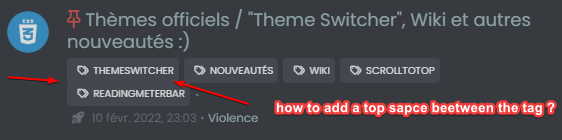
How to add a top space beetween the tag for a better lisibility ?
Thanks in advance @phenomlab
@DownPW said in [NODEBB] Help for my custom CSS:
– Other bug i have to resolve my friend :
When I have plenty of tag on Post, have this :
How to add a top space beetween the tag for a better lisibility ?
Thanks in advance @phenomlaban idea for that @phenomlab ?
PW and WS Spirit alive
-
@DownPW said in [NODEBB] Help for my custom CSS:
– Other bug i have to resolve my friend :
When I have plenty of tag on Post, have this :
How to add a top space beetween the tag for a better lisibility ?
Thanks in advance @phenomlaban idea for that @phenomlab ?
@DownPW I’ll check and get back to you.
-
@DownPW said in [NODEBB] Help for my custom CSS:
– Other bug i have to resolve my friend :
When I have plenty of tag on Post, have this :
How to add a top space beetween the tag for a better lisibility ?
Thanks in advance @phenomlaban idea for that @phenomlab ?
@DownPW Try this
.tag-list {
    display: inline-block;
    margin-top: 5px;
    line-height: 1.7;
}
Because you are using
inline-blockto float the elements on the same line, you cannot use margins to control the space. In this case,line-heightwill provide what you are looking for. -
-
Hello @phenomlab
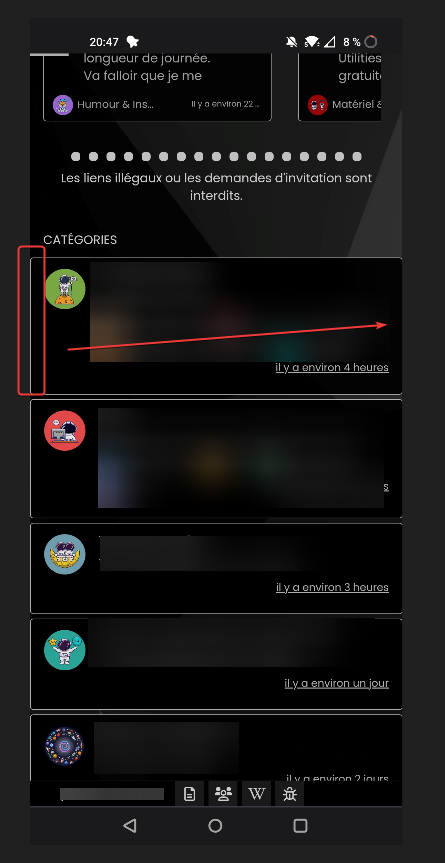
I have a odd littlebug only on Smartphone chrome based browsers (chrome, vivaldi, brave) only (it’s ok on firefox mobile)
the right border of categories /topic is not visible
Here a screenshot of the problem on chrome based browsers:
And a good result on firefox mobile (it’s OK) :
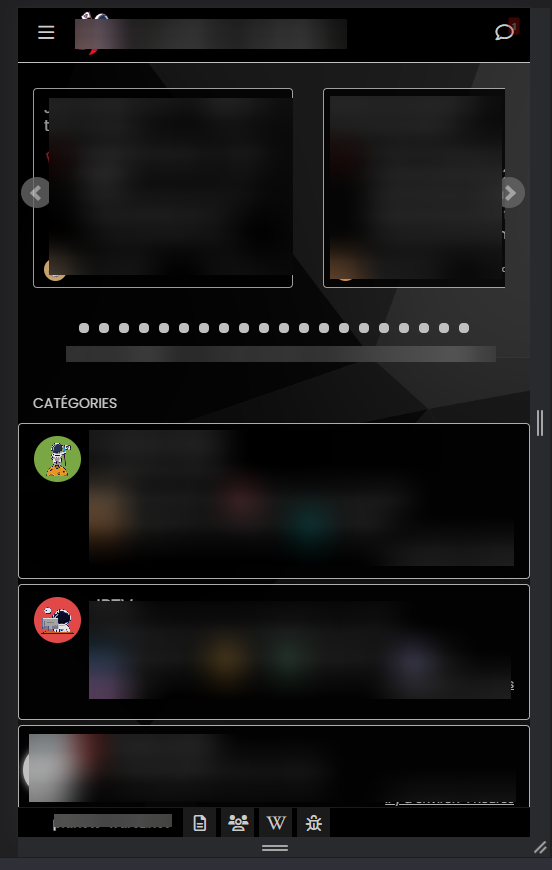
odd

PW and WS Spirit alive
-
Hello @phenomlab
I have a odd littlebug only on Smartphone chrome based browsers (chrome, vivaldi, brave) only (it’s ok on firefox mobile)
the right border of categories /topic is not visible
Here a screenshot of the problem on chrome based browsers:
And a good result on firefox mobile (it’s OK) :
odd
@DownPW odd indeed. Can you send me the CSS you are using for this ?
Mark Cutting also advises organisations as a Fractional CIO, Fractional CISO and Executive Advisor, helping boards improve technology governance, cyber resilience and executive decision making. Learn more at Phenomlab Ltd
-
.categories > li, .category > ul > li {
    border: 1px solid silver;
    border-radius: 4px;
    margin-top: 5px;
    background: black;
    opacity: 0.9;
}
PW and WS Spirit alive
-
.categories > li, .category > ul > li { border: 1px solid silver; border-radius: 4px; margin-top: 5px; background: black; opacity: 0.9; }@DownPW change the
silverfor a hex value.Mark Cutting also advises organisations as a Fractional CIO, Fractional CISO and Executive Advisor, helping boards improve technology governance, cyber resilience and executive decision making. Learn more at Phenomlab Ltd
-
-
@phenomlab Doesn’t work
@DownPW can you also change background from
blackto#000000 -
yes I have test too…
I have test too to disable all custom CSS on nodebb acp and delete all css code on file css theme with just
.categories > li, .category > ul > li {
active and it’s the same…delete cache too and logout/login
PW and WS Spirit alive
-
yes I have test too…
I have test too to disable all custom CSS on nodebb acp and delete all css code on file css theme with just
.categories > li, .category > ul > li {
active and it’s the same…delete cache too and logout/login
@DownPW is there a URL where I can check this ? Might not be this evening, but definitely tomorrow am.
-
-
@DownPW Try this
@media (max-width: 768px) {
.slideout-panel {
    margin-right: 1px;
}
}
The issue here is how other mobile browsers interpret the padding on the slideout panel, so we need to “patch” it so that those browsers can use the forced margin instead.
-
great it works great

You had to see this stuff !!
You are too strong as usual Mark.
Many Thanks

-
Hello Mark

I use this css code for reduce the image size :
.topic .posts .content .img-responsive {
    max-width: 45%;
    width: auto;
    padding: 1px;
    border-radius: 4px;
    border: 1px solid #c3c3c3;
    background-color: #F5F5F5;
    margin-top: 5px;
    margin-bottom: 5px;
}
Would it be possible to have a separate max size just for GIFs extension files (.gif) ?
I would like the gifs to be smaller than the imagesThanks in advance @phenomlab
PW and WS Spirit alive
-
Hello Mark
I use this css code for reduce the image size :
.topic .posts .content .img-responsive {
    max-width: 45%;
    width: auto;
    padding: 1px;
    border-radius: 4px;
    border: 1px solid #c3c3c3;
    background-color: #F5F5F5;
    margin-top: 5px;
    margin-bottom: 5px;
}
Would it be possible to have a separate max size just for GIFs extension files (.gif) ?
I would like the gifs to be smaller than the imagesThanks in advance @phenomlab
@DownPW Possible, yes, but it may be a little on the “greedy” side.
Try this - obviously, remove the red border I used for testing and add your own code
img[src$="gif"] {
    border: 10px solid red !important;
}
This is also very useful as a reference
Mark Cutting also advises organisations as a Fractional CIO, Fractional CISO and Executive Advisor, helping boards improve technology governance, cyber resilience and executive decision making. Learn more at Phenomlab Ltd
-
@DownPW Possible, yes, but it may be a little on the “greedy” side.
Try this - obviously, remove the red border I used for testing and add your own code
img[src$="gif"] {
    border: 10px solid red !important;
}
This is also very useful as a reference
@phenomlab said in [NODEBB] Help for my custom CSS:
@DownPW Possible, yes, but it may be a little on the “greedy” side.
Try this - obviously, remove the red border I used for testing and add your own code
img[src$="gif"] {
    border: 10px solid red !important;
}
This is also very useful as a reference
–> it seem to work with this code:
/* max-width for IMG Files */
.topic .posts .content .img-responsive {
    max-width: 45%;
}

/* max-width for GIF Files */
.topic .posts .content .img-responsive[src$="gif"] {
    max-width: 10% !important;
}
Thanks @phenomlab for the attribute that I don’t find
-
Hello @phenomlab
It’s possible to add video background (mp4 for example)on nodebb for one theme and not for the other?
PW and WS Spirit alive
-
Hello @phenomlab
It’s possible to add video background (mp4 for example)on nodebb for one theme and not for the other?
@DownPW yes, but you have to be careful with performance. This can impact the loading of the site depending on the size of the MP4 file and where it is being accessed from.
Mark Cutting also advises organisations as a Fractional CIO, Fractional CISO and Executive Advisor, helping boards improve technology governance, cyber resilience and executive decision making. Learn more at Phenomlab Ltd


Hello! It looks like you're interested in this conversation, but you don't have an account yet.
Getting fed up of having to scroll through the same posts each visit? When you register for an account, you'll always come back to exactly where you were before, and choose to be notified of new replies (either via email, or push notification). You'll also be able to save bookmarks and upvote posts to show your appreciation to other community members.
With your input, this post could be even better 💗
Register Login