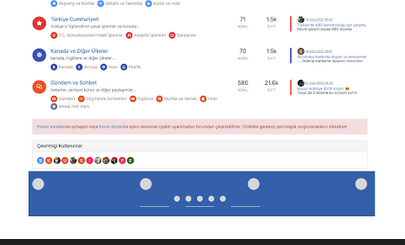
Bottom footer navbar button extend
-
Small request for my forum or here @phenomlab
I would like the bottom bar of the site to be hidden with a button and for it to appear/disappear after a click or a mouseover with a small animation that doesn’t take too many resources.
It would also be nice if the setting was kept in the DOM session if possible so that the user doesn’t have to mess with it all the time.
We could imagine that it is active by default and if the user does not want it, he hides it. It will simply remain the button on the left or right side
Thanks

PW and WS Spirit alive
-
Instructions
- Go to
/admin/extend/widgetsand locate the “Global Footer” widget - At the very top of the existing code you have in that widget, add
<div id="console-nav-tab"><i class="fa-solid fa-angles-left"></i></div>- Add this CSS
div#console-nav-tab {
position: fixed;
    bottom: 0px;
    z-index: 900;
    height: 30px;
    left: 0px;
}
div#console-nav-tab i {
    font-size: 16px;
    margin-left: 10px;
    line-height: 2.0 !important;
}
.toBottom {
   bottom: 0px !important;
}
Note, that you probably need to modify the existing CSS ID
floatleftto accommodate the additional DIV and icon. For example#floatleft { float: left; padding-left: 30px; /*additional left padding to support additional DIV and icon */ font-size: 80%; line-height: 2.0; font-weight: 600; display: flex; }- Go to
/admin/appearance/customise#custom-jsand add this block of code (bottom is fine, or wherever you want to place it)
$(document).ready(function() { $(window).on('action:ajaxify.end', function(data) { var getState = localStorage.getItem("footer"); if (getState === "hidden") { $("#console-nav-footer").hide(); $("#console-nav-tab i").addClass("fa-solid fa-angles-right"); $('.pagination-block').addClass("toBottom"); } else { $("#console-nav-tab i").addClass("fa-solid fa-angles-left"); $('.pagination-block').removeClass("toBottom"); } $("#console-nav-tab").click(function() { $("#console-nav-footer").toggle(250, function() { if ($("#console-nav-footer").is(":hidden")) { localStorage.setItem("footer", "hidden"); $("#console-nav-tab i").addClass("fa-solid fa-angles-right"); $('.pagination-block').addClass("toBottom"); } else { localStorage.setItem("footer", "shown"); $("#console-nav-tab i").addClass("fa-solid fa-angles-left"); $('.pagination-block').removeClass("toBottom"); } }); $("i", this).toggleClass("fa-solid fa-angles-left fa-solid fa-angles-right"); }); }); });- Test, and make necessary modifications to suit your own environment
- Go to
-
Small request for my forum or here @phenomlab
I would like the bottom bar of the site to be hidden with a button and for it to appear/disappear after a click or a mouseover with a small animation that doesn’t take too many resources.
It would also be nice if the setting was kept in the DOM session if possible so that the user doesn’t have to mess with it all the time.
We could imagine that it is active by default and if the user does not want it, he hides it. It will simply remain the button on the left or right side
Thanks
@DownPW said in Bottom footer navbar button extend:
We could imagine that it is active by default and if the user does not want it, he hides it. It will simply remain the button on the left or right side
So are you looking for a button on the footer that when clicked will remove from the screen with an animation, but leave just enough so that it can be clicked to make it reappear again with the same animation ?
Mark Cutting also advises organisations as a Fractional CIO, Fractional CISO and Executive Advisor, helping boards improve technology governance, cyber resilience and executive decision making. Learn more at Phenomlab Ltd
-
@DownPW said in Bottom footer navbar button extend:
We could imagine that it is active by default and if the user does not want it, he hides it. It will simply remain the button on the left or right side
So are you looking for a button on the footer that when clicked will remove from the screen with an animation, but leave just enough so that it can be clicked to make it reappear again with the same animation ?
@phenomlab said in Bottom footer navbar button extend:
@DownPW said in Bottom footer navbar button extend:
We could imagine that it is active by default and if the user does not want it, he hides it. It will simply remain the button on the left or right side
So are you looking for a button on the footer that when clicked will remove from the screen with an animation, but leave just enough so that it can be clicked to make it reappear again with the same animation ?
Exactly
PW and WS Spirit alive
-
@phenomlab said in Bottom footer navbar button extend:
@DownPW said in Bottom footer navbar button extend:
We could imagine that it is active by default and if the user does not want it, he hides it. It will simply remain the button on the left or right side
So are you looking for a button on the footer that when clicked will remove from the screen with an animation, but leave just enough so that it can be clicked to make it reappear again with the same animation ?
Exactly
@DownPW Right. I’m on it (well, tomorrow now)
Mark Cutting also advises organisations as a Fractional CIO, Fractional CISO and Executive Advisor, helping boards improve technology governance, cyber resilience and executive decision making. Learn more at Phenomlab Ltd
-
@phenomlab hé hé

-
@phenomlab said in Bottom footer navbar button extend:
@DownPW said in Bottom footer navbar button extend:
We could imagine that it is active by default and if the user does not want it, he hides it. It will simply remain the button on the left or right side
So are you looking for a button on the footer that when clicked will remove from the screen with an animation, but leave just enough so that it can be clicked to make it reappear again with the same animation ?
Exactly
-
clearly that ^^
PW and WS Spirit alive
-
clearly that ^^
@DownPW ok, good. Let me write the code to record the session state (in the same way that the theme engine works) and I’ll release the code, plus CSS.
-
hell yeah
Simple to modify ?Example: put the button on the left or right
PW and WS Spirit alive
-
@DownPW yes, that will be a simple CSS modification
-
@DownPW said in Bottom footer navbar button extend:
Example: put the button on the left or right
Looks better on the left I think - more natural

Mark Cutting also advises organisations as a Fractional CIO, Fractional CISO and Executive Advisor, helping boards improve technology governance, cyber resilience and executive decision making. Learn more at Phenomlab Ltd
-
@DownPW said in Bottom footer navbar button extend:
Example: put the button on the left or right
Looks better on the left I think - more natural
-
@DownPW I’ll make some small adjustments to the final code to accommodate this. Just need to write the session cookie data, then I’ll release the code.
-
@DownPW Can you let me know if you used the same code for the footer as what is here ? I think this is the case, but want to check. There needs to be some modifications to this code to support the footer toggle.
Mark Cutting also advises organisations as a Fractional CIO, Fractional CISO and Executive Advisor, helping boards improve technology governance, cyber resilience and executive decision making. Learn more at Phenomlab Ltd
-
Updated position of collapse/expand so it’s on the left for a more natural feel
-
Very great
-
@DownPW Can you let me know if you used the same code for the footer as what is here ? I think this is the case, but want to check. There needs to be some modifications to this code to support the footer toggle.
@phenomlab said in Bottom footer navbar button extend:
Can you let me know if you used the same code for the footer as what is here ?
yes Mark, with minor adjustement.
-
Instructions
- Go to
/admin/extend/widgetsand locate the “Global Footer” widget - At the very top of the existing code you have in that widget, add
<div id="console-nav-tab"><i class="fa-solid fa-angles-left"></i></div>- Add this CSS
div#console-nav-tab {
position: fixed;
    bottom: 0px;
    z-index: 900;
    height: 30px;
    left: 0px;
}
div#console-nav-tab i {
    font-size: 16px;
    margin-left: 10px;
    line-height: 2.0 !important;
}
.toBottom {
   bottom: 0px !important;
}
Note, that you probably need to modify the existing CSS ID
floatleftto accommodate the additional DIV and icon. For example#floatleft { float: left; padding-left: 30px; /*additional left padding to support additional DIV and icon */ font-size: 80%; line-height: 2.0; font-weight: 600; display: flex; }- Go to
/admin/appearance/customise#custom-jsand add this block of code (bottom is fine, or wherever you want to place it)
$(document).ready(function() { $(window).on('action:ajaxify.end', function(data) { var getState = localStorage.getItem("footer"); if (getState === "hidden") { $("#console-nav-footer").hide(); $("#console-nav-tab i").addClass("fa-solid fa-angles-right"); $('.pagination-block').addClass("toBottom"); } else { $("#console-nav-tab i").addClass("fa-solid fa-angles-left"); $('.pagination-block').removeClass("toBottom"); } $("#console-nav-tab").click(function() { $("#console-nav-footer").toggle(250, function() { if ($("#console-nav-footer").is(":hidden")) { localStorage.setItem("footer", "hidden"); $("#console-nav-tab i").addClass("fa-solid fa-angles-right"); $('.pagination-block').addClass("toBottom"); } else { localStorage.setItem("footer", "shown"); $("#console-nav-tab i").addClass("fa-solid fa-angles-left"); $('.pagination-block').removeClass("toBottom"); } }); $("i", this).toggleClass("fa-solid fa-angles-left fa-solid fa-angles-right"); }); }); });- Test, and make necessary modifications to suit your own environment
- Go to
-
-
@DownPW Because it’s not finished. I forgot the session state…


Hello! It looks like you're interested in this conversation, but you don't have an account yet.
Getting fed up of having to scroll through the same posts each visit? When you register for an account, you'll always come back to exactly where you were before, and choose to be notified of new replies (either via email, or push notification). You'll also be able to save bookmarks and upvote posts to show your appreciation to other community members.
With your input, this post could be even better 💗
Register LoginDid this solution help you?
Related Topics
-
-
-
Viewing Permission.
Solved General -
-
-
-
-
NodeBB Footer
Solved Customisation