[NODEBB] Help for my custom CSS
-
I see how to change background color, text color, border color but not the progress bar with transition value.
It’s too fast to see the code on console
I see this in “element style” :
transition: width 5450ms linear 0s, background-color 5450ms ease-in 0s;But I don’t no what to do with this
PW and WS Spirit alive
-
I see how to change background color, text color, border color but not the progress bar with transition value.
It’s too fast to see the code on console
I see this in “element style” :
transition: width 5450ms linear 0s, background-color 5450ms ease-in 0s;But I don’t no what to do with this
@downpw Seems like it’s contained in this block

<div id="alert_button_1643376464937" class="alert alert-dismissable alert-success clearfix animate" component="toaster/toast" timeoutid="172" style="transition: width 5450ms linear 0s, background-color 5450ms ease-in 0s;">
	<button type="button" class="close" data-dismiss="alert" aria-hidden="true">×</button>
	<strong>Welcome Back  phenomlab!</strong>
	<p>You have successfully logged in</p>
</div>
For info, you can actually pause the execution of Javascript as follows
-
Open Developer tools, Go to Sources tab and keep it ready
-
Now, go back and perform the actions on the App to get it to the state where it needs to be frozen.
-
Click on the ‘Pause Script Execution’ button (first button in the list of buttons on the right corner of Sources tab) to pause the page.
This will force the debugger to pause the execution, meaning you’ll see the below
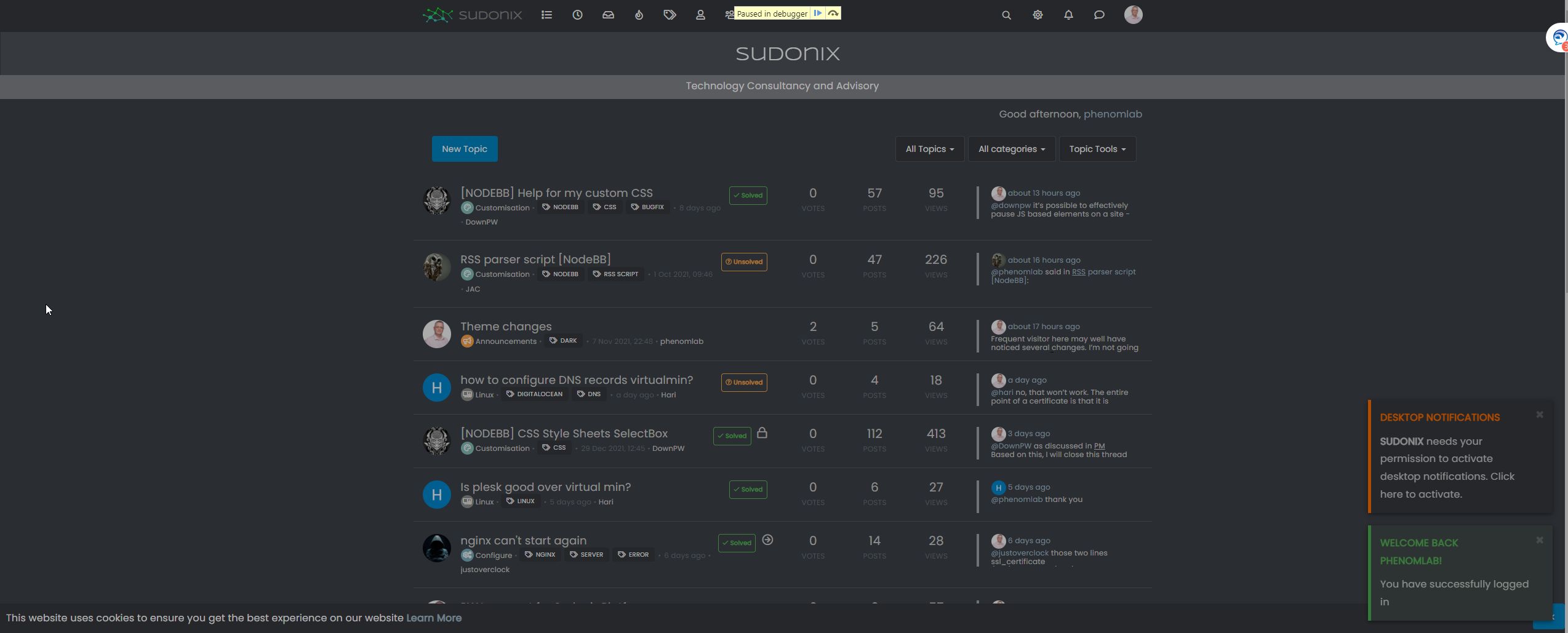
This will then allow you to expose the elements you need

Mark Cutting also advises organisations as a Fractional CIO, Fractional CISO and Executive Advisor, helping boards improve technology governance, cyber resilience and executive decision making. Learn more at Phenomlab Ltd
-
-
@downpw Seems like it’s contained in this block
<div id="alert_button_1643376464937" class="alert alert-dismissable alert-success clearfix animate" component="toaster/toast" timeoutid="172" style="transition: width 5450ms linear 0s, background-color 5450ms ease-in 0s;">
	<button type="button" class="close" data-dismiss="alert" aria-hidden="true">×</button>
	<strong>Welcome Back  phenomlab!</strong>
	<p>You have successfully logged in</p>
</div>
For info, you can actually pause the execution of Javascript as follows
-
Open Developer tools, Go to Sources tab and keep it ready
-
Now, go back and perform the actions on the App to get it to the state where it needs to be frozen.
-
Click on the ‘Pause Script Execution’ button (first button in the list of buttons on the right corner of Sources tab) to pause the page.
This will force the debugger to pause the execution, meaning you’ll see the below
This will then allow you to expose the elements you need
Yeah I test that and I find and modify these code :
.alert-window .alert {

    background-color: black;
    color: aqua;
}

.alert-window .alert.alert-success {
    color: aqua;
    border-color: aqua;
}

.alert-window .alert.animate.alert-success::before {
    background-color: red !important;
}

.alert-window .alert.animate::before {
    width: calc(100% + 50px);
}
For example, what i want here are just have animate progress bar on red but doesn’t work, she’s black.
I close the topic on nodebb communauty. no one respond
PW and WS Spirit alive
-
-
Yeah I test that and I find and modify these code :
.alert-window .alert {

    background-color: black;
    color: aqua;
}

.alert-window .alert.alert-success {
    color: aqua;
    border-color: aqua;
}

.alert-window .alert.animate.alert-success::before {
    background-color: red !important;
}

.alert-window .alert.animate::before {
    width: calc(100% + 50px);
}
For example, what i want here are just have animate progress bar on red but doesn’t work, she’s black.
I close the topic on nodebb communauty. no one respond
@downpw said in [NODEBB] Help for my custom CSS:
no one respond
Only me
I’ll have a look this weekend to see if I can identify the js class but I do think this is based off another CSS value and an alpha rgba used as an overlay.
-
.alert-window .alert.animate.alert-success::before {
    background-color: red !important;
}
I have test with white background and It seems to work.
But the red come at the middle/end (maybe a settings CSS transition) :
But with black background, the red is here (we see it at the end) we see nothing at all.
Seems the background overall the animate effect :

PW and WS Spirit alive
-
.alert-window .alert.animate.alert-success::before {
    background-color: red !important;
}
I have test with white background and It seems to work.
But the red come at the middle/end (maybe a settings CSS transition) :But with black background, the red is here (we see it at the end) we see nothing at all.
Seems the background overall the animate effect :
@downpw I’ve a feeling this night be related to
z-index. Try setting with a high value, as this will force the animation to the front. -
possible to delete border radius at the bottom left and right ?
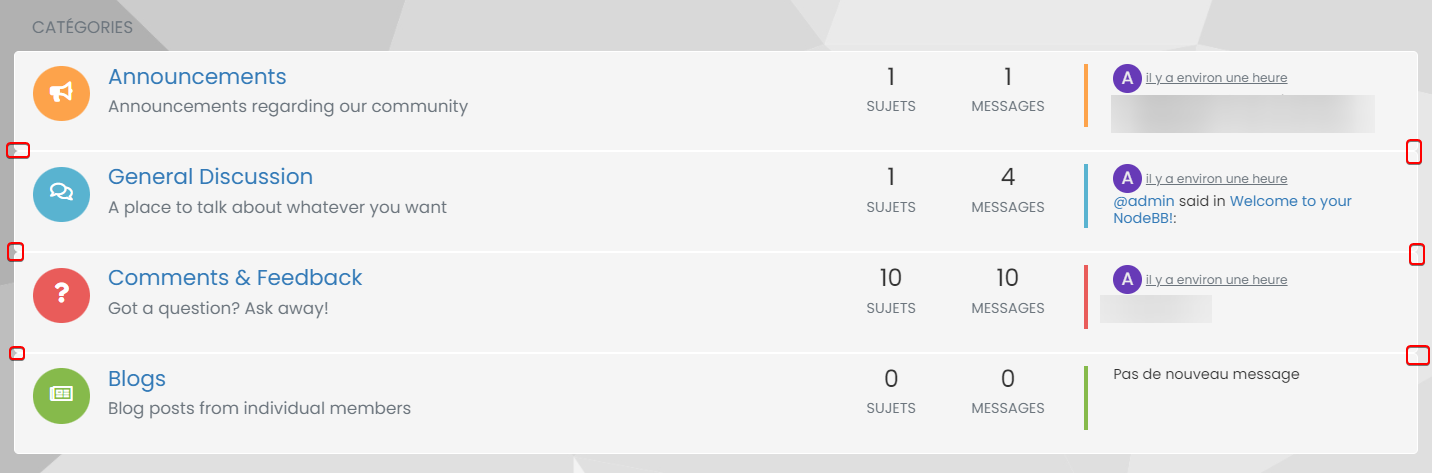
Just border radius at the top of the first div and at the last Div bottom ?
I would like a entirely bloc with four border radiusPossible ?
I play with .categories>li, .category>ul>li but it’s not what I wantI would like to move chat bubbles and WYSIWYG at the left bottom if it’s possible, I tetst with this bit it’s not perfect :
.taskbar .navbar-nav {
    padding-right: 1840px;
    padding-bottom: 15px;
    position: relative;
    bottom: 25px !important;
}
Thanks for your help in advance Mark
PW and WS Spirit alive
-
possible to delete border radius at the bottom left and right ?
Just border radius at the top of the first div and at the last Div bottom ?
I would like a entirely bloc with four border radiusPossible ?
I play with .categories>li, .category>ul>li but it’s not what I wantI would like to move chat bubbles and WYSIWYG at the left bottom if it’s possible, I tetst with this bit it’s not perfect :
.taskbar .navbar-nav {
    padding-right: 1840px;
    padding-bottom: 15px;
    position: relative;
    bottom: 25px !important;
}
Thanks for your help in advance Mark
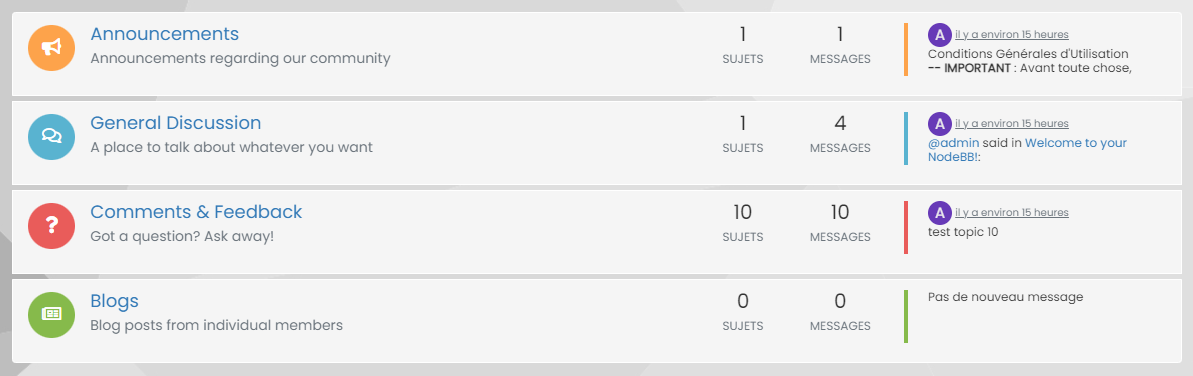
@DownPW Definitely possible, yes. This will work
.categories>li, .category>ul>li {
    border-radius: 0px;
}
.categories>li:first-of-type {
    border-top-left-radius: 4px;
    border-top-right-radius: 4px;
}
.categories>li:last-of-type {
    border-bottom-left-radius: 4px;
    border-bottom-right-radius: 4px;
}
Looks like this
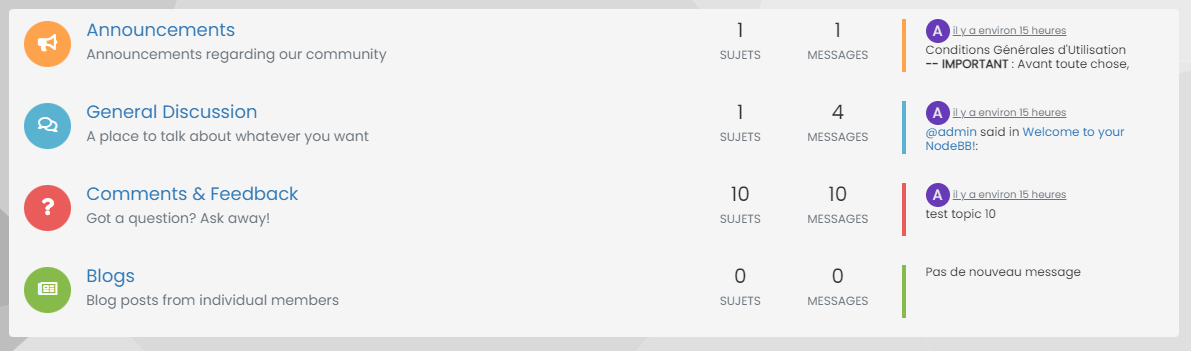
You could then close the gaps between if you really wanted it as one block
.categories>li, .category>ul>li {
    border: none;
    margin-top: 0px;
    background: #F5F5F5;
}
That gives you
Mark Cutting also advises organisations as a Fractional CIO, Fractional CISO and Executive Advisor, helping boards improve technology governance, cyber resilience and executive decision making. Learn more at Phenomlab Ltd
-
@DownPW Definitely possible, yes. This will work
.categories>li, .category>ul>li {
    border-radius: 0px;
}
.categories>li:first-of-type {
    border-top-left-radius: 4px;
    border-top-right-radius: 4px;
}
.categories>li:last-of-type {
    border-bottom-left-radius: 4px;
    border-bottom-right-radius: 4px;
}
Looks like this
You could then close the gaps between if you really wanted it as one block
.categories>li, .category>ul>li {
    border: none;
    margin-top: 0px;
    background: #F5F5F5;
}
That gives you
@phenomlab Great !! Thanks you very much:)
EDIT: Possible to do the same thing on Unread page and Recent page ?
PW and WS Spirit alive
-
Other two things
ONE
I would like to move chat bubbles and WYSIWYG at the left bottom if it’s possible, I test with this bit it’s not perfect :
.taskbar .navbar-nav {
padding-right: 1840px;
padding-bottom: 15px;
position: relative;
bottom: 25px !important;
}
Thanks for your help in advance MarkTWO
I have this problem :

The chat windows stays in the background even when I click on it.
I have zindex on composer and footbar
PW and WS Spirit alive
-
@phenomlab Great !! Thanks you very much:)
EDIT: Possible to do the same thing on Unread page and Recent page ?
@DownPW said in [NODEBB] Help for my custom CSS:
@phenomlab Great !! Thanks you very much:)
EDIT: Possible to do the same thing on Unread page and Recent page ?
This should work
.category-item:first-of-type { border-top-left-radius: 4px; border-top-right-radius: 4px; } .category-item:last-of-type { border-bottom-left-radius: 4px; border-bottom-right-radius: 4px; } -
Other two things
ONE
I would like to move chat bubbles and WYSIWYG at the left bottom if it’s possible, I test with this bit it’s not perfect :
.taskbar .navbar-nav {
padding-right: 1840px;
padding-bottom: 15px;
position: relative;
bottom: 25px !important;
}
Thanks for your help in advance MarkTWO
I have this problem :
The chat windows stays in the background even when I click on it.
I have zindex on composer and footbar
The chat windows stays in the background even when I click on it.
I have zindex on composer and footbar
This should fix that
.chat-modal { z-index: 5000; } -
Other two things
ONE
I would like to move chat bubbles and WYSIWYG at the left bottom if it’s possible, I test with this bit it’s not perfect :
.taskbar .navbar-nav {
padding-right: 1840px;
padding-bottom: 15px;
position: relative;
bottom: 25px !important;
}
Thanks for your help in advance MarkTWO
I have this problem :
The chat windows stays in the background even when I click on it.
I have zindex on composer and footbar
@DownPW said in [NODEBB] Help for my custom CSS:
I would like to move chat bubbles and WYSIWYG at the left bottom if it’s possible, I test with this bit it’s not perfect :
Can you elaborate a bit more on this in terms of what you are looking to do ?
Mark Cutting also advises organisations as a Fractional CIO, Fractional CISO and Executive Advisor, helping boards improve technology governance, cyber resilience and executive decision making. Learn more at Phenomlab Ltd
-
@DownPW said in [NODEBB] Help for my custom CSS:
I would like to move chat bubbles and WYSIWYG at the left bottom if it’s possible, I test with this bit it’s not perfect :
Can you elaborate a bit more on this in terms of what you are looking to do ?
chat-modal zindex and border for Unread & recent works !!!
Thanks Mark
@phenomlab said in [NODEBB] Help for my custom CSS:
@DownPW said in [NODEBB] Help for my custom CSS:
I would like to move chat bubbles and WYSIWYG at the left bottom if it’s possible, I test with this bit it’s not perfect :
Can you elaborate a bit more on this in terms of what you are looking to do ?
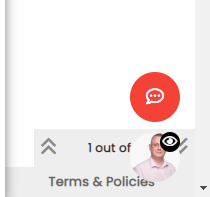
Just these icons to put on the bottom left:
PW and WS Spirit alive
-
chat-modal zindex and border for Unread & recent works !!!
Thanks Mark@phenomlab said in [NODEBB] Help for my custom CSS:
@DownPW said in [NODEBB] Help for my custom CSS:
I would like to move chat bubbles and WYSIWYG at the left bottom if it’s possible, I test with this bit it’s not perfect :
Can you elaborate a bit more on this in terms of what you are looking to do ?
Just these icons to put on the bottom left:
@DownPW Try this
.taskbar.navbar-fixed-bottom {
    right: auto;
    left: 0;
}
Mark Cutting also advises organisations as a Fractional CIO, Fractional CISO and Executive Advisor, helping boards improve technology governance, cyber resilience and executive decision making. Learn more at Phenomlab Ltd
-
@phenomlab said in [NODEBB] Help for my custom CSS:
@DownPW Try this
.taskbar.navbar-fixed-bottom { right: auto; left: 0; }Much cleaner than what I had found:
.taskbar .navbar-nav {
    padding-right: 1840px;
    padding-bottom: 15px;
    position: relative;
    bottom: 25px !important;
}
I had not found this property by inspecting the code!! I wonder where you found that one
I just added left and bottom space :
.taskbar.navbar-fixed-bottom {
    right: auto;
    left: 10px;
    bottom: 25px;
}
RESULT:

Much better with footbar !
This also allows you to leave the right side quiet already occupied by the paging block !Thanks my friend
-
How to add icon on categories span time ?
I will test this code for add Paragraph FA icon for example :
[component="topic/header"] span.timeago:before {
    content: "\f1dd";
    margin-right: 5px;
    margin-left: 5px;
}
Result


PW and WS Spirit alive
-
How to add icon on categories span time ?
I will test this code for add Paragraph FA icon for example :
[component="topic/header"] span.timeago:before {
    content: "\f1dd";
    margin-right: 5px;
    margin-left: 5px;
}
Result
@DownPW that won’t work unless you add a font family to go with it - any Unicode characters typically require an associated font family. Try adding
font-family: "font awesome 5 free";to the CSS you already have. -
I have test this :
[component="topic/header"] span.timeago:before {
    content: "\f1c0";
    font-family: "font awesome 5 free";
    margin-right: 5px;
    margin-left: 5px;
    color: black;
}
But doesn’t work

PW and WS Spirit alive
-
I have test this :
[component="topic/header"] span.timeago:before {
    content: "\f1c0";
    font-family: "font awesome 5 free";
    margin-right: 5px;
    margin-left: 5px;
    color: black;
}
But doesn’t work
@DownPW does it work if you change it to
Font Awesome 5 Free? Might need to access your site directly to test this as it works for mine and should also work for you.One last thing you can try is adding the below into the CSS class - sometimes needed as the FA5 free icons are solid only, therefore may require
font-weight: 900;Let me know how you get on
Mark Cutting also advises organisations as a Fractional CIO, Fractional CISO and Executive Advisor, helping boards improve technology governance, cyber resilience and executive decision making. Learn more at Phenomlab Ltd


Hello! It looks like you're interested in this conversation, but you don't have an account yet.
Getting fed up of having to scroll through the same posts each visit? When you register for an account, you'll always come back to exactly where you were before, and choose to be notified of new replies (either via email, or push notification). You'll also be able to save bookmarks and upvote posts to show your appreciation to other community members.
With your input, this post could be even better 💗
Register LoginDid this solution help you?
Related Topics
-
Spam spam spam
Solved Configure -
-
-
-
-
-
-