NodeBB customisation
-
@jac said in NodeBB customisation:
@phenomlab Thank you, is there any way to change to a bolder font? or does this include google fonts again? I do have one in mind but need to add it.
https://fonts.google.com/?preview.text=Stockport County&preview.text_type=custom&preview.size=53
well… there’s a few. I wonder if these can be mixed and matched? One for titles, one for categories etc?
@jac They can, but you will impact the loading speed of your site with too many fonts. Best to pick 2-3 max.
Mark Cutting also advises organisations as a Fractional CIO, Fractional CISO and Executive Advisor, helping boards improve technology governance, cyber resilience and executive decision making. Learn more at Phenomlab Ltd
-
@jac They can, but you will impact the loading speed of your site with too many fonts. Best to pick 2-3 max.
@phenomlab said in NodeBB customisation:
@jac They can, but you will impact the loading speed of your site with too many fonts. Best to pick 2-3 max.
Thanks mate, I’ll try one now.
-
@phenomlab said in NodeBB customisation:
@jac They can, but you will impact the loading speed of your site with too many fonts. Best to pick 2-3 max.
Thanks mate, I’ll try one now.
@jac still looking how to import font into css.
-
@jac said in NodeBB customisation:
@jac still looking how to import font into css.
Trying to find out how to add this - <style>
@import url(‘https://fonts.googleapis.com/css2?family=Alfa+Slab+One&display=swap’);
</style> as the title font. hmm! -
@jac said in NodeBB customisation:
@jac still looking how to import font into css.
Trying to find out how to add this - <style>
@import url(‘https://fonts.googleapis.com/css2?family=Alfa+Slab+One&display=swap’);
</style> as the title font. hmm!@jac said in NodeBB customisation:
@import url(‘https://fonts.googleapis.com/css2?family=Alfa+Slab+One&display=swap’);
You should place that line at the very top of your custom CSS file.
Mark Cutting also advises organisations as a Fractional CIO, Fractional CISO and Executive Advisor, helping boards improve technology governance, cyber resilience and executive decision making. Learn more at Phenomlab Ltd
-
@jac said in NodeBB customisation:
@import url(‘https://fonts.googleapis.com/css2?family=Alfa+Slab+One&display=swap’);
You should place that line at the very top of your custom CSS file.
@phenomlab said in NodeBB customisation:
@jac said in NodeBB customisation:
@import url(‘https://fonts.googleapis.com/css2?family=Alfa+Slab+One&display=swap’);
You should place that line at the very top of your custom CSS file.
Really sorry to bother you mate.
I’ve just tried the instruction above. Unfortunately it comes up with an error when adding the code.
I’d like to see and know what I’ve done wrong


 . Possibly a { missing or something? Just purely speculation which isn’t always a good thing
  .
. -
@phenomlab said in NodeBB customisation:
@jac said in NodeBB customisation:
@import url(‘https://fonts.googleapis.com/css2?family=Alfa+Slab+One&display=swap’);
You should place that line at the very top of your custom CSS file.
Really sorry to bother you mate.
I’ve just tried the instruction above. Unfortunately it comes up with an error when adding the code.
I’d like to see and know what I’ve done wrong
. Possibly a { missing or something? Just purely speculation which isn’t always a good thing .@jac said in NodeBB customisation:
@phenomlab said in NodeBB customisation:
@jac said in NodeBB customisation:
@import url(‘https://fonts.googleapis.com/css2?family=Alfa+Slab+One&display=swap’);
You should place that line at the very top of your custom CSS file.
Really sorry to bother you mate.
I’ve just tried the instruction above. Unfortunately it comes up with an error when adding the code.
I’d like to see and know what I’ve done wrong
. Possibly a { missing or something? Just purely speculation which isn’t always a good thing .Forgot to add picture

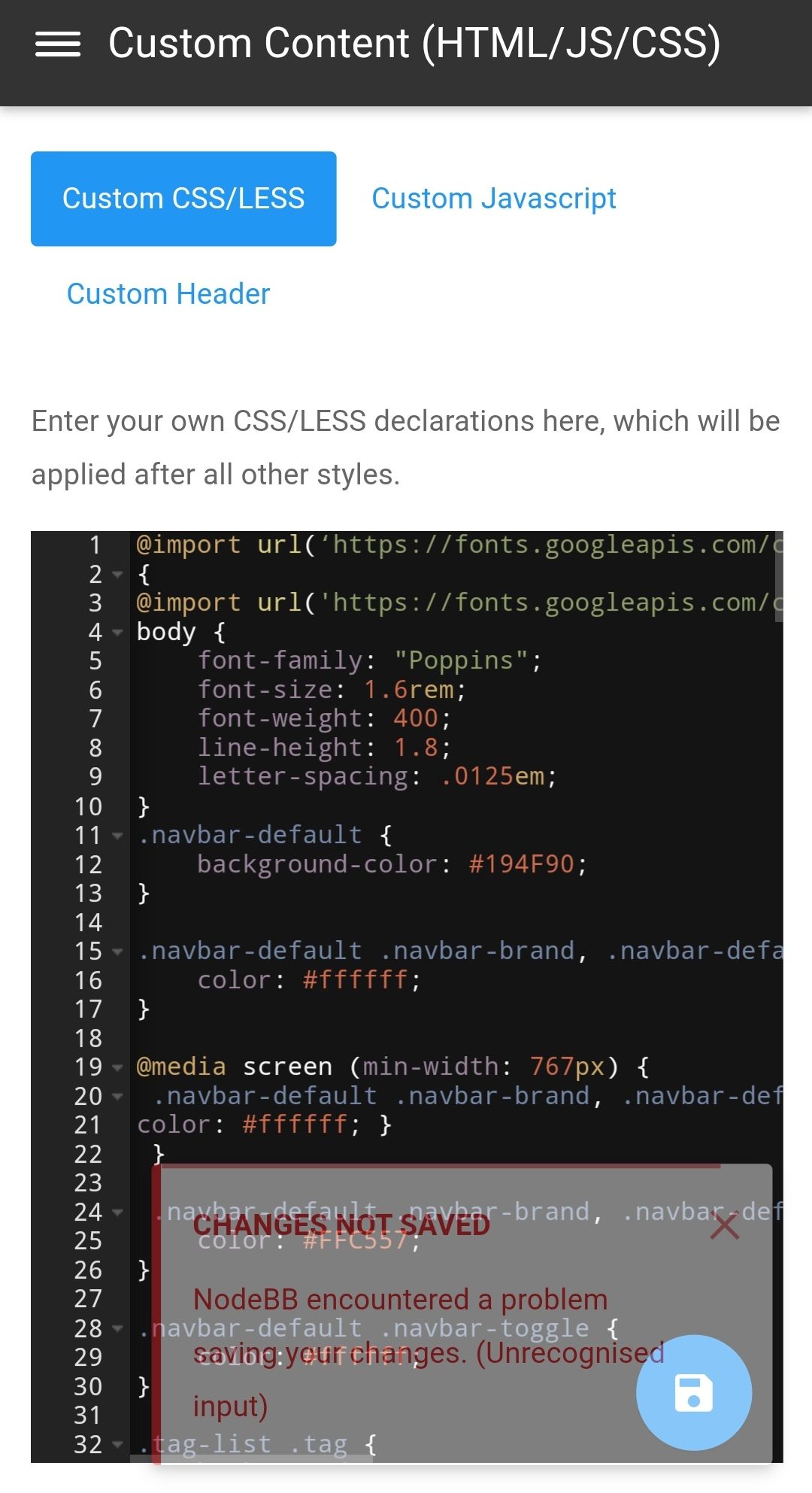
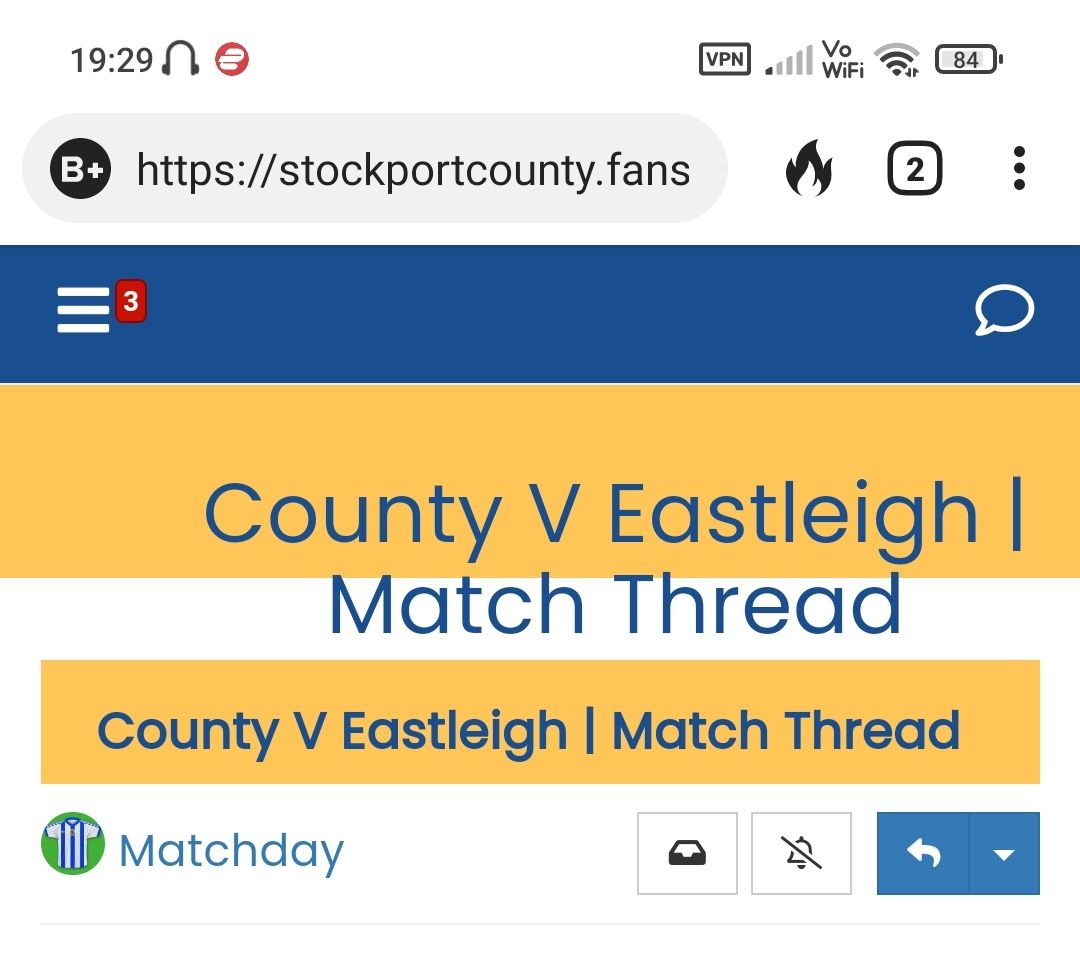
I also notice an alignment issue of the text and how to remove the other title that shows underneath? Clearly a work in progress so I do apologise and thank you for your patience.
-
@phenomlab said in NodeBB customisation:
@jac said in NodeBB customisation:
@import url(‘https://fonts.googleapis.com/css2?family=Alfa+Slab+One&display=swap’);
You should place that line at the very top of your custom CSS file.
Really sorry to bother you mate.
I’ve just tried the instruction above. Unfortunately it comes up with an error when adding the code.
I’d like to see and know what I’ve done wrong
. Possibly a { missing or something? Just purely speculation which isn’t always a good thing .@jac said in NodeBB customisation:
I’ve just tried the instruction above. Unfortunately it comes up with an error when adding the code.
Fixed. This is because you had
@import url(‘https://fonts.googleapis.com/css2?family=Alfa+Slab+One&display=swap’);When it should be
@import url('https://fonts.googleapis.com/css2?family=Alfa+Slab+One&display=swap');I’m guessing this was a copy/paste ?
This happens all the time ! -
@jac said in NodeBB customisation:
@phenomlab said in NodeBB customisation:
@jac said in NodeBB customisation:
@import url(‘https://fonts.googleapis.com/css2?family=Alfa+Slab+One&display=swap’);
You should place that line at the very top of your custom CSS file.
Really sorry to bother you mate.
I’ve just tried the instruction above. Unfortunately it comes up with an error when adding the code.
I’d like to see and know what I’ve done wrong
. Possibly a { missing or something? Just purely speculation which isn’t always a good thing .Forgot to add picture
I also notice an alignment issue of the text and how to remove the other title that shows underneath? Clearly a work in progress so I do apologise and thank you for your patience.
@jac said in NodeBB customisation:
I also notice an alignment issue of the text and how to remove the other title that shows underneath? Clearly a work in progress so I do apologise and thank you for your patience.
Yes, see below
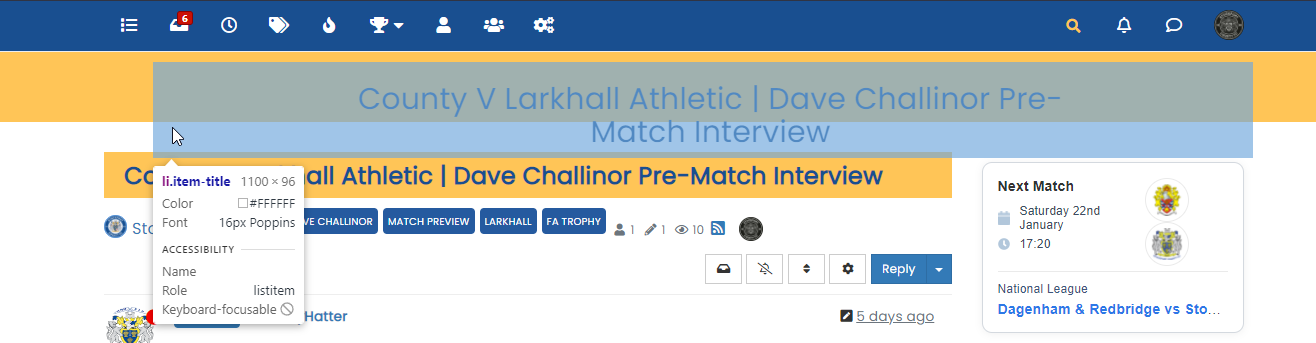
This is caused by your text being too long to fit in the allocated space. There’s a couple of choices here
- Make the text size smaller
- Enlarge the size of the viewport to accommodate
I personally wouldn’t recommend the second option as this isn’t really a fix and will look dire on mobile devices.
-
@jac said in NodeBB customisation:
@phenomlab said in NodeBB customisation:
@jac said in NodeBB customisation:
@import url(‘https://fonts.googleapis.com/css2?family=Alfa+Slab+One&display=swap’);
You should place that line at the very top of your custom CSS file.
Really sorry to bother you mate.
I’ve just tried the instruction above. Unfortunately it comes up with an error when adding the code.
I’d like to see and know what I’ve done wrong
. Possibly a { missing or something? Just purely speculation which isn’t always a good thing .Forgot to add picture
I also notice an alignment issue of the text and how to remove the other title that shows underneath? Clearly a work in progress so I do apologise and thank you for your patience.
@jac said in NodeBB customisation:
how to remove the other title that shows underneath?
Primarily, with CSS, so
.topic [component="post/header"] {
    display: none;
}
However, this may cause a conflict, so using this small function below (goes in Custom JS) will do the same thing but be more specific for the target
$(window).on('action:ajaxify.end', function (data) {
	        if (window.location.href.indexOf("topic") > -1) {
                console.log("This is a topic, so hide the stock header");
                                  $('.topic [component="post/header"]').hide();
            }
            else {
                    // Nothing to do
            }
});
Mark Cutting also advises organisations as a Fractional CIO, Fractional CISO and Executive Advisor, helping boards improve technology governance, cyber resilience and executive decision making. Learn more at Phenomlab Ltd
-
@jac said in NodeBB customisation:
how to remove the other title that shows underneath?
Primarily, with CSS, so
.topic [component="post/header"] {
    display: none;
}
However, this may cause a conflict, so using this small function below (goes in Custom JS) will do the same thing but be more specific for the target
$(window).on('action:ajaxify.end', function (data) { if (window.location.href.indexOf("topic") > -1) { console.log("This is a topic, so hide the stock header"); $('.topic [component="post/header"]').hide(); } else { // Nothing to do } });@phenomlab said in NodeBB customisation:
@jac said in NodeBB customisation:
how to remove the other title that shows underneath?
Primarily, with CSS, so
.topic [component="post/header"] {
    display: none;
}
However, this may cause a conflict, so using this small function below (goes in Custom JS) will do the same thing but be more specific for the target
$(window).on('action:ajaxify.end', function (data) {
	        if (window.location.href.indexOf("topic") > -1) {
                console.log("This is a topic, so hide the stock header");
                                  $('.topic [component="post/header"]').hide();
            }
            else {
                    // Nothing to do
            }
});
Many thanks for all the answers mate. What to do
. I suppose I’m happy for you to do the most logical solution and I’ll go with that  .
. -
@phenomlab said in NodeBB customisation:
@jac said in NodeBB customisation:
how to remove the other title that shows underneath?
Primarily, with CSS, so
.topic [component="post/header"] {
    display: none;
}
However, this may cause a conflict, so using this small function below (goes in Custom JS) will do the same thing but be more specific for the target
$(window).on('action:ajaxify.end', function (data) {
	        if (window.location.href.indexOf("topic") > -1) {
                console.log("This is a topic, so hide the stock header");
                                  $('.topic [component="post/header"]').hide();
            }
            else {
                    // Nothing to do
            }
});
Many thanks for all the answers mate. What to do
. I suppose I’m happy for you to do the most logical solution and I’ll go with that .@jac The above is already active on your site, so nothing to do. You just need to make a decision re this
This is caused by your text being too long to fit in the allocated space. There’s a couple of choices here
Make the text size smaller
Enlarge the size of the viewport to accommodate
I personally wouldn’t recommend the second option as this isn’t really a fix and will look dire on mobile devices.
Mark Cutting also advises organisations as a Fractional CIO, Fractional CISO and Executive Advisor, helping boards improve technology governance, cyber resilience and executive decision making. Learn more at Phenomlab Ltd
-
@jac The above is already active on your site, so nothing to do. You just need to make a decision re this
This is caused by your text being too long to fit in the allocated space. There’s a couple of choices here
Make the text size smaller
Enlarge the size of the viewport to accommodate
I personally wouldn’t recommend the second option as this isn’t really a fix and will look dire on mobile devices.
@phenomlab said in NodeBB customisation:
@jac The above is already active on your site, so nothing to do. You just need to make a decision re this
This is caused by your text being too long to fit in the allocated space. There’s a couple of choices here
Make the text size smaller
Enlarge the size of the viewport to accommodate
I personally wouldn’t recommend the second option as this isn’t really a fix and will look dire on mobile devices.
That’s fine mate, make the title text smaller then would you say? either that or go back to how it was if it’s easier and just change the font etc?
-
@phenomlab said in NodeBB customisation:
@jac said in NodeBB customisation:
how to remove the other title that shows underneath?
Primarily, with CSS, so
.topic [component="post/header"] {
    display: none;
}
However, this may cause a conflict, so using this small function below (goes in Custom JS) will do the same thing but be more specific for the target
$(window).on('action:ajaxify.end', function (data) {
	        if (window.location.href.indexOf("topic") > -1) {
                console.log("This is a topic, so hide the stock header");
                                  $('.topic [component="post/header"]').hide();
            }
            else {
                    // Nothing to do
            }
});
Many thanks for all the answers mate. What to do
. I suppose I’m happy for you to do the most logical solution and I’ll go with that .@jac said in NodeBB customisation:
I suppose I’m happy for you to do the most logical solution and I’ll go with that .
A more elegant approach would be this
.Hero {
    min-height: 70px;
}
This way, we set the height minimum to 70px to get the same height when the text fits without issue. When the text is longer, the same
<div>will expand to fit. So, you go from this
To this

I also added these two
mediaqueries to handle the text size on mobile devices (it’s huge otherwise and looks, well, nasty)@media (max-width: 767px) { h2.PageHero-title { font-size: 1.8rem !important; } } @media (min-width: 1200px) { h2.PageHero-title { font-size: 3rem; } }I think this looks better. It’s active on your site now.
Mark Cutting also advises organisations as a Fractional CIO, Fractional CISO and Executive Advisor, helping boards improve technology governance, cyber resilience and executive decision making. Learn more at Phenomlab Ltd
-
@jac said in NodeBB customisation:
I suppose I’m happy for you to do the most logical solution and I’ll go with that .
A more elegant approach would be this
.Hero {
    min-height: 70px;
}
This way, we set the height minimum to 70px to get the same height when the text fits without issue. When the text is longer, the same
<div>will expand to fit. So, you go from thisTo this
I also added these two
mediaqueries to handle the text size on mobile devices (it’s huge otherwise and looks, well, nasty)@media (max-width: 767px) { h2.PageHero-title { font-size: 1.8rem !important; } } @media (min-width: 1200px) { h2.PageHero-title { font-size: 3rem; } }I think this looks better. It’s active on your site now.
@phenomlab said in NodeBB customisation:
@jac said in NodeBB customisation:
I suppose I’m happy for you to do the most logical solution and I’ll go with that .
A more elegant approach would be this
.Hero {
    min-height: 70px;
}
This way, we set the height minimum to 70px to get the same height when the text fits without issue. When the text is longer, the same
<div>will expand to fit. So, you go from thisTo this
I also added these two
mediaqueries to handle the text size on mobile devices (it’s huge otherwise and looks, well, nasty)@media (max-width: 767px) { h2.PageHero-title { font-size: 1.8rem !important; } } @media (min-width: 1200px) { h2.PageHero-title { font-size: 3rem; } }I think this looks better. It’s active on your site now.
Many thanks mate for all the work! I really appreciate it. How do I add a new title font? And then a new category font if possible?
Many thanks as always!
-
@phenomlab said in NodeBB customisation:
@jac said in NodeBB customisation:
I suppose I’m happy for you to do the most logical solution and I’ll go with that .
A more elegant approach would be this
.Hero {
    min-height: 70px;
}
This way, we set the height minimum to 70px to get the same height when the text fits without issue. When the text is longer, the same
<div>will expand to fit. So, you go from thisTo this
I also added these two
mediaqueries to handle the text size on mobile devices (it’s huge otherwise and looks, well, nasty)@media (max-width: 767px) { h2.PageHero-title { font-size: 1.8rem !important; } } @media (min-width: 1200px) { h2.PageHero-title { font-size: 3rem; } }I think this looks better. It’s active on your site now.
Many thanks mate for all the work! I really appreciate it. How do I add a new title font? And then a new category font if possible?
Many thanks as always!
@jac You’d need to target the CSS class itself, so for the title font, you can use (substitute the font name for what you want to use)
h2.PageHero-title {
    font-family: "Alfa Slab One";
}
And for category, are you sure you want to do this ? It may look overdone (in my view)
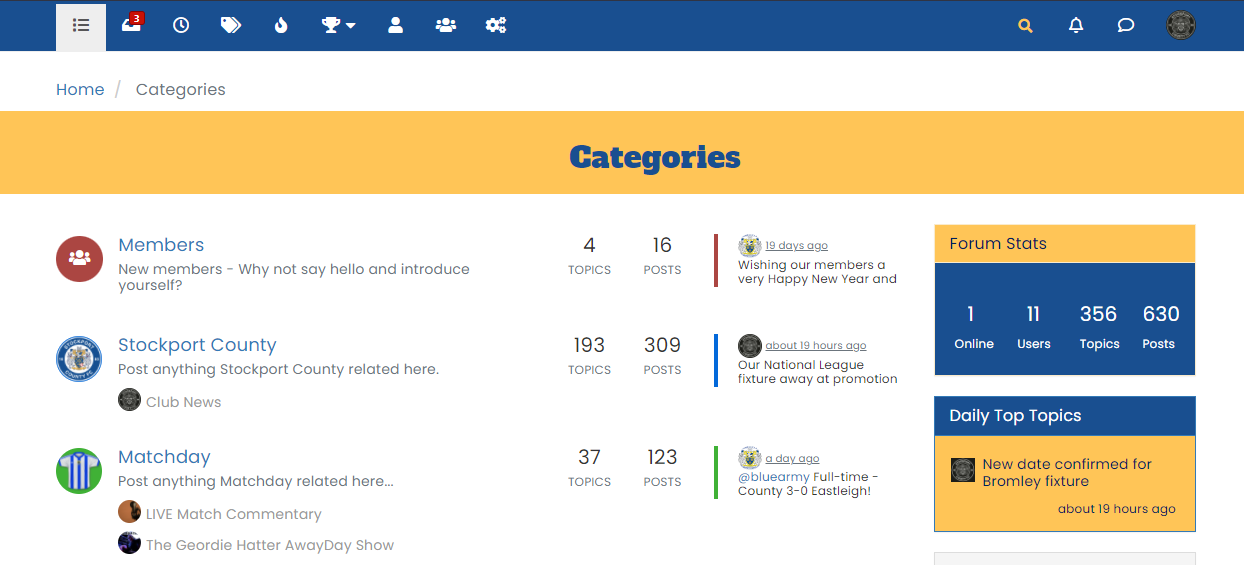
Unless you are looking for a specific font that isn’t as “out there” as the header ?
Mark Cutting also advises organisations as a Fractional CIO, Fractional CISO and Executive Advisor, helping boards improve technology governance, cyber resilience and executive decision making. Learn more at Phenomlab Ltd
-
@jac You’d need to target the CSS class itself, so for the title font, you can use (substitute the font name for what you want to use)
h2.PageHero-title {
    font-family: "Alfa Slab One";
}
And for category, are you sure you want to do this ? It may look overdone (in my view)
Unless you are looking for a specific font that isn’t as “out there” as the header ?
@phenomlab said in NodeBB customisation:
@jac You’d need to target the CSS class itself, so for the title font, you can use (substitute the font name for what you want to use)
h2.PageHero-title {
    font-family: "Alfa Slab One";
}
And for category, are you sure you want to do this ? It may look overdone (in my view)
Unless you are looking for a specific font that isn’t as “out there” as the header ?
Thanks for the info mate.
Yes I agree that font does look over the top mate. I’ll have a look out for something else.
-
 undefined phenomlab locked this topic on
-
@phenomlab said in NodeBB customisation:
@jac You’d need to target the CSS class itself, so for the title font, you can use (substitute the font name for what you want to use)
h2.PageHero-title {
    font-family: "Alfa Slab One";
}
And for category, are you sure you want to do this ? It may look overdone (in my view)
Unless you are looking for a specific font that isn’t as “out there” as the header ?
Thanks for the info mate.
Yes I agree that font does look over the top mate. I’ll have a look out for something else.
@jac Given your departure away from your previous project, I’m going to close this thread…

Hello! It looks like you're interested in this conversation, but you don't have an account yet.
Getting fed up of having to scroll through the same posts each visit? When you register for an account, you'll always come back to exactly where you were before, and choose to be notified of new replies (either via email, or push notification). You'll also be able to save bookmarks and upvote posts to show your appreciation to other community members.
With your input, this post could be even better 💗
Register Login