Social icon (Nodebb)
-
Hi Mark,
This title may not be relevant so feel free to change it.
I’m looking to add an image so when I post to social profiles etc it displays an image instead of the NodeBB logo.
How do I achieve this?
Many thanks
-
Hi Mark,
This title may not be relevant so feel free to change it.
I’m looking to add an image so when I post to social profiles etc it displays an image instead of the NodeBB logo.
How do I achieve this?
Many thanks
@jac Good question. I raised something similar on the NodeBB community
https://community.nodebb.org/topic/15650/default-image-when-sharing-topics-posts
but, I never got a response
 - however, there is an OG image (Open Graph) which you can apply at
/admin/settings/generalWhich (I think) should give you a default image (which you of course specify by uploading) for sharing on social media.
EDIT - on checking, this does indeed work. Once the image is applied, the Open Graph tags are present in each post - see below
<meta property="og:title" content="Social icon (Nodebb)" />
<meta property="og:description" content="@jac Good question. I raised something similar on the NodeBB community   	  	 		 			  				 					                                                          May 11  /  Technical Support                                                                         ..." />
<meta property="og:type" content="article" />
<meta property="article:published_time" content="2021-12-04T16:58:18.479Z" />
<meta property="article:modified_time" content="2021-12-04T17:28:05.608Z" />
<meta property="article:section" content="Customisation" />
<meta property="og:image" content="https://sudonix.com/assets/uploads/profile/1-profileavatar-1629822570834.png" />
<meta property="og:image:url" content="https://sudonix.com/assets/uploads/profile/1-profileavatar-1629822570834.png" />
<meta property="og:image" content="https://sudonix.com/assets/uploads/system/og-image.png" />
<meta property="og:image:url" content="https://sudonix.com/assets/uploads/system/og-image.png" />
<meta property="og:image:width" content="1900" />
<meta property="og:image:height" content="950" />
<meta property="og:url" content="https://sudonix.com/topic/162/social-icon-nodebb/2" />
Mark Cutting also advises organisations as a Fractional CIO, Fractional CISO and Executive Advisor, helping boards improve technology governance, cyber resilience and executive decision making. Learn more at Phenomlab Ltd
-
@jac Good question. I raised something similar on the NodeBB community
https://community.nodebb.org/topic/15650/default-image-when-sharing-topics-posts
but, I never got a response
- however, there is an OG image (Open Graph) which you can apply at/admin/settings/generalWhich (I think) should give you a default image (which you of course specify by uploading) for sharing on social media.
EDIT - on checking, this does indeed work. Once the image is applied, the Open Graph tags are present in each post - see below
<meta property="og:title" content="Social icon (Nodebb)" /> <meta property="og:description" content="@jac Good question. I raised something similar on the NodeBB community May 11 / Technical Support ..." /> <meta property="og:type" content="article" /> <meta property="article:published_time" content="2021-12-04T16:58:18.479Z" /> <meta property="article:modified_time" content="2021-12-04T17:28:05.608Z" /> <meta property="article:section" content="Customisation" /> <meta property="og:image" content="https://sudonix.com/assets/uploads/profile/1-profileavatar-1629822570834.png" /> <meta property="og:image:url" content="https://sudonix.com/assets/uploads/profile/1-profileavatar-1629822570834.png" /> <meta property="og:image" content="https://sudonix.com/assets/uploads/system/og-image.png" /> <meta property="og:image:url" content="https://sudonix.com/assets/uploads/system/og-image.png" /> <meta property="og:image:width" content="1900" /> <meta property="og:image:height" content="950" /> <meta property="og:url" content="https://sudonix.com/topic/162/social-icon-nodebb/2" />@phenomlab said in Social icon (Nodebb):
@jac Good question. I raised something similar on the NodeBB community
https://community.nodebb.org/topic/15650/default-image-when-sharing-topics-posts
but, I never got a response
- however, there is an OG image (Open Graph) which you can apply at/admin/settings/generalWhich (I think) should give you a default image (which you of course specify by uploading) for sharing on social media.
EDIT - on checking, this does indeed work. Once the image is applied, the Open Graph tags are present in each post - see below
<meta property="og:title" content="Social icon (Nodebb)" />
<meta property="og:description" content="@jac Good question. I raised something similar on the NodeBB community   	  	 		 			  				 					                                                          May 11  /  Technical Support                                                                         ..." />
<meta property="og:type" content="article" />
<meta property="article:published_time" content="2021-12-04T16:58:18.479Z" />
<meta property="article:modified_time" content="2021-12-04T17:28:05.608Z" />
<meta property="article:section" content="Customisation" />
<meta property="og:image" content="https://sudonix.com/assets/uploads/profile/1-profileavatar-1629822570834.png" />
<meta property="og:image:url" content="https://sudonix.com/assets/uploads/profile/1-profileavatar-1629822570834.png" />
<meta property="og:image" content="https://sudonix.com/assets/uploads/system/og-image.png" />
<meta property="og:image:url" content="https://sudonix.com/assets/uploads/system/og-image.png" />
<meta property="og:image:width" content="1900" />
<meta property="og:image:height" content="950" />
<meta property="og:url" content="https://sudonix.com/topic/162/social-icon-nodebb/2" />
Thanks very much mate, I’ll try this tomorrow.
-
 undefined JAC referenced this topic on
-
@phenomlab said in Social icon (Nodebb):
@jac Good question. I raised something similar on the NodeBB community
https://community.nodebb.org/topic/15650/default-image-when-sharing-topics-posts
but, I never got a response
- however, there is an OG image (Open Graph) which you can apply at/admin/settings/generalWhich (I think) should give you a default image (which you of course specify by uploading) for sharing on social media.
EDIT - on checking, this does indeed work. Once the image is applied, the Open Graph tags are present in each post - see below
<meta property="og:title" content="Social icon (Nodebb)" />
<meta property="og:description" content="@jac Good question. I raised something similar on the NodeBB community   	  	 		 			  				 					                                                          May 11  /  Technical Support                                                                         ..." />
<meta property="og:type" content="article" />
<meta property="article:published_time" content="2021-12-04T16:58:18.479Z" />
<meta property="article:modified_time" content="2021-12-04T17:28:05.608Z" />
<meta property="article:section" content="Customisation" />
<meta property="og:image" content="https://sudonix.com/assets/uploads/profile/1-profileavatar-1629822570834.png" />
<meta property="og:image:url" content="https://sudonix.com/assets/uploads/profile/1-profileavatar-1629822570834.png" />
<meta property="og:image" content="https://sudonix.com/assets/uploads/system/og-image.png" />
<meta property="og:image:url" content="https://sudonix.com/assets/uploads/system/og-image.png" />
<meta property="og:image:width" content="1900" />
<meta property="og:image:height" content="950" />
<meta property="og:url" content="https://sudonix.com/topic/162/social-icon-nodebb/2" />
Thanks very much mate, I’ll try this tomorrow.
Mark Cutting also advises organisations as a Fractional CIO, Fractional CISO and Executive Advisor, helping boards improve technology governance, cyber resilience and executive decision making. Learn more at Phenomlab Ltd
-
@phenomlab said in Social icon (Nodebb):
@jac In addition, see this
https://community.nodebb.org/post/86245
That’s a good shout mate

-
@phenomlab said in Social icon (Nodebb):
@jac In addition, see this
https://community.nodebb.org/post/86245
That’s a good shout mate
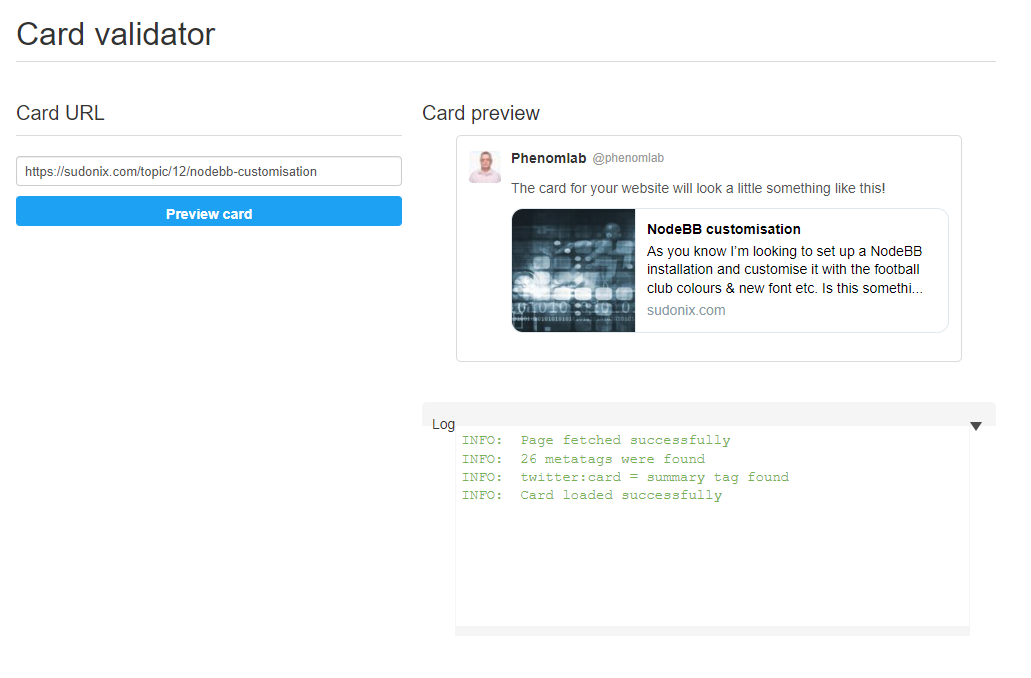
@jac I just tested my theory around using the OG image, and according to the Twitter card validator, it works fine
Mark Cutting also advises organisations as a Fractional CIO, Fractional CISO and Executive Advisor, helping boards improve technology governance, cyber resilience and executive decision making. Learn more at Phenomlab Ltd
-
@jac I just tested my theory around using the OG image, and according to the Twitter card validator, it works fine
@phenomlab said in Social icon (Nodebb):
@jac I just tested my theory around using the OG image, and according to the Twitter card validator, it works fine
fixed

-
 undefined phenomlab has marked this topic as solved on
Hello! It looks like you're interested in this conversation, but you don't have an account yet.
Getting fed up of having to scroll through the same posts each visit? When you register for an account, you'll always come back to exactly where you were before, and choose to be notified of new replies (either via email, or push notification). You'll also be able to save bookmarks and upvote posts to show your appreciation to other community members.
With your input, this post could be even better 💗
Register LoginDid this solution help you?
Related Topics
-
Nodebb design
Solved General -
-
-
NodeBB templates
Locked Chitchat -
-
-
-