
WebSocket / socket.io 403 + xhr poll error behind Cloudflare (Cluster scaling+ Redis)
-
Hi everyone, @phenomlab
I’m currently facing persistent
xhr poll errorissues with NodeBB behind Cloudflare (Free plan, proxied / orange cloud). I’ve been debugging this for quite a while and would really appreciate some expert input.
 The Problem
In the browser console I consistently get:
[socket.io] Connection error: xhr poll errorWith error i nnodebb :

Network tab shows:/socket.io/?_csrf=...&EIO=4&transport=polling → 403
So the failure happens during the polling transport phase, before WebSocket upgrade. I guess
Login works.
Sessions work.
Forum loads.
But sockets keep failing with 403 with error connexion in nodebb interface
🧭 Infrastructure Overview
Server
- VPS wHetzner with public IP and firewall Hetzner with open port : 80, 443, Virtualmin CF Proxied 8443, nodebb 4567, redis 6379, clustering 4567, 4568, 4569
- Same ports open in the server with firewalld/virtualmin
- Managed via Virtualmin
- Nginx reverse proxy
- Let’s Encrypt SSL
- Ubuntu Server
NodeBB Setup
- Latest stable NodeBB 4.9.1
- Node.js LTS 18
- MongoDB
- Redis enabled
- Cluster mode enabled scaling
Here my config.json:``` { "url": "https://xxx-xxx.net", "socket.io": { "cors": { "origin": "*" } }, "trust proxy": true, "secret": "xxxx-xxxx-4c42-xxxxx-xxxxxxxx", "database": "mongo", "mongo": { "host": "127.0.0.1", "port": "27017", "username": "nodebb", "password": "xxxxxxxxxxxxxxxxx", "database": "nodebb", "uri": "" }, "port": [4567, 4568,4569], "redis": { "host":"127.0.0.1", "port":"6379", "database": 5 } } ```Here my vhost nginx :
        upstream io_nodes {

            ip_hash;
            server 127.0.0.1:4567;
            server 127.0.0.1:4568;
            server 127.0.0.1:4569;
        }

        server {

        	server_name xx-xx.net www.xx-xxx.net mail.xx-xx.net webmail.xx-xx.net admin.xx-xx.net;

        	root /home/xxx-xxx/nodebb; #dossier root nodebb

        	index index.php index.htm index.html;

        	access_log /var/log/virtualmin/xxx-xxx.net_access_log;

        	error_log /var/log/virtualmin/xx-xx.net_error_log;

        	client_max_body_size 20M;

        	fastcgi_param GATEWAY_INTERFACE CGI/1.1;

        	fastcgi_param SERVER_SOFTWARE nginx;

        	fastcgi_param QUERY_STRING $query_string;

        	fastcgi_param REQUEST_METHOD $request_method;

        	fastcgi_param CONTENT_TYPE $content_type;

        	fastcgi_param CONTENT_LENGTH $content_length;

        	fastcgi_param SCRIPT_FILENAME "/home/xx-xx/public_html$fastcgi_script_name";

        	fastcgi_param SCRIPT_NAME $fastcgi_script_name;

        	fastcgi_param REQUEST_URI $request_uri;

        	fastcgi_param DOCUMENT_URI $document_uri;

        	fastcgi_param DOCUMENT_ROOT /home/xx-xxx/public_html;

        	fastcgi_param SERVER_PROTOCOL $server_protocol;

        	fastcgi_param REMOTE_ADDR $remote_addr;

               	fastcgi_param REMOTE_PORT $remote_port;

        	fastcgi_param SERVER_ADDR $server_addr;

        	fastcgi_param SERVER_PORT $server_port;

           	fastcgi_param SERVER_NAME $server_name;

        	fastcgi_param PATH_INFO $fastcgi_path_info;

        	fastcgi_param HTTPS $https;


        	location /.well-known {
        	}


        	location ^~ /.well-known/acme-challenge/ {
            	try_files $uri /;
            	allow all;
        	}


            # Ajout du Reverse Proxy :
            location / {

                proxy_set_header X-Real-IP $remote_addr;
                proxy_set_header X-Forwarded-For $proxy_add_x_forwarded_for;
                proxy_set_header X-Forwarded-Proto $scheme;

                #proxy_set_header Host $http_host;

                proxy_set_header X-NginX-Proxy true;
	        proxy_set_header Host $host;
                proxy_pass http://io_nodes;
                proxy_redirect off;

                # Socket.IO Support

                proxy_http_version 1.1;
                proxy_set_header Upgrade $http_upgrade;
                proxy_set_header Connection "upgrade";
            }


        	# serve static assets

        	# Ajouter le bloc ci-dessous qui forcera tout le trafic dans le cluster nodebb - redis lorsqu'il est référencé avec "@nodebb"

            # (A désactiver si pas de cluster nodebb - redis ou http://127.0.0.1:4567 pour serve static assets )


        	location @nodebb {

            	# proxy_pass http://127.0.0.1:4567;

        	proxy_pass http://io_nodes;

        	}


        	location ~ ^/assets/(.*) {

            	root /home/xxx-xxx/nodebb/;
            	try_files /build/public/$1 /public/$1 @nodebb;
        	}


        	# serve static assets compressed

        	gzip            on;
        	gzip_min_length 1000;
        	gzip_proxied    off;
        	gzip_types      text/plain application/xml text/javascript application/javascript application/x-javascript text/css application/json;


        	location ~ "\.php(/|$)" {

        		try_files $uri $fastcgi_script_name =404;
        		default_type application/x-httpd-php;
        		fastcgi_pass unix:/run/php/173162234249002.sock;
        	}


        	fastcgi_split_path_info "^(.+\.php)(/.+)$";

        	if ($host = webmail.xxx-xxxx.net) {

        		rewrite "^/(.*)$" "https://xxx-xxx.net:20000/$1" redirect;
        	}


        	if ($host = admin.planete-warez.net) {

            		rewrite "^/(.*)$" "https://planete-warez.net:10000/$1" redirect;

        	}


        	listen 65.21.3.134:443 ssl http2;
        	listen [2a01:4f9:c010:db20::1]:443 ssl http2;

            ssl_certificate /etc/letsencrypt/live/xx-xx.net/fullchain.pem; # managed by Certbot
            ssl_certificate_key /etc/letsencrypt/live/xx-xx.net/privkey.pem; # managed by Certbot


        	rewrite /awstats/awstats.pl /cgi-bin/awstats.pl;

        }

        server {

            if ($host = xx-xx.net) {
                return 301 https://$host$request_uri;
            } # managed by Certbot


        	server_name xx-xx.net www.xx-xx.net mail.xx-xx.net webmail.xx-xx.net admin.xx-xx.net;

        	listen 65.21.3.134;
        	listen [2a01:4f9:c010:db20::1];

            return 404; # managed by Certbot

        }


Nginx has been reloaded.
NodeBB restarted multiple times without  "origin": "*"  or "cors": {

* * *

# ☁️ Cloudflare Configuration

Plan: Free
Status: Proxied (orange cloud)

### SSL/TLS

- Mode: Full (Strict) with Let's encrypt SSL on the web servers with certbot
- WebSockets: ON

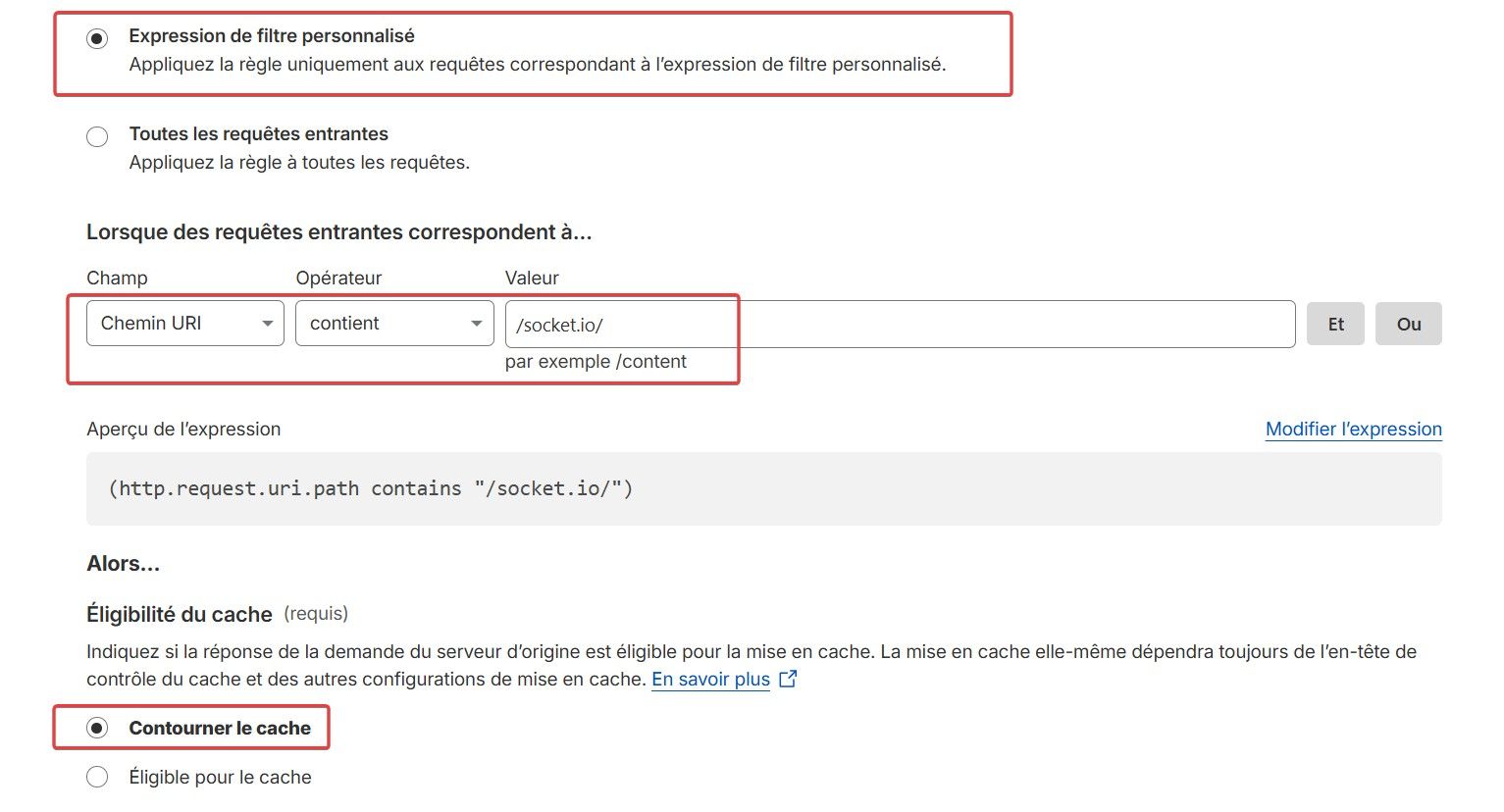
### Cache Rules

- Rules created:

    - If URI Path contains `/socket.io/`
    - Then: Bypass cache

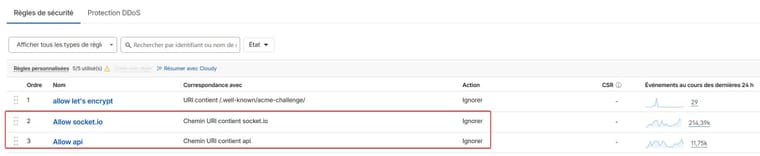
### WAF

- Custom ignore rule for `/socket.io/*`
- Custom ignore rule for `/api/*`

No rate limiting.

--> Issue persists.

* * *

# 🧪 What Has Been Tested

- Verified Redis connectivity
- Verified cluster processes running
- Verified cluster port in netstats
- Confirmed `trust proxy: true`
- Confirmed `X-Forwarded-Proto` is set
- Cleared all caches
- Restarted everything multiple times
- test without  "origin": "*"  or "cors": {


* * *

# 🧠 Observations

The failing request includes `_csrf`, for example:

    /socket.io/?_csrf=...&EIO=4&transport=polling

This suggests either:

- CSRF validation failing
- Session cookie mismatch
- Header mismatch
- Cloudflare altering something in polling requests

But:

- Login works
- Normal requests work
- Only socket polling fails

* * *

# ❓ Questions

1. Has anyone experienced 403 specifically on `transport=polling` behind Cloudflare?
2. Is there anything specific in NodeBB cluster mode that could cause this?
3. Could Cloudflare be interfering with long-polling specifically (even with WebSockets enabled)?
4. Is there a recommended minimal known-good config for NodeBB + Cloudflare (Free) + cluster?

* * *

At this point I’m unsure whether:

- This is CSRF related
- This is Cloudflare related
- This is a subtle proxy/session issue
- Or something specific to polling transport

Any guidance or expert would be greatly appreciated.

Thanks in advance 🙏
PW and WS Spirit alive
-
Hi everyone, @phenomlab
I’m currently facing persistent
xhr poll errorissues with NodeBB behind Cloudflare (Free plan, proxied / orange cloud). I’ve been debugging this for quite a while and would really appreciate some expert input.
The ProblemIn the browser console I consistently get:
[socket.io] Connection error: xhr poll errorWith error i nnodebb :
Network tab shows:/socket.io/?_csrf=...&EIO=4&transport=polling → 403So the failure happens during the polling transport phase, before WebSocket upgrade. I guess
Login works.
Sessions work.
Forum loads.
But sockets keep failing with 403 with error connexion in nodebb interface
🧭 Infrastructure Overview
Server
- VPS wHetzner with public IP and firewall Hetzner with open port : 80, 443, Virtualmin CF Proxied 8443, nodebb 4567, redis 6379, clustering 4567, 4568, 4569
- Same ports open in the server with firewalld/virtualmin
- Managed via Virtualmin
- Nginx reverse proxy
- Let’s Encrypt SSL
- Ubuntu Server
NodeBB Setup
- Latest stable NodeBB 4.9.1
- Node.js LTS 18
- MongoDB
- Redis enabled
- Cluster mode enabled scaling
Here my config.json:``` { "url": "https://xxx-xxx.net", "socket.io": { "cors": { "origin": "*" } }, "trust proxy": true, "secret": "xxxx-xxxx-4c42-xxxxx-xxxxxxxx", "database": "mongo", "mongo": { "host": "127.0.0.1", "port": "27017", "username": "nodebb", "password": "xxxxxxxxxxxxxxxxx", "database": "nodebb", "uri": "" }, "port": [4567, 4568,4569], "redis": { "host":"127.0.0.1", "port":"6379", "database": 5 } } ```Here my vhost nginx :
upstream io_nodes { ip_hash; server 127.0.0.1:4567; server 127.0.0.1:4568; server 127.0.0.1:4569; } server { server_name xx-xx.net www.xx-xxx.net mail.xx-xx.net webmail.xx-xx.net admin.xx-xx.net; root /home/xxx-xxx/nodebb; #dossier root nodebb index index.php index.htm index.html; access_log /var/log/virtualmin/xxx-xxx.net_access_log; error_log /var/log/virtualmin/xx-xx.net_error_log; client_max_body_size 20M; fastcgi_param GATEWAY_INTERFACE CGI/1.1; fastcgi_param SERVER_SOFTWARE nginx; fastcgi_param QUERY_STRING $query_string; fastcgi_param REQUEST_METHOD $request_method; fastcgi_param CONTENT_TYPE $content_type; fastcgi_param CONTENT_LENGTH $content_length; fastcgi_param SCRIPT_FILENAME "/home/xx-xx/public_html$fastcgi_script_name"; fastcgi_param SCRIPT_NAME $fastcgi_script_name; fastcgi_param REQUEST_URI $request_uri; fastcgi_param DOCUMENT_URI $document_uri; fastcgi_param DOCUMENT_ROOT /home/xx-xxx/public_html; fastcgi_param SERVER_PROTOCOL $server_protocol; fastcgi_param REMOTE_ADDR $remote_addr; fastcgi_param REMOTE_PORT $remote_port; fastcgi_param SERVER_ADDR $server_addr; fastcgi_param SERVER_PORT $server_port; fastcgi_param SERVER_NAME $server_name; fastcgi_param PATH_INFO $fastcgi_path_info; fastcgi_param HTTPS $https; location /.well-known { } location ^~ /.well-known/acme-challenge/ { try_files $uri /; allow all; } # Ajout du Reverse Proxy : location / { proxy_set_header X-Real-IP $remote_addr; proxy_set_header X-Forwarded-For $proxy_add_x_forwarded_for; proxy_set_header X-Forwarded-Proto $scheme; #proxy_set_header Host $http_host; proxy_set_header X-NginX-Proxy true; proxy_set_header Host $host; proxy_pass http://io_nodes; proxy_redirect off; # Socket.IO Support proxy_http_version 1.1; proxy_set_header Upgrade $http_upgrade; proxy_set_header Connection "upgrade"; } # serve static assets # Ajouter le bloc ci-dessous qui forcera tout le trafic dans le cluster nodebb - redis lorsqu'il est référencé avec "@nodebb" # (A désactiver si pas de cluster nodebb - redis ou http://127.0.0.1:4567 pour serve static assets ) location @nodebb { # proxy_pass http://127.0.0.1:4567; proxy_pass http://io_nodes; } location ~ ^/assets/(.*) { root /home/xxx-xxx/nodebb/; try_files /build/public/$1 /public/$1 @nodebb; } # serve static assets compressed gzip on; gzip_min_length 1000; gzip_proxied off; gzip_types text/plain application/xml text/javascript application/javascript application/x-javascript text/css application/json; location ~ "\.php(/|$)" { try_files $uri $fastcgi_script_name =404; default_type application/x-httpd-php; fastcgi_pass unix:/run/php/173162234249002.sock; } fastcgi_split_path_info "^(.+\.php)(/.+)$"; if ($host = webmail.xxx-xxxx.net) { rewrite "^/(.*)$" "https://xxx-xxx.net:20000/$1" redirect; } if ($host = admin.planete-warez.net) { rewrite "^/(.*)$" "https://planete-warez.net:10000/$1" redirect; } listen 65.21.3.134:443 ssl http2; listen [2a01:4f9:c010:db20::1]:443 ssl http2; ssl_certificate /etc/letsencrypt/live/xx-xx.net/fullchain.pem; # managed by Certbot ssl_certificate_key /etc/letsencrypt/live/xx-xx.net/privkey.pem; # managed by Certbot rewrite /awstats/awstats.pl /cgi-bin/awstats.pl; } server { if ($host = xx-xx.net) { return 301 https://$host$request_uri; } # managed by Certbot server_name xx-xx.net www.xx-xx.net mail.xx-xx.net webmail.xx-xx.net admin.xx-xx.net; listen 65.21.3.134; listen [2a01:4f9:c010:db20::1]; return 404; # managed by Certbot } Nginx has been reloaded. NodeBB restarted multiple times without "origin": "*" or "cors": { * * * # ☁️ Cloudflare Configuration Plan: Free Status: Proxied (orange cloud) ### SSL/TLS - Mode: Full (Strict) with Let's encrypt SSL on the web servers with certbot - WebSockets: ON ### Cache Rules - Rules created: - If URI Path contains `/socket.io/` - Then: Bypass cache ### WAF - Custom ignore rule for `/socket.io/*` - Custom ignore rule for `/api/*` No rate limiting. --> Issue persists. * * * # 🧪 What Has Been Tested - Verified Redis connectivity - Verified cluster processes running - Verified cluster port in netstats - Confirmed `trust proxy: true` - Confirmed `X-Forwarded-Proto` is set - Cleared all caches - Restarted everything multiple times - test without "origin": "*" or "cors": { * * * # 🧠 Observations The failing request includes `_csrf`, for example: /socket.io/?_csrf=...&EIO=4&transport=polling This suggests either: - CSRF validation failing - Session cookie mismatch - Header mismatch - Cloudflare altering something in polling requests But: - Login works - Normal requests work - Only socket polling fails * * * # ❓ Questions 1. Has anyone experienced 403 specifically on `transport=polling` behind Cloudflare? 2. Is there anything specific in NodeBB cluster mode that could cause this? 3. Could Cloudflare be interfering with long-polling specifically (even with WebSockets enabled)? 4. Is there a recommended minimal known-good config for NodeBB + Cloudflare (Free) + cluster? * * * At this point I’m unsure whether: - This is CSRF related - This is Cloudflare related - This is a subtle proxy/session issue - Or something specific to polling transport Any guidance or expert would be greatly appreciated. Thanks in advance 🙏 -
If you bypass or disable cloudflare, does the problem subside?
I will test that tonight.
I have create waf rules on CF and page rule for ignore socket.io…


Hello! It looks like you're interested in this conversation, but you don't have an account yet.
Getting fed up of having to scroll through the same posts each visit? When you register for an account, you'll always come back to exactly where you were before, and choose to be notified of new replies (either via email, or push notification). You'll also be able to save bookmarks and upvote posts to show your appreciation to other community members.
With your input, this post could be even better 💗
Register LoginRelated Topics
-
-
-
-
-
Is nginx necessary to use?
Moved Solved Hosting -
-
-





