Wasting time on a system that hangs on boot
-
For a while now, my dual boot system (Windows, which I use for work, and KDE Neon which I use primarily) had been exhibiting issues in the sense that when I elected to start Neon, the system would hang during boot for 3-4 minutes and only display the below before finally showing the SDDM login
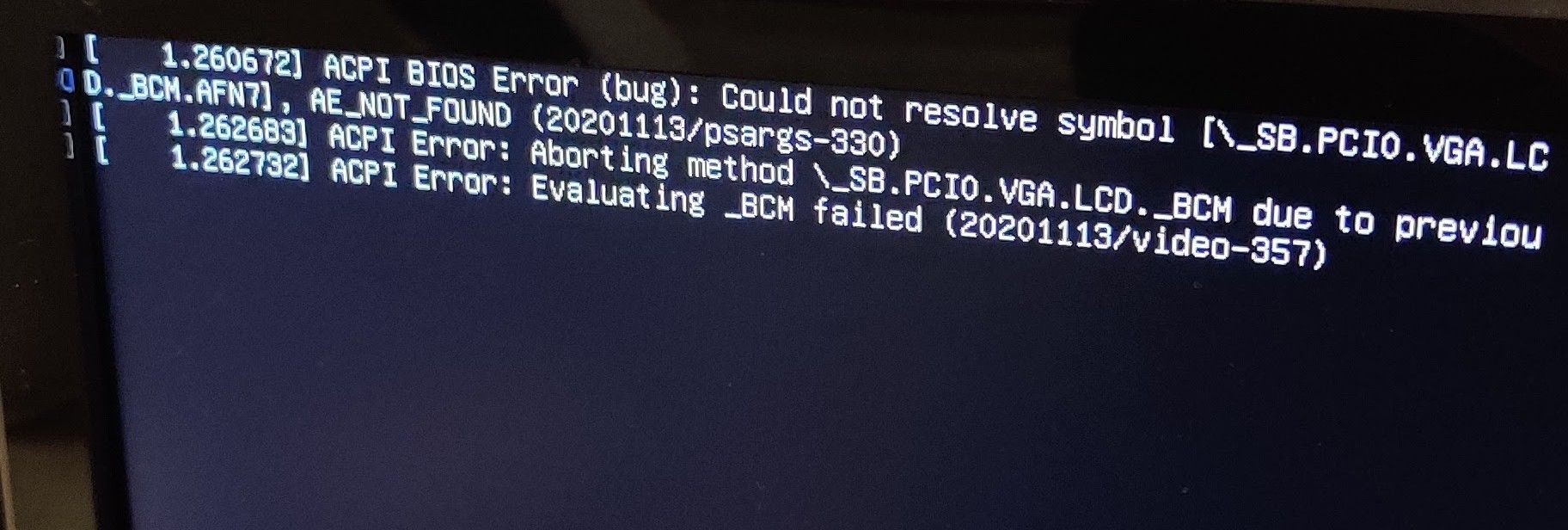
Then, when you did actually get to login, the system would then hang for another two minutes before the desktop was displayed. And to add insult to injury, you couldn’t interact with the system for another 45 seconds !
Frustrating - VERY frustrating 🤬
As I’d recently made the system dual boot for work and home usage, I thought that the bios could be at fault here, so after some research, I went ahead and upgraded that. Unsurprisingly, the bios was pretty out of date. I’m no fan of bleeding edge when it comes to motherboard firmware, and will only upgrade if there is a genuine requirement. Besides, it’s pretty easy to brick a system by flashing with an incorrect bios which will leave you with a machine that won’t start at all.
The bios upgrade went well, but certainly contributed nothing to resolving the issue at hand. Windows booted perfectly with no issues at all, but KDE ? No dice. Same issue. After googling the message displayed just before SDDM started, there were literally hundreds of posts ranging from bios to display driver updates.
Undeterred (well, perhaps a bit disheartened) I started trawling though multiple posts trying to perhaps identify the Holy Grail. After a couple of hours of fruitless searching, I gave up. After all, KDE would actually boot, but not without significant delay. I could live with that (well, not really, but I’m the absence of a fix, I was going to have to put up with it).
Later in the week, I decided to clean the desk in my office meaning I needed to unplug everything so I could clear the area. After cleaning, I reconnected everything and powered the system back on. KDE was set as the default in the bootloader, so was the first choice - and it booted cleanly without errors and within the usual 5 seconds!
Ok. WTF. Somewhat perplexed at why this issue had suddenly “cured itself”, I decided to have a look at the connections. For a long time, I’ve had a USB cable from the back of the PC into my monitor so I can extend the USB ports I have and at the same time, make them more accessible (rather then having to climb on the desk just to connect a new device).
I realized that this was one lead I hadn’t connected. Curious, I shutdown the PC and then reconnected the cable. On boot, sure enough, a long delay and KDE started. I shutdown again and removed this cable. On power on, no issues and KDE boots in 5 seconds!
So after all that, it turns out it’s just a b****y lead 🤬🤬 and I’ve spent ages looking for a “fix” when there actually isn’t one from the software perspective. I replaced the cable, and we’re all good. I really have no idea why Windows doesn’t complain though - and I certainly don’t have the energy to spend hours researching that!
Mark Cutting also advises organisations as a Fractional CIO, Fractional CISO and Executive Advisor, helping boards improve technology governance, cyber resilience and executive decision making. Learn more at Phenomlab Ltd
-
For a while now, my dual boot system (Windows, which I use for work, and KDE Neon which I use primarily) had been exhibiting issues in the sense that when I elected to start Neon, the system would hang during boot for 3-4 minutes and only display the below before finally showing the SDDM login
Then, when you did actually get to login, the system would then hang for another two minutes before the desktop was displayed. And to add insult to injury, you couldn’t interact with the system for another 45 seconds !
Frustrating - VERY frustrating 🤬
As I’d recently made the system dual boot for work and home usage, I thought that the bios could be at fault here, so after some research, I went ahead and upgraded that. Unsurprisingly, the bios was pretty out of date. I’m no fan of bleeding edge when it comes to motherboard firmware, and will only upgrade if there is a genuine requirement. Besides, it’s pretty easy to brick a system by flashing with an incorrect bios which will leave you with a machine that won’t start at all.
The bios upgrade went well, but certainly contributed nothing to resolving the issue at hand. Windows booted perfectly with no issues at all, but KDE ? No dice. Same issue. After googling the message displayed just before SDDM started, there were literally hundreds of posts ranging from bios to display driver updates.
Undeterred (well, perhaps a bit disheartened) I started trawling though multiple posts trying to perhaps identify the Holy Grail. After a couple of hours of fruitless searching, I gave up. After all, KDE would actually boot, but not without significant delay. I could live with that (well, not really, but I’m the absence of a fix, I was going to have to put up with it).
Later in the week, I decided to clean the desk in my office meaning I needed to unplug everything so I could clear the area. After cleaning, I reconnected everything and powered the system back on. KDE was set as the default in the bootloader, so was the first choice - and it booted cleanly without errors and within the usual 5 seconds!
Ok. WTF. Somewhat perplexed at why this issue had suddenly “cured itself”, I decided to have a look at the connections. For a long time, I’ve had a USB cable from the back of the PC into my monitor so I can extend the USB ports I have and at the same time, make them more accessible (rather then having to climb on the desk just to connect a new device).
I realized that this was one lead I hadn’t connected. Curious, I shutdown the PC and then reconnected the cable. On boot, sure enough, a long delay and KDE started. I shutdown again and removed this cable. On power on, no issues and KDE boots in 5 seconds!
So after all that, it turns out it’s just a b****y lead 🤬🤬 and I’ve spent ages looking for a “fix” when there actually isn’t one from the software perspective. I replaced the cable, and we’re all good. I really have no idea why Windows doesn’t complain though - and I certainly don’t have the energy to spend hours researching that!
@phenomlab That sounds really annoying.
But whatever was wrong with the lead, the OS should not respond like that.
So faulty USB device or not, you could argue it is an OS bug in a way.
Why do you prefer to use KDE Linux distro, over say Ubuntu? -
@phenomlab That sounds really annoying.
But whatever was wrong with the lead, the OS should not respond like that.
So faulty USB device or not, you could argue it is an OS bug in a way.
Why do you prefer to use KDE Linux distro, over say Ubuntu?@Panda said in Wasting time on a system that hangs on boot:
Why do you prefer to use KDE Linux distro, over say Ubuntu?
A matter of taste really. I’ve tried pretty much every Linux distro out there over the years, and whilst I started with Ubuntu, I used Linux mint for a long time also. All of them are Debian backed anyway

I guess I feel in love with KDE (Neon) because of the amount of effort they’d gone to in relation to the UI.
I agree about the lead and the OS statement which is why I suspect that Windows simply ignored it (although the Device also worked fine there, so it clearly wasn’t that faulty)


Hello! It looks like you're interested in this conversation, but you don't have an account yet.
Getting fed up of having to scroll through the same posts each visit? When you register for an account, you'll always come back to exactly where you were before, and choose to be notified of new replies (either via email, or push notification). You'll also be able to save bookmarks and upvote posts to show your appreciation to other community members.
With your input, this post could be even better 💗
Register LoginRelated Topics
-
-
-
-
-
-
SASL LOGIN authentication failed: generic failure
Moved Solved Linux -
-