Footer bar add center text

-
Hello @phenomlab
I have almost the same footerbar as yours without the welcome message. (your old one actually)
I just wanted to add some text in its center.
Rather than having 2 blocks (left and right) I wanted a left, center, right block.
I added a div in the middle of the 2 but the right div is no longer displayed.
html :
<!DOCTYPE html> <br> <br> <div id="console-nav-tab"><i class="fa-solid fa-angles-left"></i></div> <div id="console-nav-footer"> <div id="footer-content"> <div id="floatleft"> ©2022 XXXXXXXXXXXX <div class="margin-left"> <a href="https://XXXXXXXXxxxxxxxxxxxxxxxxxx" class="far fa-file-alt"></a> </div> <div class="margin-left"> <a href="https://XXXXXXXXxxxxxxxxxxxxxxxxxx" class="fas fa-users"></a> </div> <div class="margin-left"> <a href="https://XXXXXXXXxxxxxxxxxxxxxxxxxx/" class="fab fa-wikipedia-w"></a> </div> <div class="margin-left"> <a href="https://XXXXXXXXxxxxxxxxxxxxxxxxxx" class="fas fa-bug"></a> </div> </div> <div id="floatcenter"> <div class="textcenter">!!!!!!! Some new center footerbar text !!!!!</div> </div> <div id="floatright"> <a class="feedback-menu-far-right" target="_blank" href="https://XXXXXXXXxxxxxxxxxxxxxxxxxx">RGPD</a> <a class="feedback-menu-far-right" target="_blank">|</a> <a class="feedback-menu-far-right" target="_blank" href="https://XXXXXXXXxxxxxxxxxxxxxxxxxx">@dev</a> <a class="feedback-menu-far-right" target="_blank">|</a> <a class="feedback-menu-far-right" target="_blank" href="hhttps://XXXXXXXXxxxxxxxxxxxxxxxxxx">Hetzner Affiliation</a> <a class="feedback-menu-far-right" target="_blank">|</a> <a class="feedback-menu-far-right" target="_blank" href="https://sudonix.com">Sudonix </a> </div> </div> </div>CSS:
div#console-nav-tab {
    position: fixed;
    bottom: 0px;
    /*z-index: 1100;*/
    z-index: 1050;
    height: 30px;
    left: 0px;
}

div#console-nav-tab i {
    font-size: 16px;
    margin-left: 10px !important;
    line-height: 2.0 !important;
}

.toBottom {
   bottom: 0px !important;
}

/*Desktop*/
#console-nav-footer {
    background-color: #eeeeee;
    border-top: 1px solid #aaa;
    position: fixed;
    bottom: 0;
    height: 30px;
    padding-left: 10px;
    padding-right: 10px;
    left: 0;
    right: 0;
    z-index: 1000;
}

#floatleft {
    float: left;
    padding-left: 25px;
    bottom: 1px;
    font-size: 90%;
    line-height: 2.3;
    font-weight: bold;
    display: flex;
    color: #666666 !important;
}

.margin-left {
    margin-left: 5px;
    font-weight: 500 !important;
}

a.far.fa-file-alt {
    /*background: #007bb5*/
    /*background: #bbb;*/
    background: #eee;
    /*color: white;*/
    color: #6c757d;
    height: 33px;
    padding: 7px;
    font-size: 16px;
    width: 33px;
    text-align: center;
    text-decoration: none;
    box-shadow: none;
    border-radius: 0px;
    background-image: none !important;
    -webkit-background-clip: unset !important;
    -webkit-text-fill-color: unset !important;
}

a.fas.fa-users {
    color: #6c757d;
    height: 33px;
    padding: 7px;
    font-size: 16px;
    width: 33px;
    text-align: center;
    text-decoration: none;
    box-shadow: none;
    border-radius: 0px;
    /*background: #55ACEE;*/
    background: #eee;
    background-image: none !important;
    -webkit-background-clip: unset !important;
    -webkit-text-fill-color: unset !important;
}

a.fab.fa-wikipedia-w {
    color: #6c757d;
    height: 33px;
    padding: 7px;
    font-size: 16px;
    width: 33px;
    text-align: center;
    text-decoration: none;
    box-shadow: none;
    border-radius: 0px;
    /*background: #55ACEE;*/
    background: #eee;
    background-image: none !important;
    -webkit-background-clip: unset !important;
    -webkit-text-fill-color: unset !important;
}

a.fas.fa-bug {
    color: #6c757d;
    height: 33px;
    padding: 7px;
    font-size: 16px;
    width: 33px;
    text-align: center;
    text-decoration: none;
    box-shadow: none;
    border-radius: 0px;
    /*background: #bb0000;*/
    background: #eee;
    background-image: none !important;
    -webkit-background-clip: unset !important;
    -webkit-text-fill-color: unset !important;
}


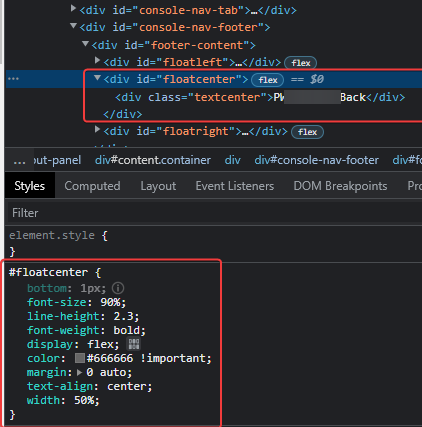
#floatcenter {
    bottom: 1px;
    font-size: 90%;
    line-height: 2.3;
    font-weight: bold;
    display: flex;
    color: #666666 !important;

}

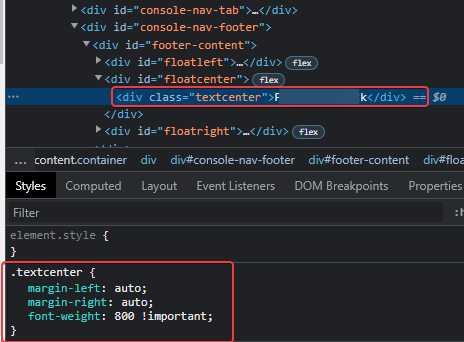
.textcenter {
    margin-left: auto;
    margin-right: auto;
    font-weight: 800 !important;
}


#floatright {
    float: right;
    bottom: 1px;
    font-size: 90%;
    line-height: 2.3;
    display: flex;
}

a.feedback-menu-far-right {
    padding-right: 5px;
    padding-left: 5px;
    text-decoration: none;
    color: #666666 !important;
    font-weight: bold;
}
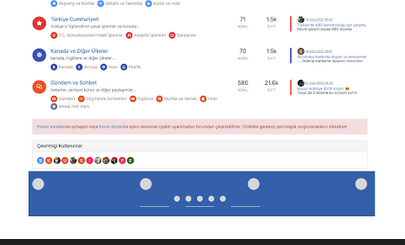
Here the result

Thank you for the tips
@DownPW Do you have this setup in a dev environment anywhere? If not, no issue - I can reproduce it in mine.
Mark Cutting also advises organisations as a Fractional CIO, Fractional CISO and Executive Advisor, helping boards improve technology governance, cyber resilience and executive decision making. Learn more at Phenomlab Ltd
-
@DownPW Do you have this setup in a dev environment anywhere? If not, no issue - I can reproduce it in mine.
Arf not sorry, not under my hand directly.
PW and WS Spirit alive
-
Arf not sorry, not under my hand directly.
@DownPW No problems. Try adding this additional CSS
#floatcenter {
    margin: 0 auto;
    text-align: center;
    width: 50%;
}
Mark Cutting also advises organisations as a Fractional CIO, Fractional CISO and Executive Advisor, helping boards improve technology governance, cyber resilience and executive decision making. Learn more at Phenomlab Ltd
-
@DownPW No problems. Try adding this additional CSS
#floatcenter { margin: 0 auto; text-align: center; width: 50%; }PW and WS Spirit alive
-
@DownPW that’s strange. I used your code to add the additional element and bound the css I supplied above and it worked fine.
Can you check and see if the css is being overridden somewhere?
Mark Cutting also advises organisations as a Fractional CIO, Fractional CISO and Executive Advisor, helping boards improve technology governance, cyber resilience and executive decision making. Learn more at Phenomlab Ltd
-
@DownPW that’s strange. I used your code to add the additional element and bound the css I supplied above and it worked fine.
Can you check and see if the css is being overridden somewhere?
PW and WS Spirit alive
-
@DownPW again, odd. I’ll need to have another look at this and revert. ,
-
Nothing conclusive on my side
PW and WS Spirit alive
-
@DownPW I’ll try again a bit later and provide full html and css. I’ll base it on your site.
-
Ok the code I provided above is the same as my website. But do like you want my friends if you prefer

PW and WS Spirit alive
-
Ok the code I provided above is the same as my website. But do like you want my friends if you prefer
@DownPW I thought it looked familiar. When I checked yesterday the central text part was missing, so I’ll add that via the console and develop from there. This will only be visible for my browser session so no impact to anyone else.
-
Ok the code I provided above is the same as my website. But do like you want my friends if you prefer
@DownPW I see the issue. Use my CSS still, but from your CSS, remove
#floatright {
    display: flex;
}
You should land up with
#floatcenter {
    bottom: 1px;
    font-size: 90%;
    line-height: 2.3;
    font-weight: bold;
    color: #666666 !important;
    margin: 0 auto;
    text-align: center;
    width: 50%;
}
Mark Cutting also advises organisations as a Fractional CIO, Fractional CISO and Executive Advisor, helping boards improve technology governance, cyber resilience and executive decision making. Learn more at Phenomlab Ltd
-
@DownPW I see the issue. Use my CSS still, but from your CSS, remove
#floatright {
    display: flex;
}
You should land up with
#floatcenter { bottom: 1px; font-size: 90%; line-height: 2.3; font-weight: bold; color: #666666 !important; margin: 0 auto; text-align: center; width: 50%; }Nope same problem with :
#floatcenter {
    bottom: 1px;
    font-size: 90%;
    line-height: 2.3;
    font-weight: bold;
    color: #666666 !important;
    margin: 0 auto;
    text-align: center;
    width: 50%;
}

.textcenter {
    margin-left: auto;
    margin-right: auto;
    font-weight: 800 !important;
}


#floatright {
    float: right;
    bottom: 1px;
    font-size: 90%;
    line-height: 2.3;
    /*display: flex;*/
}
PW and WS Spirit alive
-
Nope same problem with :
#floatcenter { bottom: 1px; font-size: 90%; line-height: 2.3; font-weight: bold; color: #666666 !important; margin: 0 auto; text-align: center; width: 50%; } .textcenter { margin-left: auto; margin-right: auto; font-weight: 800 !important; } #floatright { float: right; bottom: 1px; font-size: 90%; line-height: 2.3; /*display: flex;*/ }@DownPW try with
display: inherit;Mark Cutting also advises organisations as a Fractional CIO, Fractional CISO and Executive Advisor, helping boards improve technology governance, cyber resilience and executive decision making. Learn more at Phenomlab Ltd
-
-
@phenomlab On floatright ?
-
@DownPW sorry. Try either
display: inline;Or
display: inline-block;You might need
!importantdepending on cascading settingsEdit - for clarity, this should be in the
#floatcenterblockMark Cutting also advises organisations as a Fractional CIO, Fractional CISO and Executive Advisor, helping boards improve technology governance, cyber resilience and executive decision making. Learn more at Phenomlab Ltd
-
@DownPW sorry. Try either
display: inline;Or
display: inline-block;You might need
!importantdepending on cascading settingsEdit - for clarity, this should be in the
#floatcenterblockHoura, it’s OK with inline-block
On the other hand, I see that the text is well centered in the div but I notice that the div itself is not centered.
Indeed I see a substantial space between the floatcenter div and floatright div.
You can see it in the screenshot below.
Again my HTML/CSS
<div id="floatcenter"> Some centered text
    </div>
#floatcenter { bottom: 1px; font-size: 90%; line-height: 2.3; font-weight: bold; color: #666666 !important; margin: auto auto; text-align: center; width: 50%; display: inline-block !important; }PW and WS Spirit alive
-
Houra, it’s OK with inline-block
On the other hand, I see that the text is well centered in the div but I notice that the div itself is not centered.
Indeed I see a substantial space between the floatcenter div and floatright div.
You can see it in the screenshot below.Again my HTML/CSS
<div id="floatcenter"> Some centered text
    </div>
#floatcenter { bottom: 1px; font-size: 90%; line-height: 2.3; font-weight: bold; color: #666666 !important; margin: auto auto; text-align: center; width: 50%; display: inline-block !important; }@DownPW strange. I don’t recall seeing that issue when I created this using the console live on your site. This is likely due to
widthconstraints on the parentdiv.In the above CSS you could try to set
widthtoautorather than50%, but then you will need to setwidth: 100%;on the parentdivMark Cutting also advises organisations as a Fractional CIO, Fractional CISO and Executive Advisor, helping boards improve technology governance, cyber resilience and executive decision making. Learn more at Phenomlab Ltd
-
@DownPW strange. I don’t recall seeing that issue when I created this using the console live on your site. This is likely due to
widthconstraints on the parentdiv.In the above CSS you could try to set
widthtoautorather than50%, but then you will need to setwidth: 100%;on the parentdivI have test with
width: 50%;, I have the floatright OK with not space like before but the text is not centered.
PW and WS Spirit alive



Hello! It looks like you're interested in this conversation, but you don't have an account yet.
Getting fed up of having to scroll through the same posts each visit? When you register for an account, you'll always come back to exactly where you were before, and choose to be notified of new replies (either via email, or push notification). You'll also be able to save bookmarks and upvote posts to show your appreciation to other community members.
With your input, this post could be even better 💗
Register Login