
Ethernet speed VERY slow
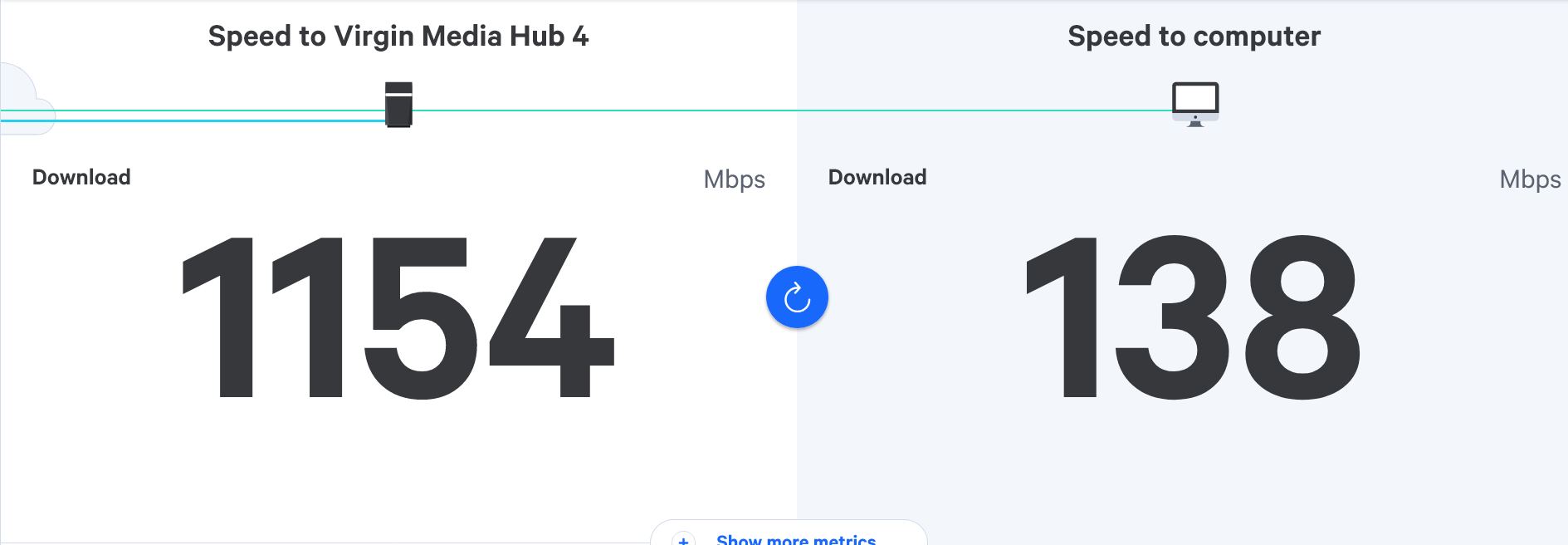
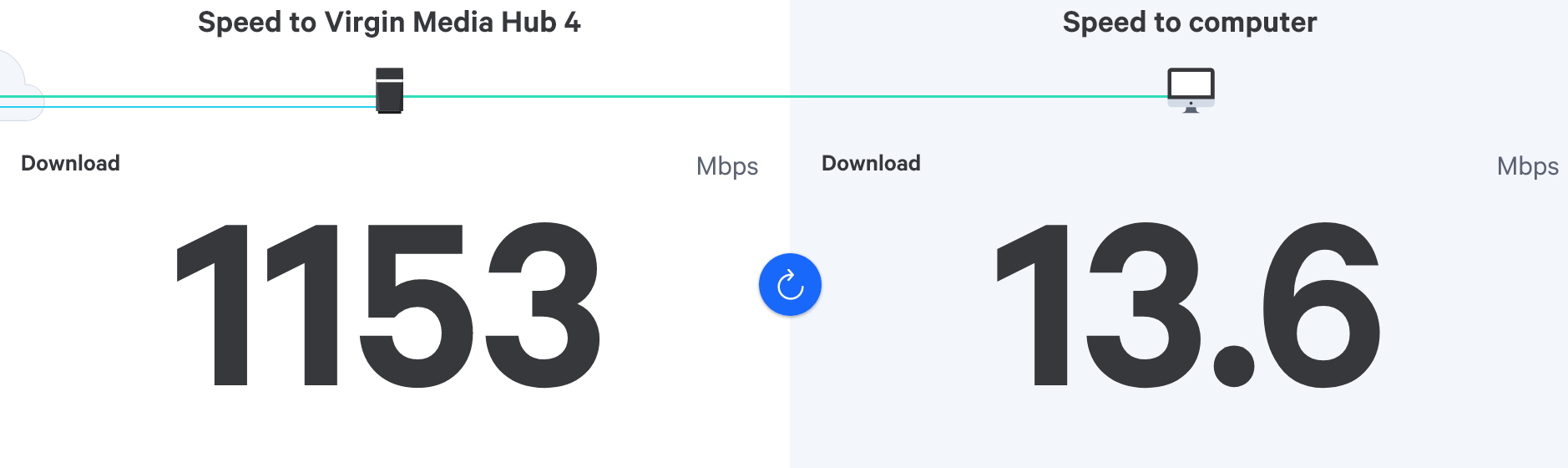
-

@phenomlab said in Ethernet speed VERY slow:
@JAC Yes, totally expected. It’s capped at 100Mbps.
wifi giving greater speeds to the laptop now.
The reason for the ethernet cable in the first place was because the wifi kept dropping out on the laptop.
Seems ok now mind

-
@phenomlab said in Ethernet speed VERY slow:
@JAC Yes, totally expected. It’s capped at 100Mbps.
wifi giving greater speeds to the laptop now.
The reason for the ethernet cable in the first place was because the wifi kept dropping out on the laptop.
Seems ok now mind
@JAC said in Ethernet speed VERY slow:
@phenomlab said in Ethernet speed VERY slow:
@JAC Yes, totally expected. It’s capped at 100Mbps.
wifi giving greater speeds to the laptop now.
The reason for the ethernet cable in the first place was because the wifi kept dropping out on the laptop.
Seems ok now mind
After saying that, I’ve just done a speed test and it shows pretty low compared with last weeks reading…
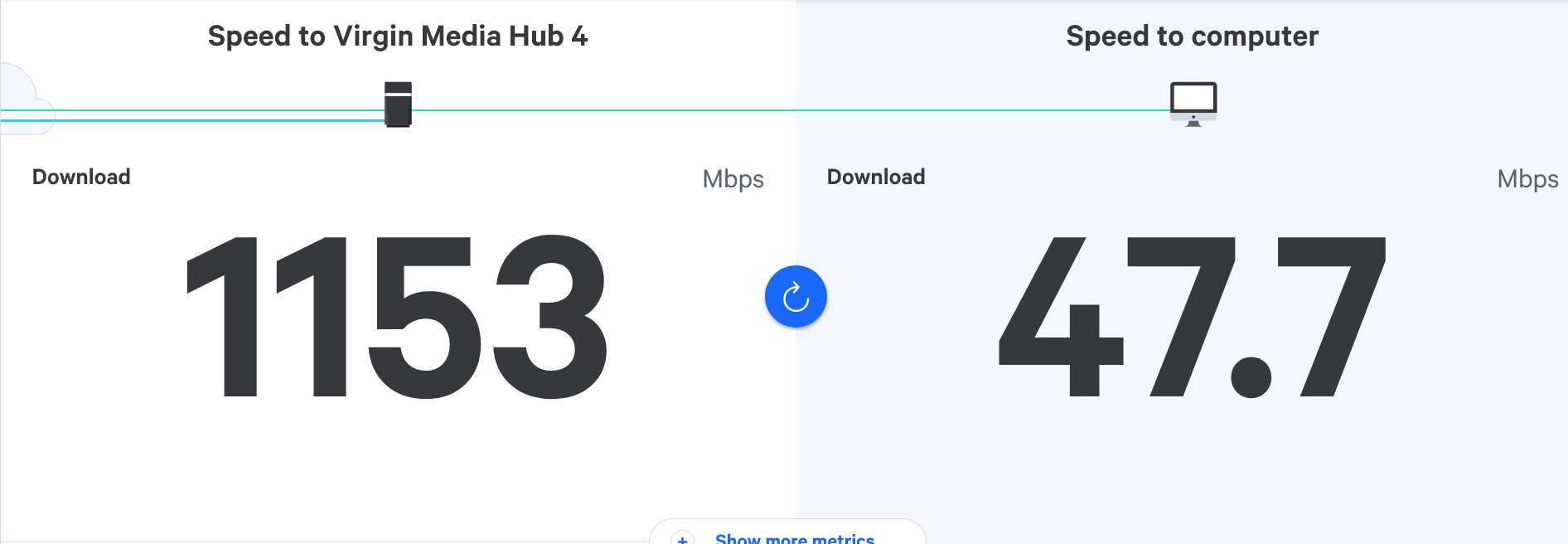
how can it be so inconsistent
-
@JAC said in Ethernet speed VERY slow:
@phenomlab said in Ethernet speed VERY slow:
@JAC Yes, totally expected. It’s capped at 100Mbps.
wifi giving greater speeds to the laptop now.
The reason for the ethernet cable in the first place was because the wifi kept dropping out on the laptop.
Seems ok now mind
After saying that, I’ve just done a speed test and it shows pretty low compared with last weeks reading…
how can it be so inconsistent
@JAC said in Ethernet speed VERY slow:
@JAC said in Ethernet speed VERY slow:
@phenomlab said in Ethernet speed VERY slow:
@JAC Yes, totally expected. It’s capped at 100Mbps.
wifi giving greater speeds to the laptop now.
The reason for the ethernet cable in the first place was because the wifi kept dropping out on the laptop.
Seems ok now mind
After saying that, I’ve just done a speed test and it shows pretty low compared with last weeks reading…
how can it be so inconsistent
A reading from my phone in the same spot…
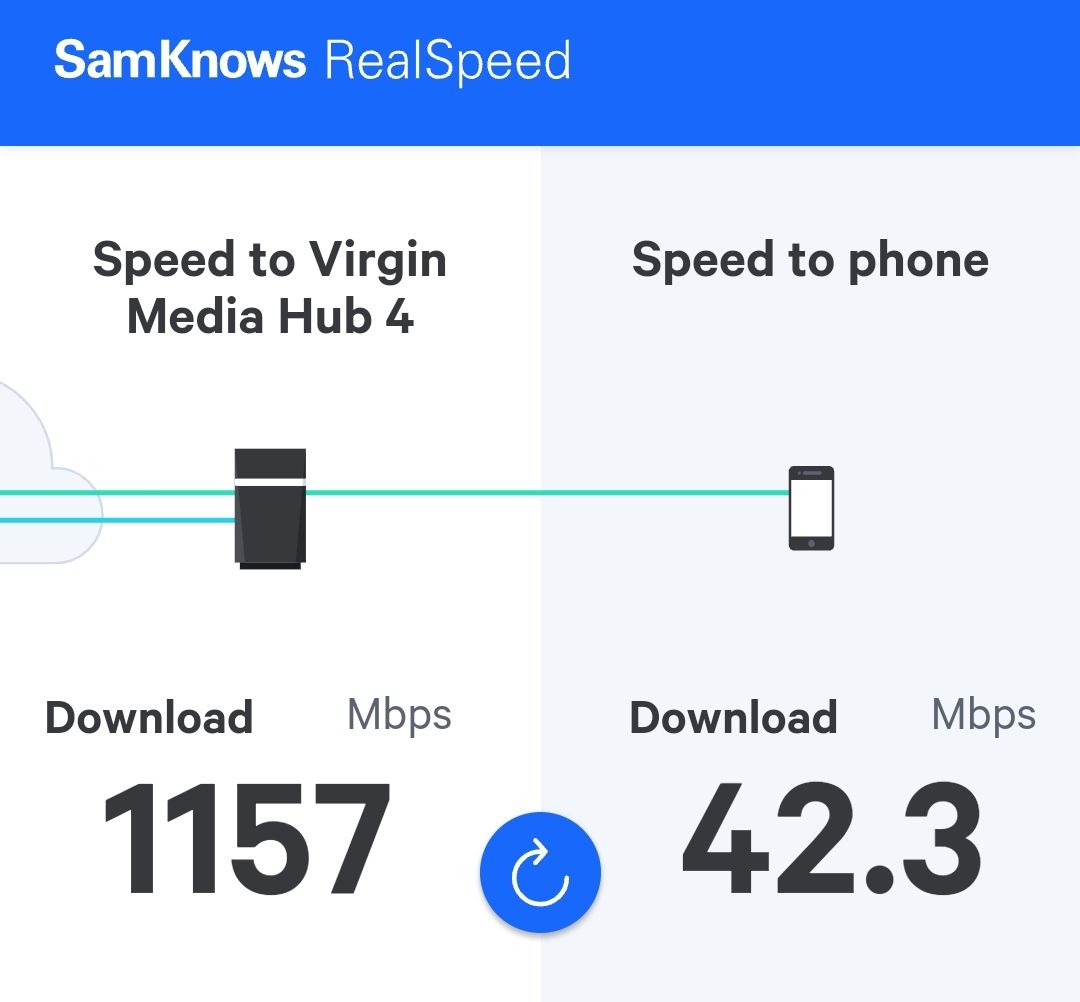
Although the readings were greater last weekend, is this a case of range and the fact other users could be on the internet too?
-
@JAC said in Ethernet speed VERY slow:
@JAC said in Ethernet speed VERY slow:
@phenomlab said in Ethernet speed VERY slow:
@JAC Yes, totally expected. It’s capped at 100Mbps.
wifi giving greater speeds to the laptop now.
The reason for the ethernet cable in the first place was because the wifi kept dropping out on the laptop.
Seems ok now mind
After saying that, I’ve just done a speed test and it shows pretty low compared with last weeks reading…
how can it be so inconsistent
A reading from my phone in the same spot…
Although the readings were greater last weekend, is this a case of range and the fact other users could be on the internet too?
@JAC said in Ethernet speed VERY slow:
@JAC said in Ethernet speed VERY slow:
@JAC said in Ethernet speed VERY slow:
@phenomlab said in Ethernet speed VERY slow:
@JAC Yes, totally expected. It’s capped at 100Mbps.
wifi giving greater speeds to the laptop now.
The reason for the ethernet cable in the first place was because the wifi kept dropping out on the laptop.
Seems ok now mind
After saying that, I’ve just done a speed test and it shows pretty low compared with last weeks reading…
how can it be so inconsistent
A reading from my phone in the same spot…
Although the readings were greater last weekend, is this a case of range and the fact other users could be on the internet too?
I use this in the top room but whatever I’m getting now is still an improvement on what I used to get up here
 . Sent off for second pod.
-
@JAC said in Ethernet speed VERY slow:
@JAC said in Ethernet speed VERY slow:
@JAC said in Ethernet speed VERY slow:
@phenomlab said in Ethernet speed VERY slow:
@JAC Yes, totally expected. It’s capped at 100Mbps.
wifi giving greater speeds to the laptop now.
The reason for the ethernet cable in the first place was because the wifi kept dropping out on the laptop.
Seems ok now mind
After saying that, I’ve just done a speed test and it shows pretty low compared with last weeks reading…
how can it be so inconsistent
A reading from my phone in the same spot…
Although the readings were greater last weekend, is this a case of range and the fact other users could be on the internet too?
I use this in the top room but whatever I’m getting now is still an improvement on what I used to get up here
. Sent off for second pod.
@JAC said in Ethernet speed VERY slow:
@JAC said in Ethernet speed VERY slow:
@JAC said in Ethernet speed VERY slow:
@JAC said in Ethernet speed VERY slow:
@phenomlab said in Ethernet speed VERY slow:
@JAC Yes, totally expected. It’s capped at 100Mbps.
wifi giving greater speeds to the laptop now.
The reason for the ethernet cable in the first place was because the wifi kept dropping out on the laptop.
Seems ok now mind
After saying that, I’ve just done a speed test and it shows pretty low compared with last weeks reading…
how can it be so inconsistent
A reading from my phone in the same spot…
Although the readings were greater last weekend, is this a case of range and the fact other users could be on the internet too?
I use this in the top room but whatever I’m getting now is still an improvement on what I used to get up here
. Sent off for second pod.Tried in kitchen earlier where we have a pod plugged in in the hallway so not far from the kitchen, I was getting over 250mbps last week but it was around 130 this morning, something’s not right
 .
-
@JAC said in Ethernet speed VERY slow:
@JAC said in Ethernet speed VERY slow:
@JAC said in Ethernet speed VERY slow:
@JAC said in Ethernet speed VERY slow:
@phenomlab said in Ethernet speed VERY slow:
@JAC Yes, totally expected. It’s capped at 100Mbps.
wifi giving greater speeds to the laptop now.
The reason for the ethernet cable in the first place was because the wifi kept dropping out on the laptop.
Seems ok now mind
After saying that, I’ve just done a speed test and it shows pretty low compared with last weeks reading…
how can it be so inconsistent
A reading from my phone in the same spot…
Although the readings were greater last weekend, is this a case of range and the fact other users could be on the internet too?
I use this in the top room but whatever I’m getting now is still an improvement on what I used to get up here
. Sent off for second pod.Tried in kitchen earlier where we have a pod plugged in in the hallway so not far from the kitchen, I was getting over 250mbps last week but it was around 130 this morning, something’s not right
.
@JAC I’m pretty sure that this is interference. Try setting the frequency to lower (2.4Ghz) rather than the default of 5Ghz.
Here’s a very well designed guide that explains this properly
https://www.actcorp.in/blog/difference-between-2.4ghz-and-5ghz-wifi
Mark Cutting also advises organisations as a Fractional CIO, Fractional CISO and Executive Advisor, helping boards improve technology governance, cyber resilience and executive decision making. Learn more at Gratmore Ltd
-
@JAC I’m pretty sure that this is interference. Try setting the frequency to lower (2.4Ghz) rather than the default of 5Ghz.
Here’s a very well designed guide that explains this properly
https://www.actcorp.in/blog/difference-between-2.4ghz-and-5ghz-wifi
@phenomlab said in Ethernet speed VERY slow:
@JAC I’m pretty sure that this is interference. Try setting the frequency to lower (2.4Ghz) rather than the default of 5Ghz.
Here’s a very well designed guide that explains this properly
https://www.actcorp.in/blog/difference-between-2.4ghz-and-5ghz-wifi
Thanks Mark, will try this later

-
@phenomlab said in Ethernet speed VERY slow:
@JAC I’m pretty sure that this is interference. Try setting the frequency to lower (2.4Ghz) rather than the default of 5Ghz.
Here’s a very well designed guide that explains this properly
https://www.actcorp.in/blog/difference-between-2.4ghz-and-5ghz-wifi
Thanks Mark, will try this later
@JAC said in Ethernet speed VERY slow:
@phenomlab said in Ethernet speed VERY slow:
@JAC I’m pretty sure that this is interference. Try setting the frequency to lower (2.4Ghz) rather than the default of 5Ghz.
Here’s a very well designed guide that explains this properly
https://www.actcorp.in/blog/difference-between-2.4ghz-and-5ghz-wifi
Thanks Mark, will try this later
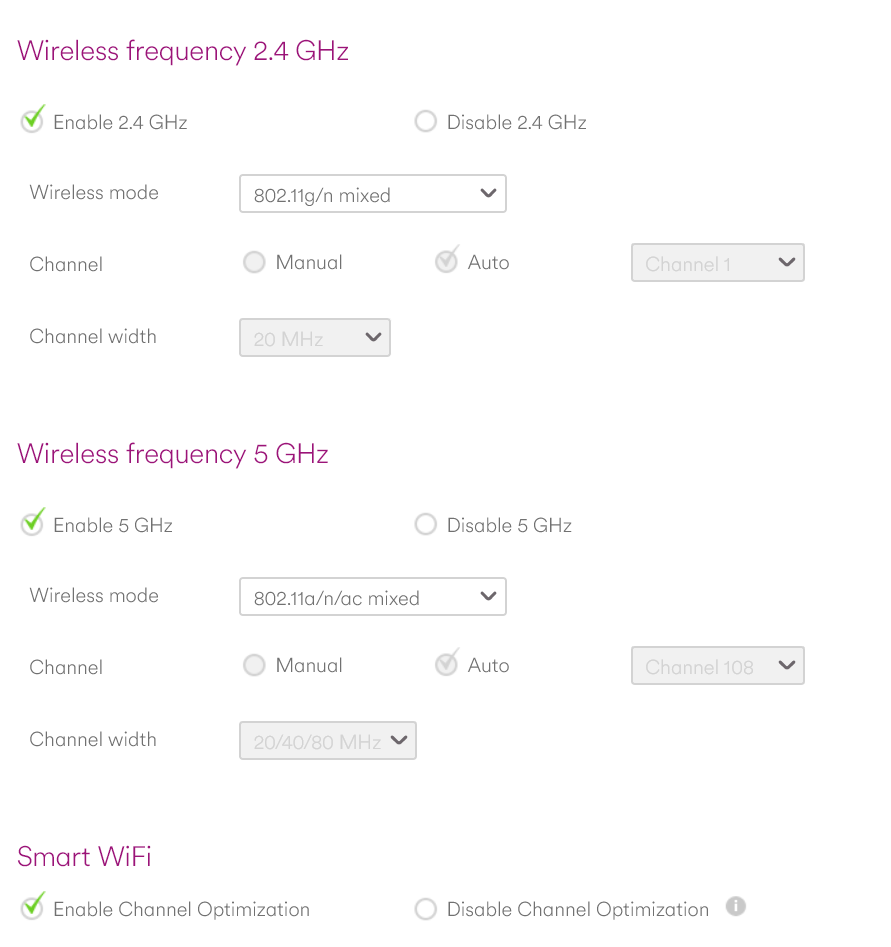
It appears the hub is already displaying: Wireless(On (2.4 and 5 GHz)).
-
@JAC said in Ethernet speed VERY slow:
@phenomlab said in Ethernet speed VERY slow:
@JAC I’m pretty sure that this is interference. Try setting the frequency to lower (2.4Ghz) rather than the default of 5Ghz.
Here’s a very well designed guide that explains this properly
https://www.actcorp.in/blog/difference-between-2.4ghz-and-5ghz-wifi
Thanks Mark, will try this later
It appears the hub is already displaying: Wireless(On (2.4 and 5 GHz)).
@JAC said in Ethernet speed VERY slow:
@JAC said in Ethernet speed VERY slow:
@phenomlab said in Ethernet speed VERY slow:
@JAC I’m pretty sure that this is interference. Try setting the frequency to lower (2.4Ghz) rather than the default of 5Ghz.
Here’s a very well designed guide that explains this properly
https://www.actcorp.in/blog/difference-between-2.4ghz-and-5ghz-wifi
Thanks Mark, will try this later
It appears the hub is already displaying: Wireless(On (2.4 and 5 GHz)).
-
@JAC said in Ethernet speed VERY slow:
@JAC said in Ethernet speed VERY slow:
@phenomlab said in Ethernet speed VERY slow:
@JAC I’m pretty sure that this is interference. Try setting the frequency to lower (2.4Ghz) rather than the default of 5Ghz.
Here’s a very well designed guide that explains this properly
https://www.actcorp.in/blog/difference-between-2.4ghz-and-5ghz-wifi
Thanks Mark, will try this later
It appears the hub is already displaying: Wireless(On (2.4 and 5 GHz)).
@JAC disable the 5Ghz and try it. 5Ghz excels when it comes to speed, but isn’t great over distance. Also try disabling the 2.4Ghz and enable the 5Ghz to see what speeds you get.
Mark Cutting also advises organisations as a Fractional CIO, Fractional CISO and Executive Advisor, helping boards improve technology governance, cyber resilience and executive decision making. Learn more at Gratmore Ltd
-
@JAC disable the 5Ghz and try it. 5Ghz excels when it comes to speed, but isn’t great over distance. Also try disabling the 2.4Ghz and enable the 5Ghz to see what speeds you get.
@phenomlab said in Ethernet speed VERY slow:
@JAC disable the 5Ghz and try it. 5Ghz excels when it comes to speed, but isn’t great over distance. Also try disabling the 2.4Ghz and enable the 5Ghz to see what speeds you get.
Just trying now…
-
@phenomlab said in Ethernet speed VERY slow:
@JAC disable the 5Ghz and try it. 5Ghz excels when it comes to speed, but isn’t great over distance. Also try disabling the 2.4Ghz and enable the 5Ghz to see what speeds you get.
Just trying now…
@JAC said in Ethernet speed VERY slow:
@phenomlab said in Ethernet speed VERY slow:
@JAC disable the 5Ghz and try it. 5Ghz excels when it comes to speed, but isn’t great over distance. Also try disabling the 2.4Ghz and enable the 5Ghz to see what speeds you get.
Just trying now…
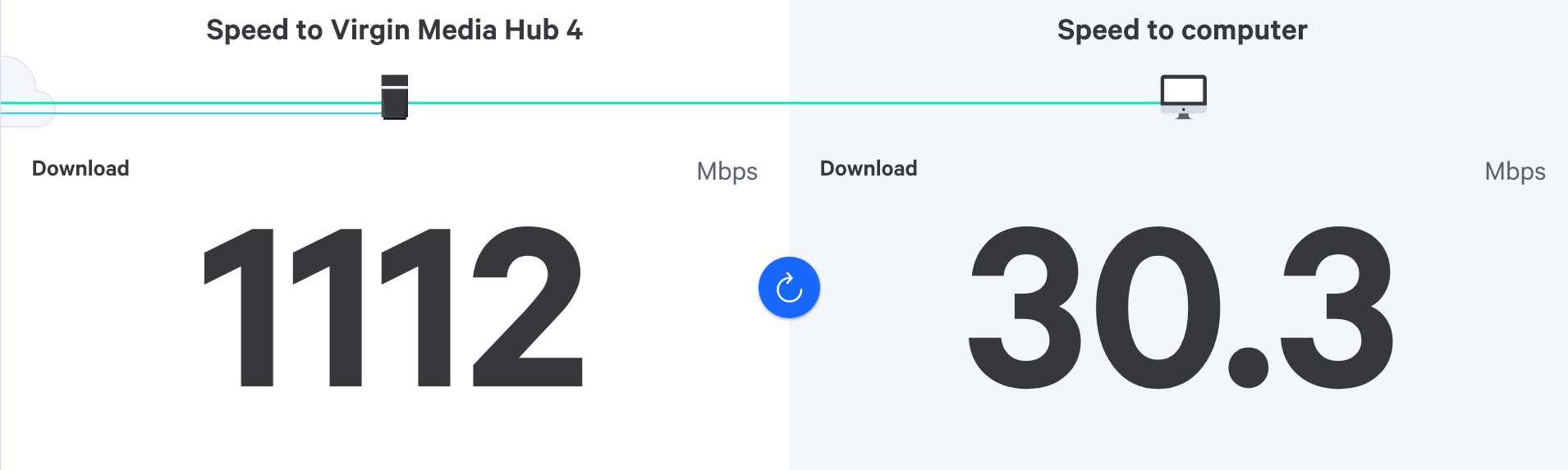
with 2.4ghz disabled…
-
@JAC said in Ethernet speed VERY slow:
@phenomlab said in Ethernet speed VERY slow:
@JAC disable the 5Ghz and try it. 5Ghz excels when it comes to speed, but isn’t great over distance. Also try disabling the 2.4Ghz and enable the 5Ghz to see what speeds you get.
Just trying now…
with 2.4ghz disabled…
@JAC said in Ethernet speed VERY slow:
@JAC said in Ethernet speed VERY slow:
@phenomlab said in Ethernet speed VERY slow:
@JAC disable the 5Ghz and try it. 5Ghz excels when it comes to speed, but isn’t great over distance. Also try disabling the 2.4Ghz and enable the 5Ghz to see what speeds you get.
Just trying now…
with 2.4ghz disabled…
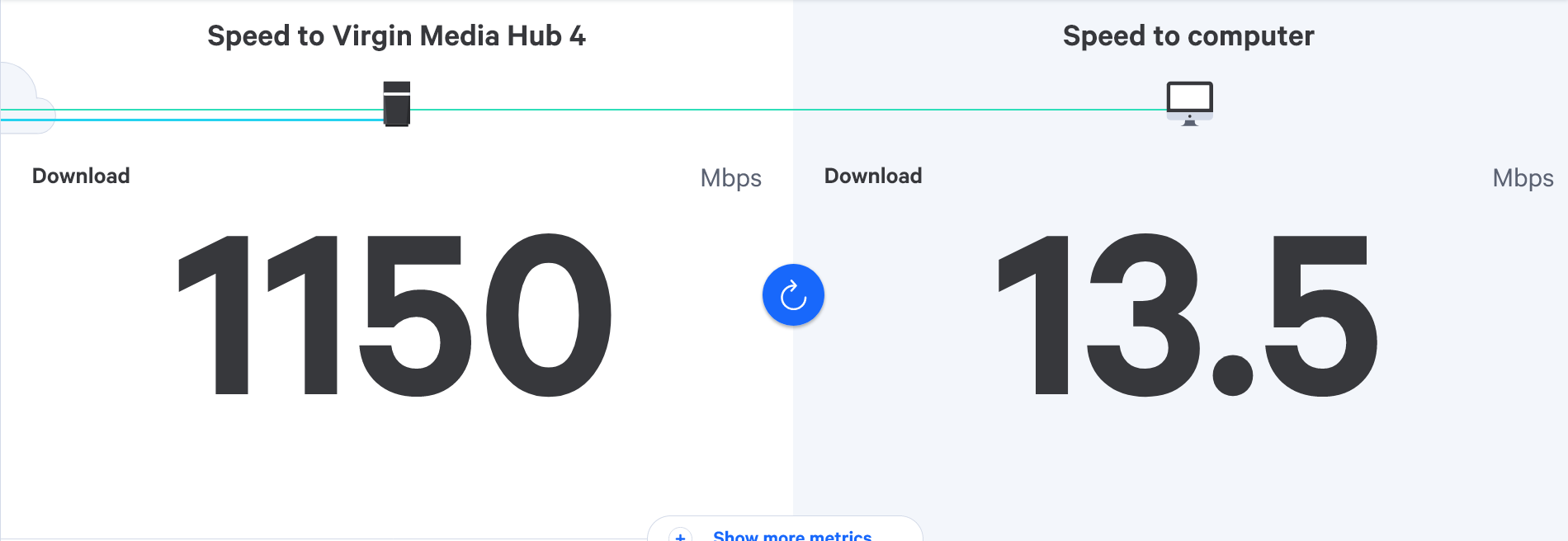
with 2.4ghz enabled and 5ghz enabled…
-
@JAC said in Ethernet speed VERY slow:
@JAC said in Ethernet speed VERY slow:
@phenomlab said in Ethernet speed VERY slow:
@JAC disable the 5Ghz and try it. 5Ghz excels when it comes to speed, but isn’t great over distance. Also try disabling the 2.4Ghz and enable the 5Ghz to see what speeds you get.
Just trying now…
with 2.4ghz disabled…
with 2.4ghz enabled and 5ghz enabled…
@JAC said in Ethernet speed VERY slow:
@JAC said in Ethernet speed VERY slow:
@JAC said in Ethernet speed VERY slow:
@phenomlab said in Ethernet speed VERY slow:
@JAC disable the 5Ghz and try it. 5Ghz excels when it comes to speed, but isn’t great over distance. Also try disabling the 2.4Ghz and enable the 5Ghz to see what speeds you get.
Just trying now…
with 2.4ghz disabled…
with 2.4ghz enabled and 5ghz enabled…
confused.com (other websites are available
) -
@JAC said in Ethernet speed VERY slow:
@JAC said in Ethernet speed VERY slow:
@JAC said in Ethernet speed VERY slow:
@phenomlab said in Ethernet speed VERY slow:
@JAC disable the 5Ghz and try it. 5Ghz excels when it comes to speed, but isn’t great over distance. Also try disabling the 2.4Ghz and enable the 5Ghz to see what speeds you get.
Just trying now…
with 2.4ghz disabled…
with 2.4ghz enabled and 5ghz enabled…
confused.com (other websites are available
)
@JAC is this the same speed throughout the house ? Also, so you get the same experience cross device or just from one ?
Mark Cutting also advises organisations as a Fractional CIO, Fractional CISO and Executive Advisor, helping boards improve technology governance, cyber resilience and executive decision making. Learn more at Gratmore Ltd
-
@JAC is this the same speed throughout the house ? Also, so you get the same experience cross device or just from one ?
@phenomlab said in Ethernet speed VERY slow:
@JAC is this the same speed throughout the house ? Also, so you get the same experience cross device or just from one ?
Speed will be greater downstairs near the router of course, but even doing tests earlier speeds are around 100mbps down on last weeks speeds that I recorded on here and I can’t quite put my finger on why
-
@phenomlab said in Ethernet speed VERY slow:
@JAC is this the same speed throughout the house ? Also, so you get the same experience cross device or just from one ?
Speed will be greater downstairs near the router of course, but even doing tests earlier speeds are around 100mbps down on last weeks speeds that I recorded on here and I can’t quite put my finger on why
@JAC ok. For clarity, the speed to the hub is from the cable exchange to the hub in the house. This only measures the speed of the internet circuit itself, and not the speed of the wi-fi network to your phone.
So whilst you think you’re getting (for example) 100Mbps internet speed to your phone, this is actually the amount of bandwidth being delivered to your phone via the hub itself. In short, this brand that you could (and are) getting 1Gbps internet delivered to your hub, that doesn’t automatically mean that’s what is being delivered to your phone.
There are a number of scenarios to consider here. The most prominent is environmental factors such as solid walls, overhead lighting etc - all of which will play an individual role in reducing the speeds being delivered to the device itself. The real issue with consumer wi-fi devices is that they do not guarantee bandwidth to the end connecting device - more along the lines of serving whatever is available at the time.
How many wireless devices do you have at home ?
Mark Cutting also advises organisations as a Fractional CIO, Fractional CISO and Executive Advisor, helping boards improve technology governance, cyber resilience and executive decision making. Learn more at Gratmore Ltd
-
@JAC ok. For clarity, the speed to the hub is from the cable exchange to the hub in the house. This only measures the speed of the internet circuit itself, and not the speed of the wi-fi network to your phone.
So whilst you think you’re getting (for example) 100Mbps internet speed to your phone, this is actually the amount of bandwidth being delivered to your phone via the hub itself. In short, this brand that you could (and are) getting 1Gbps internet delivered to your hub, that doesn’t automatically mean that’s what is being delivered to your phone.
There are a number of scenarios to consider here. The most prominent is environmental factors such as solid walls, overhead lighting etc - all of which will play an individual role in reducing the speeds being delivered to the device itself. The real issue with consumer wi-fi devices is that they do not guarantee bandwidth to the end connecting device - more along the lines of serving whatever is available at the time.
How many wireless devices do you have at home ?
@phenomlab said in Ethernet speed VERY slow:
So whilst you think you’re getting (for example) 100Mbps internet speed to your phone, this is actually the amount of bandwidth being delivered to your phone via the hub itself. In short, this brand that you could (and are) getting 1Gbps internet delivered to your hub, that doesn’t automatically mean that’s what is being delivered to your phone.
Absolutely mate, I agree with this.
-
@JAC ok. For clarity, the speed to the hub is from the cable exchange to the hub in the house. This only measures the speed of the internet circuit itself, and not the speed of the wi-fi network to your phone.
So whilst you think you’re getting (for example) 100Mbps internet speed to your phone, this is actually the amount of bandwidth being delivered to your phone via the hub itself. In short, this brand that you could (and are) getting 1Gbps internet delivered to your hub, that doesn’t automatically mean that’s what is being delivered to your phone.
There are a number of scenarios to consider here. The most prominent is environmental factors such as solid walls, overhead lighting etc - all of which will play an individual role in reducing the speeds being delivered to the device itself. The real issue with consumer wi-fi devices is that they do not guarantee bandwidth to the end connecting device - more along the lines of serving whatever is available at the time.
How many wireless devices do you have at home ?
@phenomlab said in Ethernet speed VERY slow:
How many wireless devices do you have at home ?
Probably at least 5 on the go at any one time - Laptop, mobile, tablet etc. Not including the Tivo boxes.
-
@phenomlab said in Ethernet speed VERY slow:
How many wireless devices do you have at home ?
Probably at least 5 on the go at any one time - Laptop, mobile, tablet etc. Not including the Tivo boxes.
@JAC is the speed consistent across these devices completed to your phone in the same location ? What speeds do you get from the laptop on wireless and on wired ?
Mark Cutting also advises organisations as a Fractional CIO, Fractional CISO and Executive Advisor, helping boards improve technology governance, cyber resilience and executive decision making. Learn more at Gratmore Ltd
Hello! It looks like you're interested in this conversation, but you don't have an account yet.
Getting fed up of having to scroll through the same posts each visit? When you register for an account, you'll always come back to exactly where you were before, and choose to be notified of new replies (either via email, or push notification). You'll also be able to save bookmarks and upvote posts to show your appreciation to other community members.
With your input, this post could be even better 💗
Register LoginDid this solution help you?
Related Topics
-
-
-

Linksys EA6400
Solved Networks -
Issues with routing
Solved Networks -
-