moving domain to google domains
-
I am moving in my domain to google domains. i have authorized the security code and everything and it will be moved in automatically in 5days.
while moving into google domain it offered the settings to keep existing DNS settings which is CF i have checked that option.
hoping everything will be moved successfully. once it is moved i have to make sure everything is working HTTPS at CF and also need to set email forward at google domain.
as you know at times i am experiencing HTTP to HTTPS redirect failures, shall i set the HTTPS option at google DNS level?
do you have any other suggestions?
https://community.cloudflare.com/t/help-how-do-i-get-google-domains-email-forwarding-to-work-with-cloudflare-dns/163813
https://support.google.com/domains/answer/9428703 -
I am moving in my domain to google domains. i have authorized the security code and everything and it will be moved in automatically in 5days.
while moving into google domain it offered the settings to keep existing DNS settings which is CF i have checked that option.
hoping everything will be moved successfully. once it is moved i have to make sure everything is working HTTPS at CF and also need to set email forward at google domain.
as you know at times i am experiencing HTTP to HTTPS redirect failures, shall i set the HTTPS option at google DNS level?
do you have any other suggestions?
https://community.cloudflare.com/t/help-how-do-i-get-google-domains-email-forwarding-to-work-with-cloudflare-dns/163813
https://support.google.com/domains/answer/9428703@hari If you’re still using Cloudflare to pass the traffic through then you should leave everything as it is and ensure you force https at that level. Moving the domain to Google will have no bearing on the https side of things if they are not hosting the site directly.
Mark Cutting also advises organisations as a Fractional CIO, Fractional CISO and Executive Advisor, helping boards improve technology governance, cyber resilience and executive decision making. Learn more at Phenomlab Ltd
-
@hari If you’re still using Cloudflare to pass the traffic through then you should leave everything as it is and ensure you force https at that level. Moving the domain to Google will have no bearing on the https side of things if they are not hosting the site directly.
//update// I have successfully moved to google domains and configured email forwarder so far everything is working fine.
emails are forwarding to gmail and outgoing emails are sent using elastic email for cloudways.
while configuring forwarders i have come across DNSSEC
and i configured following this, this one line looks scary
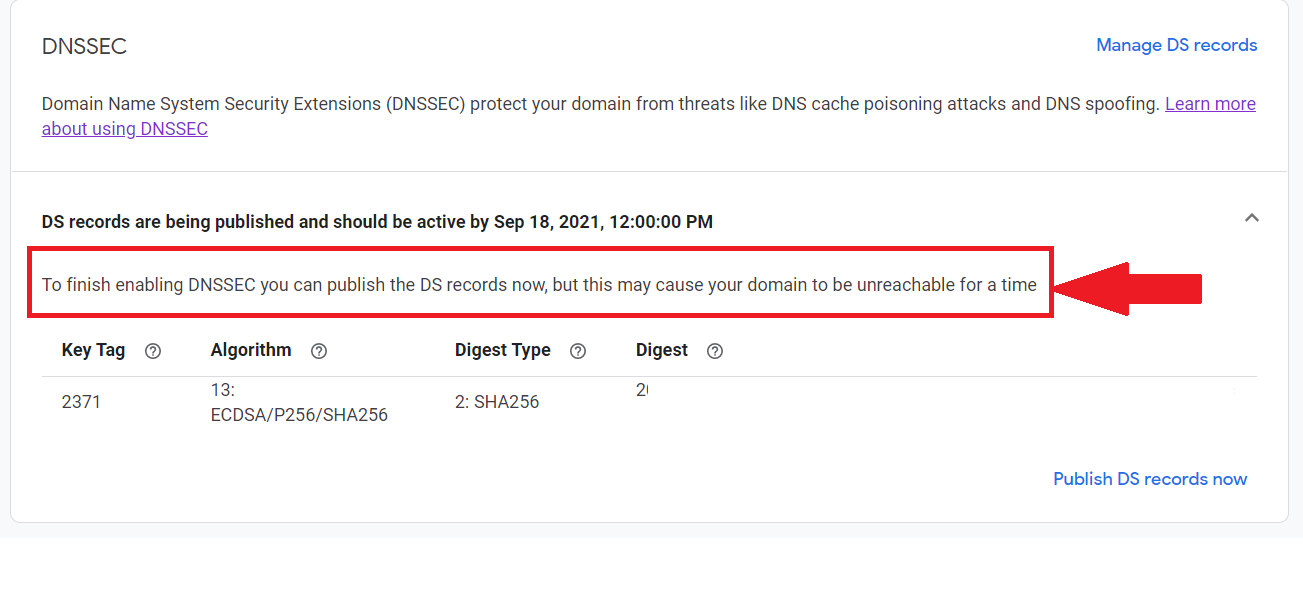
should i hit publish? or do indeed to wait till Sep 18, 2021, 12:00:00 PM ?
i am using google domains with CF. by publishing this will cause any downtime?
…
-
//update// I have successfully moved to google domains and configured email forwarder so far everything is working fine.
emails are forwarding to gmail and outgoing emails are sent using elastic email for cloudways.
while configuring forwarders i have come across DNSSEC
and i configured following this, this one line looks scary
should i hit publish? or do indeed to wait till Sep 18, 2021, 12:00:00 PM ?
i am using google domains with CF. by publishing this will cause any downtime?
…
@hari If the domain is in the progress of being migrated, then I’d personally wait rather than force the activation of DNSSEC. In most cases, DNSSEC itself does not cause any downtime, but if your domain is still in the migration phase, then this could represent issues which are easily avoided by simply waiting.
Personally, I’d let everything bed in for a week to ensure it’s all ok before enabling anything else.
Mark Cutting also advises organisations as a Fractional CIO, Fractional CISO and Executive Advisor, helping boards improve technology governance, cyber resilience and executive decision making. Learn more at Phenomlab Ltd
-
@hari If the domain is in the progress of being migrated, then I’d personally wait rather than force the activation of DNSSEC. In most cases, DNSSEC itself does not cause any downtime, but if your domain is still in the migration phase, then this could represent issues which are easily avoided by simply waiting.
Personally, I’d let everything bed in for a week to ensure it’s all ok before enabling anything else.
@phenomlab as per your suggestion after updating the tag and key i left it alone, thought i can publish it later after 2 or 3 days.
today, when i rechecked google domains already published it and CF, detected it.

So, that is all we need to do?
🥳
Solved
-
@phenomlab as per your suggestion after updating the tag and key i left it alone, thought i can publish it later after 2 or 3 days.
today, when i rechecked google domains already published it and CF, detected it.
So, that is all we need to do?
🥳
Solved
@hari That’s it. Yes. Nothing more to do


Hello! It looks like you're interested in this conversation, but you don't have an account yet.
Getting fed up of having to scroll through the same posts each visit? When you register for an account, you'll always come back to exactly where you were before, and choose to be notified of new replies (either via email, or push notification). You'll also be able to save bookmarks and upvote posts to show your appreciation to other community members.
With your input, this post could be even better 💗
Register Login