Adding a banner to chat messages
-
-
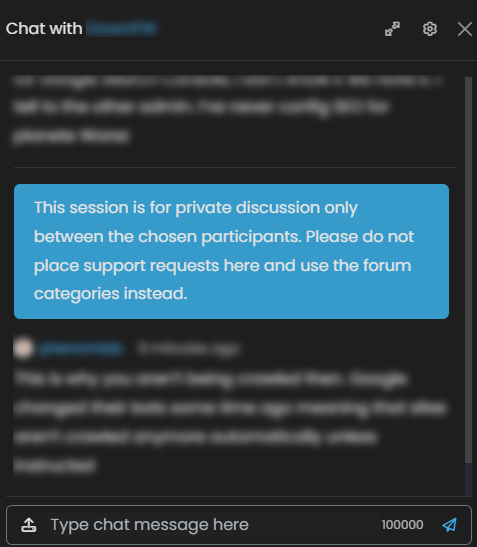
Hmmm tested your new code but I have the same banner message now
-
-
Ok so there is a problem on my side. Sorry, test it again
-

Work now with empty chat room, Thank you

But they appear at the very bottom of the chat :
Just see that the banner is displayed even after a system event :
component="chat/system-message"
System events should be considered as a separate message for thebanner message to be displayed below.
PW and WS Spirit alive
-
Work now with empty chat room, Thank you
But they appear at the very bottom of the chat :Just see that the banner is displayed even after a system event :
component="chat/system-message"System events should be considered as a separate message for thebanner message to be displayed below.

@DownPW did the chat banner work in the way you expected here?
Mark Cutting also advises organisations as a Fractional CIO, Fractional CISO and Executive Advisor, helping boards improve technology governance, cyber resilience and executive decision making. Learn more at Gratmore Ltd
-
@phenomlab said in Adding a banner to chat messages:
@DownPW did the chat banner work in the way you expected here
A little bit. See hère:
@DownPW said in Adding a banner to chat messages:
Work now with empty chat room, Thank you
But they appear at the very bottom of the chat :Just see that the banner is displayed even after a system event :
component="chat/system-message"System events should be considered as a separate message for thebanner message to be displayed below.
PW and WS Spirit alive
-
@phenomlab said in Adding a banner to chat messages:
@DownPW did the chat banner work in the way you expected here
A little bit. See hère:
@DownPW said in Adding a banner to chat messages:
Work now with empty chat room, Thank you
But they appear at the very bottom of the chat :Just see that the banner is displayed even after a system event :
component="chat/system-message"System events should be considered as a separate message for thebanner message to be displayed below.
@DownPW I think this is what you want - let me know

in this case, the code has to be modified so it looks like the below
// Chat message banner
function chatBanner() {
    var roomName = $("h5[component='chat/header/title']").text().trim();
    var bannerContent;
    if (roomName === "Testing 3") {
        bannerContent = '<div id="chatbanner">This message will fire for chat rooms with the title of "Testing 3"</div>';
    } else {
        bannerContent = '<div id="chatbanner">This session is for <strong>private discussion only</strong> between the chosen participants. Please do <strong>not</strong> place support requests here and create a <a href="#" onclick="app.newTopic();">new topic</a> instead.</div>';
    }
    var chatMessagesContainer = $('[component="chat/system-message"]:last-of-type');
    var existingMessages = $('[component="chat/message"]');

    if (existingMessages.length === 0) {
        // If there are no messages, append the banner to the messages container
        chatMessagesContainer.first().after(bannerContent);
    } else {
        // If there are messages, add the banner after the last message
        existingMessages.last().after(bannerContent);
    }
}

$(window).on('action:chat.loaded', function(data) {
    $(document).ready(function() {
        chatBanner()
    });
});
This will place the banner after the last system message and before any of the messages themselves. If there are existing messages in the room, the banner will be placed at the footer of the last message so it is seen each time.

-
-
I have tested now this last code, It’s clearly better, Thnks you again.
Just one things mark @phenomlab, the banner don’t appear if there is empty (no message) :
PW and WS Spirit alive
-
I have tested now this last code, It’s clearly better, Thnks you again.
Just one things mark @phenomlab, the banner don’t appear if there is empty (no message) : -
-
@phenomlab nope
-
It’s because you have joined the public chat and so we have a system message. (Phenomlab as joined the room…)
If you are the creator of the room, no joined her and 0 message (user and system message), banner don’t appear but it’s not very serious

PW and WS Spirit alive
-
It’s because you have joined the public chat and so we have a system message. (Phenomlab as joined the room…)
If you are the creator of the room, no joined her and 0 message (user and system message), banner don’t appear but it’s not very serious
-
-
ok, I recreated the "“Support” lounge
-
-
ok, no problem
-


Hello! It looks like you're interested in this conversation, but you don't have an account yet.
Getting fed up of having to scroll through the same posts each visit? When you register for an account, you'll always come back to exactly where you were before, and choose to be notified of new replies (either via email, or push notification). You'll also be able to save bookmarks and upvote posts to show your appreciation to other community members.
With your input, this post could be even better 💗
Register LoginRelated Topics
-
-
-
-
-
-
-
-
Invalid CSRF on dev install
Moved Solved Tips