How to replace firebase URL in "Free SMS for WooCommerce" plugin
-
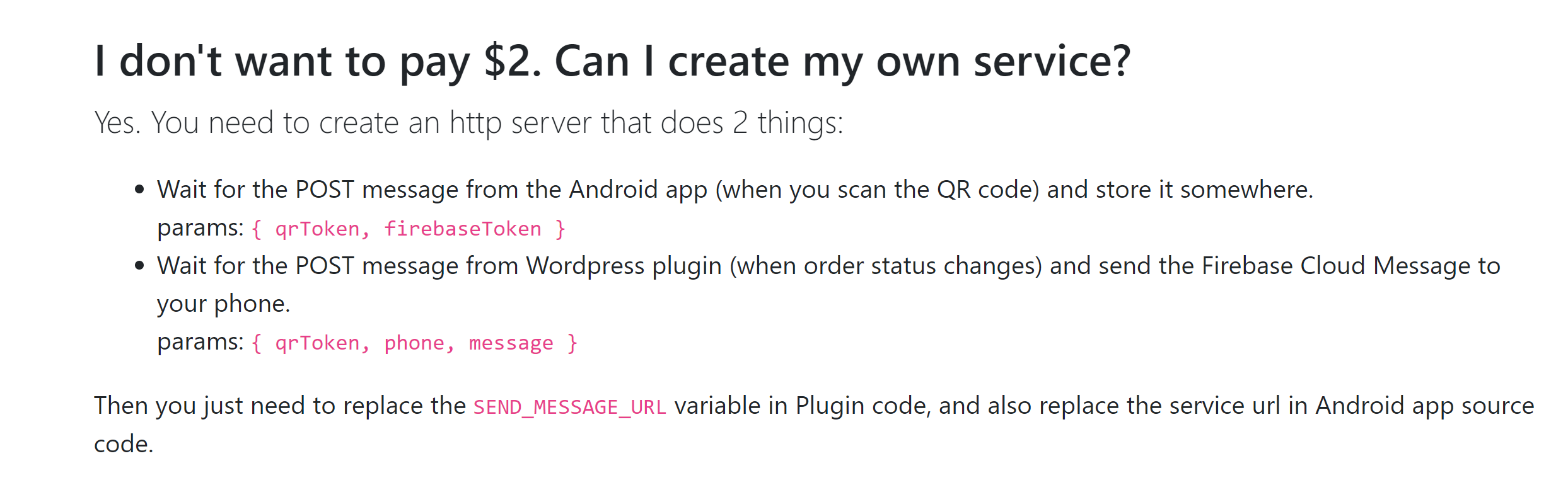
How to configure my own firebase server in this plugin and android app
this app was developed by a Poland developer Bartosz Juriewicz but he did not mentioned the configuration part clearly. could someone please help me in updating my own firebase URL and keys. since i have never crated a firebase app or server i am finding it difficult to update credentials in the plugin
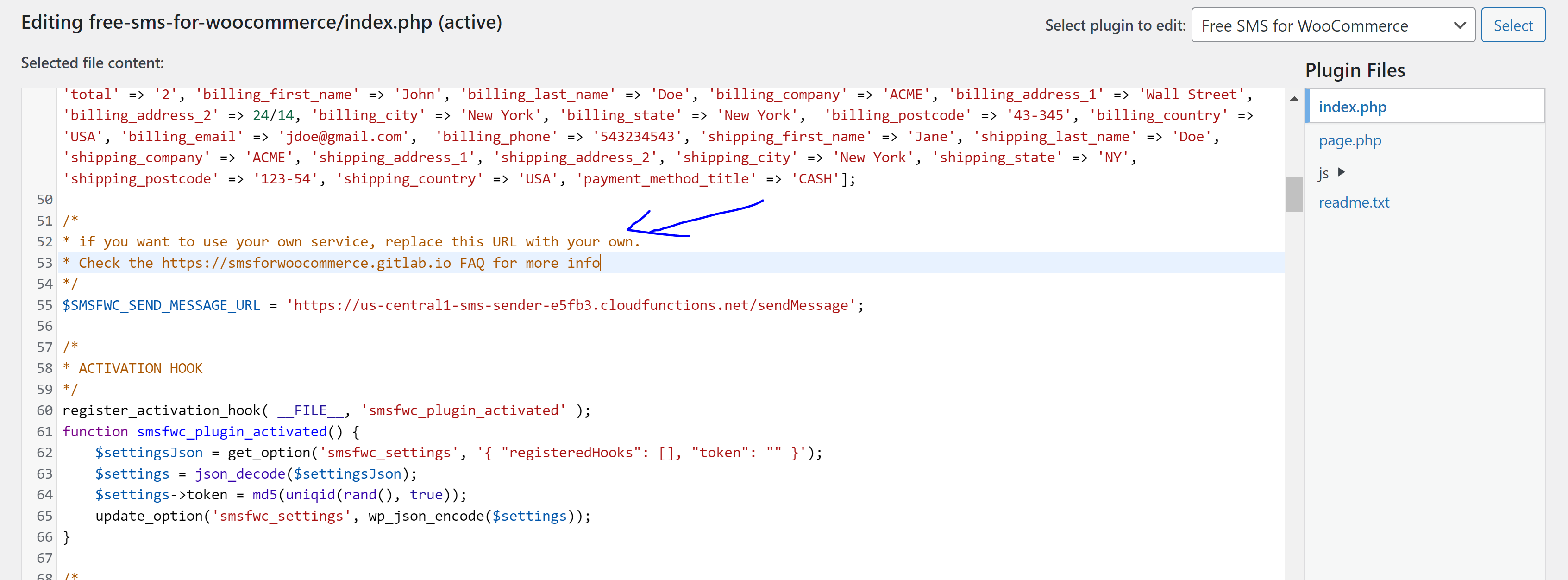
when i viewed the source code I’ve found this

@Hari Can provide a clearer idea of what your use case will be for this?
There are some good resources already available
Mark Cutting also advises organisations as a Fractional CIO, Fractional CISO and Executive Advisor, helping boards improve technology governance, cyber resilience and executive decision making. Learn more at Gratmore Ltd
-
@Hari Can provide a clearer idea of what your use case will be for this?
There are some good resources already available
Hey @phenomlab, whenever a WooCommerce order status transitions from ‘processing’ to ‘complete,’ this plugin will automatically send a SMS to users from our Android phone. To make this work, we need to install both the Android app and the WordPress plugin, and then link them together.
The plugin comes with preconfigured details from the author’s server, and they mentioned that we can also use our own Firebase to trigger/push order changes. However, I’m currently facing difficulties in modifying the Firebase credentials.
-
Hey @phenomlab, whenever a WooCommerce order status transitions from ‘processing’ to ‘complete,’ this plugin will automatically send a SMS to users from our Android phone. To make this work, we need to install both the Android app and the WordPress plugin, and then link them together.
The plugin comes with preconfigured details from the author’s server, and they mentioned that we can also use our own Firebase to trigger/push order changes. However, I’m currently facing difficulties in modifying the Firebase credentials.
@Hari said in How to replace firebase URL in “Free SMS for WooCommerce” plugin:
However, I’m currently facing difficulties in modifying the Firebase credentials.
Did you setup the Firebase credentials?
Mark Cutting also advises organisations as a Fractional CIO, Fractional CISO and Executive Advisor, helping boards improve technology governance, cyber resilience and executive decision making. Learn more at Gratmore Ltd
-
@Hari said in How to replace firebase URL in “Free SMS for WooCommerce” plugin:
However, I’m currently facing difficulties in modifying the Firebase credentials.
Did you setup the Firebase credentials?
@phenomlab i have never done it before, i think i have successfully created firebase app and tokens in my google account.
-
@phenomlab i have never done it before, i think i have successfully created firebase app and tokens in my google account.
@Hari Then they will be the credentials you need.
Mark Cutting also advises organisations as a Fractional CIO, Fractional CISO and Executive Advisor, helping boards improve technology governance, cyber resilience and executive decision making. Learn more at Gratmore Ltd
-
@phenomlab sir, but i do not know where to update them. i’ve gone through the code but i find it difficult to update the credentials of mine and make it work.
This plugin was in my Wishlist from last two years, if possible could you please suggest where to update credentials by checking the code
-
@phenomlab sir, but i do not know where to update them. i’ve gone through the code but i find it difficult to update the credentials of mine and make it work.
This plugin was in my Wishlist from last two years, if possible could you please suggest where to update credentials by checking the code
@Hari can you provide a link to the plugin itself?
Mark Cutting also advises organisations as a Fractional CIO, Fractional CISO and Executive Advisor, helping boards improve technology governance, cyber resilience and executive decision making. Learn more at Gratmore Ltd
-
Plugin URL wordpress.org/plugins/free-sms-for-woocommerce/
sent you sandbox logins via PM
-
Plugin URL wordpress.org/plugins/free-sms-for-woocommerce/
sent you sandbox logins via PM
@Hari after reviewing this plugin, I’m going to recommend that you don’t use it. This is for a variety of reasons, but the foremost is that’s it’s an untrusted APK meaning you have to install it manually and can’t get it from the play store which also means it’s not sanctioned as being safe to use.
Installing an app in this manner can easily expose the device to malware and it’s not something I’d either condone or actively support.
Personally, I’d never rely on a mobile phone to deliver SMS messages, but would use something like the API of Click Send. They have a pay per use service which is also cloud based and will be both reliable and safe to use.
-
-
Hari has marked this topic as solved on
 ️
Hello! It looks like you're interested in this conversation, but you don't have an account yet.
Getting fed up of having to scroll through the same posts each visit? When you register for an account, you'll always come back to exactly where you were before, and choose to be notified of new replies (either via email, or push notification). You'll also be able to save bookmarks and upvote posts to show your appreciation to other community members.
With your input, this post could be even better 💗
Register LoginDid this solution help you?
Related Topics
-
configure ghost and wordpress combo
Moved Solved WordPress -
-
-
-
-
-
-

WordPress & NodeBB
Solved WordPress