No valid role attribute on elements
-

For example
<div id=“aswift_1_host” style=“border: none; height: #; width: #; margin: 0px; padding: 0px; position: relative; visibility: visible; background-color: transparent; display: inline-block;” tabindex=“0” title=“Advertisement” aria-label=“Advertisement”>
**Reported**
Fix all of the following: aria-label attribute cannot be used on a div with no valid role attribute.
**Actual code** <center>Advertisement <!-- example_responsive_3 --> <ins class="adsbygoogle example_responsive_3" style="display: inline-block; text-align:center; width: #; height: #;" data-ad-client="ca-pub-#" data-ad-slot="#"></ins> <script> (adsbygoogle = window.adsbygoogle || []).push({}); </script></center>How do I fix this one?
-
@Sala thanks. Having reviewed this, I’d be far more concerned about this
The main thread was blocked for 2467 ms
However, accessing your site doesn’t immediately scream to me that it takes 2.4s before the user can interact with it. Not all of these tools are created equal and rely on standards that in fact if implemented on your website word for word, would cause it to stop working properly.
Different tools yield different results. One of the more honest tools is below
https://geekflare.com/tools/test/m2hxrhoh0a60183z5dyz9kq0qdx7lm42
@phenomlab this was the result generated on Sun, Feb 26, 2023 4:35 PM.
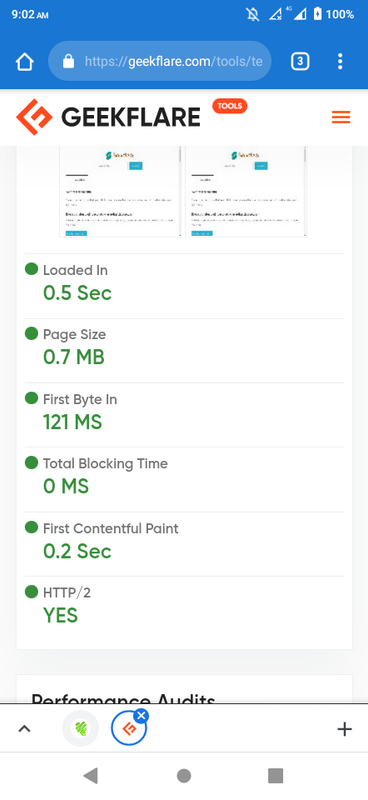
Yes the TBT result is different. If Aria is not an urgent issue well will fix it some other time.
-
For example
<div id=“aswift_1_host” style=“border: none; height: #; width: #; margin: 0px; padding: 0px; position: relative; visibility: visible; background-color: transparent; display: inline-block;” tabindex=“0” title=“Advertisement” aria-label=“Advertisement”>
**Reported**
Fix all of the following: aria-label attribute cannot be used on a div with no valid role attribute.
**Actual code** <center>Advertisement <!-- example_responsive_3 --> <ins class="adsbygoogle example_responsive_3" style="display: inline-block; text-align:center; width: #; height: #;" data-ad-client="ca-pub-#" data-ad-slot="#"></ins> <script> (adsbygoogle = window.adsbygoogle || []).push({}); </script></center>How do I fix this one?

@Sala Any reason why you can’t target the class instead, or use jQuery to target the
aria-labelattribute and assign anid?Mark Cutting also advises organisations as a Fractional CIO, Fractional CISO and Executive Advisor, helping boards improve technology governance, cyber resilience and executive decision making. Learn more at Gratmore Ltd
-
@Sala Any reason why you can’t target the class instead, or use jQuery to target the
aria-labelattribute and assign anid?
@phenomlab uh I’m relative new to that haha. It’s my first time to come across this Aria
-
@phenomlab uh I’m relative new to that haha. It’s my first time to come across this Aria
@Sala is this from an SEO checker?
Mark Cutting also advises organisations as a Fractional CIO, Fractional CISO and Executive Advisor, helping boards improve technology governance, cyber resilience and executive decision making. Learn more at Gratmore Ltd
-
@phenomlab If it from SEO i could be here making noise all night. Its from webpage speed test
-
@phenomlab If it from SEO i could be here making noise all night. Its from webpage speed test
-
@Sala Any reason why you can’t target the class instead, or use jQuery to target the
aria-labelattribute and assign anid?
@phenomlab Here is the speed test results. Aria element issues on accessibility https://www.webpagetest.org/result/230226_BiDc52_5VY/3/experiments/#Usable
-
@phenomlab Here is the speed test results. Aria element issues on accessibility https://www.webpagetest.org/result/230226_BiDc52_5VY/3/experiments/#Usable
@Sala thanks. Having reviewed this, I’d be far more concerned about this
The main thread was blocked for 2467 ms
However, accessing your site doesn’t immediately scream to me that it takes 2.4s before the user can interact with it. Not all of these tools are created equal and rely on standards that in fact if implemented on your website word for word, would cause it to stop working properly.
Different tools yield different results. One of the more honest tools is below
https://geekflare.com/tools/test/m2hxrhoh0a60183z5dyz9kq0qdx7lm42
Mark Cutting also advises organisations as a Fractional CIO, Fractional CISO and Executive Advisor, helping boards improve technology governance, cyber resilience and executive decision making. Learn more at Gratmore Ltd
-
@Sala thanks. Having reviewed this, I’d be far more concerned about this
The main thread was blocked for 2467 ms
However, accessing your site doesn’t immediately scream to me that it takes 2.4s before the user can interact with it. Not all of these tools are created equal and rely on standards that in fact if implemented on your website word for word, would cause it to stop working properly.
Different tools yield different results. One of the more honest tools is below
https://geekflare.com/tools/test/m2hxrhoh0a60183z5dyz9kq0qdx7lm42
@phenomlab this was the result generated on Sun, Feb 26, 2023 4:35 PM.
Yes the TBT result is different. If Aria is not an urgent issue well will fix it some other time.
-
@phenomlab this was the result generated on Sun, Feb 26, 2023 4:35 PM.
Yes the TBT result is different. If Aria is not an urgent issue well will fix it some other time.
-
phenomlab has marked this topic as solved on
Hello! It looks like you're interested in this conversation, but you don't have an account yet.
Getting fed up of having to scroll through the same posts each visit? When you register for an account, you'll always come back to exactly where you were before, and choose to be notified of new replies (either via email, or push notification). You'll also be able to save bookmarks and upvote posts to show your appreciation to other community members.
With your input, this post could be even better 💗
Register LoginDid this solution help you?
Related Topics
-
configure ghost and wordpress combo
Moved Solved WordPress -
-
-
-
-
-
-

WordPress & NodeBB
Solved WordPress