Mongodb Authorisation.
-
I do not really understand because I have always had it enabled in the past and was still able to use commands by just using ‘mongo’ in the shell. Whilst enabled I was also able to install NodeBB and create users. Just this time round I cannot even though I have followed instruction the same way.
The other app i use instructs me to enable and at no point says to turn it off. That’s the same with nodebb install instructions.
I do not have mongod.conf but mongodb.conf. The security looks like this:
# Turn on/off security.  Off is currently the default
#noauth = true
auth = true
@Sampo2910 interesting. What OS are you using?
Mark Cutting also advises organisations as a Fractional CIO, Fractional CISO and Executive Advisor, helping boards improve technology governance, cyber resilience and executive decision making. Learn more at Gratmore Ltd
-
@Sampo2910 interesting. What OS are you using?

-
Ubuntu 20.04
MongoDB shell version v3.6.8
@Sampo2910 that
conffile doesn’t look right to me. From where did you install MongoDB?Mark Cutting also advises organisations as a Fractional CIO, Fractional CISO and Executive Advisor, helping boards improve technology governance, cyber resilience and executive decision making. Learn more at Gratmore Ltd
-
@Sampo2910 that
conffile doesn’t look right to me. From where did you install MongoDB?
@phenomlab It is the one i have used for years and the way i did it for years.
-
@phenomlab It is the one i have used for years and the way i did it for years.
@Sampo2910 hmm. Nothing wrong with that guide, but I’ve never seen a conf file from MongoDB that looks like it.
Can you send me the remainder of the file?
Mark Cutting also advises organisations as a Fractional CIO, Fractional CISO and Executive Advisor, helping boards improve technology governance, cyber resilience and executive decision making. Learn more at Gratmore Ltd
-
@Sampo2910 hmm. Nothing wrong with that guide, but I’ve never seen a conf file from MongoDB that looks like it.
Can you send me the remainder of the file?
# mongodb.conf # Where to store the data. dbpath=/var/lib/mongodb #where to log logpath=/var/log/mongodb/mongodb.log logappend=true bind_ip = 127.0.0.1 #port = 27017 # Enable journaling, http://www.mongodb.org/display/DOCS/Journaling journal=true # Enables periodic logging of CPU utilization and I/O wait #cpu = true # Turn on/off security. Off is currently the default #noauth = true auth = true # Verbose logging output. #verbose = true # Inspect all client data for validity on receipt (useful for # developing drivers) #objcheck = true # Enable db quota management #quota = true # Set diagnostic logging level where n is # 0=off (default) # 1=W # 2=R # 3=both # 7=W+some reads #diaglog = 0 # Diagnostic/debugging option #nocursors = true # Ignore query hints #nohints = true # Disable the HTTP interface (Defaults to localhost:27018). #nohttpinterface = true # Turns off server-side scripting. This will result in greatly limited # functionality #noscripting = true # Turns off table scans. Any query that would do a table scan fails. #notablescan = true # Disable data file preallocation. #noprealloc = true # Specify .ns file size for new databases. # nssize = <size> # Accout token for Mongo monitoring server. #mms-token = <token> # Server name for Mongo monitoring server. #mms-name = <server-name> # Ping interval for Mongo monitoring server. #mms-interval = <seconds> # Replication Options # in replicated mongo databases, specify here whether this is a slave or master #slave = true #source = master.example.com # Slave only: specify a single database to replicate #only = master.example.com # or #master = true #source = slave.example.com # Address of a server to pair with. #pairwith = <server:port> # Address of arbiter server. #arbiter = <server:port> # Automatically resync if slave data is stale #autoresync # Custom size for replication operation log. #oplogSize = <MB> # Size limit for in-memory storage of op ids. #opIdMem = <bytes> # SSL options # Enable SSL on normal ports #sslOnNormalPorts = true # SSL Key file and password #sslPEMKeyFile = /etc/ssl/mongodb.pem #sslPEMKeyPassword = pass -
# mongodb.conf

# Where to store the data.
dbpath=/var/lib/mongodb

#where to log
logpath=/var/log/mongodb/mongodb.log

logappend=true

bind_ip = 127.0.0.1
#port = 27017

# Enable journaling, http://www.mongodb.org/display/DOCS/Journaling
journal=true

# Enables periodic logging of CPU utilization and I/O wait
#cpu = true

# Turn on/off security.  Off is currently the default
#noauth = true
auth = true

# Verbose logging output.
#verbose = true

# Inspect all client data for validity on receipt (useful for
# developing drivers)
#objcheck = true

# Enable db quota management
#quota = true

# Set diagnostic logging level where n is
#   0=off (default)
#   1=W
#   2=R
#   3=both
#   7=W+some reads
#diaglog = 0

# Diagnostic/debugging option
#nocursors = true

# Ignore query hints
#nohints = true

# Disable the HTTP interface (Defaults to localhost:27018).
#nohttpinterface = true

# Turns off server-side scripting.  This will result in greatly limited
# functionality
#noscripting = true

# Turns off table scans.  Any query that would do a table scan fails.
#notablescan = true

# Disable data file preallocation.
#noprealloc = true

# Specify .ns file size for new databases.
# nssize = <size>

# Accout token for Mongo monitoring server.
#mms-token = <token>

# Server name for Mongo monitoring server.
#mms-name = <server-name>

# Ping interval for Mongo monitoring server.
#mms-interval = <seconds>

# Replication Options

# in replicated mongo databases, specify here whether this is a slave or master
#slave = true
#source = master.example.com
# Slave only: specify a single database to replicate
#only = master.example.com
# or
#master = true
#source = slave.example.com

# Address of a server to pair with.
#pairwith = <server:port>
# Address of arbiter server.
#arbiter = <server:port>
# Automatically resync if slave data is stale
#autoresync
# Custom size for replication operation log.
#oplogSize = <MB>
# Size limit for in-memory storage of op ids.
#opIdMem = <bytes>

# SSL options
# Enable SSL on normal ports
#sslOnNormalPorts = true
# SSL Key file and password
#sslPEMKeyFile = /etc/ssl/mongodb.pem
#sslPEMKeyPassword = pass
@Sampo2910 I’ve only ever installed MongoDB using the NodeBB guide
Mark Cutting also advises organisations as a Fractional CIO, Fractional CISO and Executive Advisor, helping boards improve technology governance, cyber resilience and executive decision making. Learn more at Gratmore Ltd
-
@Sampo2910 I’ve only ever installed MongoDB using the NodeBB guide
All broken at the moment. Will figure it out
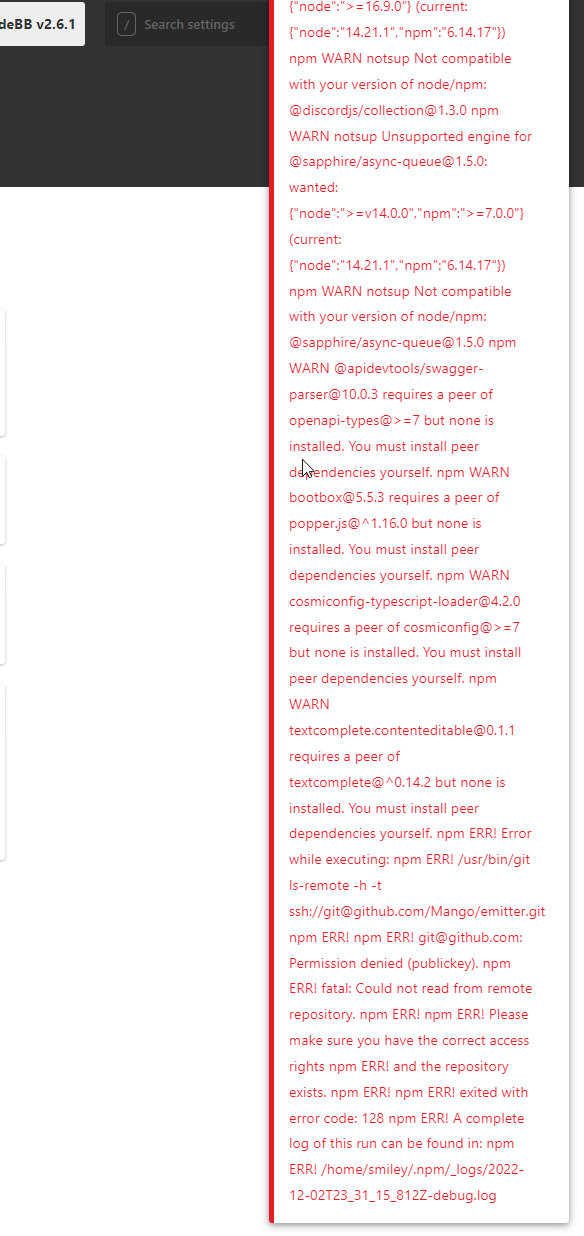
 Using that guide above stopped my other app and a ton of errors on install Also this is now in nodebb. All for another day
-
All broken at the moment. Will figure it out
Using that guide above stopped my other app and a ton of errors on install Also this is now in nodebb. All for another day
@Sampo2910 what were the errors? I’ve never had an issue with it?
Mark Cutting also advises organisations as a Fractional CIO, Fractional CISO and Executive Advisor, helping boards improve technology governance, cyber resilience and executive decision making. Learn more at Gratmore Ltd
-
@Sampo2910 what were the errors? I’ve never had an issue with it?
@phenomlab Only way all works is if i use node v12 anything more i get errors like that on the page.
MongoDB shell version v5.0.14 and MongoDB server version: 3.6.8 is what I am using. I get a warning that they do not match but i cant seem to update mongo server version either.
I am not at a level where I understand to be honest. Node, npm, nvm mongo…things work on some versions and not others. Updating to the latest just breaks things.
smiley@fmjcod4:~$ mongo MongoDB shell version v5.0.14 connecting to: mongodb://127.0.0.1:27017/?compressors=disabled&gssapiServiceName=mongodb Implicit session: session { "id" : UUID("b7326d9b-2817-403e-b072-2f0f5330761d") } MongoDB server version: 3.6.8 WARNING: shell and server versions do not match ================ Warning: the "mongo" shell has been superseded by "mongosh", which delivers improved usability and compatibility.The "mongo" shell has been deprecated and will be removed in an upcoming release. For installation instructions, see https://docs.mongodb.com/mongodb-shell/install/ ================ > show dbs uncaught exception: Error: Failed to acquire database information from privileges : _getErrorWithCode@src/mongo/shell/utils.js:25:13 Mongo.prototype._getDatabaseNamesFromPrivileges@src/mongo/shell/mongo.js:69:15 Mongo.prototype.getDBs/<@src/mongo/shell/mongo.js:134:31 Mongo.prototype.getDBs@src/mongo/shell/mongo.js:97:12 shellHelper.show@src/mongo/shell/utils.js:956:13 shellHelper@src/mongo/shell/utils.js:838:15 @(shellhelp2):1:1 > exit bye -
@phenomlab Only way all works is if i use node v12 anything more i get errors like that on the page.
MongoDB shell version v5.0.14 and MongoDB server version: 3.6.8 is what I am using. I get a warning that they do not match but i cant seem to update mongo server version either.
I am not at a level where I understand to be honest. Node, npm, nvm mongo…things work on some versions and not others. Updating to the latest just breaks things.
smiley@fmjcod4:~$ mongo
MongoDB shell version v5.0.14
connecting to: mongodb://127.0.0.1:27017/?compressors=disabled&gssapiServiceName=mongodb
Implicit session: session { "id" : UUID("b7326d9b-2817-403e-b072-2f0f5330761d") }
MongoDB server version: 3.6.8
WARNING: shell and server versions do not match
================
Warning: the "mongo" shell has been superseded by "mongosh",
which delivers improved usability and compatibility.The "mongo" shell has been deprecated and will be removed in
an upcoming release.
For installation instructions, see
https://docs.mongodb.com/mongodb-shell/install/
================
> show dbs
uncaught exception: Error: Failed to acquire database information from privileges :
_getErrorWithCode@src/mongo/shell/utils.js:25:13
Mongo.prototype._getDatabaseNamesFromPrivileges@src/mongo/shell/mongo.js:69:15
Mongo.prototype.getDBs/<@src/mongo/shell/mongo.js:134:31
Mongo.prototype.getDBs@src/mongo/shell/mongo.js:97:12
shellHelper.show@src/mongo/shell/utils.js:956:13
shellHelper@src/mongo/shell/utils.js:838:15
@(shellhelp2):1:1
> exit
bye
@Sampo2910 yes, that does indeed look a mess! I don’t think
nodeJSat version 12 for NodeBB is even supported anymore. I asked a similar question but so long agohttps://community.nodebb.org/topic/16532/supported-version-of-nodejs
Plus, the version of MongoDB started (3.x) is also really old. I seem to recall you using an app which is considered legacy and requires older versions of software, but I think the two together are going to cause you significant issues - clearly which you’re seeing now.
My suggestion would be to keep these on separate machines.
-
@phenomlab Only way all works is if i use node v12 anything more i get errors like that on the page.
MongoDB shell version v5.0.14 and MongoDB server version: 3.6.8 is what I am using. I get a warning that they do not match but i cant seem to update mongo server version either.
I am not at a level where I understand to be honest. Node, npm, nvm mongo…things work on some versions and not others. Updating to the latest just breaks things.
smiley@fmjcod4:~$ mongo
MongoDB shell version v5.0.14
connecting to: mongodb://127.0.0.1:27017/?compressors=disabled&gssapiServiceName=mongodb
Implicit session: session { "id" : UUID("b7326d9b-2817-403e-b072-2f0f5330761d") }
MongoDB server version: 3.6.8
WARNING: shell and server versions do not match
================
Warning: the "mongo" shell has been superseded by "mongosh",
which delivers improved usability and compatibility.The "mongo" shell has been deprecated and will be removed in
an upcoming release.
For installation instructions, see
https://docs.mongodb.com/mongodb-shell/install/
================
> show dbs
uncaught exception: Error: Failed to acquire database information from privileges :
_getErrorWithCode@src/mongo/shell/utils.js:25:13
Mongo.prototype._getDatabaseNamesFromPrivileges@src/mongo/shell/mongo.js:69:15
Mongo.prototype.getDBs/<@src/mongo/shell/mongo.js:134:31
Mongo.prototype.getDBs@src/mongo/shell/mongo.js:97:12
shellHelper.show@src/mongo/shell/utils.js:956:13
shellHelper@src/mongo/shell/utils.js:838:15
@(shellhelp2):1:1
> exit
bye
@Sampo2910 I just saw this on the NodeBB community site and it seems very much in line with the issue you are experiencing. Worth a look I think
https://community.nodebb.org/topic/16826/does-nodebb-work-with-mongodb-6-0
Hello! It looks like you're interested in this conversation, but you don't have an account yet.
Getting fed up of having to scroll through the same posts each visit? When you register for an account, you'll always come back to exactly where you were before, and choose to be notified of new replies (either via email, or push notification). You'll also be able to save bookmarks and upvote posts to show your appreciation to other community members.
With your input, this post could be even better 💗
Register Login